1. Sissejuhatus
This manual provides detailed instructions for the LAUNCH Creader Elite V3.0 OBD2 Scanner, a professional diagnostic tool designed specifically for Land Rover and Jaguar vehicles. It covers device setup, operational procedures for various diagnostic and service functions, software updates, and troubleshooting tips. Please read this manual thoroughly before operating the device to ensure correct usage and optimal performance.
2. Toote lõppview
2.1. Mis on karbis
- 1 * LAUNCH Creader Elite V3.0 OBD2 skanner JLR-ile
- 1 * OBD2 diagnostikakaabel
- 1 * Kiirjuhend
- 1 * Kasutusjuhend
2.2. Põhiomadused
The LAUNCH Creader Elite V3.0 offers a comprehensive suite of features for vehicle diagnostics and maintenance:
- Täiustatud riistvara: Features Android 8.1 operating system, 32GB ROM, 3000mAh battery, and 2.4&5GHz dual-band Wi-Fi for improved performance.
- DoIP Protocol Support: Supports the new DoIP protocol for Land Rover & Jaguar models manufactured after 2017 (requires an adapter).
- Full Systems Diagnostics: Provides in-depth scanning for all available vehicle modules, including engine, transmission, ABS, SRS, and more.
- Kahesuunaline juhtimine (aktiivne test): Allows control of vehicle components and systems for active testing, such as windows, mirrors, wipers, and horn.
- Comprehensive Service Functions: Includes Oil Reset, Electronic Parking Brake (EPB) Reset, Battery Management System (BMS) Reset, Steering Angle Sensor (SAS) Calibration, Injector Coding, Throttle Relearn, Height Calibration, Transmission Adaptation, Crankshaft/Camshaft Relearn, Sunroof Calibration, and more.
- 4-ühes reaalajas andmevoog: Displays real-time data from multiple sensors simultaneously in a graphical format, with recording and playback capabilities.
- Smart Diagnostic Functions: Features Auto VIN for automatic vehicle identification, DTC Lookup for code explanations, and the ability to generate and share diagnostic reports.
- Täielikud OBD2 funktsioonid: Supports all 10 OBD2 test modes for universal vehicle compatibility (post-1996 models).
- Eluaegsed tasuta värskendused: Provides lifetime free software updates specifically for Land Rover and Jaguar vehicle brands.
2.3. Device Comparison
The Creader Elite V3.0 offers significant upgrades over previous versions:

Image: Comparison of Creader Elite V3.0, V2.0, and V1.0, highlighting V3.0's superior features like DoIP, Android 8.1, 32GB memory, and 2.4&5GHz WiFi.
2.4. Füüsiline kirjeldus
The device features a durable orange casing with a 4-inch touchscreen display. The back of the device includes product identification details such as the model number, FCC ID, and serial number.
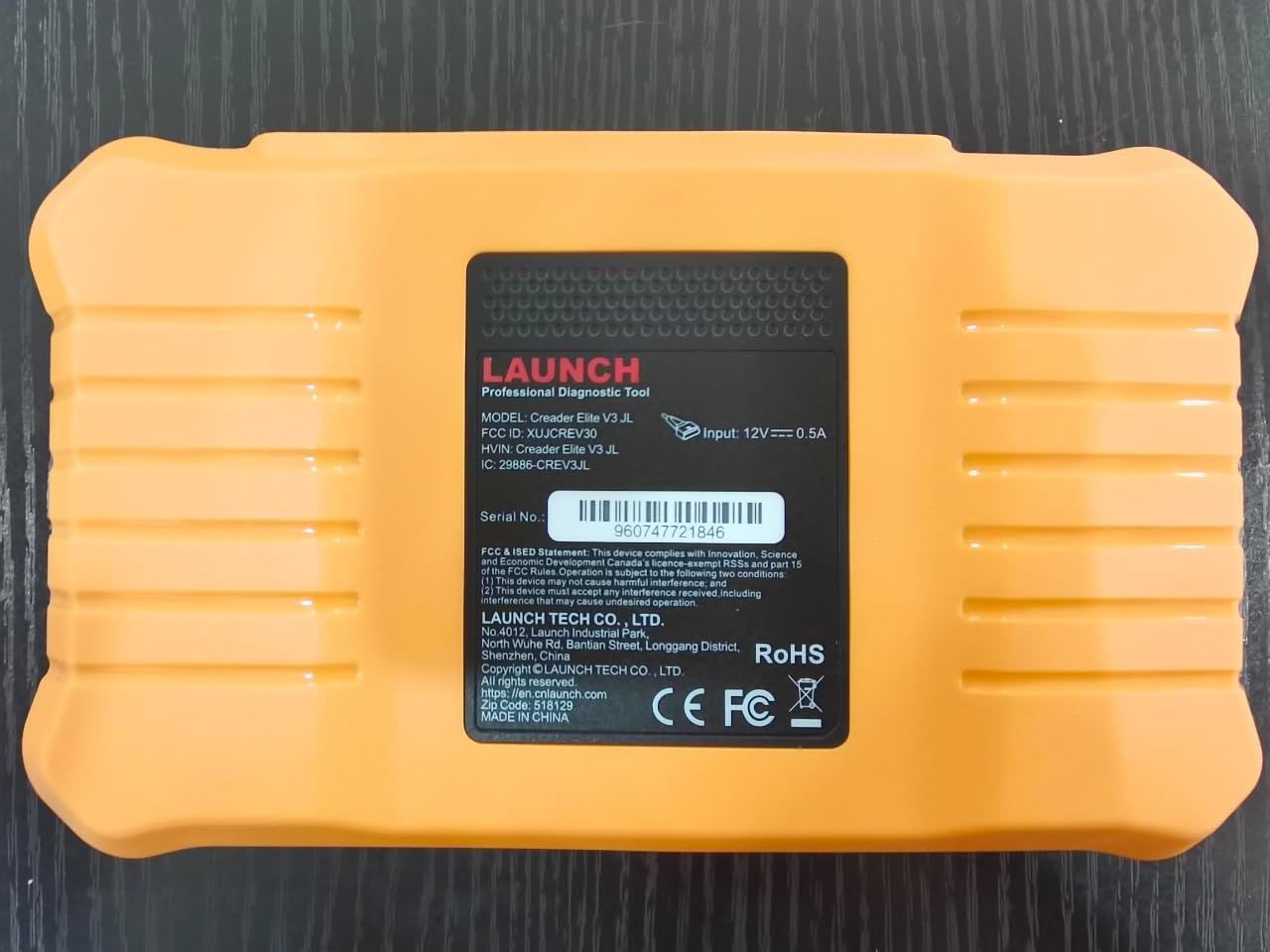
Pilt: Tagumine view of the LAUNCH Creader Elite V3.0, displaying the model number, FCC ID, and serial number (e.g., 960747721846).
3. Seadistamine
3.1. Esialgne sisselülitamine
- Veenduge, et seade on täielikult laetud või ühendatud toiteallikaga.
- Vajutage ja hoidke toitenuppu all, kuni ekraan süttib.
- Eelistatud keele ja piirkonna valimiseks järgige ekraanil kuvatavaid juhiseid.
3.2. WiFi-ühendus
- Peamenüüst navigeeri aadressile Seaded.
- Valige Wi-Fi ja lülitage see sisse.
- Valige loendist soovitud WiFi-võrk ja sisestage parool, kui seda küsitakse.
- Confirm the connection. A stable internet connection is required for software updates and online resources.
3.3. Registreerimine ja aktiveerimine
Upon first use or after a factory reset, you may be prompted to register your device. Follow the on-screen instructions to create an account or log in. This step is crucial for accessing software updates and technical support.
4. Kasutusjuhised
4.1. Connecting to the Vehicle
- Locate the vehicle's OBD2 diagnostic port, typically under the dashboard on the driver's side.
- Veenduge, et sõiduki süütelukk on asendis ON asend (mootor välja lülitatud või töötab, olenevalt testist).
- Connect the OBD2 diagnostic cable to the vehicle's OBD2 port and to the LAUNCH Creader Elite V3.0 device.
- The device will automatically power on or prompt you to do so.
4.2. Full Systems Diagnostics
This function allows you to scan all available electronic control units (ECUs) in the vehicle.

Image: Display showing OE-level all system diagnostics, including Auto VIN, fault codes, 4-in-1 live data, and MIL reset.
- Valige peamenüüst Kohalik diagnoos.
- Choose the vehicle brand (Land Rover or Jaguar).
- Valige Automaatne otsing or Käsitsi valik. Auto Search (Auto VIN) will attempt to automatically identify the vehicle.
- Once the vehicle is identified, select Tervisearuanne or Süsteemi skannimine to perform a comprehensive scan of all modules.
- Review the diagnostic trouble codes (DTCs) and ECU information. You can then choose to clear codes if necessary.
4.3. Teenindusfunktsioonid
The Creader Elite V3.0 provides numerous maintenance and reset services. Access these functions via Diagnose > Brand > System Selection > Special Function.

Pilt: Üleview of various service functions including Oil Reset, Brake Reset, SAS Calibration, Start-Stop Reset, TPMS Reset, Injector Coding, Battery Reset, ABS Bleeding, Seat Calibration, and Height Calibration.
Common services include:
- Õli lähtestamine: Lähtestab mootoriõli eluea süsteemi.
- Elektrilise pidurisüsteemi lähtestamine: Resets the electronic parking brake after replacement.
- SAS-i kalibreerimine: Kalibreerib roolinurga andurit.
- Pihusti kodeerimine: Kodeerib uued pihustite numbrid ECU-sse.
- Drosseli uuesti õppimine: Õpib uuesti drosselklapi asendit.
- Kõrguse kalibreerimine: Calibrates the vehicle's suspension height.
- Aku lähtestamine: Registers a new battery replacement.
- ABS-i verejooks: Teostab ABS-pidurite õhutusprotseduure.
Note: The availability of specific service functions may vary depending on the vehicle model and year. Always check compatibility before performing a service.
4.4. Kahesuunaline juhtimine (aktiivsed testid)
Active tests allow you to send commands to vehicle systems and components to verify their functionality.

Image: Depicts bi-directional active tests, showing the device sending commands to vehicle actuators like wipers, windows, clutch, and injectors to check their status.
- Navigate to the desired vehicle system within the diagnostic menu.
- Valige Aktiivne test or Kahesuunaline juhtimine.
- Choose the specific component or system you wish to test (e.g., 'Wiper Test', 'Window Test', 'Horn Test').
- Aktiveerimiseks ja komponendi reaktsiooni jälgimiseks järgige ekraanil kuvatavaid juhiseid.
4.5. Täielikud OBD2 funktsioonid
For universal vehicle diagnostics (all OBD2 compliant vehicles after 1996), use the OBD II menüü valik.
- Lugege koode: Retrieves generic (P0, P2, P3, U0) and manufacturer specific (P1, P3, U1) codes.
- Selged koodid: Clears diagnostic trouble codes and turns off the Malfunction Indicator Light (MIL).
- Reaalajas andmed: Kuvab sõiduki anduritelt reaalajas andmevoogu.
- I/M valmisolek: Kontrollib emissiooniga seotud monitoride valmisolekut.
- Raami külmutamine: Displays a snapshot of operating conditions at the time of an emission-related fault.
- O2 anduri test: Kuvab O2-anduri monitori testi tulemused.
- Pardal oleva monitori test (režiim 6): Hangib tulemusi heitkogustega seotud jõuülekande komponentide ja süsteemide kohta.
- EVAP-süsteemi test (režiim 8): Käivitab kütuseaurude kontrollsüsteemi testi.
- Sõiduki teave: Tagastab sõiduki identifitseerimisnumbri (VIN), kalibreerimise ID (CALID) ja kalibreerimise kinnitusnumbri (CVN).
4.6. Real-Time Monitoring and Data Stream
Monitor various vehicle parameters in real-time to diagnose intermittent issues or verify repairs.

Image: Real-time monitoring screen showing battery voltage, transmission oil temperature, coolant temperature, and vehicle speed, with a detailed 4-in-1 data stream graph below.
- From the diagnostic menu, select Reaalajas andmed.
- Choose the parameters you wish to monitor.
- The device can display up to four data streams simultaneously in a graphical format.
- Kasutage Salvestus ja Taasesitus functions to capture and review data for later analysis.
4.7. Smart Diagnostic Features
The device includes features to streamline the diagnostic process:
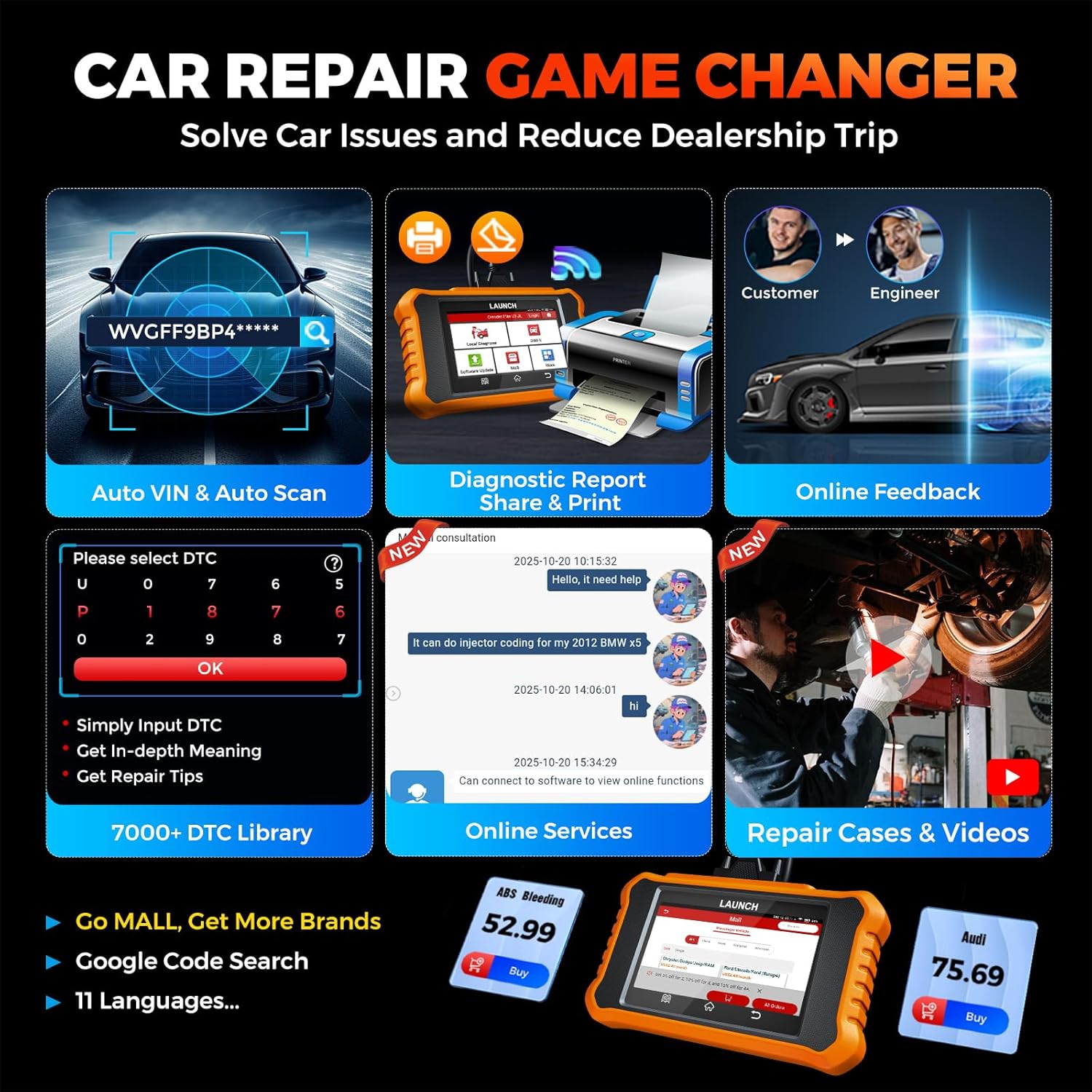
Image: Smart diagnostic features such as Auto VIN, diagnostic report generation and printing, online feedback, 7000+ DTC library, and access to online services.
- Auto VIN-kood: Automatically identifies vehicle information (year, make, model) for quicker diagnostics.
- DTC otsing: Annab diagnostiliste veakoodide kohta üksikasjalikke selgitusi.
- Diagnostiline aruanne: Generates a professional diagnostic report that can be shared or printed.
- Tagasiside veebis: Allows users to submit feedback or issues directly to technical support.
5. Hooldus ja värskendused
5.1. Tarkvaravärskendused
The LAUNCH Creader Elite V3.0 offers lifetime free software updates for Land Rover and Jaguar brands.
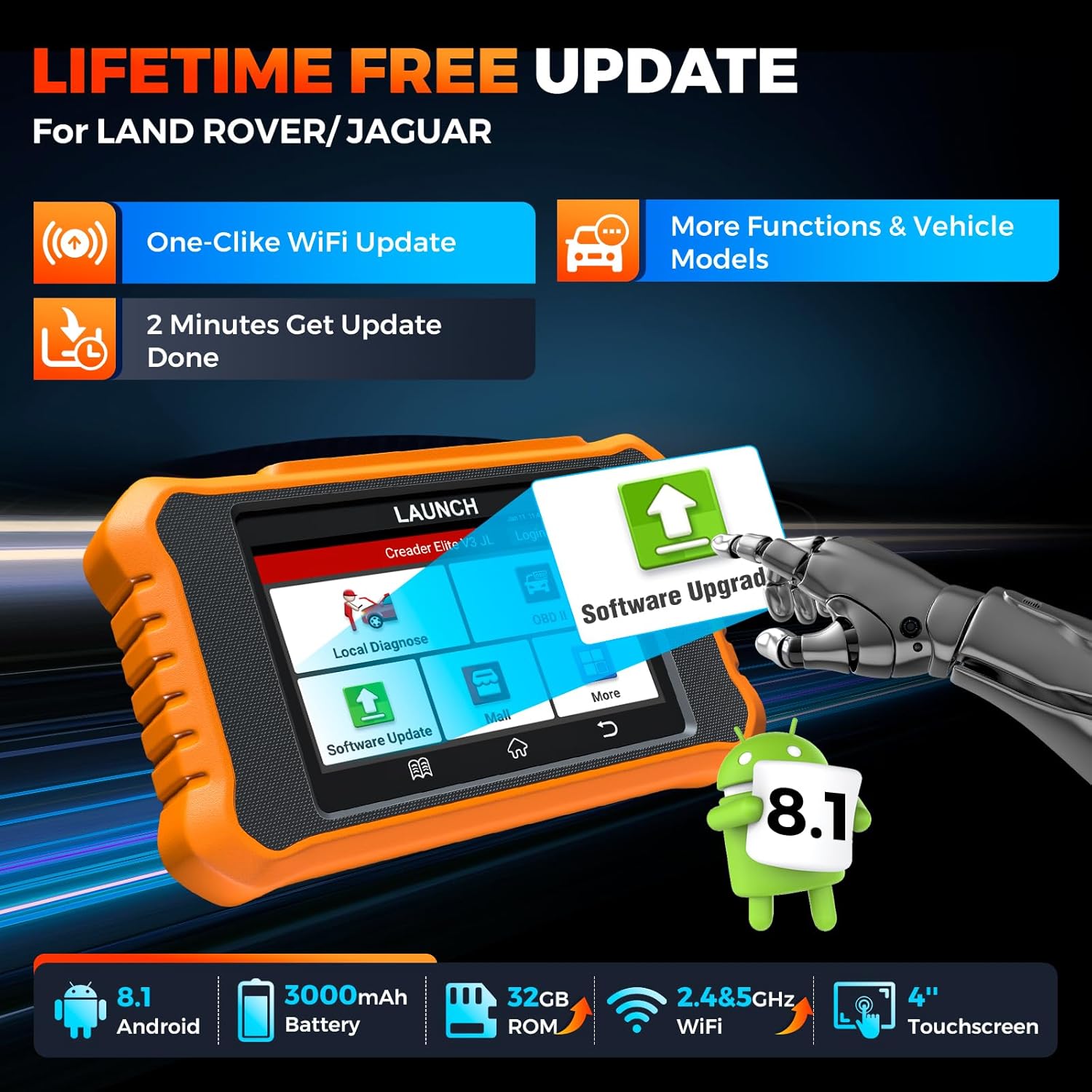
Image: Device screen illustrating the one-click Wi-Fi update process, emphasizing lifetime free updates for Land Rover/Jaguar and the ability to get more functions and vehicle models.
- Veenduge, et seade on ühendatud stabiilse WiFi-võrguga.
- Valige peamenüüst Tarkvara värskendus.
- Seade kontrollib saadaolevaid värskendusi.
- Select the updates you wish to install and follow the on-screen prompts. Updates typically take a few minutes.
5.2. Expanding Vehicle Coverage (Mall)
If you require diagnostic capabilities for other vehicle brands beyond Land Rover and Jaguar, you can purchase additional software packages from the Mall application on the device. Please note that software purchased from the Mall is typically valid for one year and may require re-purchase after expiry.
5.3. Seadme hooldus
- Hoidke seadet puhtana ning tolmu- ja niiskusevabana.
- Vältige seadme maha pillamist ega tugevate löökide saamist.
- Hoidke seadet jahedas ja kuivas kohas, kui seda ei kasutata.
- Kasutage ainult kaasasolevat laadimiskaablit ja tarvikuid.
6. Ühilduvus
The LAUNCH Creader Elite V3.0 is primarily designed for:

Image: Device interface showing diagnostic options for Land Rover (Defender, Discovery, Range Rover, Evoque) and Jaguar (E-Pace, F-Pace, F-Type, S-Type, X-Type, XE, XF, XJ, XK) models, with a note on DoIP protocol for models after 2017.
- Maastikuauto: Compatible with models such as Defender, Discovery, Discovery Sport, Range Rover, Range Rover Evoque, etc.
- Jaguar: Compatible with models such as E-Pace, F-Pace, F-Type, S-Type, X-Type, XE, XF, XJ, XK, etc.
- DoIP Protocol: Supports Land Rover & Jaguar models after 2017, requiring a separate DoIP adapter.
- Universal OBD2: Fully compatible with all OBD2 compliant vehicles manufactured after 1996 for basic OBD2 functions.
For specific vehicle compatibility, it is recommended to contact technical support via obdbox21@163.com.
7. Tehnilised andmed
| Mudel | LAUNCH Creader Elite 3.0-JL |
| Operatsioonisüsteem | Android 8.1 |
| Ekraani suurus | 4 tolli |
| Sisemälu (ROM) | 32 GB |
| Aku mahutavus | 3000 mAh |
| Wi-Fi | 2.4 & 5GHz Dual-band |
| Toiteallikas | Akutoitel |
| Kauba kaal | 1.49 naela |
| Pakendi mõõtmed | 8 x 7.5 x 1.5 tolli |
| Autode sobivuse tüüp | Universal Fit (for OBD2 functions) |
8. Veaotsing
8.1. Seade ei lülitu sisse
- Check battery level. Connect the device to a charger and allow it to charge for at least 30 minutes.
- Veenduge, et toitenuppu vajutatakse ja hoitakse õigesti all.
- If connected to the vehicle, ensure the vehicle's ignition is on and the OBD2 cable is securely connected.
8.2. Sõidukiga suhtlemise viga
- Verify the OBD2 cable is securely connected to both the device and the vehicle's port.
- Veenduge, et sõiduki süütelukk on asendis ON positsiooni.
- Confirm that the vehicle is OBD2 compliant (generally 1996 and newer for US vehicles).
- Try a different OBD2 compliant vehicle to rule out a vehicle-specific issue.
- Ensure the correct vehicle brand software is installed and up to date.
8.3. Software Update Failure
- Check your Wi-Fi connection for stability and signal strength.
- Ensure the device has sufficient battery charge or is connected to power during the update process.
- Verify that there is enough free storage space on the device.
- Taaskäivitage seade ja proovige uuesti värskendada.
8.4. Inaccurate Readings or Functions Not Working
- Ensure the vehicle's make, model, and year are correctly identified by the device.
- Verify that the specific function is supported for your vehicle model and year. Refer to the compatibility section or contact support.
- Ensure the device software is fully updated.
9. Garantii ja tugi
9.1. Garantii teave
The LAUNCH Creader Elite V3.0 comes with an Extended 60-Day Return & Replacement policy and a 5-Year Quality Backup. Please retain your proof of purchase for warranty claims.
9.2. Tehniline tugi
For any technical assistance, questions, or compatibility inquiries, please contact our support team:
- E-post: obdbox21@163.com
- Our support team is available 24/7/365.
Note: Please direct all support inquiries to the provided email address. Do not contact LAUNCH Tech USA for support related to this specific product.


