Sissejuhatus
This manual provides detailed instructions for setting up, operating, maintaining, and troubleshooting your GEEKOM GeekBook X14 Pro laptop. Please read this manual thoroughly before using your device to ensure proper functionality and longevity. Keep this manual for future reference.
Mis on karbis
Upon unboxing your GEEKOM GeekBook X14 Pro, verify that all the following items are included:
- GEEKOM GeekBook X14 Pro Laptop
- GEEKOM GeekBook X14 Pro Premium Packaging
- 65W PD GaN Fast Charger
- USB-C-USB-C kaabel
- Dokkimisjaam
- Kasutusjuhend

Toode läbiview
The GEEKOM GeekBook X14 Pro is an ultra-light and thin laptop designed for professionals. It features a magnesium alloy unibody chassis, weighing only 999g and tapering to 6mm at its thinnest point.

Peamised omadused:
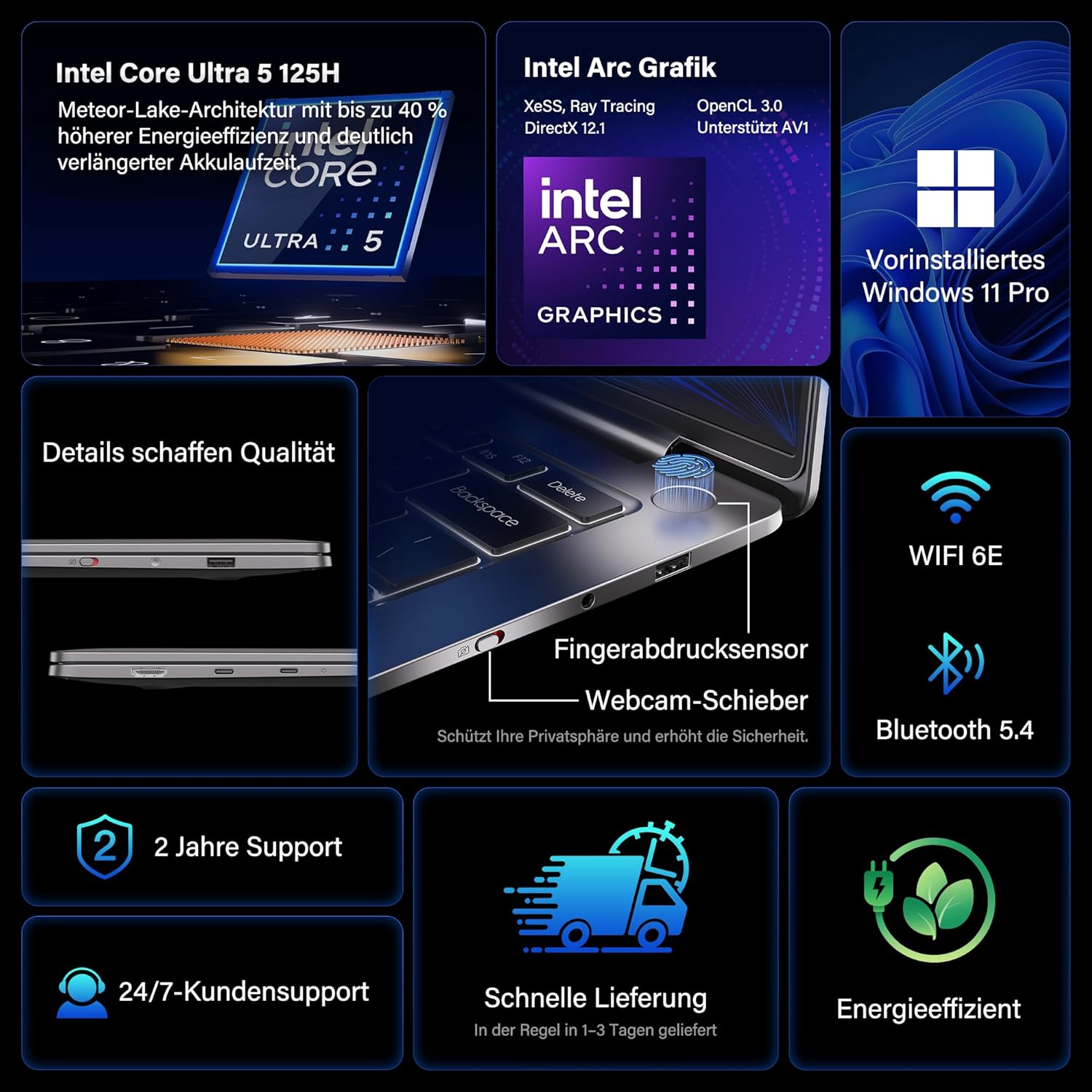
- Protsessor: Intel Core Ultra 5 125H (14 cores, 18 threads, up to 4.5 GHz)
- Graafika: Intel Arc Graphics with Xe-LPG architecture
- Kuva: 14-inch 2.8K OLED (2880 x 1800) with 120Hz refresh rate, 100% DCI-P3, up to 450 nits brightness
- Mälu: 32GB LPDDR5x RAM (7500 MT/s)
- Hoiustamine: 1 TB PCIe 4.0 NVMe SSD
- Operatsioonisüsteem: Eelinstallitud Windows 11 Pro
- Ühenduvus: 2x USB4 (40 Gbps), 1x USB 3.2 Gen 1 Type-A (5 Gbps), HDMI 2.0, Wi-Fi 6E, Bluetooth 5.4
- Turvalisus: Fingerprint sensor in power button, physical webcam slider
- Heli: DTS:X Ultra Audio
- Aku: 72 Wh, up to 16 hours battery life, 65W USB-C fast charging
- Jahutus: GEEKOM IceBlade 2.0 cooling system with adjustable fan profiles

Portid ja pistikud:
- 2x USB4 (40 Gbps)
- 1x USB 3.2 Gen 1 Type-A (5 Gbps)
- 1x HDMI 2.0
- 1x 3.5 mm helipistikupesa
- Power Input (via USB-C)

Seadistamine
1. Esmane sisselülitamine ja laadimine
- Connect the 65W PD GaN Fast Charger to a power outlet and then to one of the USB-C ports on your laptop.
- Enne esmakordset kasutamist laske sülearvutil vähemalt 30 minutit laadida või kuni aku indikaator näitab piisavat laetust.
- Press the power button (integrated with the fingerprint sensor) to turn on the laptop.
2. Windows 11 Pro seadistamine
Windows 11 Pro esialgse seadistamise lõpuleviimiseks järgige ekraanil kuvatavaid juhiseid. See hõlmab järgmist:
- Oma piirkonna ja klaviatuuripaigutuse valimine.
- Ühenduse loomine Wi-Fi võrguga.
- Sisselogimine Microsofti kontoga või kohaliku konto loomine.
- Privaatsusseadete seadistamine.
3. Sõrmejäljesensori seadistamine
For enhanced security and quick login, set up the fingerprint sensor:
- Mine aadressile Seaded > Kontod > Sisselogimisvalikud.
- Valige jaotisest „Sisselogimisviisid” Sõrmejäljetuvastus (Windows Hello) and follow the instructions to register your fingerprints.
Kasutusjuhised
Kuva funktsioonid
The 14-inch 2.8K OLED display offers vibrant colors and sharp details. With a 120Hz refresh rate, scrolling and animations are smooth. The display covers 100% DCI-P3 color gamut and reaches up to 450 nits brightness, ensuring clear visibility in various lighting conditions.

Esitus
Equipped with an Intel Core Ultra 5 125H processor, 32GB LPDDR5x RAM, and a 1TB PCIe 4.0 NVMe SSD, the GeekBook X14 Pro delivers efficient performance for demanding tasks, quick application launches, and seamless multitasking.

Ühenduvus
The laptop supports Wi-Fi 6E for fast and stable wireless internet connections and Bluetooth 5.4 for connecting peripherals. The two USB4 ports offer high-speed data transfer (40 Gbps) and support up to three 4K external displays simultaneously via the included mini docking station or direct connection.
Heli
Experience clear and spatial audio with DTS:X Ultra technology, enhancing your video calls, movies, and music playback.
Cooling System (GEEKOM IceBlade 2.0)
The GEEKOM IceBlade 2.0 cooling system ensures optimal performance even under sustained load. It features a quiet fan and a dual-heatpipe design to efficiently dissipate heat. You can switch between three intelligent fan profiles (Silent, Standard, Performance) by pressing Fn + P to balance noise and cooling efficiency.

Aku ja laadimine
The 72 Wh battery provides up to 16 hours of usage. The included 65W USB-C PD GaN fast charger can charge the battery up to 80% in approximately one hour, allowing for quick power-ups on the go.

Webcam Privacy Slider
For enhanced privacy, the laptop includes a physical slider to cover the webnukk, kui seda ei kasutata.
Hooldus
Puhastamine
- Ekraani ja korpuse puhastamiseks kasutage pehmet, ebemevaba lappi.
- Kangekaelsete plekkide korral dörtsige kergeltampLoputage lappi veega või ekraanile ohutu puhastuslahusega.
- Vältige karmide kemikaalide, abrasiivsete materjalide ja liigse niiskuse kasutamist.
- Enne puhastamist veenduge, et sülearvuti on välja lülitatud ja vooluvõrgust lahti ühendatud.
Tarkvaravärskendused
Regularly check for and install Windows updates and driver updates to ensure optimal performance, security, and compatibility. You can check for Windows updates via Seaded > Windows Update.
Veaotsing
Sülearvuti ei lülitu sisse
- Veenduge, et laadija oleks kindlalt ühendatud nii sülearvuti kui ka töötava pistikupesaga.
- Allow the laptop to charge for at least 30 minutes.
- Try a different power outlet or USB-C port if available.
Kuvamisprobleemid
- If the screen is black, ensure the laptop is powered on and not in sleep mode. Press any key or the power button briefly.
- Check display settings in Windows if external monitors are not detected or showing incorrect resolution.
Aeglane jõudlus
- Sulgege taustal töötavad mittevajalikud rakendused.
- Veenduge, et Windows ja draiverid oleksid ajakohased.
- Kontrollige, kas SSD-l on piisavalt vaba salvestusruumi.
- Monitor CPU/RAM usage in Task Manager to identify resource-intensive processes.
Ühenduvusprobleemid
- WiFi: Restart your router and the laptop. Ensure Wi-Fi is enabled in Windows settings.
- Bluetooth: Ensure Bluetooth is enabled and devices are in pairing mode. Remove and re-pair devices if issues persist.
- USB/HDMI: Ensure cables are securely connected. Test with different cables or ports if possible.
Lisateabe saamiseks vaadake jaotist Garantii ja tugi.
Tehnilised andmed
| Funktsioon | Detail |
|---|---|
| Kaubamärk | GEEKOM |
| Mudeli nimi | GeekBook X14 Pro |
| Mudeli number | NX14CM |
| Värv | Titaanhall |
| Vormitegur | Ultra-portable and Ultra-light Notebook |
| Ekraani suurus | 14 tolli |
| Ekraani eraldusvõime | 2.8K (2880 x 1800 pixels, 16:10) |
| Protsessori tüüp | Intel Core Ultra 5 125H |
| Protsessori kiirus | Kuni 4.5 GHz |
| RAM-i suurus | 32 GB |
| RAM-tehnoloogia | LPDDR5x |
| Mälu kella kiirus | 7500 MHz |
| Kõvaketta suurus | 1 TB |
| Kõvaketta tüüp | SSD (PCIe x4) |
| Graafika kaasprotsessor | Intel Arc Graphics |
| Traadita tüüp | 802.11ax (Wi-Fi 6E), Bluetooth 5.4 |
| USB-pordid | 2x USB4, 1x USB 3.2 Gen 1 Type-A |
| HDMI pordid | 1 2.0 (HDMI XNUMX) |
| Operatsioonisüsteem | Windows 11 Pro |
| Keskmine aku tööiga | Up to 16 Hours (72 Wh) |
| Kauba kaal | 999g (Laptop only) |
| Eriomadused | Fingerprint sensor, Webcam privacy slider, DTS:X Ultra Audio, GEEKOM IceBlade 2.0 cooling, Mini docking station included |
Garantii ja tugi
The GEEKOM GeekBook X14 Pro comes with a 2-aastane garantii. GEEKOM provides 24/7 klienditugi for any technical assistance or inquiries you may have.
For support, please visit the official GEEKOM webveebisaidilt või võtke otse ühendust nende klienditeenindusega. Hoidke ostutšekk ja toote seerianumber käepärast, kui klienditoega ühendust võtate.
The product undergoes extensive reliability testing, including thermal shock, vibration, humidity, and impact tests, to ensure durability and high quality.


