1. Sissejuhatus
The OTTOCAST Mini 3.0 (Pot) is a 2-in-1 wireless adapter designed to convert your car's existing wired CarPlay or Android Auto system into a wireless experience. Enjoy seamless smartphone connectivity, navigation, music, and communication without the need for cables.

Image: The OTTOCAST MINI Pot adapter shown in a car interior, illustrating its wireless connectivity for Apple CarPlay and Android Auto.
2. Mis on karbis
Your OTTOCAST Mini 3.0 package includes the following items:
- Wireless CarPlay/Android Auto Adapter (OTTOCAST Mini Pot)
- USB Plug Adapter (Type-A to Type-C)
- Kasutusjuhend
- Toote pakend
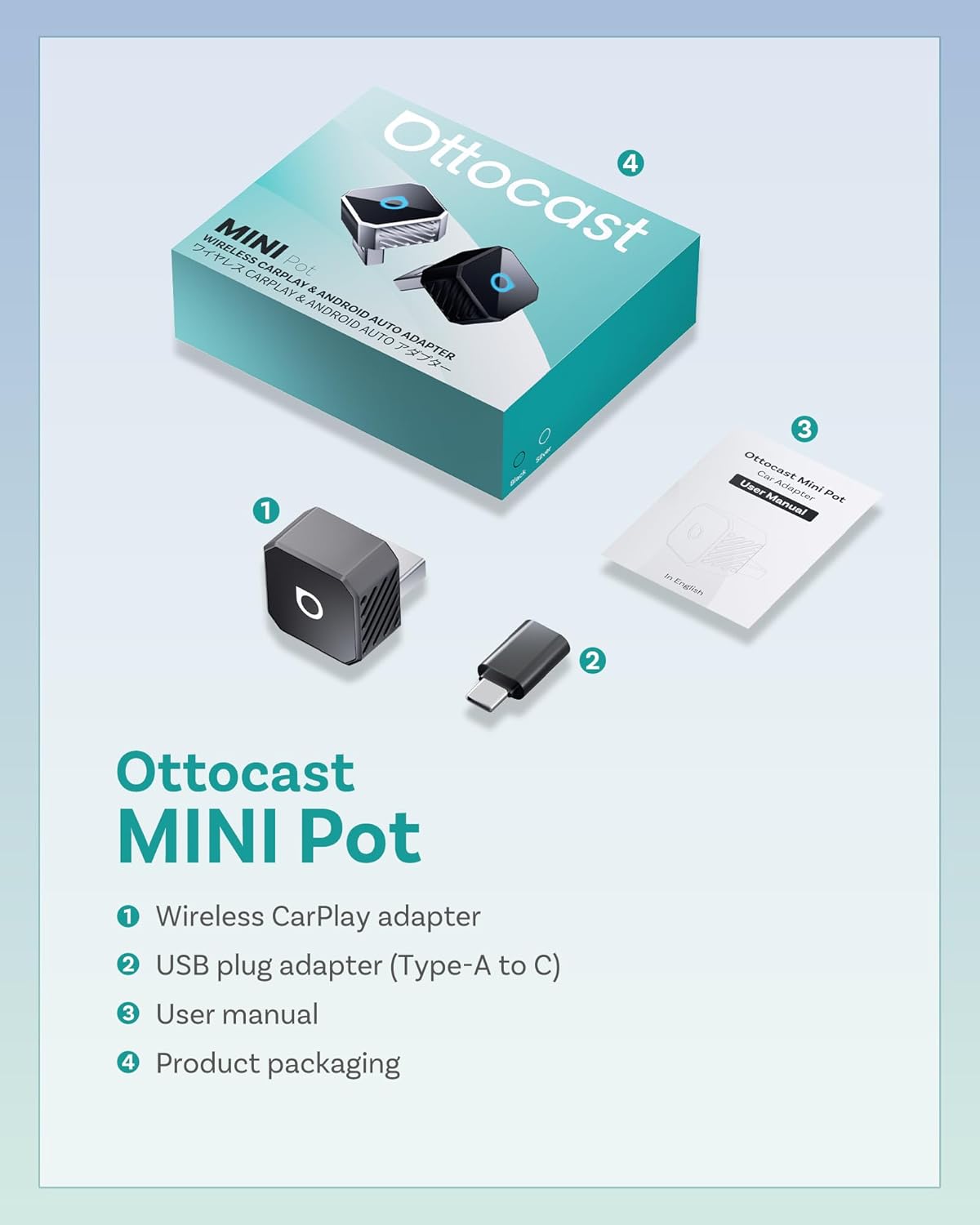
Image: The OTTOCAST Mini Pot, a USB-A to USB-C adapter, and the user manual, laid out next to the product box.
3. Seadistusjuhised
Follow these steps to set up your OTTOCAST Mini 3.0 adapter for the first time:
- Ühendage adapter: Connect the OTTOCAST Mini 3.0 adapter into your car's USB port. If your car has a USB-C port, use the provided USB-A to USB-C adapter. The adapter's LED light will illuminate.
- Bluetoothi ja WiFi lubamine: Veenduge, et teie nutitelefonis on nii Bluetooth kui ka Wi-Fi sisse lülitatud.
- Bluetoothiga sidumine: On your phone's Bluetooth settings, search for available devices and select the one named "AUTO2-XXX" (where XXX is a unique identifier for your device). Confirm the pairing request on your phone and car's infotainment screen if prompted.
- Luba load: Grant necessary permissions for contacts and favorites sync if requested.
- Connect to CarPlay/Android Auto: Once paired, your car's infotainment system should automatically launch Apple CarPlay or Android Auto wirelessly.

Image: Visual guide showing the three simple steps to set up the OTTOCAST Mini Pot: plugging it in, pairing via Bluetooth, and starting wireless CarPlay/Android Auto.
Seadistamise videojuhend:
Video: An official seller video demonstrating the quick and easy plug-and-play setup process for the OTTOCAST Mini 3.0 adapter, highlighting wireless freedom.
4. Kasutusjuhised
Once the adapter is set up, it will automatically connect to your paired smartphone every time you start your car. The adapter maintains your original car controls for a familiar user experience.
- Automaatne taasühendamine: The adapter will reconnect in seconds once the engine is on, without any extra steps.
- Originaal auto juhtnupud: Continue to use your car's touchscreen, steering wheel buttons, and rotary knob controls as you normally would for navigation, music, and calls.
- Häälassistent: Activate your smartphone's voice assistant (Siri or Google Assistant) for hands-free control.
- Dual Device Memory: The adapter can store pairing information for two devices, automatically connecting to the most recently used phone. To switch between phones, ensure the currently connected phone's Bluetooth/Wi-Fi is off, then connect the other phone.

Hääleabiline

Puuteekraani juhtimine

Nupu juhtimine

Rooli juhtimine
Image: Icons illustrating various control methods supported by the adapter, including voice, touchscreen, knob, and steering wheel controls.
5. Ühilduvus
The OTTOCAST Mini 3.0 adapter is designed for broad compatibility with various vehicles and smartphones:
- Sõiduki ühilduvus: Works with most cars manufactured in 2016 or later that come with factory-wired Apple CarPlay or Android Auto.
- Nutitelefonide ühilduvus:
- iPhone: Supports iOS 10 or later (iPhone 5 and all newer models).
- Android telefonid: Requires Android 11 or later with 5GHz Wi-Fi support (common in 2020+ models).
- Märkus. This adapter is not compatible with BMW or Tesla vehicles.

Image: A visual representation of the adapter's broad compatibility with over 800 car models, excluding BMW and Tesla.
For a detailed compatibility list, please visit: https://check.adaptermanual.com/AMZ/
6. Hooldus
To ensure optimal performance and longevity of your OTTOCAST Mini 3.0 adapter:
- Hoidke seade puhas ja vaba tolmust ja prahist.
- Vältige adapteri kokkupuudet äärmuslike temperatuuride või niiskusega.
- Handle the adapter gently to prevent physical damage.
- The metal frame is designed for fast heat dissipation, ensuring consistent performance.
7. Veaotsing
If you encounter issues with your OTTOCAST Mini 3.0 adapter, try the following solutions:
- Ühendust pole:
- Ensure the adapter is securely plugged into the correct USB port (data-enabled, not just charging).
- Verify that Bluetooth and Wi-Fi are enabled on your smartphone.
- Check your phone's Bluetooth settings to confirm it's paired with "AUTO2-XXX".
- Taaskäivitage oma auto teabe- ja meelelahutussüsteem ning nutitelefon.
- Vahelduvad katkestused:
- Ensure the adapter is firmly seated in the USB port. The tapered design helps maintain a strong connection.
- Minimize interference from other wireless devices in the car.
- Update the adapter's firmware (see "Online Update" section).
- Screen Goes Black Occasionally:
- This can be a rare wireless quirk. Ensure firmware is up to date.
- If persistent, try resetting the adapter (long press the button for 15 seconds to clear data).
- Delay in Audio/Video:
- While designed for low latency, some minor delays can occur. Ensure your phone's software and the adapter's firmware are updated.
Veebivärskendus:
To update the adapter's firmware:
- Plug the product into the car's USB port.
- Connect your iPhone/Android phone to the product's Wi-Fi network.
- Enter "192.168.1.101" in your mobile browser.
- Go to the backend interface and click "Update" if a new version is available.

Image: Visual guide detailing the steps for performing an online firmware update for the OTTOCAST Mini Pot.
For further support, scan the QR code or visit: http://otto-cast.com/app/QRCode/download.html
8. Tehnilised andmed
| Mudeli nimi | CP88-T3 |
| Erifunktsioon | Madal latentsusaeg |
| Ühenduvustehnoloogia | Bluetooth, 5GHz Wi-Fi (802.11ac) |
| Toiteallikas | Juhtmega elekter (USB) |
| Materjal | Metall, Plastik |
| Värv | Must |
| Installi tüüp | Juhtmeta |
| Kontrollimeetod | Rakendus |
| Ühilduvad seadmed | iPhone (iOS 10+), Android (Android 11+ with 5GHz WiFi) |
| Toetatud rakendused | Spotify, YouTube, MP3, AAC, etc. |
| Kauba mõõtmed (P x L x K) | 0.82" P x 0.82" L x 0.93" K |
9. Garantii ja tugi
The OTTOCAST Mini 3.0 adapter comes with a 2-aastane tootjagarantii for your peace of mind. This covers any defects in materials or workmanship under normal use.
- Garantii kestus: 24 kuud alates ostukuupäevast.
- Nõude esitamise protsess: Proof of purchase is required for all warranty claims. Please contact OTTOCAST customer support for assistance.

Image: A graphic illustrating the 2-year protection plan offered with the OTTOCAST Mini Pot, emphasizing extended coverage.
For further support, troubleshooting, or warranty inquiries, please refer to the contact information provided in your user manual or visit the official OTTOCAST websaidile.


