1. Toote lõppview
The KLIM Cassette Player Boombox is a versatile audio device combining classic cassette playback with modern features like AM/FM radio, Bluetooth connectivity, and USB playback/recording. Its portable design allows for use at home or on the go.
Peamised omadused:
- Kassetimängija ja -salvesti
- AM/FM-raadio tuuner
- Bluetooth Connectivity for wireless streaming
- USB Port for MP3 playback and recording
- Integrated Microphone for direct recording
- Headphone Jack for private listening
- Dual Power: AC power cord or 4 x C-type batteries (not included)
- Portable design with a carrying handle
Mis on karbis:
- KLIM Cassette Player Boombox
- Vahelduvvoolu toitejuhe
- Kasutusjuhend

Joonis 1: Esiosa view of the KLIM Cassette Player Boombox, showcasing its controls and cassette compartment.
2. Seadistamine
Seadme toide:
The KLIM Cassette Player Boombox can be powered in two ways:
- Vahelduvvoolu toide: Connect the included AC power cord to the device's power input and then to a standard wall outlet.
- Aku võimsus: For portable use, insert 4 x C-type batteries (not included) into the battery compartment located on the underside of the device. Ensure correct polarity.

Joonis 2: alumine pool view showing the battery compartment for portable power.
3. Kasutusjuhised
3.1. Cassette Player/Recorder
- Slide the function selector to 'TAPE'.
- Press the 'OPEN' button to open the cassette compartment.
- Insert a cassette tape with the open side facing up.
- Sulgege kassetipesa.
- Use the 'PLAY', 'STOP/EJECT', 'FFWD' (Fast Forward), and 'REW' (Rewind) buttons to control playback.
- To record, ensure a blank tape is inserted. Press the 'REC' button to start recording from the built-in microphone, radio, or USB.

Joonis 3: Ülemine view of the boombox with a cassette tape inserted into the compartment.
3.2. AM/FM-raadio
- Slide the function selector to 'RADIO'.
- Optimaalse vastuvõtu saavutamiseks pikendage teleskoopantenni.
- Use the 'BAND' switch to select between AM and FM frequencies.
- Rotate the 'TUNING' knob to find your desired radio station.
3.3. Bluetooth-ühenduvus
- Slide the function selector to 'BT' (Bluetooth).
- The device will enter pairing mode, indicated by a flashing light or audible prompt.
- Lubage oma nutitelefonis või tahvelarvutis Bluetooth ja otsige saadaolevaid seadmeid.
- Select 'KLIM Cassette Player' (or similar name) from the list to pair.
- Once paired, you can stream audio wirelessly from your device.
3.4. USB-taasesitus ja -salvestus
- Slide the function selector to 'USB'.
- Sisestage MP3-helifailidega USB-mälupulk files USB-porti.
- The device will automatically begin playing the audio files. Use the playback controls (play/pause, skip) to navigate.
- To record to USB, ensure a USB drive is inserted. Press the 'REC' button while in radio or cassette mode to record the audio source directly to the USB drive.
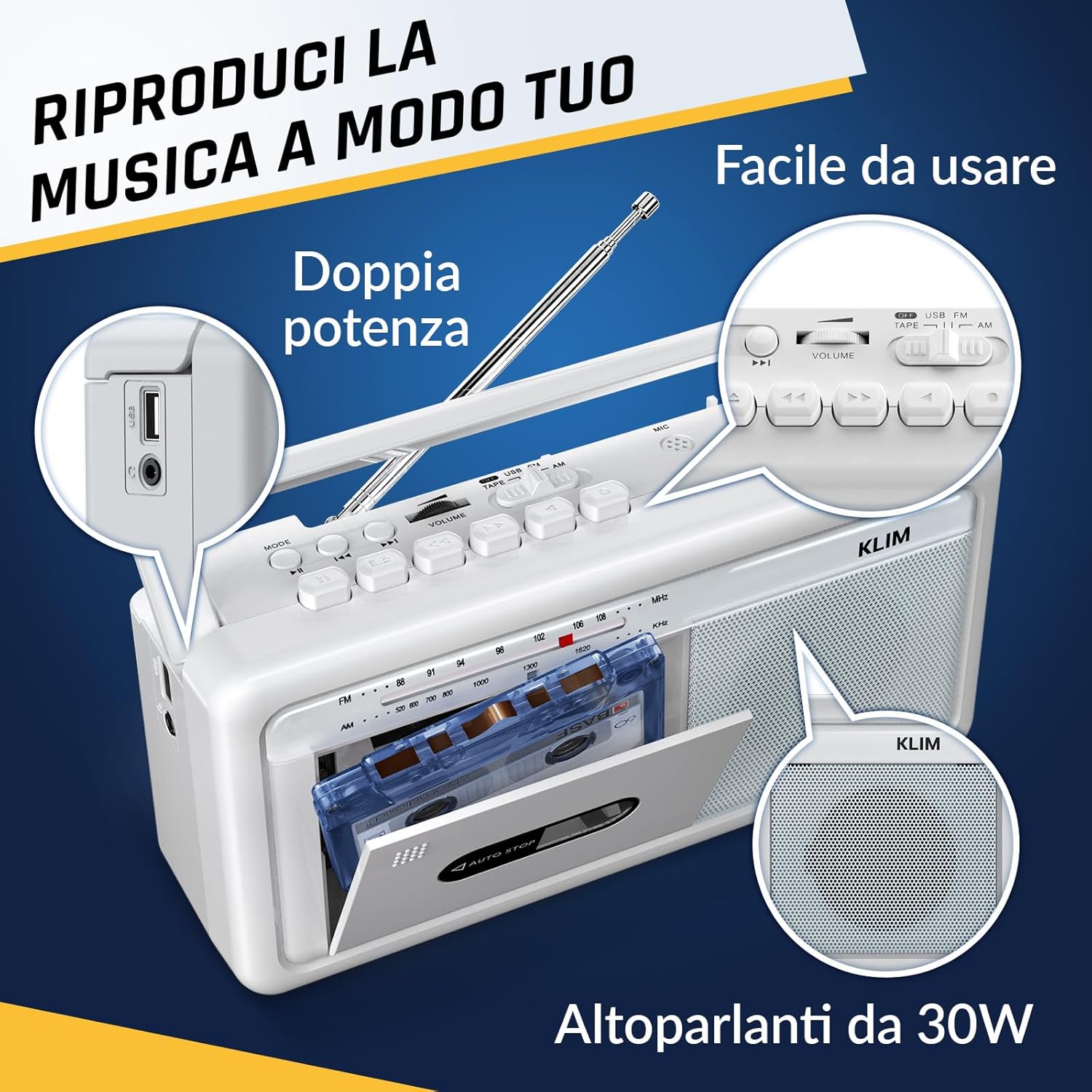
Joonis 4: Külg view highlighting the USB port for media playback and recording.
3.5. Kõrvaklappide kasutamine
Connect standard 3.5mm headphones to the headphone jack for private listening. The internal speakers will automatically mute when headphones are connected.
Video 1: Instructions on how to record a tape to USB using the WTB-795 model. This video demonstrates the USB recording functionality.
Video 2: Üleview of a retro cassette player with USB, Bluetooth, and AM/FM radio features, similar to the KLIM Cassette Player Boombox.
4. Hooldus
- Hoidke seadet puhtana, pühkides seda pehme kuiva lapiga. Vältige vedelate puhastusvahendite või lahustite kasutamist.
- Regularly clean the cassette head and pinch rollers with a cotton swab lightly dampisopropüülalkoholiga rikastatud, et tagada optimaalne helikvaliteet ja vältida lindi kahjustumist.
- Keep the device away from direct sunlight, heat sources, and excessive dust or moisture.
- Kui seadet pikemat aega ei kasutata, eemaldage patareid lekke vältimiseks.
5. Veaotsing
| Probleem | Võimalik lahendus |
|---|---|
| Pole jõudu | Check if the AC power cord is securely connected. If using batteries, ensure they are inserted correctly and are not depleted. |
| Kõlaritest ei kosta heli | Increase the volume. Ensure headphones are not connected. Check the function selector is in the correct mode (TAPE, RADIO, BT, USB). |
| Halb raadiovastuvõtt | Extend the telescopic antenna fully. Adjust the antenna direction. Try moving the unit to a different location. |
| Kassett ei mängi/salvesta | Ensure the tape is inserted correctly. Check if the tape is damaged. Clean the cassette head and pinch rollers. |
| Bluetooth ei loo ühendust | Ensure the unit is in Bluetooth mode. Make sure your device's Bluetooth is enabled and within range. Try unpairing and re-pairing the device. |
| USB taasesituse probleemid | Ensure the USB drive is formatted correctly (FAT32) and contains compatible audio files (MP3, WAV, WMA, AAC, FLAC). Try a different USB drive. |
6. Tehnilised andmed
- Kaubamärk: KLIM
- Mudel: Kassetimängija
- Toote mõõtmed: 25 x 13.1 x 7.6 cm
- Kauba kaal: 1 kg
- Ühilduvad seadmed: MP3-mängija, nutitelefon, tahvelarvuti
- Heliväljundi režiim: Stereo
- Toetatud helivormingud: Cassette, Analog Radio, MP3, WAV, WMA, AAC, FLAC, Bluetooth
- Toiteallikas: Corded Electric (AC) / 4 x C-type Batteries (not included)
- Ühenduvustehnoloogia: USB, Bluetooth
- Värv: Härma valge
- Kauba number: KLSIN4825
7. Garantii ja tugi
The KLIM Cassette Player Boombox comes with a 5-aastane garantii. For any questions, technical assistance, or warranty claims, please contact KLIM customer support. Our team is available 24/7 to assist you.
Please refer to the contact information provided in your product packaging or visit the official KLIM websaidilt lisateabe saamiseks.


