1. Sissejuhatus
This manual provides detailed instructions for the safe and efficient operation of your Bigme B6 Color Ebook Reader. Please read this manual thoroughly before using the device and retain it for future reference.
Pakendi sisu
- Bigme B6 e-raamatute lugeja
- Kaitseümbris
- Kasutusjuhend (see dokument)
- Laadimiskaabel

Image 1.1: Bigme B6 Color Ebook Reader and included protective case.
2. Toote lõppview
Familiarize yourself with the components and features of your Bigme B6 device.
Põhifunktsioonid
- Kuva: 6-inch Color E-paper display, 300 PPI resolution.
- Protsessor: Octa-core CPU for responsive performance.
- Mälu ja salvestusruum: 4GB RAM and 64GB internal storage, expandable via Micro-SD card (up to 1TB).
- Operatsioonisüsteem: Android 14, providing access to various applications.
- Ühenduvus: Bluetooth and Wi-Fi for wireless communication.
- Heli: Integrated Hi-Fi Speakers.
- Disain: Üliõhuke profffile at 6.98mm.
- Silmade mugavus: Features Zero Blue Light and Flicker-Free technology, TUV Rheinland certified for reduced eye strain.

Pilt 2.1: läbiview of the Bigme B6 Ebook Reader's main features.
3. Seadistamine
3.1 Esmane laadimine
Before first use, fully charge your Bigme B6. Connect the device to a power source using the provided charging cable. The charging indicator will show the charging status.
3.2 Toide sisse/välja
- To power on: Press and hold the power button until the screen illuminates.
- To power off: Press and hold the power button, then select "Power Off" from the options.
- Une-/ärkamiseks: vajutage lühidalt toitenuppu.
3.3 Võrguühendus (Wi-Fi)
- Avakuval navigeeri Seaded.
- Valige Võrk ja Internet.
- Lülita Wi-Fi ON.
- Valige loendist soovitud WiFi-võrk.
- Sisestage parool, kui seda küsitakse, ja puudutage Ühendage.
3.4 Süsteemi algkonfiguratsioon
Upon first power-on or after a factory reset, follow the on-screen prompts to select your language, connect to Wi-Fi, and set up your Google account (optional, for app store access).
4. Kasutusjuhised
4.1 Lihtne navigeerimine
- Puuteekraan: Tap to select items, swipe to scroll, pinch to zoom.
- Avakuva: Displays installed applications and widgets.
- Teavituspaneel: Kiirseadetele ja teavitustele juurdepääsemiseks libista ekraani ülaosast alla.
- Juhtimiskeskus: Access system settings like Wi-Fi, Bluetooth, brightness, and refresh modes.
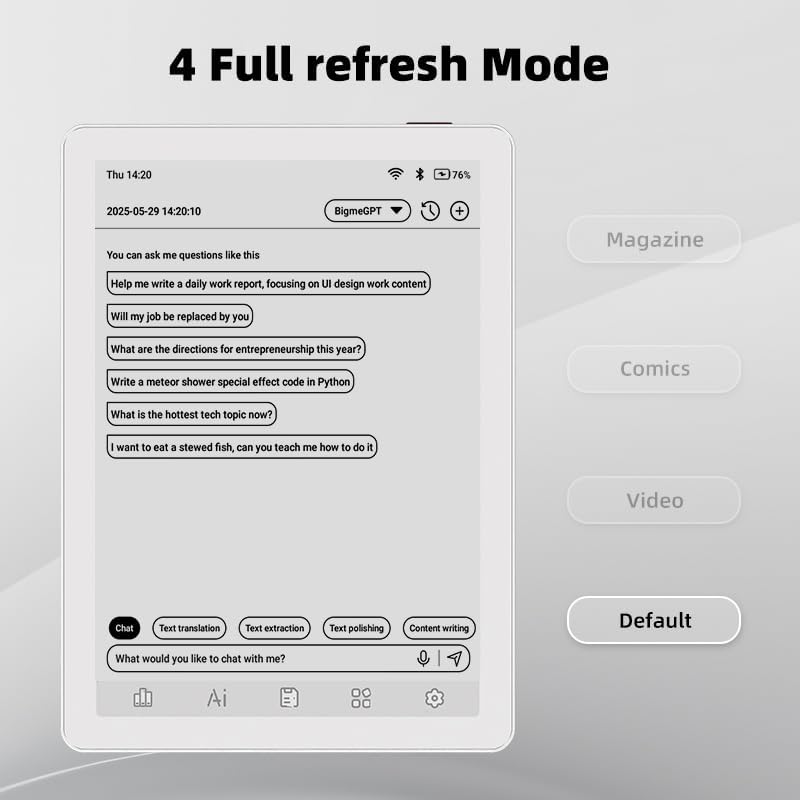
Image 4.1: The Bigme B6 home screen displaying various application icons.

Image 4.2: Accessing the Control Center for quick adjustments to device settings.
4.2 Reading eBooks
The Bigme B6 supports over 19 eBook formats, including PDF, TXT, EPUB, MOBI, and more. You can load books via USB or download them directly through reading applications.
- Open a reading application (e.g., the default reader or a downloaded app like Kindle or Libby).
- Select the book you wish to read from your library.
- Tap the left or right side of the screen to turn pages.
- Tap the center of the screen to access reading options (font size, line spacing, contrast, etc.).
- To highlight text: Press and hold on a word, then drag the selection handles to cover the desired text. Options for highlighting or notes will appear.

Image 4.3: Reading an eBook and highlighting text with color on the Bigme B6.
4.3 Rakenduste haldus
As an Android 14 device, you can install applications from the Google Play Store or other compatible sources.
- Rakenduste installimine: Avage App Store icon (Google Play Store) on your home screen, search for the desired app, and follow the installation prompts.
- Rakenduste desinstallimine: Mine aadressile Seaded > Rakendused, valige rakendus ja puudutage Desinstalli.
4.4 Audiobooks and Media Playback
The device supports audiobook playback through its built-in Hi-Fi speakers or connected Bluetooth headphones.
- Playing Audiobooks: Use a compatible audiobook application.
- Connecting Bluetooth Headphones: Mine aadressile Seaded > Ühendatud seadmed > Bluetooth, enable Bluetooth, and pair with your headphones.

Image 4.4: The Bigme B6 supports audiobooks, allowing for hands-free listening.
4.5 Display Refresh Modes
The Bigme B6 offers multiple refresh modes to optimize display performance for different content types.
- Access refresh modes from the Control Center or Display Settings.
- Levinumad režiimid on järgmised:
- Vaikimisi: Standard reading mode.
- Ajakiri: Optimized for images and text in magazines.
- Comics: Enhanced for comic book viewing.
- Video: Provides a smoother refresh rate for video content (note: e-paper displays have limitations for video).

Image 4.5: Selecting from various refresh modes to suit different content types.
5. Hooldus
5.1 Seadme puhastamine
- Use a soft, lint-free cloth to gently wipe the screen and body of the device.
- Kangekaelsete plekkide korral kergelt dampLoputage lappi veega või spetsiaalselt elektroonika jaoks mõeldud ekraanipuhastusvahendiga.
- Vältige karmide kemikaalide, abrasiivsete materjalide ja liigse niiskuse kasutamist.
5.2 Aku hooldus
- Laadige seadet regulaarselt, kuid ärge jätke seda pikaks ajaks täiesti tühjaks.
- Do not expose the device to extreme temperatures, as this can affect battery life.
- Use only the provided or a certified charging cable and adapter.
5.3 Säilitamine
When not in use for extended periods, store the device in a cool, dry place, away from direct sunlight and extreme temperatures. It is recommended to charge the device to about 50% before long-term storage.
6. Veaotsing
| Probleem | Võimalik põhjus | Lahendus |
|---|---|---|
| Seade ei lülitu sisse. | Aku tühjeneb; seade hangub. | Laadige seadet vähemalt 30 minutit. Tehke sunnitud taaskäivitus, hoides toitenuppu 10–15 sekundit all. |
| Screen is unresponsive or slow. | Temporary software glitch; too many apps running. | Restart the device. Close unnecessary background applications. Check for system updates. |
| Wi-Fi-ga ei saa ühendust. | Vale parool; ruuteri probleem; WiFi keelatud. | Ensure Wi-Fi is enabled and the password is correct. Restart your Wi-Fi router. Try connecting to a different network. |
| Aku tühjeneb kiiresti. | High screen brightness; many background apps; frequent Wi-Fi/Bluetooth use. | Reduce screen brightness. Close unused applications. Disable Wi-Fi and Bluetooth when not needed. Adjust refresh mode settings. |
| Applications crash or freeze. | App incompatibility; insufficient memory. | Update the application. Clear the app's cache (Settings > Apps > [App Name] > Storage & cache). If issues persist, uninstall and reinstall the app. |
7. Tehnilised andmed
| Mudeli nimi | US-B6 |
| Ekraan | 6-tolline värviline e-paber, elektrooniline tint, 300 PPI |
| Operatsioonisüsteem | Android 14 |
| RAM | 4 GB |
| Sisemälu | 64 GB |
| Laiendatav salvestusruum | Micro-SD card (up to 1TB support) |
| Ühenduvus | Bluetooth, WiFi |
| Aku | 1 mittestandardne aku (kaasas) |
| Mõõtmed (P x L x K) | 5.88" x 4.25" x 0.28" (14.94 cm x 10.8 cm x 0.71 cm) |
| Kauba kaal | 6.2 untsi (175.77 grammi) |
| Toetatud e-raamatu vormingud | PDF, TXT, EPUB, EPUB3, HTML, HTM, AZW3, FB2, DOC, DOCX, MOBI, OEB, CBR, RPC, RTF, DJVU, ZIP |
8. Garantii ja tugi
8.1 Garantii teave
Please refer to the warranty card included with your product for specific warranty terms and conditions. The warranty typically covers manufacturing defects for a specified period from the date of purchase.
8.2 Klienditugi
For technical assistance, troubleshooting not covered in this manual, or warranty claims, please contact Bigme customer support. Contact details can usually be found on the Bigme official webveebilehel või toote pakendil.
Võite külastada ka Bigme pood Amazonis Lisateabe saamiseks toote kohta ja tugiressursside saamiseks.


