Sissejuhatus
This manual provides detailed instructions for the setup, operation, and maintenance of your LIGE EF21-B Smart Watch. Please read this manual thoroughly before using the device to ensure proper function and to maximize your user experience. Keep this manual for future reference.
Mis on karbis
Upon opening your LIGE EF21-B Smart Watch package, you should find the following items:
- 1 x LIGE EF21-B Smart Watch
- 1 x roostevabast terasest rihm
- 1 x silikoonrihm
- 1 x USB magnetiline laadimiskaabel
- 1 x Type-C Magnetic Charging Cable
- 1 x kasutusjuhend

Image: The LIGE EF21-B Smart Watch shown with both USB and Type-C magnetic charging cables, highlighting the included accessories.
Seadistamine
1. Nutikella laadimine
Before initial use, fully charge your smart watch. Connect the magnetic charging cable to the charging contacts on the back of the watch and plug the USB or Type-C end into a compatible power source (e.g., computer, wall adapter). The watch display will indicate charging status. A full charge typically takes approximately 3 hours.

Image: The LIGE EF21-B Smart Watch connected to its magnetic charger, displaying a charging animation and indicating its 600mAh battery capacity.
2. Rakenduse installimine
To unlock the full functionality of your LIGE EF21-B Smart Watch, you need to install the companion application, FitCloudPro, on your smartphone.
- Scan the QR code provided in the watch's interface or in the included manual to download the FitCloudPro app.
- Alternatively, search for "FitCloudPro" in your smartphone's app store (Google Play Store for Android, Apple App Store for iOS).
- Install the application and grant necessary permissions when prompted.
3. Seadme sidumine
After installing the app and fully charging your watch:
- Avage oma nutitelefonis FitCloudPro rakendus.
- Veenduge, et Bluetooth oleks teie nutitelefonis lubatud.
- Rakenduses navigeeri jaotisse „Seade” või „Lisa seade”.
- The app will search for available devices. Select "EF21-B" from the list to initiate pairing.
- Follow any on-screen prompts on both your phone and watch to confirm the pairing.
Kasutusjuhised
Põhiline navigeerimine
The LIGE EF21-B Smart Watch features a 1.43-inch AMOLED touchscreen display and a rotary encoder crown for navigation.
- Puuteekraan: Swipe left, right, up, or down to navigate through menus and access different features. Tap to select items.
- Rotary Encoder Crown: Rotate the crown to scroll through lists, adjust settings, or zoom in/out on certain interfaces. Press the crown to return to the home screen or confirm selections.
- Külgmised nupud: The watch includes additional side buttons that can be customized for quick access to specific functions or apps.

Pilt: Lähivõte view of the LIGE EF21-B Smart Watch's 1.43-inch AMOLED display, showcasing its vibrant colors and sharp resolution.
Bluetooth-kõned ja -teavitused
Once paired with your smartphone, the watch supports Bluetooth calling and message notifications.
- Kõnede tegemine/vastamine: You can answer or reject incoming calls directly from your watch. Use the built-in microphone and speaker for hands-free communication.
- Sõnumite meeldetuletused: Receive real-time notifications for calls, SMS, and various social media apps directly on your watch display.

Image: A user interacting with the LIGE EF21-B Smart Watch to answer a Bluetooth call, demonstrating its clear two-way communication capabilities.

Image: The LIGE EF21-B Smart Watch showing incoming notifications from various social media applications, ensuring discreet awareness of important messages.
Tervise jälgimine
Kell pakub põhjalikke tervise jälgimise funktsioone:
- Südame löögisageduse jälgimine: Jälgib pidevalt teie südame löögisagedust kogu päeva jooksul. View real-time data and historical trends in the FitCloudPro app.
- Une jälgimine: Automatically records your sleep patterns, including deep sleep, light sleep, and wake times. Provides insights to help improve sleep quality.
- Vere hapnikusisalduse (SpO2) jälgimine: Mõõdab teie vere hapnikusisaldust.
- Stressitaseme jälgimine: Tracks daily stress levels to help you manage well-being.
Märkus. See seade ei ole meditsiiniseade. Terviseandmed on ainult viitamiseks ja neid ei tohiks kasutada meditsiiniliseks diagnoosimiseks ega raviks.

Image: The LIGE EF21-B Smart Watch displaying continuous heart rate monitoring data, showing BPM and historical trends.

Image: The LIGE EF21-B Smart Watch displaying sleep monitoring data, including total sleep time and sleep stage breakdown over several days.
Spordirežiimid
The watch supports over 200 sports modes to accurately track your physical activities.
- Select your desired sport from the watch's menu.
- The watch will record data such as distance, steps, calories burned, and heart rate during your workout.
- Review detailed analysis of your training results in the FitCloudPro app.

Image: The LIGE EF21-B Smart Watch displaying its interface for selecting from over 100 sports modes, with examples of users engaged in golf, climbing, and running.
Muud funktsioonid
The LIGE EF21-B Smart Watch includes several additional smart features:
- AI häälassistent: Suhtle oma kellaga erinevate ülesannete jaoks häälkäskluste abil.
- Taskulamp: Utilize the built-in LED flashlight for convenience in low-light conditions.
- Muusika juhtimine: Juhtige oma nutitelefoni muusika taasesitust otse oma kellast.
- Ilmateade: Hankige reaalajas ilmateateid.
- Äratuskell: Määrake äratused ja meeldetuletused.
- Leia minu telefon: Leidke oma kadunud nutitelefon.
- Kaamera kaugjuhtimispult: Kasuta oma kella telefoni kaamera kaugjuhtimispuldina.
- Vee meeldetuletus: Receive prompts to drink water throughout the day.
- Kalkulaator: Saadaval on põhiline kalkulaatori funktsioon.

Image: The LIGE EF21-B Smart Watch showcasing its diverse range of smart features, including music control, weather, health monitoring, and a flashlight icon.
Video: Üleview of the LIGE EF21-B Smart Watch's key features, including its AMOLED display, rotary crown, health monitoring, sports modes, and charging capabilities.
Hooldus
Puhastamine
Kella välimuse ja funktsionaalsuse säilitamiseks:
- Pühkige kella ekraani ja korpust pehme, ebemevaba lapiga.
- Kangekaelse mustuse korral kergelt dampLoputage lappi veega. Vältige tugevate kemikaalide või abrasiivsete materjalide kasutamist.
- Tõhusa laadimise tagamiseks puhastage laadimiskontakte regulaarselt.
Veekindlus (IP68)
The LIGE EF21-B Smart Watch is rated IP68, meaning it is resistant to dust and can withstand immersion in water up to 1.5 meters for up to 30 minutes. This makes it suitable for daily use, such as washing hands or light rain exposure. However, it is not recommended for hot showers, saunas, or diving, as steam and high water pressure can compromise the seals.
Aku hooldus
Aku tööea pikendamiseks:
- Vältige aku sagedast täielikku tühjenemist.
- Hoidke kella jahedas ja kuivas kohas, kui seda pikemat aega ei kasutata.
- Use only the provided charging cables.
Veaotsing
If you encounter issues with your LIGE EF21-B Smart Watch, refer to the following common solutions:
| Probleem | Võimalik lahendus |
|---|---|
| Kell ei lülitu sisse | Veenduge, et kell oleks täielikult laetud. Hoidke toitenuppu mitu sekundit all. |
| Ei saa telefoniga siduda | Ensure Bluetooth is enabled on your phone and the watch. Restart both devices. Make sure the FitCloudPro app has necessary permissions. |
| Teateid ei saadud | Check app permissions for notifications on your phone. Ensure the watch is connected via Bluetooth. Verify notification settings within the FitCloudPro app. |
| Ebatäpsed terviseandmed | Ensure the watch is worn snugly on your wrist. Clean the sensor on the back of the watch. Remember, this is not a medical device. |
| Lühike aku tööiga | Reduce screen brightness, disable unnecessary features (e.g., always-on display), and limit frequent heart rate monitoring. |
Kui probleem püsib, võtke ühendust klienditoega.
Tehnilised andmed
Key technical specifications for the LIGE EF21-B Smart Watch:
- Mudel: EF21-B
- Kuva: 1.43-inch AMOLED, 466x466 pixels
- Aku mahutavus: 600 mAh liitiumpolümeer
- Aku eluiga: 10+ days (typical use), 30+ days (standby)
- Laadimisaeg: Umbes 3 tundi
- Veekindlus: IP68
- Ühenduvus: Bluetooth
- Ühilduvus: Android 8.0+ / iOS 12.0+ (via FitCloudPro App)
- Andurid: Heart Rate, Blood Oxygen, Pedometer
- Eriomadused: Bluetooth Call, Voice Assistant, 200+ Sports Modes, Flashlight, Music Control, Notifications, Sleep Monitor, Activity Tracker
- Mõõdud: Watch case approx. 47-48mm diameter, 22mm lug width. Max wrist circumference: 250mm, Min wrist circumference: 150mm.
- Kaal: 180 grammi (umbes 6.3 untsi)
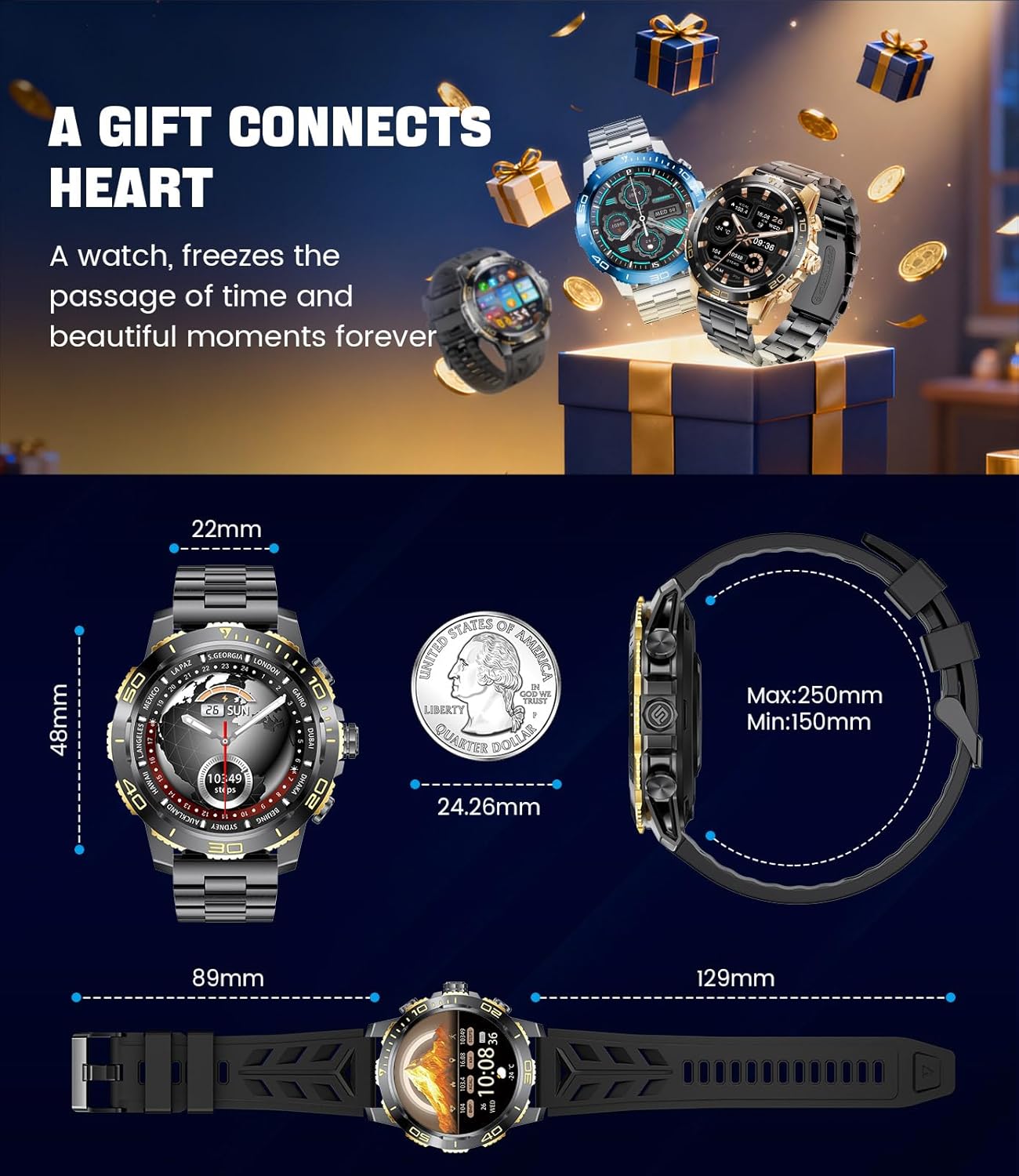
Image: Detailed dimensions of the LIGE EF21-B Smart Watch, including case diameter, strap width, and wrist circumference range.
Garantii ja tugi
Your LIGE EF21-B Smart Watch comes with a manufacturer's warranty. Please refer to the warranty card included in your packaging for specific terms and conditions.
For any questions, technical support, or warranty claims, please contact LIGE customer service through the platform where you purchased the product. Our professional customer service team is available to assist you.


