1. Sissejuhatus
Tänan ostu eestasing the CAMRY Digital Pocket Gram Scale. This precision instrument is designed for accurate weighing of small items, offering a maximum capacity of 500g with 0.01g readability. Its compact size and multiple weighing units make it suitable for various applications, including food, jewelry, herbs, and more. Please read this manual carefully to ensure proper use and maintenance of your scale.
2. Ohutusalane teave
- Ärge koormake kaalu üle selle maksimaalse kandevõime 500 g, kuna see võib põhjustada püsivaid kahjustusi.
- Vältige kaalu jätmist äärmuslike temperatuuride, niiskuse või otsese päikesevalguse kätte.
- Hoidke kaalu tugevatest elektromagnetväljadest eemal.
- Puhastage kaalu pehme, damp lapiga. Ärge kasutage abrasiivseid puhastusvahendeid ega kastke kaalu vette.
- Handle the scale with care. Avoid dropping or subjecting it to sudden shocks.
- Lekke vältimiseks eemaldage patareid, kui kaalu pikemat aega ei kasutata.
3. Pakendi sisu
Veenduge, et pakis on kõik esemed olemas:
- 1 x CAMRY Digital Pocket Gram Scale (Model WEHA0451H)
- 2 x AAA patareid
- 1 x Kasutusjuhend
4. Toote lõppview
The CAMRY Digital Pocket Gram Scale features a compact design with a protective flip cover that doubles as a weighing tray. Key components include:
- Stainless Steel Weighing Platform: Durable and easy to clean surface for placing items.
- Taustvalgustusega LCD -ekraan: Provides clear weight readings and unit indications.
- Nupud:
- [T] TARE Button: Used to zero the scale or subtract the weight of a container.
- [U] UNIT Button: Used to switch between weighing units (g, oz, gn, ct, dwt, ozt).
- [Power] ON/OFF Button: Lülitab kaalu sisse või välja.
- Flip kate: Shields the weighing platform and display when not in use.

Pilt: Üleview of the CAMRY Digital Pocket Gram Scale, highlighting its components and the instructions printed on the protective lid.
5. Seadistamine
5.1. Aku paigaldamine
- Avage kaalu alumisel küljel asuv patareipesa kate.
- Sisestage kaks AAA-patareid, jälgides õiget polaarsust (+/-).
- Sulgege akupesa kaas kindlalt.
5.2. Esialgne paigutus
Place the scale on a hard, flat, and stable surface to ensure accurate readings. Avoid placing it on soft or uneven surfaces, or near sources of vibration.
6. Kasutusjuhised
6.1. Sisse/välja lülitamine
- Sisselülitamiseks vajutage nuppu [Toide] button. The LCD will display "88888" then "0.00g" (or the last used unit).
- Väljalülitamiseks: vajutage ja hoidke all [Toide] button for a few seconds, or the scale will automatically turn off after approximately 60 seconds of inactivity (Auto-Off function).
6.2. Ühiku teisendus
Kui kaal on sisse lülitatud, vajutage nuppu [U] UNIT button repeatedly to cycle through the available weighing units:
- grammi (g)
- Untsi (oz)
- Terad (gn)
- Karaadid (ct)
- Pennyweight (dwt)
- Troi unts (ozt)
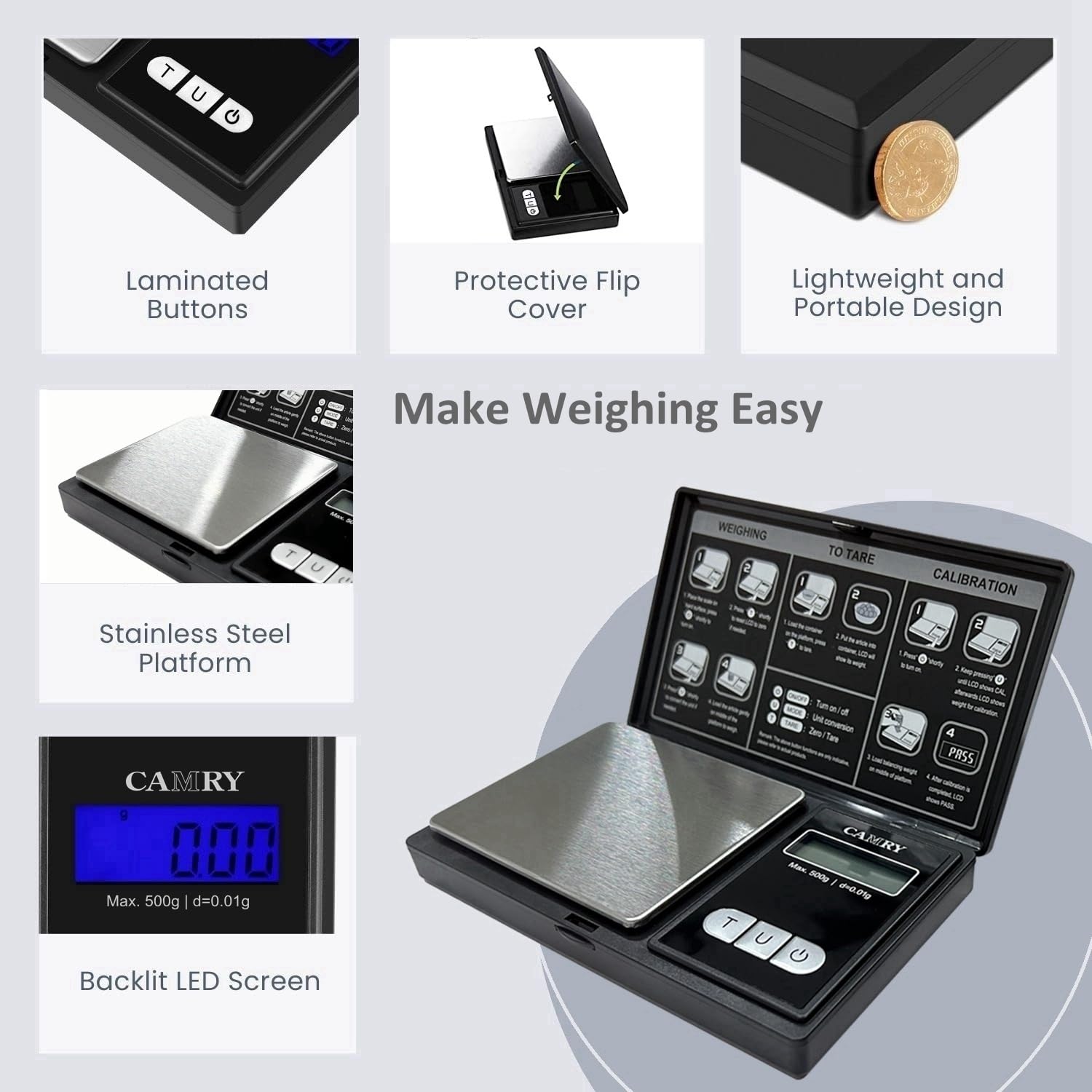
Image: The scale's display and unit button, illustrating the six different weighing units.
6.3. Taara funktsioon
The Tare function allows you to subtract the weight of a container, so you only measure the net weight of the contents.
- Turn on the scale and wait for it to display "0.00g".
- Place an empty container (e.g., a bowl or tray) on the weighing platform. The display will show the container's weight.
- Vajutage nuppu [T] TARE nuppu. Ekraanile kuvatakse uuesti „0.00 g“.
- Add the items you wish to weigh into the container. The display will now show only the weight of the items.

Image: Step-by-step illustration of using the Tare function to measure net weight.
6.4. Kaaluste kaalumine
- Ensure the scale is on and displays "0.00g".
- Carefully place the item(s) to be weighed onto the center of the stainless steel platform.
- Wait for the display to stabilize and read the weight.
- If using a container, utilize the Tare function as described above.

Image: The scale in use, weighing small items on its platform, highlighting its accuracy.
7. Kalibreerimine
Calibration ensures the accuracy of your scale. It is recommended to calibrate the scale periodically or if you suspect inaccurate readings. A 500g calibration weight (not included) is required for this process.
- Lülitage kaal SISSE.
- Vajutage ja hoidke all nuppu [U] UNIT nuppu, kuni ekraanil kuvatakse "CAL".
- Vajutage nuppu [U] UNIT button again. The display will flash "500.00g".
- Place a 500g calibration weight gently onto the center of the weighing platform.
- Oodake, kuni ekraanil kuvatakse "PASS". See näitab edukat kalibreerimist.
- Eemaldage kalibreerimisraskus. Kaal on nüüd kasutusvalmis.
Image: Calibration instructions as displayed on the scale's protective lid.
8. Hooldus
8.1. Puhastamine
To clean the scale, wipe the surface with a slightly damp cloth. Do not use harsh chemicals, abrasive cleaners, or immerse the scale in water. The stainless steel platform can be wiped clean easily.
8.2. Ladustamine
When not in use, store the scale in a dry, cool place. Keep the protective flip cover closed to prevent dust and damage to the weighing platform and display. Remove batteries if storing for extended periods.

Image: The scale with its protective imitation leather cover closed, suitable for storage.
9. Veaotsing
| Probleem | Võimalik põhjus | Lahendus |
|---|---|---|
| "Lo" or Low Battery Indicator | Patareid on tühjad. | Vahetage mõlemad AAA-patareid uute vastu. |
| "O-Ld" or "EEEE" (Overload) | Weight on the platform exceeds maximum capacity (500g). | Remove the item immediately. Do not exceed 500g. |
| Ebatäpsed näidud |
|
|
| Kaal ei lülitu sisse |
|
|
10. Tehnilised andmed
- Mudel: WEHA0451H
- Mahutavus: 500 g
- Täpsus: 0.01 g
- Kaaluühikud: g, oz, gn, ct, dwt, ozt
- Kuva: Taustvalgustusega LCD
- Platvormi materjal: Roostevaba teras
- Võimsus: 2 x AAA patareid (kaasas)
- Automaatne väljalülitus: Approximately 60 seconds of inactivity
- Mõõdud: Approximately 12.8 cm (5.0 in) x 7.4 cm (3.0 in) x 1.8 cm (0.7 in) (closed)
- Eriomadused: Tare Function, Overload Indicator, Low Battery Indicator, Protective Flip Cover

Image: Dimensions and portable size of the CAMRY Digital Pocket Gram Scale.
11. Tootevideo
Watch this video for a visual guide on the features and operation of the CAMRY Digital Pocket Gram Scale.
Video: A demonstration of the CAMRY Digital Gram Scale (Model WEHA0451H), showcasing its backlight LCD display, unit conversion, and calibration process.
12. Garantii ja tugi
CAMRY products are designed for reliability and performance. For specific warranty details or technical support, please refer to the contact information provided with your purchase or visit the official CAMRY webveebisait. Hoidke ostutšekk ostutõendina garantiinõuete korral.
For further assistance, you may contact the seller, USA NUTRI FIT, through the Amazon platform.