1. Sissejuhatus
Thank you for choosing the LOEWE Leo Wireless Headphones. These premium headphones are designed to deliver an exceptional audio experience with advanced features such as Hi-Res Audio, adaptive noise cancellation, and real-time voice translation. This manual provides essential information for setting up, operating, and maintaining your headphones to ensure optimal performance and longevity.
2. Pakendi sisu
Enne kasutamist veenduge, et pakendis on kõik esemed olemas:
- LOEWE Leo Wireless Headphones
- USB-C laadimiskaabel
- AUX to USB-C Audio Cable
- Nahast kandekott
- Raske kandekott
- Cable Pouch
- Kasutusjuhend (see dokument)
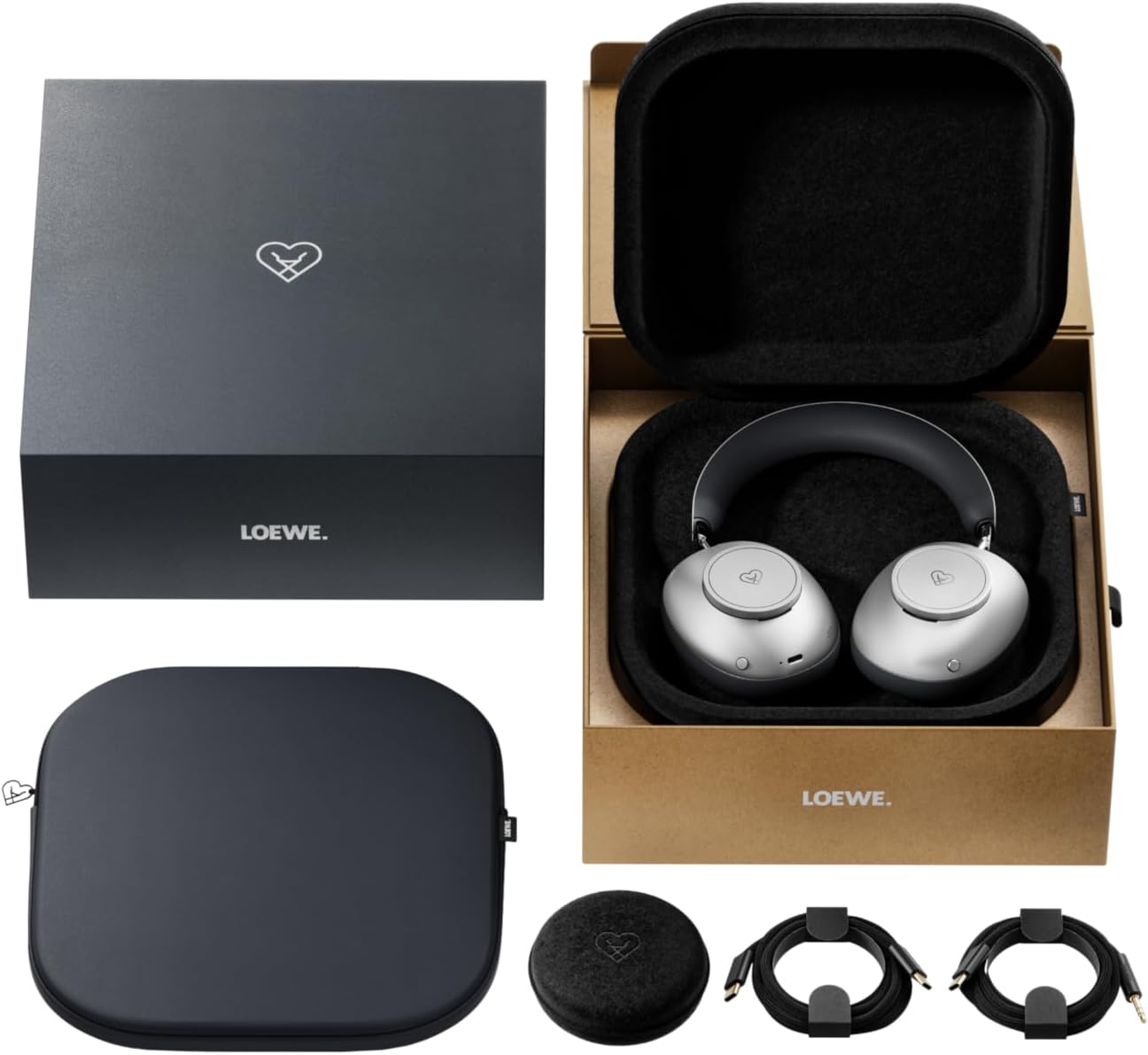
Image: The LOEWE Leo Wireless Headphones package contents, showing the headphones, USB-C cable, AUX cable, leather case, hard case, and cable pouch.
3. Toote lõppview
Familiarize yourself with the physical components and controls of your LOEWE Leo headphones.

Pilt: Esikülg view of the LOEWE Leo Wireless Headphones, showcasing kõrvaklappe ja peavõru.
3.1. Juhtimisseadmed ja pordid
The headphones feature intuitive controls for easy operation:
- Juhtnupud: Two precision-crafted rotary wheels for volume adjustment and navigation.
- Toimingunupud: Dedicated buttons for playback control, ANC modes, and voice translation activation.
- USB-C port: Laadimiseks ja juhtmega heliühenduse loomiseks.
- 3.5 mm pistikupesa: For traditional wired audio connection.

Pilt: Detailne view of the earcup, highlighting the control dial, USB-C port, and 3.5mm audio jack.
4. Alustamine
4.1. Kõrvaklappide laadimine
Before first use, fully charge your LOEWE Leo headphones. A full charge provides up to 65 hours of continuous playback.
- Ühendage kaasasolev USB-C laadimiskaabel kõrvaklappide USB-C porti.
- Ühendage kaabli teine ots ühilduva USB-toiteadapteriga (ei kuulu komplekti) või arvuti USB-porti.
- The LED indicator on the headphones will show the charging status. It will typically turn off or change color once fully charged.
4.2. Toide sisse/välja
- Sisselülitamiseks: Vajutage ja hoidke toitenuppu umbes 3 sekundit all, kuni LED-indikaator süttib.
- Väljalülitamiseks: Vajutage ja hoidke toitenuppu umbes 3 sekundit all, kuni LED-indikaator kustub.
4.3. Bluetoothi sidumine
The LOEWE Leo headphones utilize Bluetooth Low Energy (BLE) for faster pairing and reduced power consumption.
- Veenduge, et kõrvaklapid on välja lülitatud.
- Press and hold the Power button for approximately 5 seconds until the LED indicator flashes rapidly, indicating pairing mode.
- Luba oma seadmes (nutitelefon, tahvelarvuti, arvuti) Bluetooth ja otsi saadaolevaid seadmeid.
- Select "LOEWE Leo" from the list of found devices.
- Pärast ühendamist lõpetab LED-indikaator vilkumise ja jääb siniseks.
4.4. Juhtmega ühendus
For a wired audio experience, use the supplied AUX to USB-C cable.
- Connect the USB-C end of the AUX cable to the headphones.
- Connect the 3.5mm end of the AUX cable to your audio source's 3.5mm jack.
- Kõrvaklapid lülituvad automaatselt juhtmega režiimile.
5. Kõrvaklappide kasutamine
5.1. Audio Playback and Volume Control
Use the control dials and action buttons for managing your audio:
- Helitugevuse suurendamine/mahandamine: Rotate the designated control dial.
- Esita/peata: Press the central action button once.
- Järgmine lugu: Double-press the central action button.
- Eelmine lugu: Triple-press the central action button.

Image: Close-up of the earcup's control dial, used for volume and navigation.
5.2. Adaptiivne mürasummutus (ANC)
The LOEWE Leo features advanced adaptive noise cancellation that continuously analyzes your environment and adjusts in real-time.
- ANC aktiveerimine/deaktiveerimine: Press the dedicated ANC button once.
- Läbipaistvusrežiim: Press the ANC button twice to allow ambient sounds to pass through, enhancing situational awareness.

Image: Illustration of the adaptive noise cancellation feature, depicting sound wave management.
5.3. Reaalajas häältõlge
Communicate across language barriers with the integrated real-time voice translation feature.
- Ensure your headphones are connected to a device with internet access and the LOEWE companion app installed.
- Activate the translation feature via the dedicated button or the companion app.
- Speak into the headphone's microphone. The translated audio will be played back in real-time.

Image: Earcup detail showing the microphone for voice input and the 'leo' icon, representing the real-time translation function.
5.4. Dolby Atmos and Spatial Audio
Experience immersive sound with Dolby Atmos and spatial audio support. This feature is automatically enabled when compatible content is played through a connected device that supports these audio technologies.
6. Hooldus ja hooldus
6.1. Puhastamine
- Pühkige kõrvaklappe pehme, kuiva ja ebemevaba lapiga.
- Ärge kasutage abrasiivseid puhastusvahendeid, alkoholi ega keemilisi lahusteid.
- Keep moisture away from openings.
6.2. Aku hooldus
- Vältige aku sagedast täielikku tühjenemist.
- Store the headphones in a cool, dry place when not in use for extended periods.
- The battery is user-replaceable, contributing to the product's longevity.
6.3. Modular Design
The LOEWE Leo headphones feature a durable modular design with replaceable components, such as ear cushions and headbands. This design allows for easy replacement of worn parts, extending the product's lifespan.

Image: The modular construction of the LOEWE Leo headphones, showing detachable earcups and headband for maintenance or replacement.
7. Veaotsing
If you encounter issues with your LOEWE Leo headphones, refer to the following common solutions:
- Toide puudub: Veenduge, et kõrvaklapid on täielikult laetud. Ühendage need USB-C-kaabli abil toiteallikaga.
- Heli puudub:
- Kontrollige nii kõrvaklappide kui ka ühendatud seadme helitugevust.
- Ensure the headphones are properly paired via Bluetooth or the AUX cable is securely connected.
- Try restarting both the headphones and the audio source device.
- Bluetoothi katkestamine:
- Ensure the headphones are within the Bluetooth range of your device (typically 10 meters).
- Disable and re-enable Bluetooth on your device, then attempt to re-pair.
- Clear the LOEWE Leo from your device's Bluetooth history and pair again.
- ANC ei tööta tõhusalt:
- Veenduge, et kõrvaklapid istuksid teie kõrvade ümber tihedalt. Vajadusel kohandage sobivust.
- Verify that ANC is activated.
- Voice Translation Issues:
- Kontrollige oma seadme internetiühendust.
- Ensure the LOEWE companion app is up-to-date and configured correctly.
- Räägi selgelt ja mõõduka tempoga.
If problems persist, please contact LOEWE customer support.
8. Tehnilised andmed
| Funktsioon | Kirjeldus |
|---|---|
| Mudeli nimi | Leo |
| Mudeli number | 64641J10 |
| Ühenduvustehnoloogia | Wireless (Bluetooth), Wired |
| Traadita side | Bluetoothi vähese energiatarbega (BLE) |
| Heli omadused | Hi-Res Audio, Dolby Atmos, Spatial Audio |
| Mürasummutus | Adaptive Noise Reduction (ANC) |
| Eriomadused | Real-time Voice Translation, Modular Design with Replaceable Components |
| Aku tööiga | Kuni 65 tundi (umbes) |
| Juhtimistüüp | Button Control, Rotary Dials |
| Ühilduvad seadmed | Cellular Phone, Tablet, Computer, Laptop |
| Kaal | 3 Kilograms (product weight as listed, may include packaging) |
9. Garantii ja tugi
9.1. Tootja garantii
The LOEWE Leo Wireless Headphones come with a 2-aastane tootjagarantiiSee garantii katab materjali- ja tootmisdefektid normaalse kasutamise korral. Palun hoidke oma ostutõend garantiinõuete esitamiseks alles.
For specific terms and conditions of the warranty, please refer to the warranty card included in your product packaging or visit the official LOEWE websaidile.
9.2. Klienditugi
For technical assistance, troubleshooting, or warranty inquiries, please contact LOEWE customer support through their official websaidil või toote dokumentatsioonis oleva kontaktteabe kaudu.
Interneti-ressursid: Visit the official LOEWE webKKK, tarkvarauuenduste ja täiendavate tugiressursside sait.


