1. Toote lõppview
The MAYBESTA Wireless Mini Microphone is designed for high-quality audio and video recording across various platforms. Its compact and wireless design offers convenience and portability for content creators, interviewers, and anyone requiring clear audio capture.

Figure 1: MAYBESTA Wireless Mini Microphone Kit, showing two microphones, a receiver, and windscreens.
2. Pakendi sisu
Karbist lahti võttes veenduge, et kõik järgmised esemed on olemas:
- 2x Lavalier Microphones
- 1x Receiver (for Phone Connectivity)
- 1x USB laadimiskaabel
- 3x klambrit
- 2x High Density Sponge tips

Figure 2: All components included in the MAYBESTA Wireless Mini Microphone package.
3. Seadistusjuhend
3.1 Ühilduvus
The MAYBESTA Wireless Mini Microphone is designed for wide compatibility:
- Android süsteem: Compatible with various Android smartphones and tablets.
- iPhone & iPad Series: Supports all iPhone and iPad models, including iPhone 14 and below (Lightning port) and the latest iPhone 15/16 series (USB-C port).
- Laptops & Tablets: Can also be used with compatible laptops and tablets.
Märkus. For Android devices, ensure the OTG function is enabled before use.
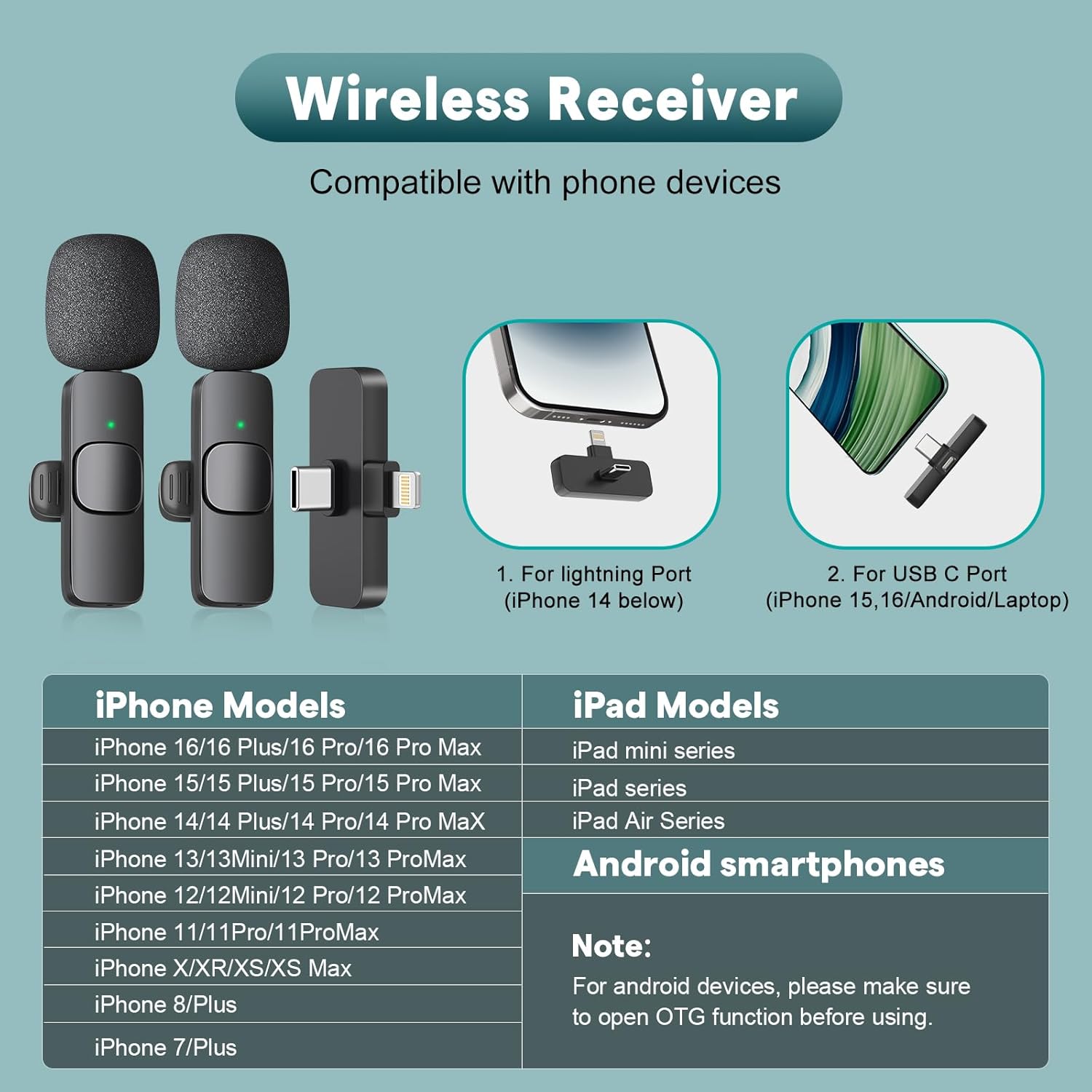
Figure 3: Visual representation of device compatibility for the wireless receiver.
3.2 Vastuvõtja ühendamine
The receiver features an upgraded longer interface for better compatibility with most phone cases, eliminating the need to remove your phone case during use.

Figure 4: The newly upgraded longer receiver design for enhanced phone case compatibility.
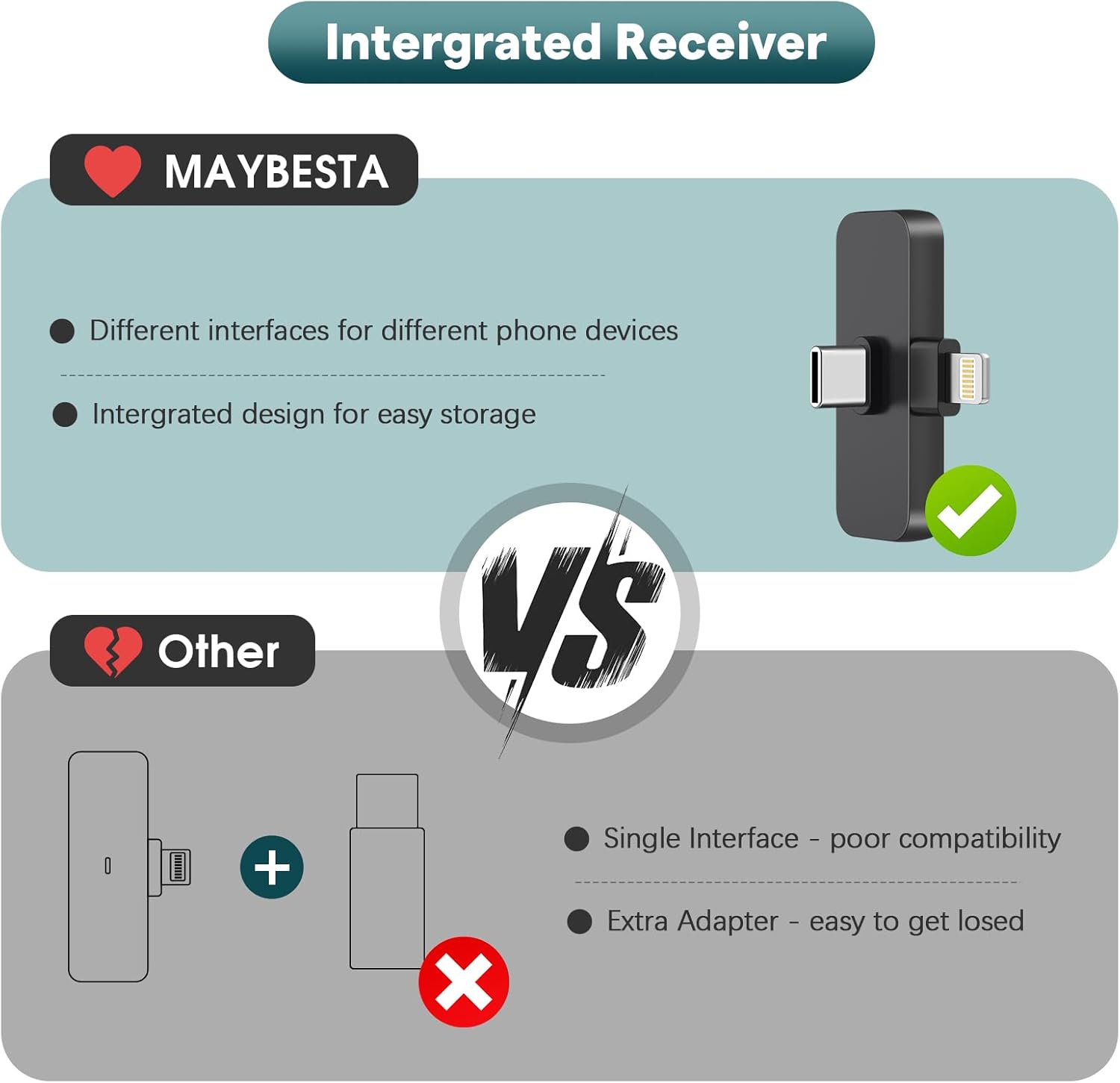
Figure 5: The integrated receiver with both Lightning and USB-C connectors for versatile device connection.
3.3 Easy Automatic Connection
The microphone system offers a simple plug-and-play setup:
- Pistik: Select the appropriate adapter (Lightning or USB-C) and plug the receiver into your device's charging port.
- Vajutage: Turn on the lavalier microphone by pressing its power button.
- Ühendatud: A solid green light on both the receiver and the microphone indicates a successful connection. You can now begin audio/video recording.
Oluline märkus: Please ensure your cellphone's Bluetooth is VÄLJAS before starting any audio or video recordings to prevent interference.

Figure 6: Step-by-step guide for connecting the microphone and receiver.
4. Kasutusjuhised
4.1 Juhtmeta heliedastus
The lavalier microphone utilizes Bluetooth technology for wireless audio transmission, allowing for a range of up to 65 feet (20 meters). This enables freedom of movement during recording sessions.

Figure 7: The microphone supports stable audio transmission up to 65 feet.
4.2 Omnidirectional Pickup & Noise Reduction
Equipped with an omnidirectional pickup pattern, the microphone captures sound from all directions. It features a built-in noise reduction chip and comes with a microphone windscreen to minimize ambient noise, ensuring clear and high-quality audio.
4.3 Reaalajas jälgimine
To monitor your recording in real-time:
- Ensure the microphone and receiver are paired.
- Open your device's voice memo or recording application.
- Insert wired USB-C earphones (without button functions) into the microphone's interface.

Figure 8: Steps to enable real-time audio monitoring during recording.
4.4 Aku tööiga ja laadimine
Each microphone has a built-in rechargeable battery providing approximately 6 hours of continuous working time after a full charge (about 1 hour). The receiver does not require charging.

Figure 9: Details on microphone battery life and charging time.
4.5 Laadimine salvestamise ajal
You can charge your phone using a USB-C charging cable through the receiver's port while the microphone system is in use.
4.6 Using Different Windscreens
The kit includes different windscreens for various recording environments:
- High Density Sponge Tips: Ideal for indoor audio reception.
- Furry Windscreens (Deadcat): Recommended for outdoor recording activities to reduce wind noise.
5. Hooldus
To ensure the longevity and optimal performance of your MAYBESTA Wireless Mini Microphone, follow these maintenance guidelines:
- Keep the microphone and receiver clean and dry. Avoid exposure to moisture or extreme temperatures.
- Store the components in a protective case when not in use to prevent physical damage.
- Regularly clean the microphone's foam cover and furry windscreens. Replace them if they become worn or damaged to maintain sound quality.
- Laadimiseks kasutage ainult kaasasolevat USB-laadimiskaablit või selle ekvivalenti.
6. Veaotsing
If you encounter issues with your MAYBESTA Wireless Mini Microphone, refer to the following common solutions:
- Ühendust pole: Ensure the receiver is fully plugged into your device and the microphone is powered on. Check for a solid green light on both units.
- Halb helikvaliteet:
- Ensure there are no obstacles between the microphone and the receiver.
- Try to face the microphone directly.
- Verify that your cellphone's Bluetooth is VÄLJAS.
- Use the appropriate windscreen for your environment (foam for indoors, furry for outdoors).
- Helisalvestust pole: Confirm that the microphone is properly paired and your recording application is correctly configured to use the external microphone.
- Mahuprobleemid: The microphone does not have a built-in volume control. Adjust the audio volume directly through your cellphone or recording application.
- Aku tühi: Charge the microphone using the provided USB charging cable. The receiver does not require charging.
7. Tehnilised andmed
| Funktsioon | Spetsifikatsioon |
|---|---|
| Mudeli number | WM356-1 |
| Kaubamärk | VÕIMALIKULT |
| Mikrofoni vormitegur | Mini |
| Ühenduvustehnoloogia | Juhtmeta |
| Ühenduse tüüp | Lightning, USB Type-C |
| Ühilduvad seadmed | Android, Laptop, Smartphone, Tablet, iPad |
| Polaarne muster | Kõiksuunaline |
| Sagedusvastus | 2.4 GHz |
| Signaali-müra suhe | 80 dB |
| Audio Tundlikkus | 15 detsibelli |
| Tööaeg | Up to 6 hours (per mic) |
| Juhtmevaba edastusulatus | Kuni 65 jalga |
| Toiteallikas | Battery Powered (1 C battery included) |
| Materjal | Akrüülnitriilbutadieenstüreen |
| Kauba kaal | 1.76 untsi (50 grammi) |
| Toote mõõtmed (P x L x K) | 0.59 x 0.3 x 2.56 tolli |
8. Garantii ja tugi
For any product inquiries, technical support, or warranty information, please contact MAYBESTA customer service:
- E-post: support@maybesta.com
- Websait: https://maybesta.com/vip-register/
Palun hoidke oma ostutšekk garantiinõuete esitamiseks alles.


