1. Sissejuhatus
The DOOGEE Note56X Pro is an Android 16 smartphone designed for optimal performance and user experience. It features a sleek design, a powerful octa-core processor, a high-capacity battery, and advanced camera capabilities. This manual provides essential information for setting up, operating, and maintaining your device.

This image displays the DOOGEE Note56X Pro smartphone in light blue and black, showcasinselle elegantne profiversioonfile and key features such as its 8.45mm ultra-thin design, 6150mAh silicon-carbon battery, integrated Gemini AI with Android 16, 128GB expandable ROM, and a 6.56-inch HD+ 90Hz display.
2. Mis on karbis
Veenduge, et tootepakendis on kõik esemed olemas:
- 1 x DOOGEE Note56X Pro Smartphone
- 1x laadimiskaabel
- 1x laadija
- 1 x ekraanikaitse (eelrakendatud)
- 1 x SIM Card Ejection Tool
- 1 x kaitseümbris
- 1 x pakendikarp
- 1 x kasutusjuhend
- 1 x hoolduskaart
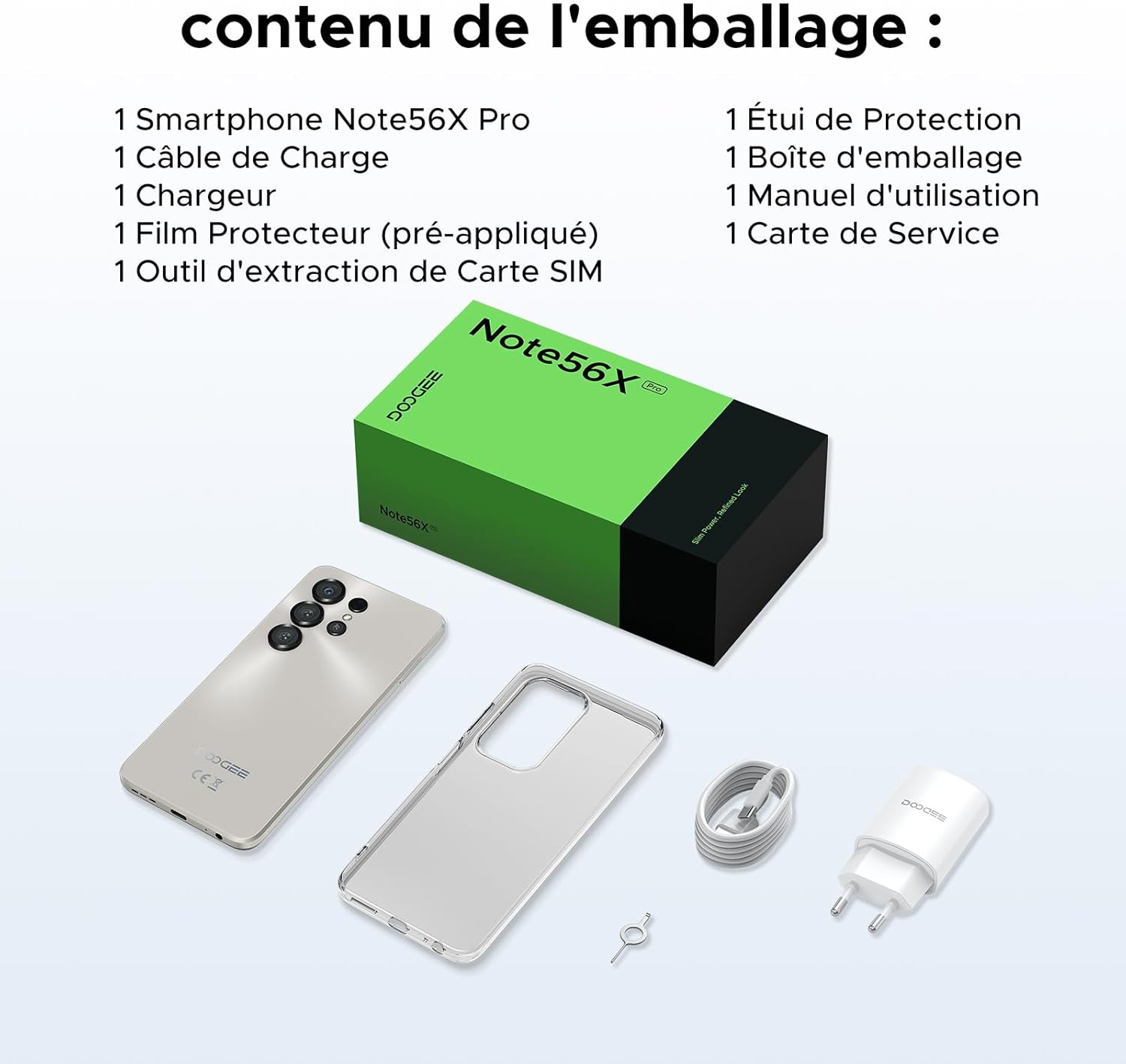
This image shows the contents included in the DOOGEE Note56X Pro packaging: the smartphone, a charging cable, a charger, a pre-applied screen protector, a SIM card ejection tool, a protective case, the packaging box, a user manual, and a service card.
3. Alustamine
3.1. SIM-kaartide sisestamine
The DOOGEE Note56X Pro supports Dual SIM functionality. To insert your SIM card(s):
- Leidke seadme küljelt SIM-kaardi salv.
- Use the provided SIM ejection tool to open the tray.
- Asetage oma Nano-SIM-kaart(id) ja/või microSD-kaart salve nii, et kuldsed kontaktid oleksid allapoole.
- Lükake salv ettevaatlikult tagasi pessa, kuni see on seadmega ühetasane.
3.2. Toite sisse / välja lülitamine
- Sisselülitamiseks: Vajutage ja hoidke toitenuppu all, kuni ilmub DOOGEE logo.
- Väljalülitamiseks: Vajutage ja hoidke toitenuppu all, kuni ekraanile ilmuvad toitevalikud, seejärel valige „Lülita välja”.
- Taaskäivitamiseks: Vajutage ja hoidke toitenuppu all, kuni kuvatakse toitevalikud, seejärel valige "Taaskäivita".
3.3. Algseadistus
Esimesel sisselülitamisel järgige ekraanil kuvatavaid juhiseid algseadistuse lõpuleviimiseks:
- Valige oma keel.
- Ühendage Wi-Fi võrguga.
- Logi sisse oma Google'i kontoga või loo uus.
- Seadistage ekraanilukk (PIN-kood, muster, parool, sõrmejälg või Face ID).
- Review ja nõustuge tingimustega.
4. Seadme kasutamine
4.1. Ekraan
The Note56X Pro features a 6.56-inch HD+ IPS Waterdrop display with a 90Hz refresh rate, offering smooth visuals and vibrant colors. The 90% screen-to-body ratio provides an immersive viewkogemusi.

This graphic highlights the display features of the DOOGEE Note56X Pro, including a 90Hz refresh rate for smooth visuals, support for 16.7 million colors, and a 90% screen-to-body ratio for an immersive viewkogemusi.
A brief video demonstrating the smooth gaming experience on the DOOGEE Note56X Pro's 6.56-inch HD+ 90Hz display, showing responsive gameplay.
4.2. Esitus
Powered by an UNISOC T7225 Octa-Core processor, the Note56X Pro ensures fluid multitasking and efficient application launch. It comes with 32GB of RAM (4GB physical + 28GB virtual) and 128GB of internal storage, expandable up to 2TB via a TF card (sold separately).

This image presents a technical diagram of the UNISOC T7225 Octa-Core processor, highlighting its 1.8 GHz high frequency and Mali G57 ARM GPU, ensuring smooth performance for web browsing, online learning, and chats.

This graphic illustrates the memory configuration of the DOOGEE Note56X Pro, featuring 32GB RAM (4GB physical + 28GB virtual) and 128GB ROM, expandable up to 2TB with a TF card (sold separately), providing ampruumi rakenduste ja meedia jaoks.
A short video highlighting the internal components of the DOOGEE Note56X Pro, specifically the Octa-Core UNISOC T7225 processor and the 32GB RAM (4GB + 28GB virtual) and 128GB ROM configuration.
4.3. Aku
Equipped with a 6150mAh Silicon-Carbon battery, the Note56X Pro offers extended usage time and supports 5W reverse charging. The battery is designed for durability, with up to 1000 charge/discharge cycles and an estimated 4-year lifespan.

A detailed diagram showing the internal structure of the 6150mAh Silicon-Carbon battery within the DOOGEE Note56X Pro, emphasizing its extended endurance, 1000 charge/discharge cycles, 4-year lifespan, 20% reduced size, and 5W reverse charging capability.
Lühike videoshowasing the sleek design, vertical lens arrangement, ultra-thin 8.45mm body, lightweight 195g build, and available colors (Midnight Black, Glacier Blue, Titanium Grey Mist) of the DOOGEE Note56X Pro.
4.4. Kaamera
Capture clear and vibrant photos with the Note56X Pro's camera system:
- Põhikaamera: 13MP with AI recognition, HDR, Pro Mode, Smile Capture, Panoramas, Burst Mode, Night Mode, and Fun Filters.
- Esikaamera: 8MP with Beauty Mode and Portrait Mode for natural selfies.

This graphic highlights the features of the 13MP main camera on the DOOGEE Note56X Pro, including AI recognition, HDR, Pro Mode, Smile Capture, Panoramas, Burst Mode, Night Mode, and Fun Filters, illustrated with a landscape photo taken by the phone.

This image showcases the 8MP front camera features of the DOOGEE Note56X Pro, including Beauty Mode and Portrait Mode, designed to simplify photography and produce bright, natural selfies.

This graphic details the intelligent features of the Google Smart Camera on the DOOGEE Note56X Pro, such as displaying search results, text extraction and translation, homework analysis, plant and animal identification, and online search capabilities.
4.5. Ühenduvus
The device supports 4G cellular networks, Wi-Fi, Bluetooth 5.0, and NFC for secure contactless payments. It also includes GPS for precise navigation and OTG functionality for connecting external devices.
4.6. Turvaelemendid
The Note56X Pro offers multiple security options to protect your data:
- Näo ID: Ava oma telefon näotuvastuse abil.
- Sõrmejäljetuvastus: Küljele paigaldatud sõrmejäljesensor tagab kiire ja turvalise juurdepääsu.
- Saadaval on ka tavalised PIN-koodi, mustri ja parooli valikud.
4.7. Operating System and AI
Running on Android 16, the Note56X Pro provides an intuitive and secure user experience. It integrates Google Gemini AI, offering intelligent assistance for various tasks.

A visual representation of the Android 16 operating system interface on the DOOGEE Note56X Pro, showcasing various application icons and a clean, intuitive user experience.

This image shows the Google Gemini AI chat interface on the DOOGEE Note56X Pro, demonstrating its capability for planning vacations, discussing current events, and practicing interview küsimusi.
5. Tehnilised andmed
| Funktsioon | Spetsifikatsioon |
|---|---|
| Kaubamärk | DOOGEE |
| Mudeli nimi | Note56X Pro |
| Operatsioonisüsteem | Android 16 |
| Ekraani suurus | 6.56 tolli |
| Ekraani eraldusvõime | 720 x 1612 |
| Värskendussagedus | 90 Hz |
| Protsessor | UNISOC T7225 kaheksatuumaline |
| Paigaldatud RAM-i maht | 32 GB (4 GB füüsilist + 28 GB virtuaalset) |
| Mälu salvestusmaht | 128 GB (laiendatav kuni 2 TB-ni) |
| Aku tüüp | Liitium-polümeer |
| Aku mahutavus | 6150 mAh |
| Mobiiltehnoloogia | 4G |
| Juhtmevaba kandja | Kõik operaatorid (lukustamata) |
| Ühenduvus | WiFi, Bluetooth 5.0, NFC |
| Eriomadused | Dual SIM, Integrated GPS, USB OTG Support, Face ID, Fingerprint Recognition |
| Audio pistik | 3.5 mm |
| Mõõtmed (paksus) | 8.45 mm |
| Kaal | 195 g |

Üks pool view of the DOOGEE Note56X Pro, emphasizing its ultra-thin 8.45mm profile and lightweight 195g construction, designed for easy portability and comfortable handling throughout the day.

This image displays the DOOGEE Note56X Pro in its available elegant colors: Midnight Black, Titanium Grey Mist, and Glacier Blue, showcasing the aesthetic options for the device.
6. Hooldus
To ensure the longevity and optimal performance of your DOOGEE Note56X Pro, follow these maintenance guidelines:
- Puhastamine: Ekraani ja korpuse puhastamiseks kasutage pehmet, ebemevaba lappi. Vältige abrasiivseid materjale ega karme kemikaale.
- Tarkvaravärskendused: Uusimate funktsioonide, turvaparanduste ja jõudluse täiustuste kasutamiseks kontrollige ja installige regulaarselt süsteemivärskendusi. Minge aadressile Seaded > Süsteem > Süsteemivärskendus.
- Aku hooldus: Avoid extreme temperatures. Do not let the battery completely drain frequently. Use the original charger for optimal charging.
- Salvestusruumi haldus: Eemaldage perioodiliselt mittevajalikud files and uninstall unused apps to free up storage space and maintain device speed.
- Kaitse: Kasutage kaasasolevat kaitseümbrist ja ekraanikaitset kriimustuste ja väiksemate löökide eest kaitsmiseks.
7. Veaotsing
If you encounter issues with your DOOGEE Note56X Pro, try the following solutions:
- Seade ei lülitu sisse: Veenduge, et aku on laetud. Ühendage laadija ja oodake paar minutit, enne kui proovite uuesti sisse lülitada.
- Ekraan ei reageeri: Force restart the device by pressing and holding the Power button for about 10-15 seconds.
- Rakenduste kokkujooksmine/hangumine: Tühjendage probleemse rakenduse vahemälu (Seaded > Rakendused > [Rakenduse nimi] > Salvestusruum ja vahemälu > Tühjenda vahemälu). Kui probleem püsib, desinstallige rakendus ja installige see uuesti.
- Kehv aku eluiga: Check background app usage (Seaded > Aku). Reduce screen brightness, disable unused features like Wi-Fi, Bluetooth, GPS when not needed.
- Võrguühenduse probleemid: Toggle Airplane Mode on and off. Restart the device. Check SIM card insertion. Reset network settings (Seaded > Süsteem > Lähtestamisvalikud > Lähtesta WiFi, mobiilside ja Bluetooth).
- Sõrmejälg/näotuvastus ei tööta: Ensure your fingers are clean and dry for fingerprint scanning. For Face ID, ensure adequate lighting and that your face is clearly visible to the front camera. Re-register your fingerprint or face if necessary.
- Aeglane jõudlus: Sulgege kasutamata taustarakendused. Tühjendage vahemälu ja ajutised files. Consider a factory reset as a last resort (Seaded > Süsteem > Lähtestamisvalikud > Kustuta kõik andmed (tehaseseadetele lähtestamine) - Note: This will erase all data on your phone. Back up important information first.).
8. Garantii ja tugi
Your DOOGEE Note56X Pro comes with a 24-month warranty and a 30-day return policy. For any questions or assistance, please contact DOOGEE customer service via Amazon. Our dedicated support team is available to help you.

This image displays DOOGEE's customer service commitments: a 30-day money-back and free return guarantee, a 2-year limited warranty, and 24/7 online individual assistance.


