Sissejuhatus
This manual provides essential information for the safe and efficient use of your Getac B300 G7 Fully Rugged Notebook. Please read this manual thoroughly before operating the device and retain it for future reference.
The Getac B300 G7 is designed for demanding environments, featuring MIL-STD-810G and IP65 certifications for resistance against shock, vibration, dust, and water.
Seadistamine
1. Lahtipakkimine ja esmane ülevaatus
Carefully remove the notebook and all accessories from the packaging. Inspect the device for any signs of damage. If any damage is found, contact your vendor immediately.
2. Toite ühendamine
Before initial use, ensure the battery is fully charged. Connect the AC adapter to the notebook's DC-in jack and then to a power outlet.
- Vahelduvvooluadapter: 90W
- Aku: Li-on 10.8V

Figure 1: Left side of the Getac B300 G7, showing various ports including the power input.
3. Esimene käivitamine
Press the power button to turn on the notebook. The device will boot into Windows 11 Pro. Follow the on-screen instructions to complete the initial setup of the operating system.
4. Välisseadmete ühendamine
The Getac B300 G7 offers multiple ports for connecting external devices:
- USB 3.0: 3 ports for connecting USB devices like external drives, keyboards, or mice.
- LAN (RJ45): Juhtmega võrguühenduse jaoks.
- HDMI: Väliste kuvaritega ühendamiseks.
- External VGA: Vanemate väliste kuvaritega ühendamiseks.
- Jadaport: 2 ports for legacy device connectivity.
- Microphone (Mini-jack): Välise mikrofoni sisendi jaoks.
- Audio Output (Mini-jack): Kõrvaklappide või väliste kõlarite jaoks.
- Dokkimisliides: For connecting to a compatible docking station.
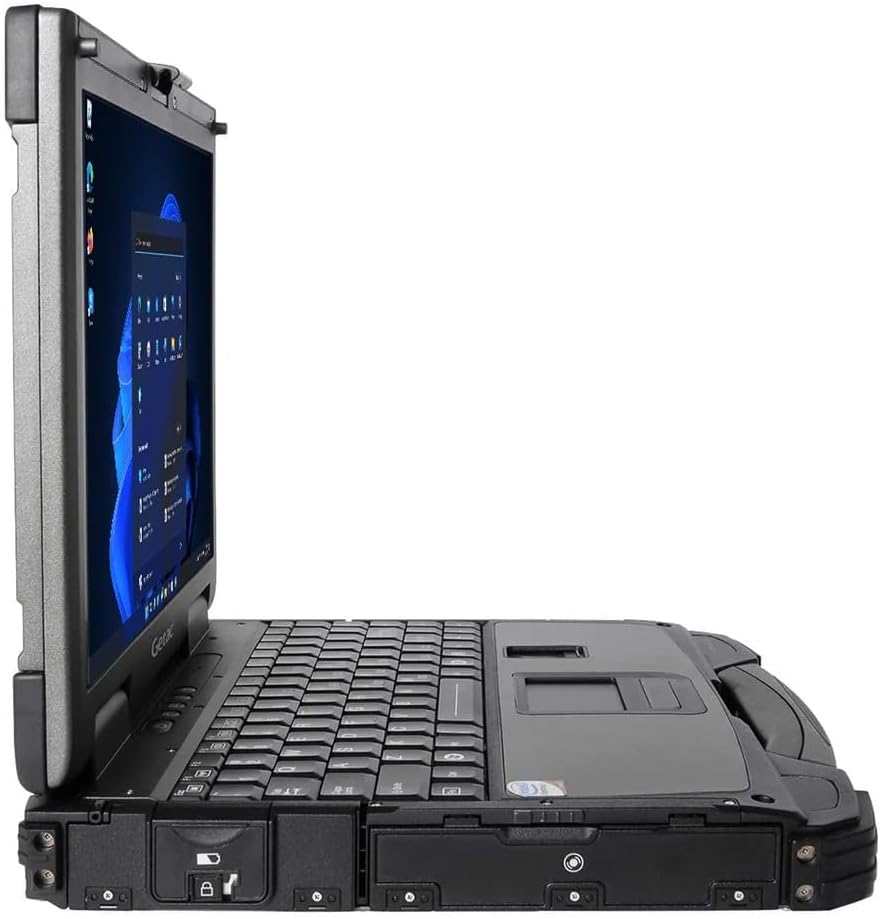
Figure 2: Right side of the Getac B300 G7, showing additional ports.
Operating the Notebook
1. Toide sisse/välja
- Sisselülitamiseks: Vajutage seadmel asuvat toitenuppu.
- Väljalülitamiseks: Use the Windows Start menu to select 'Shut down'. Avoid forced shutdowns unless necessary to prevent data loss.
2. Display and Touchscreen
The notebook features a 13.3-inch TFT LCD XGA (1024 x 768) touchscreen display with 700 nits brightness. You can interact with the display using your finger or a compatible stylus (not included).
- Puutežestid: Standard Windows 11 touch gestures are supported.
- Heleduse reguleerimine: Adjust display brightness through Windows settings or dedicated function keys (if available).
3. Klaviatuur ja sisendseadmed
The Getac B300 G7 includes a backlit keyboard for use in low-light conditions. The integrated touchpad can be used for cursor control. An Insertable Smartcard Reader is also available for secure access applications.
- Taustvalgustuse juhtimine: Use the appropriate function key combination to toggle or adjust keyboard backlight.
- Smartcard Reader: Insert your smartcard into the designated slot for authentication or data access.
4. Optiline draiv
The notebook is equipped with a DVD Super Multi Drive. This allows you to read and write various CD and DVD formats.
- Plaadi sisestamine: Gently push the disc into the drive until it clicks into place.
- Plaadi väljutamine: Use the eject button on the drive or the eject option in Windows File Explorer.
5. Operatsioonisüsteem
Your Getac B300 G7 comes with Windows 11 Pro pre-installed. Refer to Microsoft's documentation for detailed information on using Windows 11 Pro features and functionalities.
Hooldus
1. Cleaning the Notebook
- Välimus: Kasutage pehmet, damp cloth with a mild cleaning solution. Avoid harsh chemicals or abrasive materials.
- Kuva: Use a microfiber cloth specifically designed for screens. Do not spray cleaners directly onto the screen.
- Pordid: Veenduge, et pordid oleksid tolmust ja prahist vabad. Vajadusel kasutage suruõhku, hoides purki püsti.
2. Aku hooldus
Aku tööea ja jõudluse maksimeerimiseks toimige järgmiselt.
- Vältige äärmuslikke temperatuure.
- Ärge tühjendage akut sageli täielikult.
- If storing the notebook for an extended period, charge the battery to approximately 50-60% before storage.
3. Vastupidavad omadused
While the B300 G7 is designed to be rugged, proper care is still essential:
- Ensure all port covers are securely closed to maintain IP65 dust and water resistance.
- Avoid unnecessary drops or impacts, even though the device is MIL-STD-810G certified.
- Clean any mud or dirt from the casing promptly.

Joonis 3: Ülemine view of the Getac B300 G7, showcasing oma vastupidavat disaini.
Veaotsing
This section addresses common issues you might encounter with your Getac B300 G7 notebook.
1. Notebook Does Not Power On
- Ensure the AC adapter is securely connected to both the notebook and a working power outlet.
- Verify the battery is charged. If the battery is completely drained, it may take a few minutes of charging before the notebook can power on.
- Try removing and reinserting the battery (if user-removable) to reset it.
2. Kuvamisprobleemid
- Kuvarit pole: Connect an external monitor to the HDMI or VGA port to check if the issue is with the internal display.
- Hämar ekraan: Adjust the brightness settings in Windows or using the keyboard function keys.
- Puuteekraan ei reageeri: Restart the notebook. If the issue persists, check for driver updates in Windows Device Manager.
3. Peripheral Devices Not Working
- Ensure the device is properly connected to the correct port.
- Try connecting the device to a different port or another computer to rule out device malfunction.
- Check Windows Device Manager for any driver issues related to the peripheral.
4. System Performance Issues
- Sulgege taustal töötavad mittevajalikud rakendused.
- Veenduge, et Windows ja draiverid oleksid ajakohased.
- Käivita kettapuhastus ja defragmentimine (kõvaketaste puhul, SSD-de puhul pole vajalik).
- Kontrollige pahavara või viiruste suhtes.
Tehnilised andmed
| Funktsioon | Kirjeldus |
|---|---|
| Mudeli nimi | B300 G7 |
| Protsessor | Intel Core i5-8350U (1.7 GHz, up to 3.6 GHz with Turbo Boost, 6MB Cache) |
| RAM | 16GB DDR4 (2400 MHz), Max 32GB |
| Säilitamine | 512GB SSD |
| Ekraan | 13.3-inch TFT LCD XGA (1024 x 768), 700 nits, Touchscreen |
| Graafika | Integreeritud Intel UHD Graphics 620 |
| Operatsioonisüsteem | Windows 11 Pro |
| Optiline draiv | DVD Super Multi Drive |
| Sadamad | USB 3.0 x 3, LAN (RJ45), HDMI, External VGA, Serial Port x 2, Microphone (Mini-jack), Audio Output (Mini-jack), DC-in Jack, Docking Connector |
| Eriomadused | Backlit Keyboard, Insertable Smartcard Reader |
| Rugged Certification | MIL-STD-810G, IP65 |
| Mõõdud (P x L x K) | 11.9" x 10.35" x 2.36" |
| Kaal | 7.7 naela |
| Ühenduvus | Ethernet (No Wi-Fi, No Bluetooth) |
| Kaasasolevad esemed | Li-on battery 10.8V, AC Adapter 90W |

Joonis 4: Ülemine view of the Getac B300 G7, highlighting its robust casing and integrated handle for portability.
Garantii teave
This Getac B300 G7 notebook comes with a 90-päevane piiratud garantiiSee garantii katab materjali- ja tootmisdefektid normaalse kasutamise korral garantiiaja jooksul.
Garantii ei hõlma:
- Kahju, mis on põhjustatud õnnetusest, väärkasutusest, väärkasutusest, üleujutusest, tulekahjust, maavärinast või muudest välistest põhjustest.
- Damage caused by operating the product outside the permitted or intended uses described by Getac.
- Damage caused by service performed by anyone who is not an authorized service provider.
- Products or parts that have been modified to alter functionality or capability without the written permission of Getac.
For specific terms and conditions, please refer to the warranty documentation provided with your purchase or contact your vendor.
Toetus
If you encounter issues that cannot be resolved using the troubleshooting guide in this manual, please contact your vendor or an authorized service center for assistance. When contacting support, please have your model number (B300 G7) and serial number ready.
For the latest drivers, software updates, and additional support resources, please visit the official Getac support websaidile.


