Sissejuhatus
Thank you for choosing the EUQQ YYK-Q10 AI Translator Earbuds. These earbuds are designed to provide seamless real-time language translation, high-quality audio, and effective noise cancellation, making them ideal for communication across language barriers, business meetings, and everyday use. This manual will guide you through the setup, operation, and maintenance of your new device to ensure optimal performance and user experience. Please read this manual thoroughly before using the product.
Pakendi sisu
Palun kontrollige pakendilt järgmisi esemeid:
- EUQQ YYK-Q10 AI Translator Earbuds (L/R)
- Laadimisümbris
- USB laadimiskaabel
- Erineva suurusega kõrvaotsad
- Kasutusjuhend
Kui mõni ese on puudu või kahjustatud, võtke ühendust klienditoega.
Toode läbiview
The EUQQ YYK-Q10 features a compact design with intuitive controls and a smart charging case. Familiarize yourself with the components below.
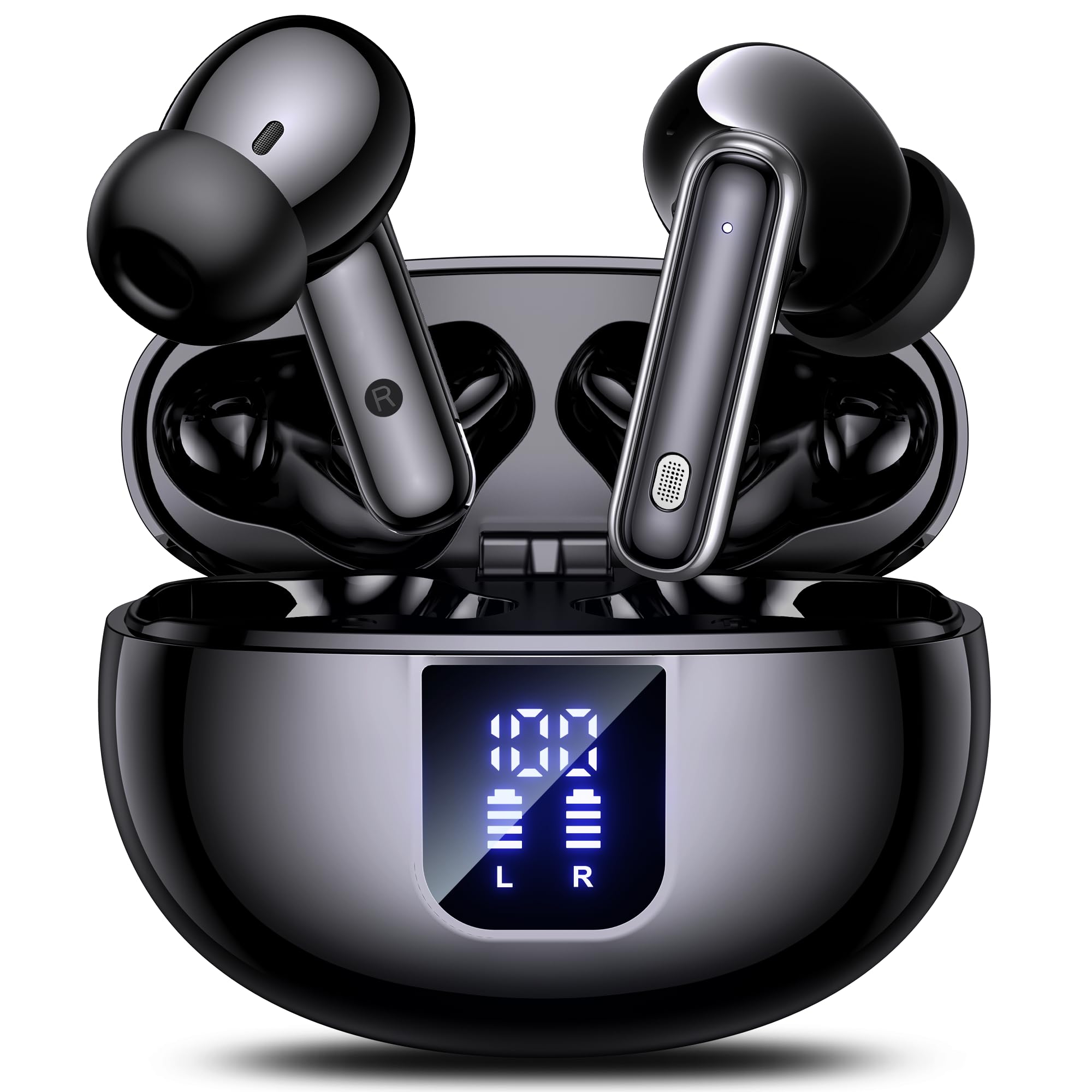
Image: The EUQQ YYK-Q10 AI Translator Earbuds are shown inside their open charging case. The case is black and features a digital display on the front, indicating battery levels for both the case and individual earbuds (L and R). The earbuds themselves are black with silver accents.
Põhikomponendid:
- Earbuds: Left (L) and Right (R) earbuds with touch control areas and microphones.
- Laadimisümbris: Stores and charges the earbuds. Features a digital display for battery status.
- Laadimisport: USB-C port on the charging case for power input.
- LED indikaatorid: On earbuds and case to show charging status and connection.
Seadistamine
1. Esialgne laadimine
- Asetage mõlemad kõrvaklapid laadimisümbrisesse.
- Ühenda USB-laadimiskaabel korpuse laadimisporti ja toiteallikaga.
- The digital display on the case will show the charging status. Ensure both earbuds and the case are fully charged before first use (approximately 1-2 hours).
2. Bluetoothi sidumine
- Ava laadimisümbris. Kõrvaklapid sisenevad automaatselt sidumisrežiimi, mida näitavad vilkuvad LED-tuled.
- Lubage oma nutitelefonis või seadmes Bluetooth ja otsige saadaolevaid seadmeid.
- Select "EUQQ YYK-Q10" from the list of devices.
- Once connected, the earbud LEDs will stop flashing, and a voice prompt will confirm the connection.
3. Rakenduse installimine (tõlkefunktsioonide jaoks)
To utilize the real-time translation features, download the dedicated EUQQ translation app from your device's app store (iOS App Store or Google Play Store). Follow the in-app instructions to connect your earbuds and configure language settings.
Kasutusjuhised
Toide sisse/välja
- Toide sisse: Ava laadimisümbris või võta kõrvaklapid ümbrisest välja. Need lülituvad automaatselt sisse.
- Toide välja: Asetage kõrvaklapid tagasi laadimisümbrisesse ja sulgege kaas. Need lülituvad automaatselt välja.
Music Playback Controls (Touch Controls)
- Esita/peata: Üks puudutus kummalgi kõrvaklapil.
- Järgmine lugu: Topeltpuudutage paremat kõrvaklappi.
- Eelmine lugu: Topeltpuudutage vasakul kõrvaklapil.
- Helitugevuse suurendamine: Kolmikpuudutus paremal kõrvaklapil.
- Hääl maha: Kolmikpuudutus vasakul kõrvaklapil.
Kõnede haldamine (puutetundlikud juhtnupud)
- Kõnele vastamine/lõpetamine: Üks puudutus kummalgi kõrvaklapil.
- Keeldu kõnest: Vajutage ja hoidke kumbagi kõrvaklappi 2 sekundit all.
Translation Mode
Activate translation mode through the dedicated EUQQ app. The app will guide you through selecting source and target languages. Depending on the app's features, you may use different modes:
- Vestlusrežiim: Speak into your earbud's microphone, and the translation will be played through the other person's earbud or your phone's speaker.
- Interpreter Mode: One person wears an earbud, the other speaks into the phone.
- Touch-to-Speak Mode: Tap an earbud to speak, release to translate.
Refer to the EUQQ app's help section for detailed instructions on specific translation modes and features.
Mürasummutus
The earbuds feature dual-mic noise cancelling. This feature is typically active by default or can be toggled via the companion app. It helps reduce ambient noise during calls and translation sessions for clearer communication.
Hooldus
- Puhastamine: Puhastage kõrvaklappe ja laadimisümbrist regulaarselt pehme, kuiva ja ebemevaba lapiga. Ärge kasutage tugevaid kemikaale ega abrasiivseid materjale.
- Kõrva näpunäited: Eemaldage kõrvaotsad regulaarselt ja puhastage neid vee ja õrna seebiga. Enne tagasipanekut veenduge, et need on täiesti kuivad.
- Laadimiskontaktid: Puhastage kõrvaklappide ja korpuse laadimiskontaktid õrnalt kuiva vatitupsuga, et tagada korralik laadimine.
- Hoiustamine: Kui kõrvaklappe ei kasutata, hoidke neid laadimisümbrises, et neid kaitsta ja laetuna hoida. Vältige äärmuslikke temperatuure ja niiskust.
Veaotsing
| Probleem | Lahendus |
|---|---|
| Kõrvaklapid ei ühendu |
|
| Heli pole või helitugevus on madal |
|
| Laadimisprobleemid |
|
| Tõlge ei tööta |
|
Tehnilised andmed
| Funktsioon | Detail |
|---|---|
| Kaubamärk | EUQQ |
| Mudeli nimi | YYK-Q10 |
| Ühenduvustehnoloogia | Juhtmeta |
| Kõrvaklappide vormitegur | Kõrvasisene |
| Värv | Must |
| Kaasatud komponendid | Instruction Manual (and other standard accessories like earbuds, case, cable, ear tips) |
| Artiklite arv | 1 (product unit) |
| Nõutavad patareid | No (built-in rechargeable) |
| Tootja mudelinumber | YYK-Q10 |
| Pakendi mõõtmed | 0.1 x 0.1 x 0.1 cm; 45.36 g |
| ASIN | B0FN3WC8LW |
Garantii teave
The EUQQ YYK-Q10 AI Translator Earbuds come with a standard manufacturer's warranty. For detailed information regarding warranty coverage, terms, and conditions, please refer to the warranty card included in your package or visit the official EUQQ webPalun hoidke oma ostutõend garantiinõuete esitamiseks alles.
Klienditugi
If you encounter any issues or have questions regarding your EUQQ YYK-Q10 AI Translator Earbuds, please do not hesitate to contact our customer support team. You can find contact information on the official EUQQ website or through the support section of the EUQQ translation app.
Interneti-ressursid:
- Official EUQQ Websait: Visit EUQQ Store on Amazon
- EUQQ Translation App (for in-app support)


