Sissejuhatus
The FEELWORLD FW759PRO is a 7-inch full HD IPS touchscreen camera monitor designed to enhance your video production workflow. It features a 1280x800 resolution, 1000:1 contrast ratio, and a 178° ultra-wide viewing angle, providing a clear and detailed display for precise monitoring. This manual will guide you through the setup, operation, and maintenance of your FW759PRO monitor.
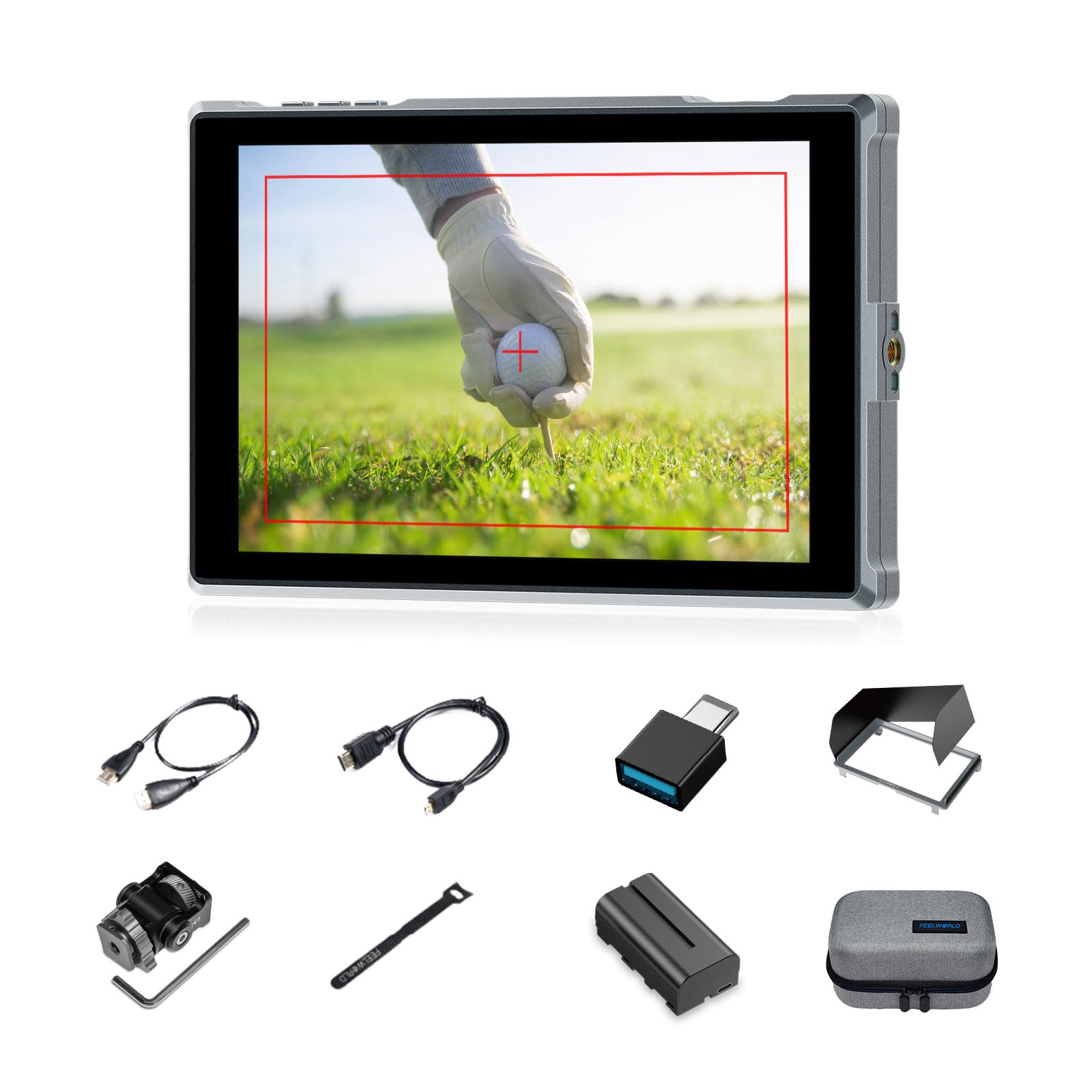
Figure 1: FEELWORLD FW759PRO Monitor Overview
Peamised omadused:
- 7-inch Full HD IPS Touchscreen (1280x800 resolution)
- 4K HDMI Input & Output (up to 4K30Hz) and AV Input
- Slim and Lightweight Design (22mm thickness, 300g weight)
- Multiple Power Options: NP-F series battery, 12V DC IN, 5V Type-C
- Advanced Monitoring Functions: Histogram, Embedded Audio, False Colors, Peaking Filter, etc.
- Customizable Features: 4 groups of menu settings, 9:16 vertical screen marker
Seadistamine
1. Pakendi sisu
Veenduge, et pakendis on kõik esemed olemas:
- 1 x FW759PRO Monitor
- 1 x HDMI kaabel
- 1 x mikro-HDMI-kaabel
- 1 x Mini Hot Shoe Mount + Hex Wrench
- 1 x USB-A-USB-C-adapter
- 1 x Sun Shade + Frame
- 1 x Cable Management Tie
- 1 x kiirjuhend
- 1 x F550 Battery
- 1 x kott

Joonis 2: Kaasasolevad tarvikud
2. Monitori toite sisselülitamine
The FW759PRO offers three power options:
- NP-F Series Battery: Attach a compatible NP-F series battery to the battery plate on the rear of the monitor.
- 12V DC IN: Connect a 12V DC power adapter (not included, suitable for 1A, DC 5.5*2.1mm plug) to the "DC IN 12V" port.
- 5V C-tüüpi: Connect a 5V/2A (or higher) Type-C power source to the "TYPE-C 5V" port.

Figure 3: Power Input Options
3. Monitori paigaldamine
The monitor features two 1/4"-20 mounting ports on its sides for versatile attachment to camera rigs, arms, or tripods. Use the included mini hot shoe mount to attach it to your camera's hot shoe or cold shoe mount.

Figure 4: 1/4 Inch Mounting Ports
4. Connecting to a Camera/Device
The FW759PRO supports 4K HDMI and AV inputs:
- HDMI sisend: Connect your camera or video source using an HDMI cable to the HDMI port. The monitor supports up to 4K30Hz signals.
- AV sisend: For specialized or legacy devices, use the AV input port.

Joonis 5: Ühenduvuspordid
Kasutusjuhised
1. Toide sisse/välja
Monitori sisse- või väljalülitamiseks vajutage ja hoidke all monitori ülaservas asuvat toitenuppu.
2. Puuteekraani kasutamine
The FW759PRO features an intuitive touchscreen interface for menu navigation and function control.
- Taustvalguse reguleerimine: Swipe up/down on the left half of the screen.
- Helitugevuse reguleerimine: Swipe up/down on the right half of the screen.
- Access Shortcut Menu: Swipe up/down on the bottom of the screen.

Figure 6: Touchscreen Gestures
3. Menu Navigation and Custom Buttons
Access the main menu by tapping the screen. Navigate through options using touch. The monitor also features customizable function buttons (F1, F2, F3) on the top edge, allowing quick access to frequently used features.

Figure 7: Menu and Custom Buttons
4. Advanced Monitoring Functions
The FW759PRO includes several tools for precise exposure and focus control:
- Histogramm: Kuvab teie pildi tonaalse jaotuse.
- Tippfilter: Tõstab teravaid servi esile, et aidata teravustada.
- Manustatud heli: Monitors audio levels.
- Valed värvid: Helps set exposure by displaying different exposure levels as distinct colors.
- Kontrolli väli: Assists in calibrating the monitor.
- Üheksa ruudustikku: Aids in composition.
- Ekraani marker: Various aspect ratio markers for framing.
- Keskne marker: Marks the center of the screen.
- Suhte marker: Provides different aspect ratio guides.
- Üleskannimine: Reguleerib kuvamisala.
- Anamorfne režiim: Eemaldab anamorfse foo pigistusetage (1.33x, 1.6x, 2.0x, or custom).
- Pildi klapp: Pöörab pilti horisontaalselt või vertikaalselt.
- Pildi külmutamine: Külmutab praeguse kaadri.
- Suurenda: Suurendab osa pildist detailsemaks uurimiseks.
- Pikslilt pikslile: Kuvab pildi selle algse eraldusvõimega ilma skaleerimiseta.

Figure 8: Auxiliary Functions Overview

Figure 9: False Color Function

Figure 10: Anamorphic Mode
5. New Feature Upgrades
- 9:16 Vertical Screen Marker: Ideal for content creators producing vertical video for platforms like TikTok and YouTube Shorts.
- 4 Groups Menu Setting Saving: Save up to four custom menu configurations for quick recall. Once settings are adjusted, they save automatically and can be called directly.

Figure 11: 9:16 Vertical Screen Marker
Hooldus
1. Monitori puhastamine
- Pühkige monitori ekraani ja korpust õrnalt pehme, ebemevaba lapiga.
- Kangekaelsete plekkide korral kergelt dampLoputage lappi veega või ekraanile ohutu puhastuslahusega.
- Avoid using harsh chemicals, solvents, or abrasive materials, as these can damage the screen or finish.
2. Aku hooldus
- Kui akusid ei kasutata, hoidke neid jahedas ja kuivas kohas.
- Avoid fully discharging lithium-ion batteries frequently to prolong their lifespan.
- Pikemaajalise hoiustamise korral laadige akud umbes 50–60% ulatuses täis.
Veaotsing
No Signal Displayed
- Kontrollige kaabliühendusi: Ensure HDMI or AV cables are securely connected to both the monitor and the camera/source.
- Kinnitage sisendallikas: Confirm that the correct input source (HDMI or AV) is selected on the monitor.
- Camera Output Settings: Check your camera's video output settings to ensure it is sending a signal and that the resolution/frame rate is compatible with the monitor (up to 4K30Hz).
- Testige teise kaabli/seadmega: If possible, try a different HDMI/AV cable or connect the monitor to another video source to isolate the issue.
Monitor Does Not Power On
- Kontrollige akut: Ensure the NP-F battery is charged and correctly installed.
- Kontrollige toiteadapterit: If using DC IN or Type-C, confirm the power adapter is connected and providing sufficient power (12V DC IN, 5V/2A Type-C).
- Toitenupp: Ensure the power button is pressed and held for a few seconds to initiate power-on.
Puuteekraan ei reageeri
- Restart Monitor: Power off and then power on the monitor.
- Puhas ekraan: Veenduge, et ekraan oleks puhas ja vaba mustusest või niiskusest, mis võivad puutetundlikku sisestust segada.
Tehnilised andmed
| Funktsioon | Detail |
|---|---|
| Kaubamärk | FEELWORLD |
| Mudeli nimi | FW759PRO |
| Ekraani suurus | 7 tolli |
| Resolutsioon | 1280x800 |
| Kuvasuhe | 16:10 |
| Kontrastsuse suhe | 1000:1 |
| Kuva tüüp | IPS |
| Viewing | 178 kraadi |
| Ühenduvustehnoloogia | Auxiliary, HDMI |
| Riistvara ühenduvus | HDMI |
| Lisafunktsioonid | Touchscreen, Portable |
| Reageerimisaeg | 2 millisekundit |
| Total Number of HDMI Ports | 2 |
| Tootja | LAIZESKE |
Garantii ja tugi
Garantii teave
The FEELWORLD FW759PRO monitor comes with a 1-aastane garantii alates ostukuupäevast. See garantii katab tootmisdefektid ja normaalse kasutamise korral esinevad talitlushäired. Palun hoidke oma ostutõend garantiinõuete esitamiseks alles.
For detailed warranty terms and conditions, please refer to the official FEELWORLD websaidil või võtke ühendust nende klienditoega.
Klienditugi
If you encounter any issues not covered in this manual or require further assistance, please contact FEELWORLD customer support. Contact information can typically be found on the official FEELWORLD webveebisaidil või tootega kaasasolevas kiirjuhendis.


