1. Sissejuhatus
Welcome to the user manual for your RebotAi A9 8.7-inch Android 15 Tablet. This guide provides essential information on setting up, operating, maintaining, and troubleshooting your device to ensure a smooth and enjoyable user experience. Please read this manual carefully before using your tablet.
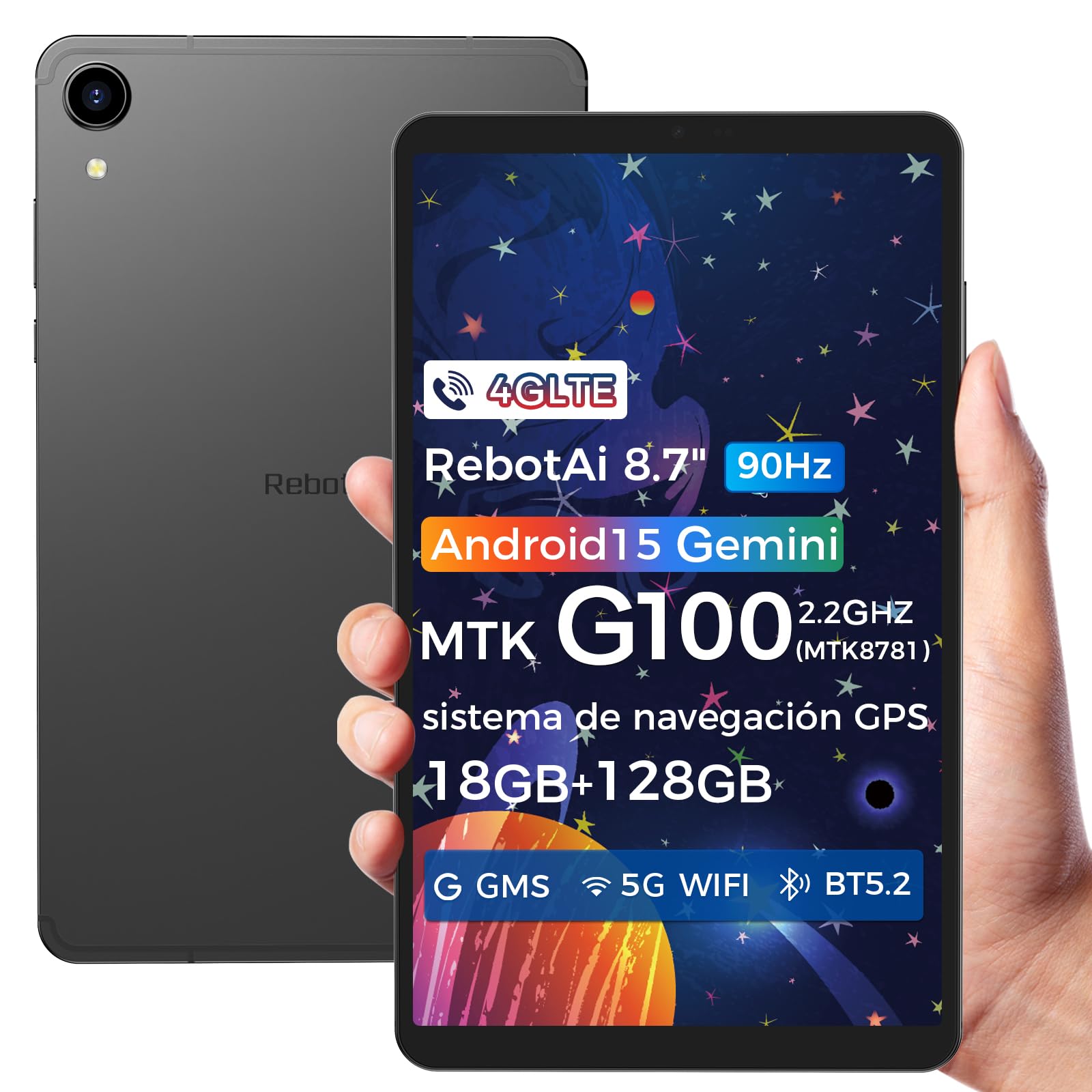
Image: General view of the RebotAi A9 tablet, showcasing oma elegantset disaini.
2. Pakendi sisu
Karbist lahti võttes veenduge, et kõik esemed on olemas:
- RebotAi A9 tahvelarvuti
- USB-C laadimiskaabel
- SIM -i väljatõmbamise tööriist
- Kiirjuhend
- Garantiikaart
Märkus. In accordance with global environmental guidelines, the RebotAi A9 tablet does not include a power adapter. Please use a compatible USB-C power adapter (not included) for charging.
3. Seade üleview
Familiarize yourself with the physical components of your RebotAi A9 tablet.

Pilt: Ülemineview of the RebotAi A9 tablet's key features, including its 8.68-inch display, Android 15 OS, 1340x800 IPS resolution with 90Hz refresh rate, MediaTek Helio G100 processor, slim design, 6GB RAM, 5000mAh battery, 128GB ROM, dual-band Wi-Fi, GPS, Bluetooth 5.2, and Widevine L1 support.
Füüsiline disain
- Kuva: 8.7-inch IPS screen with 1340 x 800 resolution and 90Hz refresh rate for vibrant colors and smooth visuals.
- Casing: Metallic casing with nano-coating process, offering a smooth feel and elegant appearance, designed for water and impact resistance.
- Mõõdud: Approximately 7.8 mm thin.
- Kaal: Umbes 360 grammi.

Image: This image highlights the tablet's durable construction, featuring nano-injection molding technology for advanced water and impact resistance. It shows details of the impermeability specifications and antenna slots designed with nanotechnology.
Heli ja andurid
- Kõlarid: Dual-BOX speakers for enhanced audio experience.
- Kõrvaklappide pesa: Standardne 3.5 mm kõrvaklapipesa.
- Andurid: High-precision gyroscope, light sensor, and gravity sensor for accurate orientation, automatic screen rotation, and improved navigation.

Image: This image details the tablet's advanced features, including dual-band Wi-Fi (2.4GHz/5GHz), Bluetooth 5.2, dual-box speakers, and a 3.5mm headphone jack. It also highlights fast connectivity and precise positioning with A-GPS and 4-mode GPS, along with a 450 nits bright display.
4. Seadistamine
4.1 Esmane sisselülitamine
- Press and hold the Power button located on the side of the tablet until the RebotAi logo appears.
- Keele valimiseks, WiFi-võrguga ühenduse loomiseks ja Google'i konto seadistamiseks järgige ekraanil kuvatavaid juhiseid.
4.2 SIM-kaardi ja MicroSD-kaardi paigaldamine
The tablet supports two nano-SIM cards for 4G LTE connectivity and a microSD card for storage expansion.
- Leidke tahvelarvuti küljelt SIM-/MicroSD-kaardi salv.
- Sisestage SIM-kaardi väljutustööriist salve avamiseks selle kõrval asuvasse väikesesse auku.
- Carefully place your nano-SIM card(s) and/or microSD card into the designated slots on the tray. Ensure the gold contacts are facing down.
- Lükake salv õrnalt tahvelarvutisse tagasi, kuni see klõpsuga oma kohale lukustub.

Image: This image illustrates the tablet's connectivity options, highlighting 4G LTE support, Bluetooth 5.2, dual-band Wi-Fi (2.4GHz and 5GHz), and multi-system GPS (GPS/Galileo/Glonass). A close-up of the dual SIM card slot is also visible, indicating support for mobile data and calls.
5. Töötamine
5.1 Ekraan ja visuaalid
The 8.7-inch IPS display with 1340 x 800 resolution and 90Hz refresh rate provides a clear and fluid visual experience. With 450 nits brightness, content remains visible even in bright environments. Widevine L1 support ensures high-definition video streaming from compatible services.

Image: An image showing the tablet being used for gaming, emphasizing its smooth performance for games and videos. It highlights the 8.68-inch screen, G100 chip, and 90Hz refresh rate for an uninterrupted and comfortable visual experience.
5.2 Toimivus
Powered by the MediaTek Helio G100 octa-core processor (MT8781), the RebotAi A9 delivers enhanced performance for multitasking, gaming, and media consumption. It features two high-performance Cortex-A76 cores and six low-power Cortex-A55 cores, along with a Mali-G57 MC2 GPU.

Image: An image detailing the MediaTek Helio G100 processor, showing its octa-core CPU architecture (Cortex-A76 and Cortex-A55 cores), Mali-G57 MC2 GPU, and 2.2 GHz frequency. A benchmark comparison chart is included, demonstrating its performance relative to other chipsets.
5.3 Kaamera
The tablet is equipped with a 13MP rear camera and a 5MP front camera, suitable for online meetings, video calls, and capturing daily moments with clear and natural images.

Image: This image focuses on the tablet's camera system, showing the 5MP front camera and 13MP rear camera. The accompanying text indicates these cameras provide clear and natural images suitable for online meetings and daily recordings.
5.4 Android 15 ja tehisintellekti funktsioonid
Running on Android 15 and GMS certified, the RebotAi A9 provides access to a wide range of Google services and applications. Its high-performance hardware and A9 chip are optimized for comfortable use of various AI tools, enhancing user interaction and productivity.

Image: An image depicting the tablet's interface with various app icons, emphasizing its Android 15 operating system and GMS certification. It highlights the high-performance hardware and A9 chip, enabling comfortable use of various AI tools.
6. Ühenduvus
The RebotAi A9 tablet offers comprehensive connectivity options:
- 4G LTE: Dual nano-SIM support for mobile data and calls, ensuring connectivity on the go.
- 5G WiFi: Dual-band Wi-Fi (2.4GHz and 5GHz) for fast and stable internet connections, ideal for streaming and downloads.
- Bluetooth 5.2: For connecting wireless accessories such as headphones, speakers, and keyboards with lower power consumption.
- GPS: Multi-system GPS (GPS/Galileo/Glonass) for precise positioning and navigation.
7. Salvestusruum ja jõudlus
- RAM: 6GB of installed RAM, expandable virtually by an additional 12GB for a total of 18GB, ensuring smooth multitasking.
- Sisemine salvestusruum: 128GB of internal storage for your apps, photos, and files.
- Laiendatav salvestusruum: Supports microSD card expansion up to 1TB, providing ample space for large media files ja dokumendid.
8. Aku ja laadimine
The RebotAi A9 is equipped with a 5000mAh high-capacity battery, offering extended usage times.
- Aku eluiga: Up to 12 hours of general use on a single charge.
- Kiire laadimine: Supports 20W PD fast charging, allowing the tablet to be fully charged quickly.
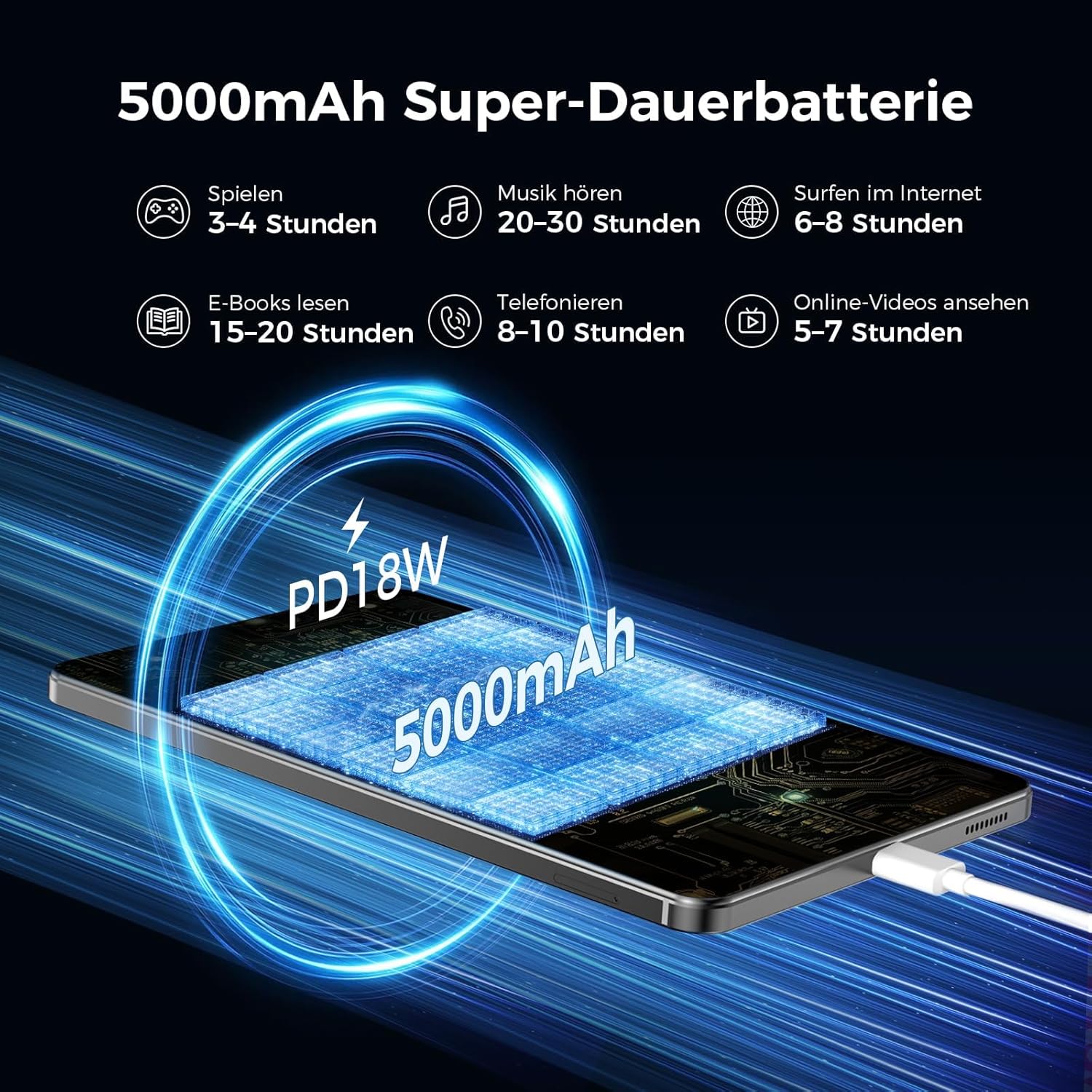
Image: An image illustrating the 5000mAh battery capacity and its estimated usage times for various activities: 3-4 hours gaming, 20-30 hours music, 6-8 hours internet browsing, 15-20 hours e-reading, 8-10 hours calls, and 5-7 hours online videos. It also shows the tablet being charged via PD18W fast charging.
9. Hooldus
To ensure the longevity and optimal performance of your RebotAi A9 tablet, follow these maintenance guidelines:
- Puhastamine: Ekraani ja korpuse puhastamiseks kasutage pehmet, ebemevaba lappi. Vältige abrasiivseid materjale ega karme kemikaale.
- Aku hooldus: Vältige äärmuslikke temperatuure. Ärge laske akul sageli täielikult tühjeneda. Pikaajaliseks hoiustamiseks laadige aku umbes 50% ulatuses.
- Tarkvaravärskendused: Turvalisuse ja jõudluse parandamiseks kontrollige ja installige regulaarselt süsteemivärskendusi.
- Salvestusruumi haldus: Eemaldage perioodiliselt mittevajalikud fileja rakendusi salvestusruumi vabastamiseks ja jõudluse säilitamiseks.
10. Veaotsing
If you encounter issues with your tablet, try the following common troubleshooting steps:
- Tahvelarvuti ei lülitu sisse: Veenduge, et aku on laetud. Ühendage tahvelarvuti toiteallikaga ja proovige uuesti.
- Ekraan ei reageeri: Restart the tablet by holding the power button. If unresponsive, force restart by holding the power button for an extended period (usually 10-15 seconds).
- WiFi/4G ühenduvuse probleemid: Toggle Wi-Fi/Mobile Data off and on. Restart your router or contact your service provider.
- Rakendused jooksevad kokku: Tühjendage probleemse rakenduse vahemälu või installige see uuesti. Veenduge, et teie tahvelarvuti tarkvara oleks ajakohane.
- Aeglane jõudlus: Close unused apps, clear cache, and ensure sufficient storage space. Consider a factory reset as a last resort (back up your data first).
11. Tehnilised andmed
| Funktsioon | Detail |
|---|---|
| Kaubamärk | RebotAi |
| Mudeli nimi | A9 |
| Operatsioonisüsteem | Android 15 |
| Protsessor | MediaTek Helio G100 (MT8781) Octa-Core |
| RAM | 6 GB (laiendatav kuni 18 GB) |
| Mälu salvestusmaht | 128 GB |
| Laiendatav salvestusruum | Kuni 1 TB microSD-kaardi kaudu |
| Ekraani suurus | 8.7 Inches (8.68 Inches) |
| Ekraani eraldusvõime | 1340 x 800 IPS, 90Hz Refresh Rate |
| Maksimaalne toetatud eraldusvõime | 2560 Pixels (for content playback) |
| Heledus | 450 niti |
| Tagumine kaamera | 13 MP |
| Esikaamera | 5 MP |
| Aku mahutavus | 5000 mAh |
| Aku tööiga | Kuni 12 tundi |
| Laadimine | 20W PD Fast Charging (cable included, adapter not included) |
| Ühenduvus | 4G LTE (Dual Nano-SIM), 5G WiFi (2.4GHz/5GHz), Bluetooth 5.2, GPS (GPS/Galileo/Glonass) |
| Värv | Hall |
12. Garantii ja tugi
RebotAi offers a 2-aastane garantii for your A9 tablet. For any technical issues or support inquiries, please contact RebotAi customer service. We guarantee a quick response within 24 hours.
Please refer to the warranty card included in your package for detailed terms and conditions.


