1. Sissejuhatus
This manual provides detailed instructions for the Bikevee Wireless Cycling GPS Computer, a device designed to track and display various cycling data. It features a 2.4-inch LCD display with auto backlight, IPX7 waterproofing, and multi-satellite GPS tracking for accurate data collection.
1.1 Põhifunktsioonid
- Pikendatud aku tööiga: Equipped with a 650mAh rechargeable battery, providing up to 28 hours of continuous use.
- Precision GPS Tracking: Utilizes 5-satellite systems (GPS, BDS, GLONASS, Galileo, QZSS) for stable and accurate signal reception.
- Vastupidav ja veekindel: IPX7 waterproof rating ensures resistance to rain and splashes.
- Selge ekraan: 2.4-inch LCD screen with automatic backlight for visibility in various lighting conditions.
- Comprehensive Data: Tracks speed (MPH/KM/H), distance, time, temperature, altitude, gradient, and more.
1.2 Mis on karbis
Veenduge, et pakendis on kõik komponendid olemas:
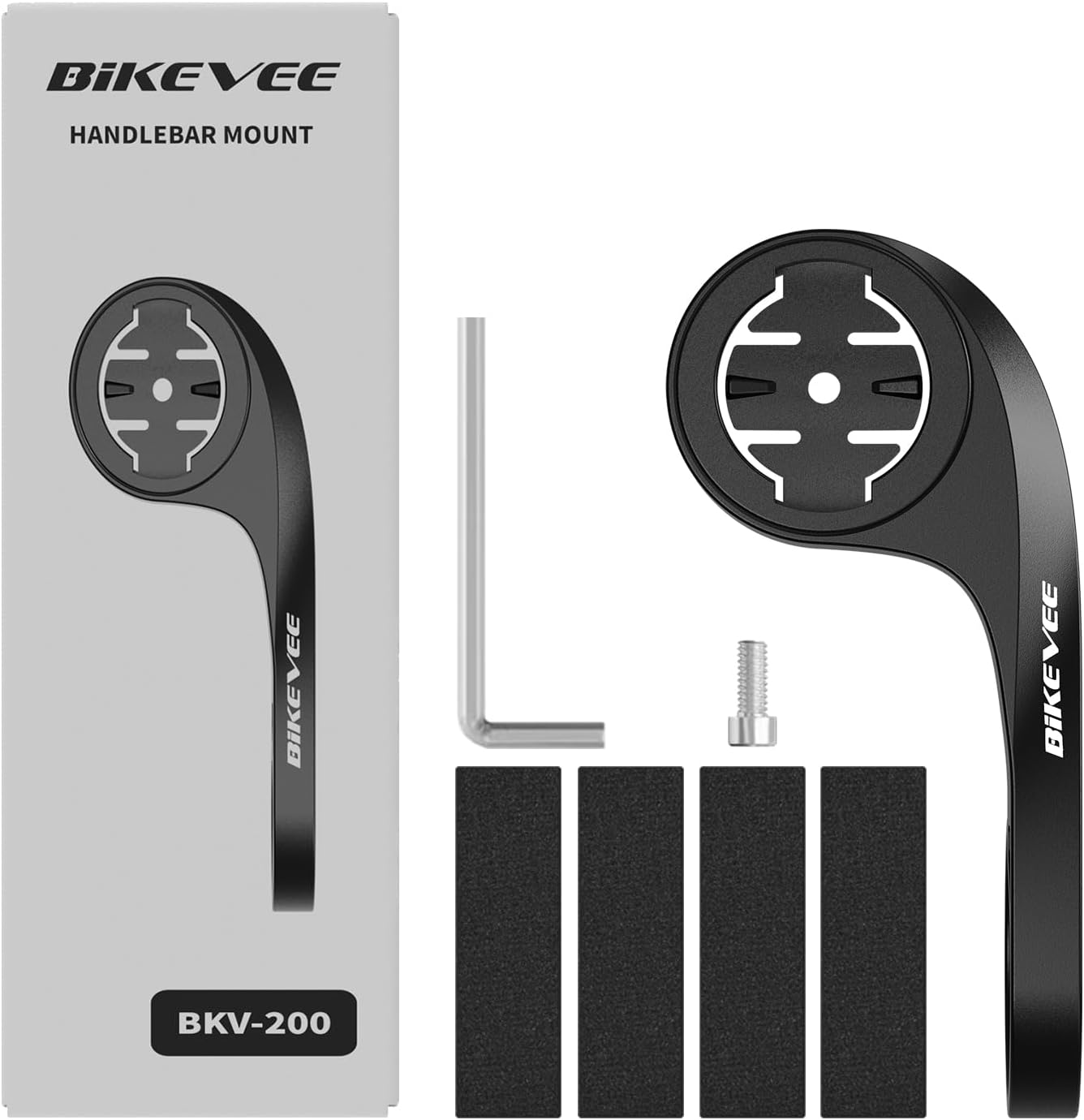
Figure 1.1: Package Contents. Includes Bike Computer, Charging Cable, Rubber Rings, Mount, Rubber Pad, and User Manual.
- Bikevee GPS Cycling Computer
- Standardne rattakinnitus
- Out Front Mount
- Kummist padjad
- Laadimiskaabel (tüüp-C)
- Rubber Rings for Mount Installation
- Kasutusjuhend
2. Seadistamine ja installimine
2.1 Seadme laadimine
Before first use, fully charge the Bikevee GPS Computer. Connect the provided Type-C charging cable to the device's charging port and a USB power source. The battery indicator on the screen will show charging status.
2.2 Seadme paigaldamine
The Bikevee GPS Computer comes with both a standard bike mount and an out front mount. Choose the mount that best suits your preference and bicycle setup.
2.2.1 Standard Bike Mount Installation
- Place the rubber pad on your bicycle's handlebar or stem.
- Position the standard bike mount on top of the rubber pad.
- Secure the mount using the provided rubber rings, wrapping them around the handlebar/stem and hooking them onto the mount.
- Align the Bikevee GPS Computer with the mount's grooves and twist clockwise until it locks into place.
2.2.2 Out Front Mount Installation

Figure 2.1: Bikevee Out Front Mount.
- Place the rubber pad around your bicycle's handlebar where you intend to install the mount.
- Position the out front mount over the rubber pad.
- Use the provided Allen key to tighten the screw on the mount's clamp around the handlebar until it is secure.
- Align the Bikevee GPS Computer with the mount's grooves and twist clockwise until it locks into place.
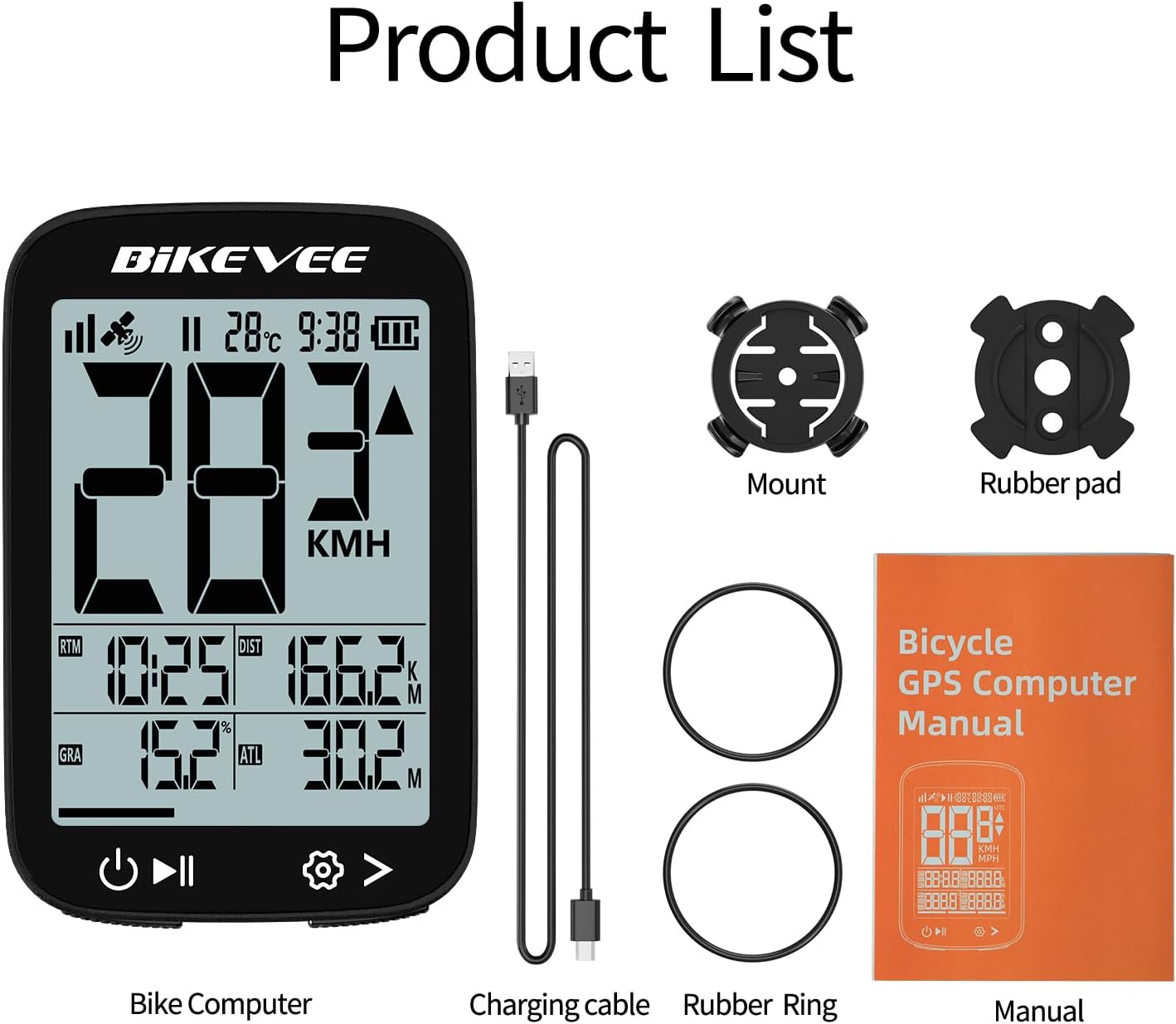
Figure 2.2: Handlebar Mount Components.
2.3 Esialgne sisselülitamine ja sätted
- Toide sisse: Press and hold the power button (usually located at the bottom left) until the screen illuminates.
- Ühiku valik: Upon first power-on or after a reset, you may be prompted to select your preferred unit of measurement (MPH or KM/H). Use the navigation buttons to select and confirm.
- GPS-i hankimine: Take the device outdoors to an open area to allow it to acquire GPS satellite signals. This may take a few moments. A stable GPS signal icon will appear once connected.
3. Kasutusjuhised
3.1 Põhitoimingud
- Toide sisse/välja: Press and hold the left button to power on or off.
- Sõidu alustamine/peatamine/peatamine: Press the middle button to start recording a ride. Press again to pause. Press and hold to stop and save the ride data.
- Page Switching: Use the right button to cycle through different data display pages.
- Taustvalgus: The device features an automatic backlight that adjusts based on ambient light conditions.
3.2 Data Display and Interpretation
The Bikevee GPS Computer displays up to 14 types of cycling data, providing comprehensive insights into your ride.
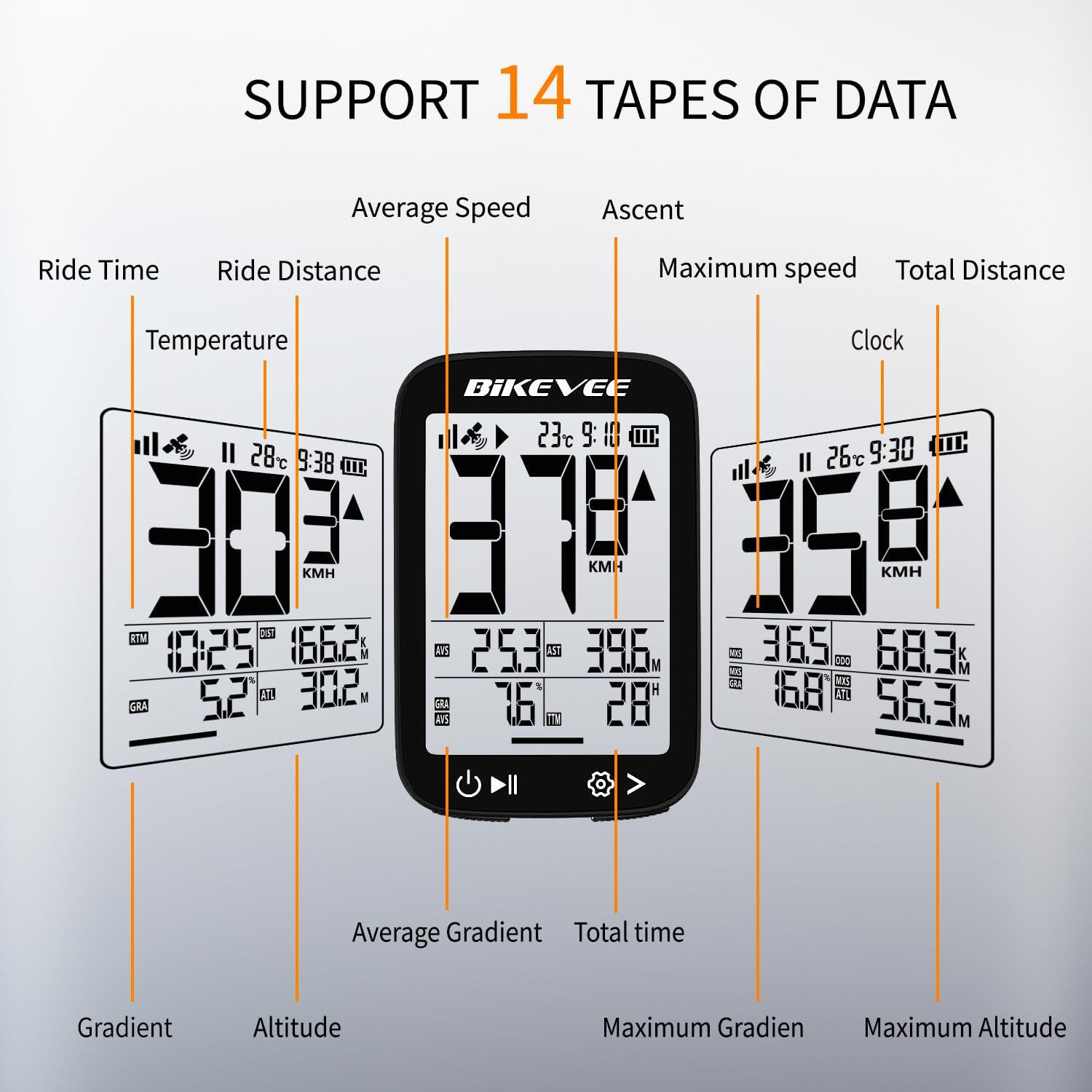
Figure 3.1: Supported Data Types Display.
- Praegune kiirus: Displays your real-time speed (MPH or KM/H).
- Keskmine kiirus: The average speed for the current ride.
- Maksimaalne kiirus: The highest speed recorded during the current ride.
- Sõiduaeg: Duration of the current active ride.
- Ride Distance: Praeguse sõidu ajal läbitud vahemaa.
- Koguvahemaa (odomeeter): Cumulative distance recorded by the device.
- Temperatuur: Ümbritsev temperatuur.
- Kell: Praegune aeg.
- Tõus: Total elevation gained during the ride.
- Gradient: Current incline or decline percentage.
- Kõrgus: Current elevation above sea level.

Figure 3.2: Display Icons and Their Meanings.
- Satelliidi signaal: Näitab GPS-signaali tugevust.
- IPX7: Confirms waterproof rating.
- Aku tase: Näitab aku järelejäänud laetust.
- Automaatne taustvalgus: Indicates auto backlight feature is active.
- Tüüp C: Denotes the charging port type.
- Kiiruse võrdlus: Arrow indicates if current speed is higher or lower than average speed.
4. Hooldus ja hooldus
4.1 Seadme puhastamine
To maintain optimal performance and appearance, clean the device regularly:
- Pühkige ekraani ja korpust pehme lapigaamp riie.
- Avoid using abrasive cleaners, solvents, or chemical sprays, as these can damage the device's surface or internal components.
- Veenduge, et laadimispordi kate oleks kindlalt suletud, et vältida tolmu ja vee sissetungimist.
4.2 Veekindlus (IPX7)

Figure 4.1: IPX7 Waterproof Feature.
The Bikevee GPS Computer has an IPX7 waterproof rating, meaning it is protected against temporary immersion in water (up to 1 meter for 30 minutes). However, it is important to note:
- Ärge kastke seadet pikaks ajaks vette.
- Vältige kõrgsurve veejugasid.
- Ensure the charging port cover is sealed before exposure to water.
4.3 Aku hooldus ja hoiustamine
- Hoidke seadet jahedas ja kuivas kohas, kui seda ei kasutata.
- Vältige seadme pikaajalist kokkupuudet äärmuslike temperatuuridega (kuumus või külm).
- Pikaajaliseks hoiustamiseks laadige aku umbes 50% ulatuses, et säilitada aku tööiga.
5. Veaotsing
If you encounter issues with your Bikevee GPS Computer, refer to the following common problems and solutions:
| Probleem | Võimalik põhjus | Lahendus |
|---|---|---|
| Seade ei lülitu sisse. | Aku tühi. | Laadige seade kaasasoleva Type-C-kaabli abil täielikult. |
| No GPS signal or inaccurate readings. | Takistud view of sky; initial signal acquisition. | Move to an open outdoor area. Wait a few minutes for signal acquisition. Avoid dense forests or tunnels. |
| Ekraan on tuhm või loetamatu. | Auto backlight setting; low battery. | Ensure sufficient battery charge. The backlight adjusts automatically; try moving to a different lighting condition. |
| Seade hangub või ei reageeri. | Tarkvara tõrge. | Perform a soft reset by pressing and holding the power button for 10-15 seconds until the device restarts. |
6. Tehnilised andmed
Detailed technical specifications for the Bikevee Wireless Cycling GPS Computer:

Figure 6.1: Device Dimensions and Weight.
- Mudel: Bikevee Cycling GPS Computer
- Kuva: 2.4-inch LCD, Automatic Backlight
- Aku: 650mAh laetav liitiumioonaku
- Aku eluiga: Kuni 28 tundi (pidev kasutamine)
- GPS-süsteemid: GPS, BDS, GLONASS, Galileo, QZSS (5-satellite tracking)
- Veekindluse reiting: IPX7
- Mõõdud: Approximately 70mm (Height) x 45mm (Width) / 2.76in x 1.77in
- Kaal: Approximately 50g / 0.11lb
- Laadimisport: C-tüüpi USB
- Data Types Supported: 14 types (e.g., Speed, Distance, Time, Temperature, Altitude, Gradient)
7. Garantii teave
The Bikevee Wireless Cycling GPS Computer is covered by a limited manufacturer's warranty. This warranty typically covers defects in materials and workmanship under normal use. Please retain your proof of purchase for warranty claims.
For specific warranty terms and conditions, including duration and coverage details, please refer to the warranty card included with your product or contact Bikevee customer support directly.
8. Klienditugi
If you have any questions, require technical assistance, or need to report an issue with your Bikevee Wireless Cycling GPS Computer, please contact our customer support team.
- Veebitugi: Visit the official Bikevee webKKK, tõrkeotsingu juhendite ja kontaktvormide sait.
- E-posti tugi: Vaadake toote pakendilt või ametlikult webklienditoe e-posti aadressi sait.
When contacting support, please be prepared to provide your product model number (Bikevee Cycling GPS Computer) and a detailed description of the issue.