1. Sissejuhatus
Thank you for choosing the WOLFANG WDV01 Portable DVD Player. This manual provides essential information for setting up, operating, and maintaining your device. Please read it carefully before use to ensure optimal performance and longevity of your product.
The WOLFANG WDV01 is designed for portable entertainment, featuring a 9.5-inch unit with a 7.5-inch HD swivel screen, stereo speakers, and a long-lasting battery. It supports various disc and file formats, making it versatile for different media content.
2. Pakendi sisu
Veenduge, et pakendis on kõik esemed olemas:
- WOLFANG WDV01 Portable DVD Player
- Kaugjuhtimispult
- Kasutusjuhend
- AC laadija
- Auto laadija
- Kolm-ühes AV-kaabel

Image: Contents of the WOLFANG WDV01 package, showing the DVD player, remote control, user manual, AC charger, car charger, and AV cable.
3. Toote lõppview
3.1 Põhifunktsioonid
- Kuva: 9.5-inch unit with 7.5-inch HD eye-protection screen.
- Ekraani pööramine: 270° horizontal rotation and 180° vertical flip for flexible viewnurgad.
- Heli: Integreeritud stereokõlarid.
- Aku eluiga: Up to 6 hours of playback on a full charge.
- Toitevalikud: AC power adapter and car charger included.
- Mälu funktsioon: Breakpoint memory resumes playback from the last stopped point.
- Meedia ühilduvus: Supports DVD, SVCD, VCD, CD-R/RW discs.
- File Vormingu tugi: JPEG, WMA, MPG, MP3, DIVX, VOB, AVI.
- Väline ühenduvus: USB port, SD card slot (max 32GB), AV input, AV output, 3.5mm headphone jack.
3.2 Seadme paigutus
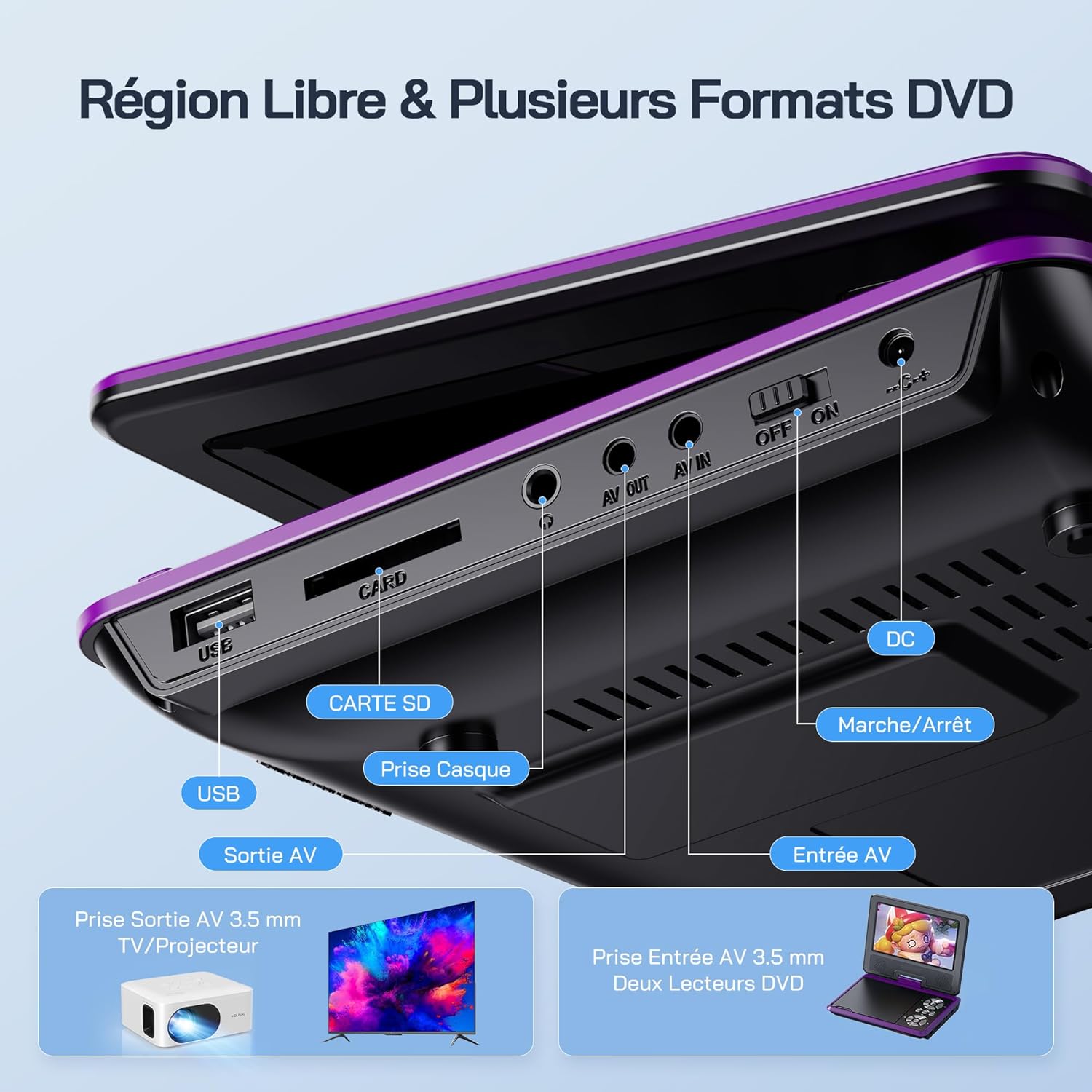
Pilt: Detailne view of the side panel of the WOLFANG WDV01, highlighting the USB port, SD card slot, headphone jack, AV OUT, AV IN, DC power input, and ON/OFF switch.
- USB-port: USB-mälupulkade ühendamiseks.
- SD-kaardi pesa: For inserting SD/MMC cards.
- Kõrvaklappide pesa: 3.5 mm heliväljund kõrvaklappide jaoks.
- AV VÄLJAS: Audio/Video output for connecting to a TV or projector.
- AV IN: Audio/Video input for connecting external devices or another DVD player.
- Alalisvool: Toitesisend vahelduvvooluadapteri või autolaadija jaoks.
- ON/OFF lüliti: Seadme võimsuse juhtimine.
4. Seadistamine
4.1 Esmane laadimine
Before first use, fully charge the device. Connect the AC charger to the DC IN port on the player and plug it into a wall outlet. The charging indicator light will illuminate. Once fully charged, the light may change color or turn off, depending on the model.
4.2 Sisse-/väljalülitamine
To power on the device, slide the ON/OFF switch to the "ON" position. To power off, slide it to the "OFF" position.
4.3 Ekraani reguleerimine
The screen can be rotated 270 degrees horizontally and flipped 180 degrees vertically. Adjust the screen to your preferred viewing angle. This feature is particularly useful for mounting in a car or for shared viewing.

Image: Illustration demonstrating the 270-degree rotation and 180-degree flip capabilities of the WOLFANG WDV01 screen.
5. Kasutusjuhised
5.1 DVD/CD esitamine
- Avage plaadi kaas ettevaatlikult.
- Place a compatible DVD or CD onto the spindle, label side up.
- Sulgege plaadi kaas.
- The player will automatically detect and begin playback. If not, select "Disc" from the main menu.
Märkus. This device supports DVD, SVCD, VCD, CD-R/RW discs. It is not compatible with 1080p, 4K, or Blu-ray discs.
5.2 Playing from USB/SD Card
- Sisestage USB-mälupulk USB-porti või SD-kaart SD-kaardi pessa.
- From the main menu, select "USB" or "SD" depending on your media source.
- Liikuge kaustade vahel ja files using the control buttons or remote control.
- Valige soovitud file (JPEG, WMA, MPG, MP3, DIVX, VOB, AVI) to begin playback.
Märkus. Maximum supported Micro SD card capacity is 32GB. Video files should have a resolution up to 720x480. Image files should have a resolution up to 2650x1440.
5.3 Breakpoint Memory Function
The player automatically remembers the last playback position. When you power on the device again or re-insert the same disc/media, it will prompt you to resume playback from where you left off. This function may need to be activated in the system settings.

Image: Visual representation of the breakpoint memory feature, illustrating how the player can pause and resume video playback from the exact point of interruption.
5.4 Connecting to an External Display (TV/Projector)
Use the provided 3-in-1 AV cable to connect the player to a TV or projector.
- Connect one end of the AV cable to the AV OUT port on the DVD player.
- Connect the other end of the AV cable to the corresponding AV input ports (Yellow for Video, Red for Right Audio, White for Left Audio) on your TV or projector.
- Valige oma teleril või projektoril õige AV-sisendallikas.
- Mängija ekraanisisu kuvatakse nüüd välisel ekraanil.

Image: A WOLFANG WDV01 Portable DVD Player connected to a large television screen, displaying content for a family watching together, demonstrating the TV sync feature.
5.5 Connecting to Another DVD Player (AV IN)
The AV IN port allows you to connect another compatible device, such as a second DVD player, to display its content on the WOLFANG WDV01 screen.
- Connect one end of an AV cable to the AV OUT port of the external device.
- Connect the other end of the AV cable to the AV IN port on the WOLFANG WDV01.
- Switch the WOLFANG WDV01 to AV input mode (refer to the on-screen menu or remote control for this option).
6. Hooldus
6.1 Seadme puhastamine
- Enne puhastamist veenduge, et seade on välja lülitatud ja vooluvõrgust lahti ühendatud.
- Use a soft, dry cloth to wipe the exterior of the player.
- Ekraani puhastamiseks kasutage pehmet ja ebemevaba lappi, mis on spetsiaalselt mõeldud elektroonikaekraanide puhastamiseks. Ärge kasutage abrasiivseid puhastusvahendeid ega lahusteid.
- To clean the disc lens, use a specialized DVD lens cleaning disc. Do not attempt to clean the lens manually.
6.2 Aku hooldus
- Vältige seadme jätmist äärmuslike temperatuuride kätte (kuumus või külm).
- If storing the device for an extended period, charge the battery to approximately 50% to prolong its lifespan.
- Ärge proovige sisemist akut ise vahetada. Akuprobleemide korral võtke ühendust klienditoega.
6.3 Säilitamine
Store the player in a cool, dry place away from direct sunlight and moisture. Keep it in its original packaging or a protective case when not in use to prevent damage.
7. Veaotsing
| Probleem | Võimalik põhjus | Lahendus |
|---|---|---|
| Pole jõudu | Battery drained, power adapter not connected, power switch off. | Charge the battery, ensure power adapter is securely connected, slide power switch to ON. |
| Plaat ei mängi | Incompatible disc format, disc dirty/scratched, disc inserted incorrectly. | Check disc compatibility (no Blu-ray/4K), clean disc, insert disc label side up. |
| Ei mingit heli | Volume too low, headphones connected, audio settings incorrect. | Increase volume, disconnect headphones, check audio output settings. |
| Televiisoris pole pilti | AV cable loose, incorrect TV input selected. | Ensure AV cable is securely connected, select correct AV input on TV. |
| USB/SD-kaarti ei tuvastatud | Incompatible format, card/drive damaged, incorrect file süsteem. | Ensure media is formatted to FAT32, check for damage, try another USB/SD card. Max 32GB SD card. |
If the problem persists after trying these solutions, please contact WOLFANG customer support.
8. Tehnilised andmed
| Funktsioon | Detail |
|---|---|
| Kaubamärk | WOLFANG |
| Mudel | WDV01 |
| Ekraani suurus | 7.5 tolli |
| Ühiku suurus | 9.5 tolli (diagonaal) |
| Ekraani eraldusvõime | Kuni 800 x 480 pikslit |
| Plaadi ühilduvus | DVD, SVCD, VCD, CD-R/RW |
| File Vormingu tugi | Video: AVI, MPG, MP3, DIVX, VOB; Audio: WMA, MP3; Image: JPEG |
| USB/SD-kaardi tugi | Max 32GB (Micro SD) |
| Video Resolution (USB/SD) | Kuni 720 x 480 pikslit |
| Image Resolution (USB/SD) | Kuni 2650 x 1440 pikslit |
| Aku tööiga | 4-6 tundi |
| Kauba kaal | 1100 grammi |
| UPC | 850067892205 |
9. Garantii ja tugi
9.1 Tootja garantii
The WOLFANG WDV01 Portable DVD Player comes with a 24-kuuline tootjagarantii alates ostukuupäevast. See garantii katab materjali- ja tootmisdefektid normaalse kasutamise korral. See ei kata kahjustusi, mis on tekkinud väärkasutuse, õnnetuste, volitamata muudatuste või normaalse kulumise tagajärjel.
Garantiinõuete esitamiseks säilitage ostutõend.
9.2 Klienditugi
For any questions, technical assistance, or warranty claims, please contact WOLFANG customer support. Our team is available to assist you and aims to respond within 24 hours.
Contact information can typically be found on the official WOLFANG websaidi või oma ostuplatvormi kaudu.


