1. Sissejuhatus
Tänan ostu eestasing the LG 43-Inch Class QNED AI 4K Smart TV. This manual provides essential information for the safe and efficient operation of your television. Please read it thoroughly before use and keep it for future reference.
The LG QNED AI 4K TV offers vivid, immersive color with its wide color gamut technology, enhanced by the α7 AI Processor Gen8. It intelligently optimizes picture and sound based on content. Powered by LG webOS 24, it provides a streamlined streaming experience with customizable Quick Cards and the Magic Remote. Enjoy virtual 5.1 surround sound, FILMMAKER MODE, and advanced gaming features like FreeSync, VRR, and GeForce NOW.
2. Ohutusalane teave
Always follow basic safety precautions when using this product to reduce the risk of fire, electric shock, or injury.
- Ärge jätke telerit vihma või niiskuse kätte.
- Ärge avage teleri korpustasing; pöörduge kogu hoolduse eest kvalifitseeritud personali poole.
- Tagage piisav ventilatsioon ja ärge blokeerige ventilatsiooniavasid.
- Kasutage ainult teleriga kaasasolevat toitejuhet.
- Hoidke telerit soojusallikatest ja otsesest päikesevalgusest eemal.
- Avoid placing heavy objects on the power cord or TV.
3. Mis on karbis
Veenduge, et kõik komponendid on olemas:
- LG 43-Inch Class QNED AI 4K Smart TV
- Toitekaabel
- Kaugjuhtimispult (kaasas 2 AAA patareid)
- Stendi komponendid
- Kasutusjuhend (see dokument)
4. Seadistamine
4.1 Aluse kinnitamine
Carefully place the TV screen-down on a soft, flat surface. Attach the stand components to the designated slots on the bottom of the TV using the provided screws. Ensure the stand is securely fastened before placing the TV upright.
Pilt: Tagumine view of the LG 43QNED82AUA TV with its stand.
4.2 Seinale kinnitamine (valikuline)
This TV supports VESA mount standard 200 x 200 mm. For wall mounting, remove the stand and use a compatible wall mount bracket (sold separately). Follow the instructions provided with your wall mount.
4.3 Seadmete ühendamine
Connect your external devices (cable box, Blu-ray player, gaming console, etc.) to the appropriate ports on the TV. The TV features 3 HDMI ports, 1 USB port, Ethernet, and S/PDIF (Optical) for audio output.

Image: Connectivity ports on the back of the LG 43QNED82AUA TV.
4.4 Sisselülitamine
Plug the power cable into the TV and then into a wall outlet. Press the power button on the remote control or on the TV to turn it on. Follow the on-screen instructions for initial setup, including network connection and channel scanning.
5. Teleri juhtimine
5.1 kaugjuhtimispult
The included Magic Remote allows for intuitive control with point-and-click functionality, voice commands, and a scroll wheel. Insert the two AAA batteries (included) into the remote control.
5.2 WebOS 24 Smart Platform
Your TV runs on LG's webOS 24 operating system. Navigate through apps, settings, and inputs using the customizable Quick Cards. Access popular streaming services like Netflix, Prime Video, Disney Plus, HBO Max, and Apple TV directly from the home screen.
5.3 Pildi ja heli seaded
Access the settings menu to adjust picture modes (e.g., Standard, Vivid, Cinema, Filmmaker Mode) and sound modes (e.g., AI Sound Pro, Standard, Cinema). The α7 AI Processor Gen8 automatically optimizes these settings based on the content being viewtoim.

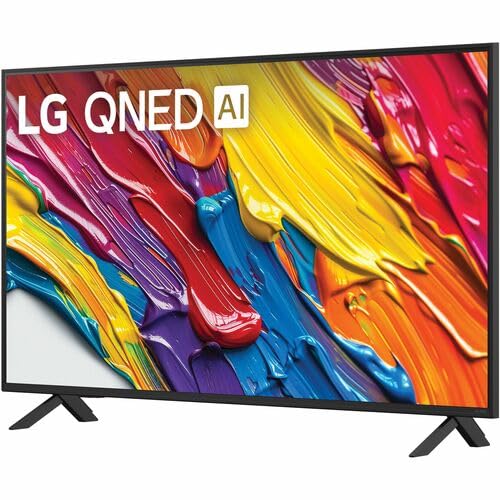
Image: Dynamic QNED Color representation.
6. Nutikad funktsioonid ja tehisintellekt
6.1 AI Picture and Sound
The α7 AI Processor Gen8 enhances brightness, improves sound, and refines picture detail with 4K upscaling and Dynamic Tone Mapping. AI Sound Pro provides virtual 5.1 surround sound, and WOW Orchestra integrates TV speakers with compatible LG soundbars for an enhanced audio experience.
6.2 Voice Assistance and AI Search
Your TV has Alexa Built-in. Press the Alexa button on your remote to activate voice commands. Utilize AI Otsi personalized recommendations and to find content quickly. The TV also supports Google Assistant, Apple AirPlay 2, and Google Cast for seamless integration with your smart home ecosystem.

Image: LG AI Search interface.
7. Mängufunktsioonid
The LG QNED AI 4K TV is designed for an optimal gaming experience with a 60 Hz native refresh rate, which can be boosted up to 144 Hz with VRR (Variable Refresh Rate) enabled. It supports FreeSync and features LG Game Optimizer and Game Dashboard for quick access to gaming settings.
- Vaba sünkroonimine ja VRR: Vähendab ekraani rebenemist ja katkendlikkust sujuvama mängukogemuse tagamiseks.
- Mängu optimeerija ja armatuurlaud: Centralized hub for adjusting game settings, including genre-specific picture modes.
- Pilvemängud: Access GeForce NOW and Xbox Cloud Gaming (subscriptions and compatible controllers required).
- ALLM (automaatne madala latentsusaja režiim): Lülitub mängukonsooli tuvastamisel automaatselt madala latentsusega režiimile.

Image: Gaming experience on the LG 43QNED82AUA TV.
8. Ühenduvus
Your LG QNED AI 4K Smart TV offers a variety of connectivity options:
- HDMI: 3 ports for connecting external devices.
- USB: 1 port for media playback or connecting USB devices.
- Ethernet: Juhtmega internetiühenduse jaoks.
- WiFi: Built-in for wireless internet access.
- Bluetooth 5.0: Juhtmevabade kõrvaklappide, heliribade või muude Bluetooth-seadmete ühendamiseks.
- Optiline (S/PDIF): Digitaalse heli väljundiks helisüsteemidesse.
- Ekraani peegeldamine: Supports AirPlay 2 and Google Cast for casting content from mobile devices.
9. Hooldus
9.1 Televiisori puhastamine
Unplug the TV before cleaning. Use a soft, dry cloth to wipe the screen and exterior. For stubborn marks, lightly dampLoputage lappi veega või spetsiaalse ekraanipuhastusvahendiga. Vältige tugevate kemikaalide või abrasiivsete materjalide kasutamist.
9.2 Tarkvaravärskendused
Ensure your TV's software is up to date for optimal performance and new features. Software updates auto-download when connected to the internet. If "auto-update" is disabled, you will receive a prompt to update manually.
10. Veaotsing
Kui teil tekib teleriga probleeme, vaadake järgmisi levinud lahendusi.
| Probleem | Lahendus |
|---|---|
| Pole jõudu | Check power cable connection, wall outlet, and remote batteries. |
| Pilti pole, aga heli on olemas | Verify input source, check cable connections, try a different HDMI port. |
| Heli pole, aga pilt on olemas | Check volume, mute status, audio output settings, and external audio device connections. |
| Kaugjuhtimispult ei tööta | Replace batteries, ensure no obstructions between remote and TV, re-pair Magic Remote if necessary. |
| Halb pildikvaliteet | Adjust picture settings, check source resolution, ensure strong signal for broadcast channels. |
| Wi-Fi-ga ei saa ühendust | Restart router, check Wi-Fi password, ensure TV is within range, try wired Ethernet connection. |
For further assistance, please refer to the full electronic manual available on the LG support webveebisaidilt või võtke ühendust LG klienditoega.
11. Tehnilised andmed
| Funktsioon | Detail |
|---|---|
| Ekraani suurus | 43 tolli |
| Kuvamistehnoloogia | LED (QNED) |
| Resolutsioon | 4K (3840 x 2160) |
| Värskendussagedus | 60 Hz (Native), up to 144 Hz (VRR) |
| Protsessor | α7 AI protsessor Gen8 |
| HDR tugi | HDR10, HLG |
| Operatsioonisüsteem | webOS 24 |
| Ühenduvus | Wi-Fi, Bluetooth 5.0, Ethernet, 3x HDMI, 1x USB, Optical (S/PDIF) |
| Hääleabilised | Alexa Built-in, Google Assistant compatible |
| Mõõdud (koos alusega) | 10.1" P x 38.1" L x 25" K |
| Kaal (ilma aluseta) | 20.7 naela |
| VESA kinnitusstandard | 200 x 200 mm |
| Energiatarve | 82 vatti |
| Aastane energiatarbimine | 152 kilovatt-tundi aastas |

Image: LG 43QNED82AUA TV dimensions.
12. Garantii ja tugi
12.1 Garantii teave
This LG TV comes with a 1 Year Parts & Labor Limited Warranty. Please retain your proof of purchase for warranty claims. For full warranty terms and conditions, refer to the warranty card included with your product or visit the official LG websaidile.
12.2 Klienditugi
For technical support, product registration, or service inquiries, please visit the LG support website or contact their customer service hotline. Contact information can be found on the LG official webveebisaidil või teleriga kaasasolevas dokumentatsioonis.