Sissejuhatus
Thank you for choosing the MOZOTER SP9i Wireless Earbuds. These earbuds are designed to provide a comfortable and stable audio experience with advanced Bluetooth 5.3 technology, deep bass sound, and extended playtime. This manual will guide you through the setup, operation, and maintenance of your new earbuds to ensure optimal performance.
Mis on karbis
- MOZOTER SP9i Wireless Earbuds (Left and Right)
- Laadimisümbris
- USB-C laadimiskaabel
- Kõrvaotsad (suurused S, M, L)
- Kasutusjuhend
Toode läbiview
The MOZOTER SP9i earbuds feature an over-ear hook design for secure fit and comfort. Each earbud is equipped with intuitive touch controls for easy management of audio and calls. The compact charging case provides additional battery life and convenient storage.

Image: The MOZOTER SP9i Wireless Earbuds resting in their open charging case, showcasing the over-ear hook design and the charging contacts.
Pilt: detailne view of an earbud highlighting the integrated Bluetooth 5.3 technology for stable and efficient wireless connectivity.
Seadistamine
1. Kõrvaklappide ja ümbrise laadimine
Enne esmakordset kasutamist laadige kõrvaklapid ja laadimisümbris täielikult. Ühendage kaasasolev USB-C-kaabel ümbrise laadimisporti ja toiteallikaga. Ümbrisel olevad märgutuled näitavad laadimise olekut.
- Laadimisaeg: Umbes 1.5 tundi täislaadimiseks.
- Kõrvaklappide mänguaeg: Ühe laadimisega kuni 12 tundi.
- Kogu mänguaeg ümbrisega: Kuni 60 tundi.

Image: The charging case with earbuds inside, illustrating the 60-hour total playtime, 12-hour single charge, and 48-hour case capacity, along with the USB-C charging port.
2. Seadmega sidumine
- Ensure the charging case has power and the earbuds are inside.
- Ava laadimisümbris. Kõrvaklapid lülituvad automaatselt sisse ja lülituvad sidumisrežiimi.
- Luba oma seadmes (nutitelefon, tahvelarvuti, sülearvuti) Bluetooth.
- Otsi saadaolevad Bluetooth-seadmed ja valige "SP9i"loendist.
- Once connected, you will hear a confirmation tone, and the earbuds' indicator lights will turn off or flash slowly.
Kõrvaklapid ühenduvad ümbrisest eemaldamisel automaatselt viimati seotud seadmega uuesti, kui seadmes on Bluetooth lubatud.

Image: An illustration showing the MOZOTER SP9i earbuds in their open case, with a smartphone screen displaying a successful Bluetooth connection to "SP9i".
Kandmisjuhised
For optimal sound quality and comfort, it is important to wear the earbuds correctly and choose the appropriate eartip size.
1. Kõrvaotsikute valimine
The earbuds come with small (S), medium (M), and large (L) eartips. Experiment with different sizes to find the pair that provides the best seal and comfort for your ears. A good seal enhances bass response and passive noise cancellation.
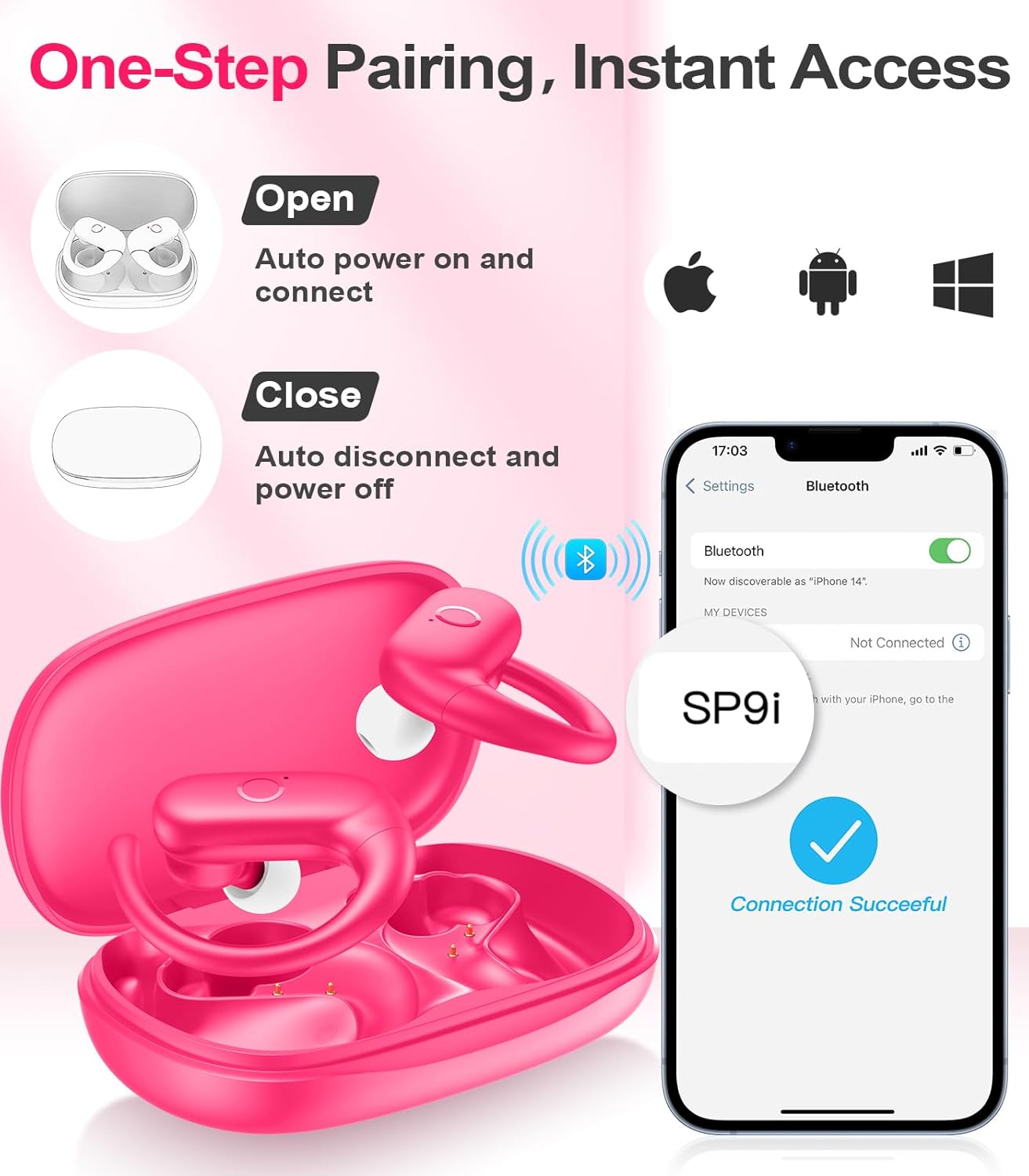
Image: A woman wearing an earbud, with an inset showing the three available eartip sizes (S, M, L) for a customized and comfortable fit.
2. Kindla sobivuse saavutamine
- 1. samm: Asetage kõrvakonks kõrva peale.
- 2. samm: Sisestage kõrvaklapp õrnalt kõrvakanalisse.
- 3. samm: Rotate the earbud slightly to find a comfortable and secure angle. The flexible ear hooks ensure a stable fit, ideal for sports and active use.

Image: A three-step diagram illustrating the correct method to wear the MOZOTER SP9i earbuds, ensuring a secure and comfortable fit with the ear hook.

Image: A woman wearing the MOZOTER SP9i earbuds, demonstrating the ergonomic design that rests comfortably and securely on the ear.
Kasutusjuhised
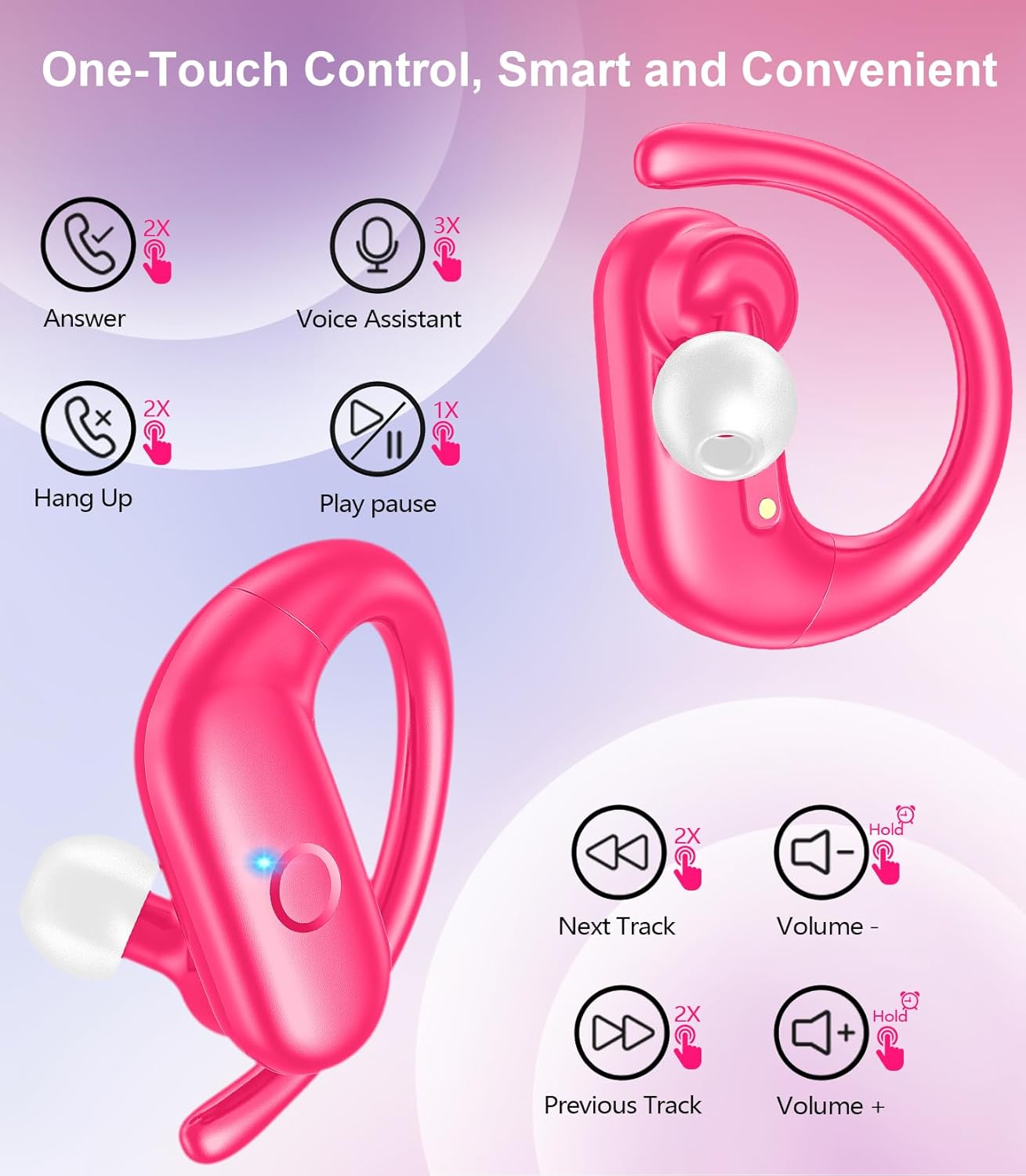
The MOZOTER SP9i earbuds feature intuitive touch controls on each earbud. The following table outlines the functions:
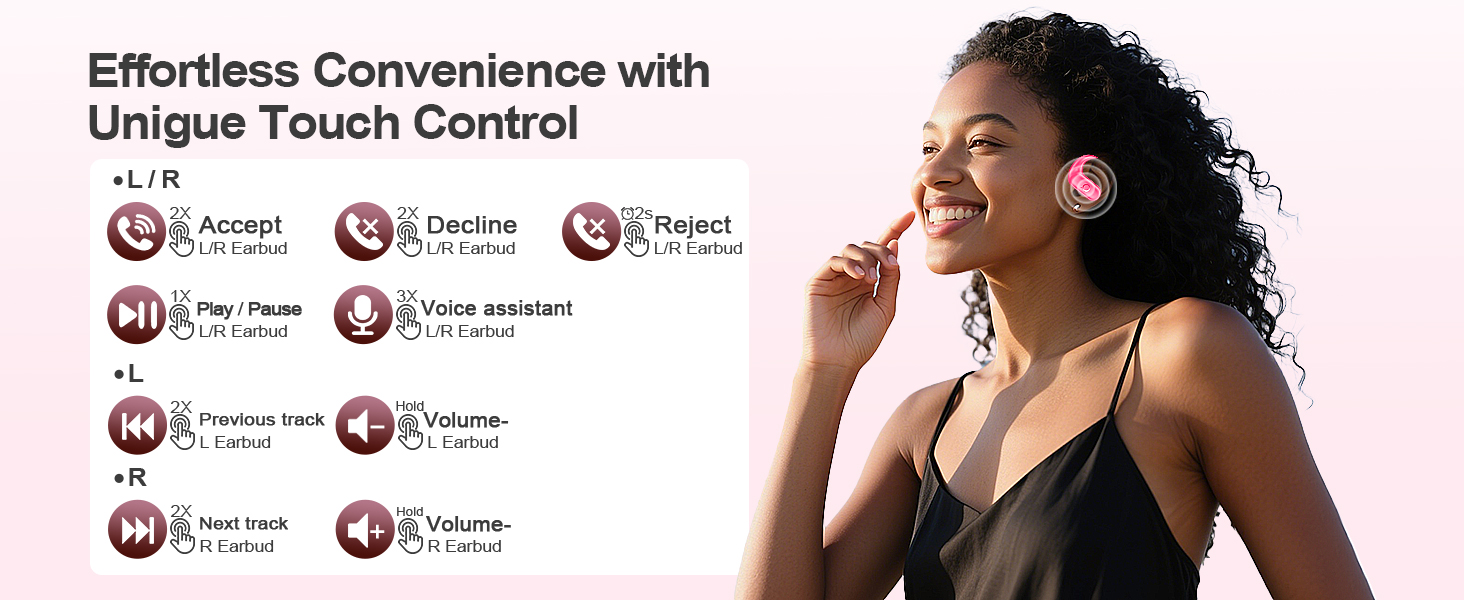
Image: A visual guide detailing the various touch control gestures for the MOZOTER SP9i earbuds, including call management, music playback, and volume adjustments.
| Tegevus | Gesture (L/R Earbud) |
|---|---|
| Vasta kõnele | Double-tap (2X) |
| Katkesta kõne | Double-tap (2X) |
| Keeldu kõnest | Triple-tap (3X) |
| Esita/peata muusika | Single-tap (1X) |
| Aktiveerige Voice Assistant | Triple-tap (3X) |
| Järgmine lugu | Double-tap (2X) on Õige kõrvaklapp |
| Eelmine lugu | Double-tap (2X) on Vasakule kõrvaklapp |
| Helitugevuse suurendamine | Pea vastu Õige kõrvaklapp |
| Helitugevuse vähendamine | Pea vastu Vasakule kõrvaklapp |
Hooldus
Kõrvaklappide õige hooldus tagab nende pikaealisuse ja jõudluse.
- Puhastamine: Regularly clean the eartips and the charging contacts on both the earbuds and the case with a soft, dry, lint-free cloth. Avoid using harsh chemicals or abrasive materials.
- Hoiustamine: Kui kõrvaklappe ei kasutata, hoidke neid tolmu ja kahjustuste eest kaitsmiseks laadimisümbrises.
- Kokkupuude veega: Kuigi kõrvaklapid on mõeldud sportimiseks, ärge kastke neid vette. Pühkige higi või niiskus kohe pärast kasutamist ära.
Veaotsing
If you encounter any issues with your MOZOTER SP9i earbuds, please refer to the following common solutions:
- Kõrvaklapid ei paaristu: Ensure both earbuds are charged and removed from the case. Turn off and on your device's Bluetooth. If issues persist, try resetting the earbuds (refer to manufacturer's web(kui kasutusjuhendis pole täpseid lähtestamisjuhiseid, siis vaadake veebisaiti).
- Ainult üks kõrvaklapp töötab: Place both earbuds back into the charging case, close the lid, wait a few seconds, then open the lid and remove them. This often resynchronizes them.
- Halb helikvaliteet: Ensure the eartips provide a good seal in your ear. Clean any debris from the earbud speakers. Check your device's volume and audio settings.
- Laadimisprobleemid: Veenduge, et laadimiskaabel oleks kindlalt nii ümbrise kui ka toiteallikaga ühendatud. Puhastage kõrvaklappide laadimiskontaktid ja ümbrise sisemus.
- Kõrvaklapid kukuvad välja: Experiment with different eartip sizes and adjust the ear hooks for a more secure fit as described in the Wearing Instructions section.
Tehnilised andmed
| Funktsioon | Detail |
|---|---|
| Mudeli nimi | SP9i |
| Ühenduvustehnoloogia | Traadita (Bluetooth 5.3) |
| Mürakontroll | Passiivne müra tühistamine |
| Takistus | 4 oomi |
| Kõrvaklapi kaal | Ligikaudu 8 g kõrvaklapi kohta |
| Kõrvaklappide mänguaeg | Kuni 12 tundi |
| Kogu mänguaeg (koos ümbrisega) | Kuni 60 tundi |
| Laadimisport | USB-C |
| Kaasatud komponendid | Earbuds, Charging Case, Eartips, User Manual |
Garantii ja tugi
MOZOTER products are designed and manufactured to the highest quality standards. For warranty information and customer support, please refer to the documentation included with your purchase or visit the official MOZOTER website. If you require further assistance, please contact our customer service team.


