1. Sissejuhatus
This manual provides detailed instructions for the Loutoc SRC4526 Universal Remote Control, designed for seamless compatibility with Philips Ambilight Smart TVs. Please read this guide thoroughly to ensure optimal use and longevity of your remote control.
1.1 Toode on üleview
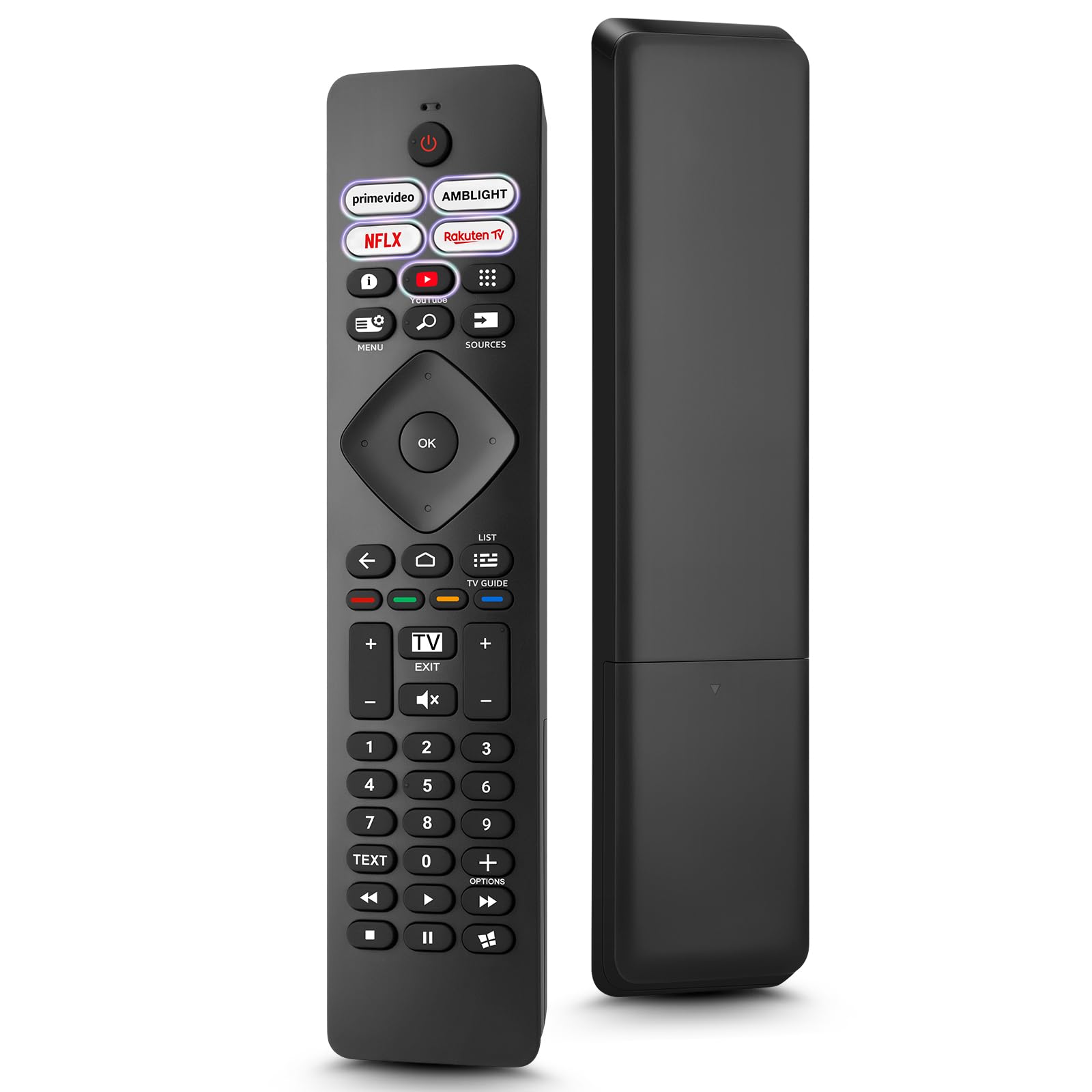
Image: The Loutoc SRC4526 Universal Remote Control, showcasinselle ergonoomiline disain ja nuppude paigutus.
1.2 Põhifunktsioonid
- Convenient Plug-and-Play: No complex setup or programming required. Simply insert batteries and the remote is ready for use.
- Wide TV Compatibility: Fully compatible with Philips Ambilight TVs, including 4K Ambilight LED, OLED, FHD, and Full Ultra HD models.
- Spetsiaalsed otseteenupud: Features 5 direct access buttons for popular streaming platforms: Ambilight, Video, NFLX (Netflix), Rakuten TV, and YouTube.
- Usaldusväärne jõudlus: Offers an effective operating range of 8 meters (26 feet) and an ultra-fast response time of 0.2 seconds.
2. Seadistamine
2.1 Aku paigaldamine
The Loutoc SRC4526 remote control requires two AAA batteries (not included) for operation.
- Leidke kaugjuhtimispuldi tagaküljel olev patareipesa.
- Avage patareipesa kaas.
- Sisestage kaks AAA-patareid, veendudes, et positiivsed (+) ja negatiivsed (-) klemmid joonduvad õigesti sahtlis olevate indikaatoritega.
- Sulgege akupesa kaas kindlalt.
2.2 Esmane kasutamine
This remote control is designed for immediate use with compatible Philips Ambilight TVs. No programming or pairing is required. Once batteries are installed, point the remote at your TV and begin operation.
3. Kasutusjuhised
3.1 Nuppude funktsioonid üleview
Refer to the image below for a visual guide to the remote control's buttons and their corresponding functions.

Image: Detailed diagram of the Loutoc SRC4526 remote control, illustrating each button and its primary function.
| Nupp | Funktsioon |
|---|---|
| Võimsus | Switches the TV on or off (Standby mode). |
| Prime Video, Ambilight, Netflix, Rakuten TV | Quickly launches the corresponding application. |
| Menüü | Opens the Quick Menu with typical TV functions. Hold to show Gaming control bar. |
| Otsing | Opens the Search tab on the Home screen. |
| Allikad | Opens or closes the TV's input sources menu. |
| OK | Confirms a selection or setting. |
| Arrow/Navigation Keys | Navigates up, down, left, or right through menus and options. |
| Tagasi | Naaseb eelmisele ekraanile või kanalile. |
| Kodu | Opens the TV's Home menu. |
| Telekava | Opens or closes the TV Guide. Long press to open the channel list. |
| Color Keys (Red, Green, Yellow, Blue) | Provides direct selection of on-screen options. The blue key typically opens Help. |
| Helitugevus (+/-) | Reguleerib teleri helitugevust. |
| Kanal (+/-) | Switches to the next or previous channel. |
| Välju | Exits current menu/application or returns to live TV. From standby, goes to last viewed source. |
| Vaigista | Vaigistab või tühistab teleri heli. |
| Numbriklahvid (0-9) | Valib otse telekanaleid. |
| TEKST | Opens or closes Text/Teletext. |
| Taasesituse juhtnupud | Controls media playback: Play, Pause, Stop, Rewind, Fast Forward. |
| Rakendused | Opens the Apps tab on the Home screen. |
3.2 Ambilight Functionality
For Philips TVs equipped with Ambilight functionality, the dedicated Ambilight button on your remote allows you to control the lighting effects.
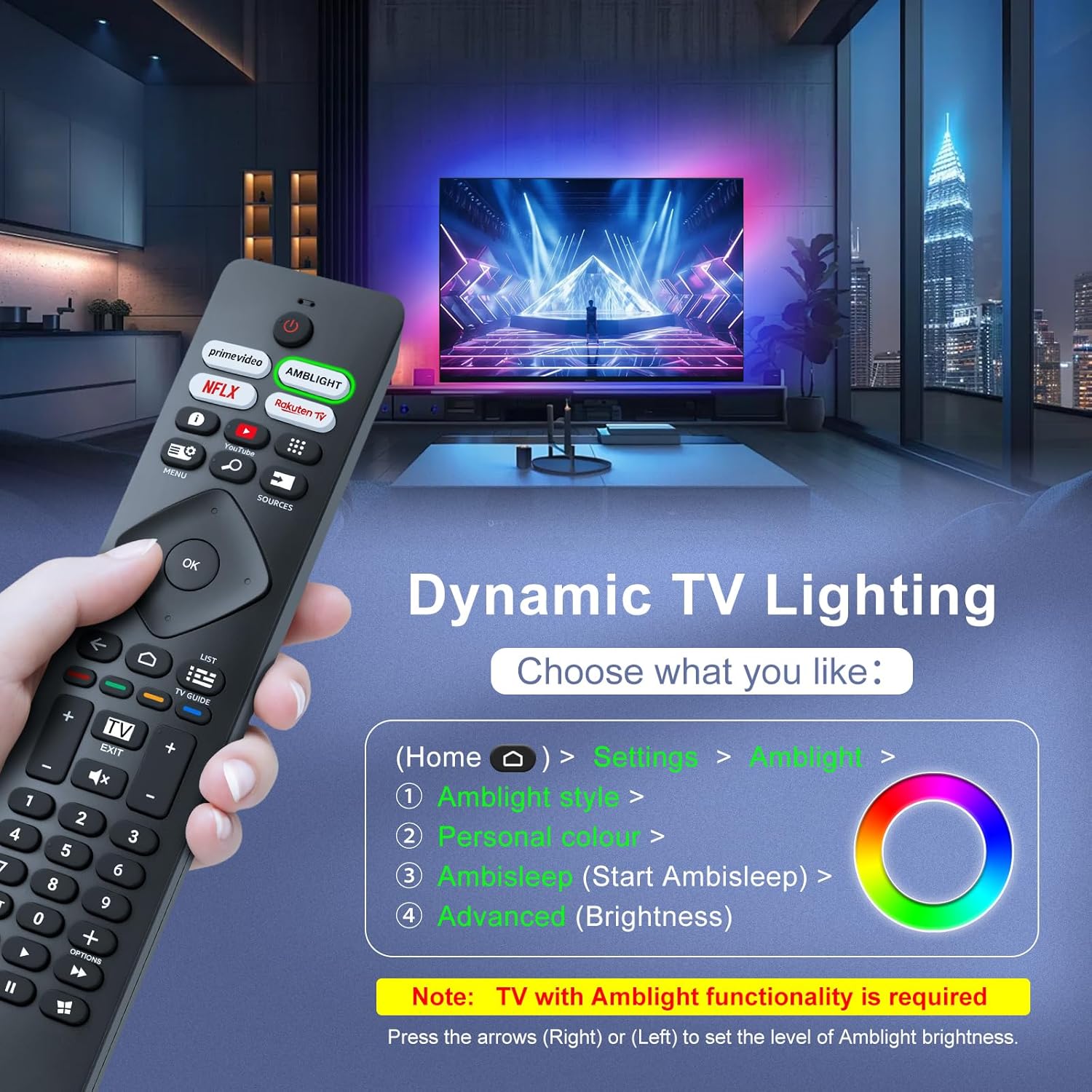
Image: A hand holding the remote control, with an overlay showing Ambilight settings on a TV screen.
After pressing the Ambilight button, you can navigate through the TV's menu to:
- Select different Ambilight display styles.
- Adjust personal color preferences.
- Initiate AmbiSleep mode.
- Adjust Ambilight brightness levels (using the right or left arrow keys).
Note: This feature requires a Philips TV with built-in Ambilight functionality.
4. Hooldus
4.1 Puhastamine
To clean your remote control, gently wipe it with a soft, dry cloth. Avoid using liquid cleaners, aerosols, or harsh chemicals, as these can damage the remote's surface or internal components.
4.2 Säilitamine
Hoidke kaugjuhtimispulti jahedas ja kuivas kohas, eemal otsesest päikesevalgusest ja äärmuslikest temperatuuridest. Kui kaugjuhtimispulti pikemat aega ei kasutata, on soovitatav patareid lekke vältimiseks eemaldada.
4.3 Aku hooldus
- Vahetage kõik patareid korraga; ärge segage vanu ja uusi patareisid.
- Ärge segage erinevat tüüpi patareisid (nt leelis- ja laetavaid patareisid).
- Kõrvaldage kasutatud patareid vastutustundlikult vastavalt kohalikele eeskirjadele.
5. Veaotsing
5.1 Levinud probleemid ja lahendused
- Kaugjuhtimispult ei reageeri:
- Kontrollige, kas patareid on õigesti ja õige polaarsusega sisestatud.
- Vahetage patareid uute AAA patareide vastu.
- Veenduge, et kaugjuhtimispuldi ja teleri infrapunavastuvõtja vahel ei oleks takistusi.
- Veenduge, et olete efektiivse tööraadiuse piires (kuni 8 meetrit).
- Teatud nupud ei tööta:
- Clean the remote control, especially around the non-functioning buttons, to remove any dirt or debris.
- If only Ambilight functions are not working, ensure your Philips TV model supports Ambilight.
5.2 Võtke ühendust klienditoega
If you encounter persistent issues that cannot be resolved with the troubleshooting steps above, please contact Loutoc customer support directly. We aim to respond to all inquiries within 12 working hours.
6. Tehnilised andmed
| Funktsioon | Detail |
|---|---|
| Kaubamärk | Loutoc |
| Mudeli nimi | SRC4526-FBA |
| Kauba mudeli number | SRC4526 |
| Värv | Must |
| Ühenduvustehnoloogia | Infrapuna |
| Eriomadused | No programming required, Ergonomic, Lightweight |
| Ühilduvad seadmed | Television (Philips Ambilight TVs) |
| Toetatud seadmete maksimaalne arv | 1 |
| Kontrolleri tüüp | Nupu juhtimine |
| Maksimaalne vahemik | 8 meetrit (26 jalga) |
| Aku kirjeldus | AAA (nõutav 2, ei kuulu komplekti) |
| Tootja | Loutoc |
| Päritoluriik | Hiina |
| Kuupäev esmakordselt saadaval Amazon.com.be-s | 31. august 2025 |
7. Garantii ja tugi
7.1 Garantii teave
This Loutoc remote control comes with a manufacturer's warranty of 30 days from the date of purchase. Please retain your proof of purchase for any warranty claims.
7.2 Klienditugi
For any questions, technical assistance, or warranty inquiries, please contact Loutoc customer support. We are committed to providing timely assistance and will respond to your queries within 12 working hours.