1. Sissejuhatus
This manual provides detailed instructions for the installation, operation, and maintenance of your Girafit GRF-T350SW 3K 5MP Indoor/Outdoor Pan/Tilt/Zoom Wi-Fi Security Camera. Please read this manual thoroughly before using the product to ensure proper functionality and safety. Keep this manual for future reference.
2. Toote lõppview
Põhifunktsioonid
- 3K 5MP Resolution with 4X Digital Zoom: Pakub selget ja üksikasjalikku videofootage.
- 360° Pan and 180° Tilt: Offers comprehensive coverage of your monitoring area.
- AI Person/Pet/Vehicle Detection: Advanced artificial intelligence for accurate identification of subjects, reducing false alerts.
- Auto Motion Tracking: Automatically follows detected subjects within the camera's field of view.
- Tähevalguse värviline öönägemine: Enhanced low-light performance for vivid color images at night.
- Kahesuunaline heli: Sisseehitatud mikrofon ja kõlar reaalajas suhtlemiseks.
- Auto Alert Siren: Deters intruders with an audible alarm.
- IP65 ilmastikukindluse reiting: Sobib kasutamiseks õues erinevates ilmastikutingimustes.
- Paindlikud salvestusvõimalused: Supports encrypted US cloud storage and local Micro SD card storage (up to 256GB).
- 2.4GHz/5GHz Wi-Fi Connectivity: Dual-band Wi-Fi support for stable connection.
Mis on karbis
- Girafit GRF-T350SW Camera Body
- Toiteadapter
- Kinnituskruvid ja ankrud
- Paigaldusmall
- Kasutusjuhend

Figure 2.1: Girafit GRF-T350SW camera showing its pan and tilt capabilities.

Figure 2.2: The Girafit GRF-T350SW camera operating reliably in both rainy and sunny conditions, highlighting its IP65 weatherproof design.
3. Seadistamine
3.1 Füüsiline paigaldus
- Valige asukoht: Select a suitable outdoor or indoor location that provides the desired viewing angle and is within range of your Wi-Fi network. Ensure the power outlet is accessible.
- Paigaldage kaamera: Use the provided mounting template to mark drill holes. Secure the mounting bracket to the wall or ceiling using the screws and anchors. Attach the camera to the bracket.
- Ühendage toide: Plug the power adapter into the camera and then into a power outlet. The camera will power on and initiate its startup sequence.
3.2 Rakenduse installimine ja konto loomine
- Download the Girafit App: Otsi 'Girafit' in your smartphone's app store (iOS or Android) and download the official application.
- Loo konto: Avage rakendus ja järgige uue konto registreerimiseks ekraanil kuvatavaid juhiseid.
3.3 Võrguühendus
- Lisa seade: In the Girafit app, tap the '+' icon to add a new device. Select your camera model.
- Järgige rakendusesiseseid juhiseid: The app will guide you through connecting the camera to your 2.4GHz or 5GHz Wi-Fi network. This typically involves scanning a QR code displayed on your phone with the camera lens.
- Lõpetamine: Pärast ühenduse loomist muutub kaamera olekuindikaator ja näete rakenduses reaalajas pilti.
4. Töötamine
4.1 Panoraamimise, kallutamise ja suumimise juhtimine
Otseülekandest view in the Girafit app, use the on-screen controls to remotely adjust the camera's viewing angle. The camera supports 360° horizontal pan and 180° vertical tilt. You can also digitally zoom in up to 4X to view üksikasjad.

Figure 4.1: Visual comparison demonstrating the clarity of 3K 5MP resolution with 4X zoom compared to standard 3MP resolution.
4.2 Motion Detection and Auto Tracking
The camera features advanced AI detection capabilities to identify humans, pets, and vehicles. When motion is detected, the camera can automatically track the subject, zoom in, record the event, and send push notifications to your smartphone.
- Luba tuvastamine: Navigate to the camera settings in the app to enable AI Person/Pet/Vehicle Detection.
- Set Detection Zones: Määrake kaamera piires kindlad alad view kus soovite liikumistuvastuse aktiivseks muuta.
- Activate Auto Tracking: Enable auto tracking in the settings to allow the camera to follow detected subjects.
- Auto Alert Siren: Configure the camera to trigger an audible siren upon detection to deter unwanted visitors.

Figure 4.2: Illustration of the camera's automatic tracking feature, showing a person being followed with a 4X zoom.

Figure 4.3: The camera's AI accurately detecting a human, a pet, and a vehicle in a home environment.

Figure 4.4: The camera detecting activity in a defined hexagonal area and issuing an auto voice alert.
4.3 Öine nägemine
The GRF-T350SW offers multiple night vision modes for clear surveillance in low-light conditions.
- Tähevalguse värviline öönägemine: Utilizes a Starlight Sensor and f/1.6 aperture to capture more light, providing full-color video even in very dim environments.
- Infrapuna režiim: Standard black and white night vision using infrared LEDs.
- Prožektori režiim: Activates built-in spotlights to illuminate the area and capture color video when motion is detected at night.
You can switch between these modes or set them to automatic in the app settings.

Figure 4.5: Visual representation of the camera's Starlight Color Night Vision, Infrared Mode, and Spotlight Mode capabilities.
4.4 Kahesuunaline heli
The integrated microphone and speaker allow for two-way communication. You can speak through the camera to visitors or deter intruders directly from your smartphone via the Girafit app.
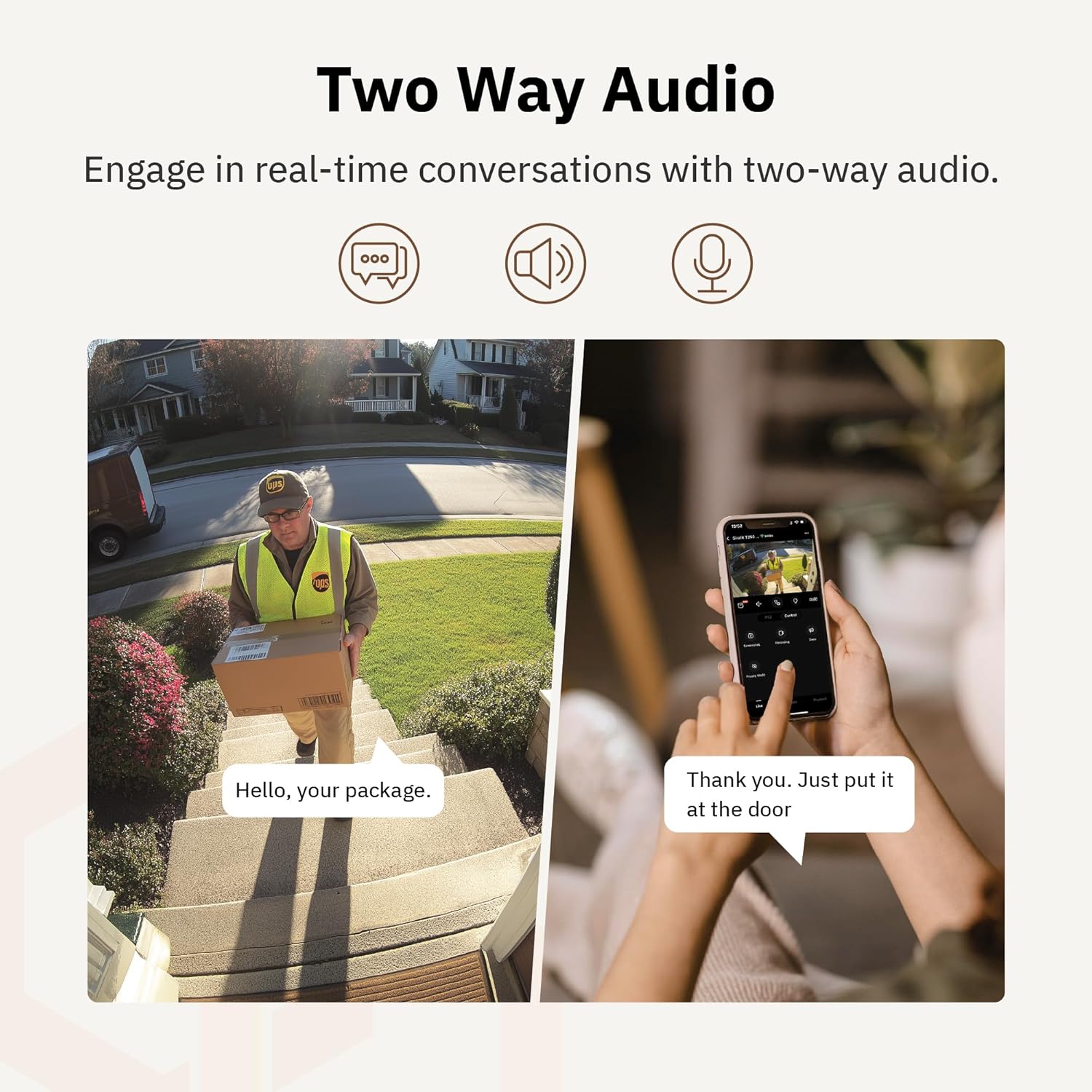
Joonis 4.6: eksampNäiteks kahesuunalise heli kasutamine ukse juures oleva kulleriga suhtlemiseks.
4.5 Privaatsusrežiim
For enhanced privacy, the camera features a privacy mode. When activated, the camera lens physically tilts down by 180°, ensuring no live feed is captured or transmitted. This provides 100% privacy protection when needed.

Figure 4.7: The camera in privacy mode, with the lens tilted downwards to ensure no recording or live view.
4.6 Video salvestamine
The camera supports two primary methods for video storage:
- Micro SD kaart: Insert a Micro SD card (up to 256GB, not included) into the designated slot on the camera for local storage of recordings.
- Pilvesalvestus: Girafit offers encrypted cloud storage services in the US. Refer to the app for subscription options and details.
5. Hooldus
5.1 Puhastamine
To maintain optimal performance, periodically clean the camera lens and housing. Use a soft, damp lapiga tolmu ja mustuse pühkimiseks. Vältige tugevate kemikaalide või abrasiivsete materjalide kasutamist, mis võivad objektiivi või viimistlust kahjustada.
5.2 Püsivara värskendused
Girafit regularly releases firmware updates to improve camera performance, add new features, and enhance security. Check the Girafit app periodically for available updates and follow the in-app instructions to install them. Ensure the camera has a stable power supply during updates.
6. Veaotsing
- Kaamera ei loo Wi-Fi-ga ühendust:
- Ensure your Wi-Fi network is 2.4GHz or 5GHz and the password is correct.
- Liiguta kaamera oma Wi-Fi ruuterile lähemale.
- Taaskäivitage ruuter ja kaamera.
- Kehv videokvaliteet:
- Kontrollige oma internetiühenduse kiirust.
- Puhastage kaamera objektiiv.
- Ensure the camera is receiving adequate power.
- Liikumistuvastus ei tööta:
- Veenduge, et liikumistuvastus oleks rakenduse seadetes lubatud.
- Adjust detection sensitivity and detection zones.
- Veenduge, et kaamera ees ei oleks takistusi view.
- Kahesuunalised heliprobleemid:
- Check microphone and speaker permissions for the Girafit app on your phone.
- Veenduge, et kaamera mikrofon ja kõlar poleks takistatud.
For further assistance, please contact Girafit customer support.
7. Tehnilised andmed
| Funktsioon | Kirjeldus |
|---|---|
| Mudeli nimi | GRF-T350SW |
| Video jäädvustamise eraldusvõime | 3K (5MP) |
| Kasutamine siseruumides/välistingimustes | Õues |
| Ühenduvustehnoloogia | Wi-Fi (2.4GHz/5GHz), Wired |
| Toiteallikas | Juhtmega elekter |
| Paigaldustüüp | Seinakinnitus |
| Erifunktsioon | 2-Way Audio, AI Detection (Human/Pet/Vehicle), Auto Tracking, Color Night Vision, IP65 Weatherproof |
| Ühilduvad seadmed | Desktop, Laptop, Smartphone (Android/iOS) |
| Kauba mõõtmed (P x L x K) | 2.63 x 2.63 x 4.76 tolli |
| Kauba kaal | 14.7 untsi |
| Salvestusvalikud | Micro SD-kaart (kuni 256 GB), pilvesalvestus |
| UPC | 764742517881 |
8. Garantii ja tugi
Girafit products are designed for reliability and performance. For warranty information, please refer to the warranty card included with your product or visit the official Girafit website. For technical support, troubleshooting assistance, or any inquiries regarding your Girafit GRF-T350SW camera, please contact Girafit customer service through the contact information provided on the official website or within the Girafit app.


