1. Sissejuhatus
Thank you for choosing the Leadfan Car Radio. This manual provides detailed instructions for the installation, operation, and maintenance of your new 10.1-inch touchscreen stereo replacement for Chevy Silverado and GMC Sierra models manufactured between 2014 and 2018. Please read this manual thoroughly before installation and use to ensure proper function and safety.
Oluline ühilduvuse märkus:
- This car radio does not support vehicles with premium sound systems (e.g., J.B.L, SO-NY Amplifier, Bose Speakers, OEM camera).
- It is not compatible with vehicles featuring optical fiber audio output.
- If your car's power cord interface has only two cables, this unit is not supported.
Always turn off the car power before connecting any product cables.
2. Ohutusalane teave
- Veenduge, et kõik ühendused oleksid kindlalt kinnitatud ja korralikult isoleeritud, et vältida lühiseid.
- Ärge kasutage seadet viisil, mis teie tähelepanu juhtimiselt hajutab.
- Vältige seadme jätmist äärmuslike temperatuuride, pikaajalise otsese päikesevalguse või liigse niiskuse kätte.
- Only use specified power cables and accessories.
- Kui te pole autoaudio juhtmestikuga tuttav, on soovitatav professionaalne paigaldus.
3. Pakendi sisu
Veenduge, et kõik allpool loetletud esemed on teie pakendis olemas:
- 10.1-inch Car Radio Unit
- Varukaamera
- GPS antenn
- Microphone (Small)
- USB-kaablid (x2)
- RCA kaabel
- Can Busi dekooder
- Toitekaabel
- Kasutusjuhend

Figure 3.1: Package contents and unit dimensions. Includes the main unit, backup camera, GPS antenna, microphone, USB cables, RCA cable, Can Bus, power cable, and user manual.
4. Seadistamine ja installimine
This unit is designed for plug-and-play installation for compatible Chevy Silverado and GMC Sierra models (2014-2018). Necessary wiring harnesses are included.
4.1 Eelinstallimine
- Ensure your vehicle is compatible as per the Introduction section.
- Lülitage sõiduki süüde välja ja ühendage lahti auto aku negatiivne klemm, et vältida lühiseid.
- Carefully remove the factory radio and dashboard trim. Refer to your vehicle's service manual for specific instructions on trim removal.
4.2 Juhtmete ühendamine
Connect the provided wiring harnesses to the corresponding ports on the new car radio and your vehicle's wiring. Ensure all connections are firm.
- Toitekaabel: Connect to the vehicle's power harness.
- RCA-kaabel: For external audio/video input/output.
- USB kaablid: For USB devices and wired CarPlay/Android Auto (if applicable).
- Pöördsisend: Connect to the backup camera signal.
- GPS-antenn: Paigaldage kohta, kus on selge view taevast.
- Raadioantenn: Connect to the vehicle's radio antenna.
- MIC: Kõne kvaliteedi parandamiseks ühendage väline mikrofon.
4.3 Tagurduskaamera paigaldamine
The included 1080p high-definition backup camera provides a 170° wide-angle view with night vision. Connect the camera as follows:
- Mount the backup camera at the rear of your vehicle.
- Connect the video cable from the camera to the 'Reverse Input' on the car radio.
- Connect the camera's power cable to your vehicle's reverse light power source (positive and negative). This ensures the camera activates when reverse gear is engaged.

Figure 4.1: Visual comparison of the vehicle dashboard before and after installing the Leadfan car radio.
Figure 4.2: Detailed diagram showing the wiring connections for the backup camera, highlighting HD, wide-angle, waterproof, and night vision features.
4.4 Lõplik kokkupanek
- Carefully place the new car radio into the dashboard opening.
- Secure the unit with screws or clips as per your vehicle's requirements.
- Reinstall any removed dashboard trim pieces.
- Ühendage uuesti autoaku negatiivne klemm.
5. Kasutusjuhised
5.1 Power On/Off and Basic Touchscreen Operation
Press the power button to turn the unit on or off. The 10.1-inch HD touchscreen supports intuitive touch gestures for navigation and control. Swipe gestures allow for easy switching between applications.

Figure 5.1: The 10.1-inch HD touchscreen interface, demonstrating touch responsiveness and split-screen capabilities.
5.2 Juhtmevaba CarPlay ja Android Auto
This unit supports wireless CarPlay for iPhone and wireless/wired Android Auto for Android phones, allowing seamless integration of your smartphone's features.
- Veenduge, et teie nutitelefonis oleks Bluetooth ja Wi-Fi lubatud.
- On the car radio, select the CarPlay or Android Auto application.
- Follow the on-screen prompts to pair your device. Once connected, you can access navigation, music, calls, and other compatible apps directly from the car radio display.
5.3 Peegellink
MirrorLink allows you to mirror your smartphone's screen onto the car radio display. iOS devices support wireless connection, while Android devices support both wireless and wired connections.
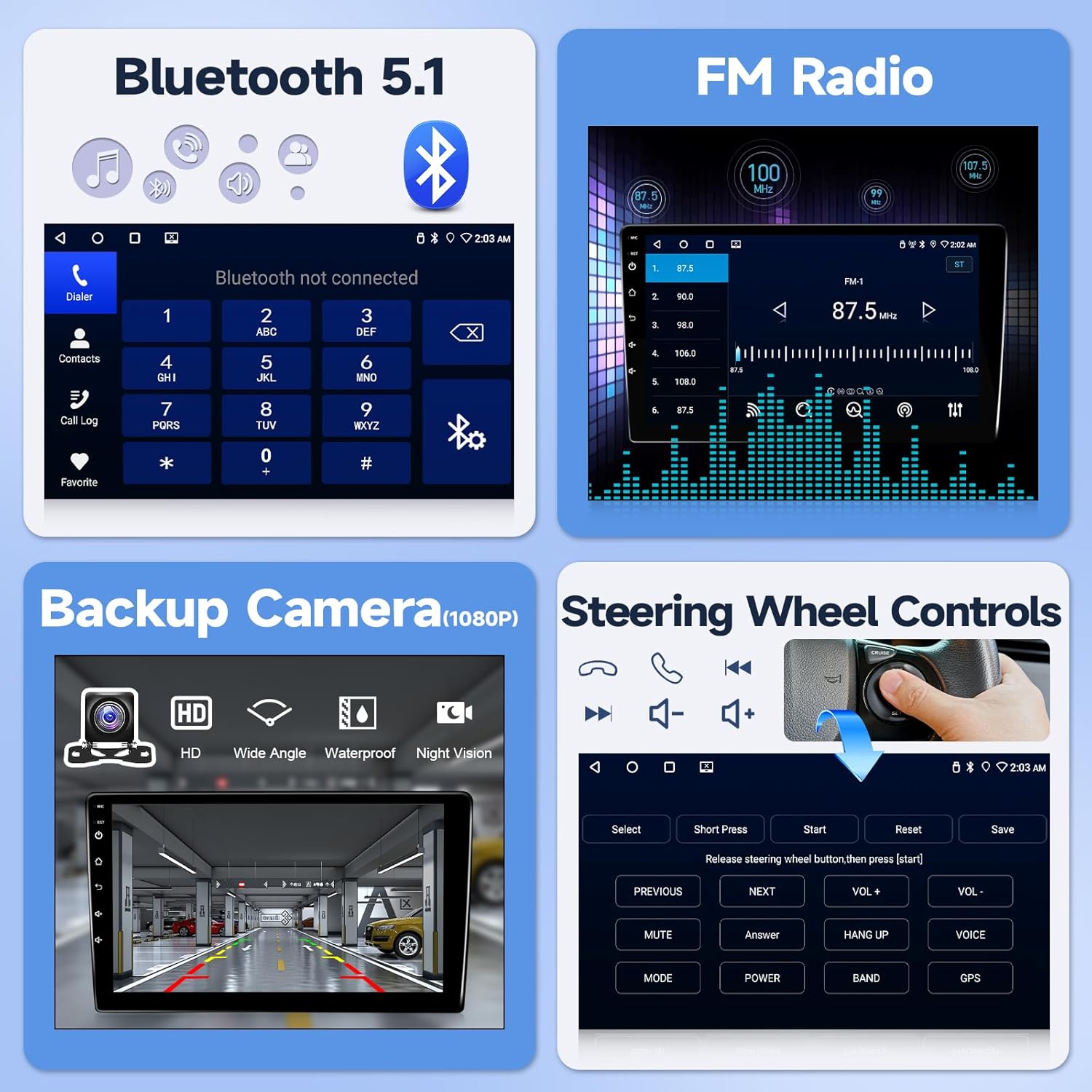
Figure 5.2: Illustration of wireless CarPlay, Android Auto, and MirrorLink functionality, showing how smartphones connect to the car radio.
5.4 Bluetooth 5.1
Ühenda oma nutitelefon Bluetoothi kaudu käed-vabad kõnede ja heli voogesituse jaoks.
- Go to the Bluetooth settings on the car radio.
- Lubage oma nutitelefonis Bluetooth ja otsige saadaolevaid seadmeid.
- Select the car radio from the list and confirm pairing.
- Once paired, you can make/receive calls and play music through the car's speakers.
5.5 GPS-navigeerimine
The unit features a built-in GPS navigation system supporting both offline and online maps. The large screen provides clear map routes.
- Veenduge, et GPS-antenn on õigesti paigaldatud ja sellel on vaba ühendus. view taevast.
- Open the navigation application on the car radio.
- Enter your destination to receive turn-by-turn directions.
5.6 FM -raadio
Access real-time radio programs and save your favorite stations.
- Select the FM Radio application.
- Kasutage skannimisfunktsiooni saadaolevate jaamade leidmiseks või käsitsi sagedusele häälestamiseks.
- Save frequently listened-to stations for quick access.

Joonis 5.3: Üleview of Bluetooth 5.1, FM Radio interface, backup camera display, and steering wheel control learning interface.

Figure 5.4: Displaying GPS navigation with online and offline map options, alongside WiFi connectivity for app downloads and internet access.
5.7 Rooliratta juhtnupud (SWC)
The unit supports steering wheel control functions for a safer driving experience.
- After correct wiring, access the SWC learning interface in the system settings.
- Roolinuppudele funktsioonide määramiseks järgige ekraanil kuvatavaid juhiseid.
5.8 Ekraani jagamise funktsioon
Use two applications simultaneously with the split-screen feature. Swipe gestures allow for easy switching between applications.
6. Omadused Üleview
- Operatsioonisüsteem: Android system with 4-core processor for smooth performance.
- Mälu: 2GB RAM + 32GB ROM for app storage.
- Kuva: 10.1-inch HD touchscreen (1280x720 resolution).
- Ühenduvus: Wireless CarPlay, Android Auto, MirrorLink, Bluetooth 5.1, Wi-Fi, USB.
- Navigeerimine: Built-in GPS with support for offline and online maps.
- Heli: FM Radio, EQ settings for customized sound.
- Ohutus: Supports 1080p HD backup camera with 170° wide-angle night vision.
- Juhtimine: Steering Wheel Control (SWC) compatibility.
- Kasutajaliides: 24 types of customizable UI designs.
7. Veaotsing
Probleemide korral vaadake palun järgmisi levinud probleeme ja lahendusi.
- Toide puudub: Ensure all power cables are securely connected and the vehicle's battery is charged. Check the fuse.
- Heli puudub: Verify speaker connections. Check volume levels and EQ settings. Ensure the mute function is not active.
- GPS-signaali kadu: Veenduge, et GPS-antenn on õigesti paigaldatud ja selle vaheline kaugus on takistusteta. view taevast.
- Bluetoothi/Wi-Fi ühenduse probleemid: Restart both the car radio and your smartphone. Ensure no other devices are interfering with the connection.
- Tagurduskaamera ei kuva pilti: Check the camera's power and video connections. Ensure the reverse trigger wire is correctly connected to the vehicle's reverse light.
- Rooliratta juhtnupud ei tööta: Verify wiring and ensure the SWC learning process has been completed successfully in the settings.
For further technical assistance, please contact customer support as described in Section 9.
8. Tehnilised andmed
| Funktsioon | Spetsifikatsioon |
|---|---|
| Ekraani suurus | 10.1 tolli |
| Operatsioonisüsteem | Android |
| Mälu salvestusmaht | 32 GB |
| Ühenduvustehnoloogia | Bluetooth, USB, WiFi |
| Eriomadused | Android Auto, Bluetooth, CarPlay, Waterproof (Backup Camera) |
| Kaardi tüüp | Põhja-Ameerika |
| Heliväljundi režiim | Stereo |
| Paigaldustüüp | Armatuurlaua kinnitus |
| Kauba kaal | 4.71 naela |
| Pakendi mõõtmed | 17.01 x 12.2 x 4.49 tolli |
9. Garantii ja tugi
This product comes with a standard warranty. Please refer to your purchase documentation for specific warranty terms and duration.
For technical support, installation queries, or troubleshooting assistance, please follow these steps:
- Locate the seller information on your purchase platform (e.g., Amazon).
- Click on the seller's name (e.g., "Nideo").
- Select the option to "Ask a question" or contact the seller directly.
- Provide a detailed description of your issue, including any photos or videos if relevant.
The seller typically offers:
- 30-day free return policy.
- 12-kuuline asendusgarantii kvaliteediprobleemide korral.
- Lifetime technical support with responses within 24 hours.
- Professional customer service.

Figure 9.1: Visual guide on how to access technical support through the seller's contact options on the purchase platform.