1. Sissejuhatus
Tänan ostu eestasing the SENCOR SPT 3907 Bluetooth Radio Player. This compact and versatile device offers multiple audio playback options, including CD, Bluetooth, USB, and FM radio. This manual provides essential information for safe and efficient use of your new player. Please read it thoroughly before operation and retain it for future reference.
2. Ohutusjuhised
- Toiteallikas: Veenduge, et toiteallikas voltage matches the rating indicated on the unit. Use only the provided power cable.
- Vesi ja niiskus: Ärge jätke seadet vihma, niiskuse ega tilkuvate/pritsivate vedelike kätte. Ärge asetage seadmele vedelikega täidetud esemeid, näiteks vaase.
- Ventilatsioon: Ärge blokeerige ühtegi ventilatsiooniava. Tagage seadme ümber piisavalt ruumi nõuetekohaseks õhuvooluks.
- Kuumus: Hoidke seadet eemal soojusallikatest, näiteks radiaatoritest, küttekehadest, pliitidest või muudest seadmetest (sh amptõsteseadmed), mis toodavad soojust.
- Puhastamine: Enne puhastamist eemaldage seade seinakontaktist. Kasutage pehmet ja kuiva lappi. Ärge kasutage vedelaid ega aerosoolpuhastusvahendeid.
- Teenindus: Ärge proovige seda toodet ise hooldada. Andke kõik hooldustööd kvalifitseeritud hooldustöötajatele.
- Patareid: When using batteries, ensure correct polarity. Do not mix old and new batteries, or different types of batteries. Remove batteries if the unit is not used for extended periods.
3. Pakendi sisu
Veenduge, et pakendis on kõik esemed olemas:
- SENCOR SPT 3907 Radio Player
- Kaugjuhtimispult
- Vahelduvvoolu kaabel
- Dokumentatsioon (käesolev juhend)
4. Toote omadused
The SENCOR SPT 3907 is designed for versatile audio entertainment:
- Väljundvõimsus: 4W RMS for clear sound.
- CD-mängija: Supports CD-R/RW discs with programmable playback for up to 20 songs.
- Bluetoothi ühenduvus: Bluetooth V2.1 + EDR for wireless audio streaming from compatible devices.
- USB taasesitus: USB connection for MP3 file playback with programmable playback for up to 99 songs.
- FM-raadio: Stereo FM radio receiver with digital tuning and 30 station presets.
- AUX-SISEND: 3.5mm auxiliary input for connecting external audio sources.
- Kuva: Backlight LCD display for easy navigation.
- Kaugjuhtimispult: Täisfunktsionaalne kaugjuhtimispult mugavaks kasutamiseks.
- Toitevalikud: Operates on AC 100-240V or D/LR20 batteries for portability.
- Lisafunktsioonid: Repeat and random playback modes.
5. Juhtnupud ja funktsioonid
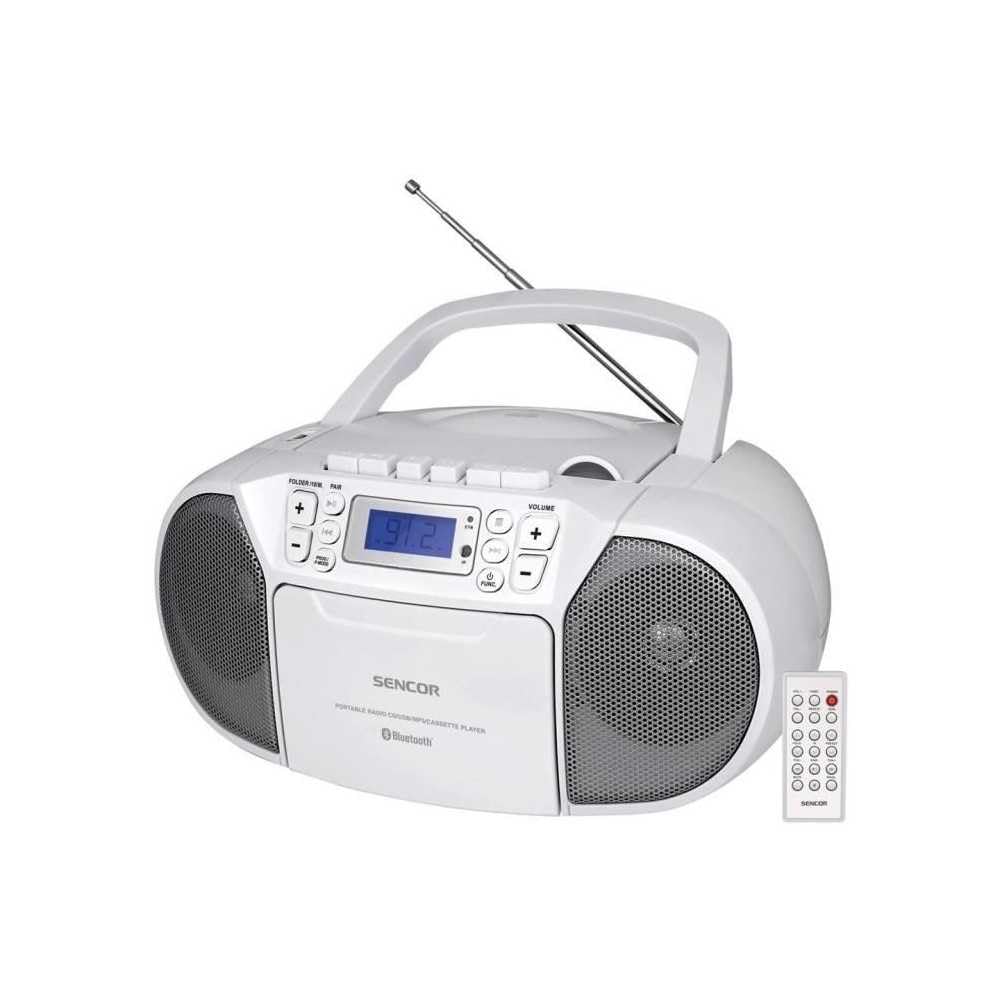
Esiosa view of the SENCOR SPT 3907 unit, highlighting the control buttons, LCD screen, CD tray, and speakers. The remote control is also visible.
Esipaneeli juhtnupud:
- POWER nupp: Lülitab seadme sisse või välja.
- MODE nupp: Switches between CD, Bluetooth, USB, FM Radio, and AUX-IN modes.
- HELITUGEVUSE +/- nupud: Reguleerib heliväljundi taset.
- PLAY/PAUSE (►/▮▮) Button: Starts or pauses playback in CD, Bluetooth, or USB mode.
- SKIP (◀◀ / ►►) Buttons: Hüppab eelmise või järgmise loo/jaama juurde.
- STOPP (■) nupp: Peatab taasesituse.
- FOLDER / PAIR Button: Navigates folders in USB mode; initiates Bluetooth pairing.
- FUNC-nupp: Accesses additional functions (e.g., program, repeat, random).
- LCD ekraan: Näitab praegust režiimi, loo numbrit, sagedust ja muud teavet.
- CD-sahtel: Audio-CD-de sisestamiseks.
- USB-port: USB-mäluseadmete ühendamiseks.
- AUX-IN pesa: Väliste heliseadmete ühendamiseks.
- Kõrvaklappide väljund: Privaatseks kuulamiseks.
Tagapaneeli juhtnupud:
- Vahelduvvoolu sisend: Ühendab vahelduvvoolu toitekaabli.
- FM-antenn: Extendable telescopic antenna for FM reception.
Kaugjuhtimispult:
The remote control duplicates most of the front panel functions for convenient operation from a distance. Refer to the remote control diagram in the included documentation for specific button layouts.
6. Seadistamine
6.1 Toiteühendus
The SENCOR SPT 3907 can be powered by AC mains or batteries.
Vahelduvvoolu toide:
- Veenduge, et seade oleks välja lülitatud.
- Connect the supplied AC power cable to the AC input jack on the rear of the unit.
- Plug the other end of the AC power cable into a standard wall outlet (AC 100-240V, 50/60Hz).
Aku võimsus:
- Avage seadme põhjas asuv patareipesa kaas.
- Insert 6 x D/LR20 size batteries (not included), ensuring correct polarity (+/-) as indicated inside the compartment.
- Sulgege akupesa kaas kindlalt.
Note: When the AC power cable is connected, battery power is automatically disconnected. Remove batteries if the unit will not be used for an extended period to prevent leakage.
6.2 Antenni seadistamine
For optimal FM radio reception, fully extend the telescopic FM antenna located on the rear of the unit. Adjust its position for the best signal.
7. Kasutusjuhised
7.1 Toite sisse-/väljalülitamine ja režiimi valik
- Vajutage nuppu VÕIMSUS button to turn the unit on. The LCD display will light up.
- Vajutage nuppu REŽIIM button repeatedly to cycle through available modes: CD, Bluetooth, USB, FM Radio, AUX-IN. The selected mode will be shown on the LCD display.
- Vajutage nuppu VÕIMSUS nuppu uuesti, et seade välja lülitada.
7.2 CD taasesitus
- Vajutage nuppu REŽIIM CD -režiimi valimiseks.
- Avage CD-pesa kaas.
- Place a CD (CD-R/RW compatible) with the label side facing up onto the spindle.
- Sulgege CD-pesa kaas. Seade loeb plaati ja ekraanile kuvatakse lugude koguarv.
- Vajutage nuppu ESITA/PAUS taasesituse alustamiseks nuppu.
- Kasutage JÄTA VAHELE (◀◀ / ►►) nuppe lugude vahelejätmiseks.
- Vajutage nuppu STOPP (■) taasesituse peatamiseks.
- Programmi taasesitus: While in STOP mode, press the TÖÖTAJA Programmeerimisrežiimi sisenemiseks kasutage nuppu. JÄTA VÄLJA buttons to select tracks and TÖÖTAJA again to confirm. Up to 20 CD songs can be programmed.
7.3 Bluetoothi kasutamine
- Vajutage nuppu REŽIIM button to select Bluetooth mode. The display will show 'BT' and flash, indicating it's in pairing mode.
- Bluetooth-toega seadmes (nt nutitelefonis, tahvelarvutis) lubage Bluetooth ja otsige saadaolevaid seadmeid.
- Select 'SPT 3907' from the list of devices. Once paired, the 'BT' indicator on the display will stop flashing and remain solid.
- Start playing audio on your connected device. The sound will be streamed through the SENCOR SPT 3907.
- Kasutage ESITA/PAUS ja JÄTA VÄLJA seadme või kaugjuhtimispuldi nuppe taasesituse haldamiseks.
7.4 USB-taasesitus
- Sisestage USB-mälupulk (mis sisaldab MP3-faile) files) USB-porti.
- Vajutage nuppu REŽIIM button to select USB mode. The unit will automatically read the files.
- Vajutage nuppu ESITA/PAUS taasesituse alustamiseks nuppu.
- Kasutage JÄTA VAHELE (◀◀ / ►►) nuppe lugude vahelejätmiseks.
- Vajutage nuppu KAUST button to navigate between folders on the USB drive.
- Programmi taasesitus: While in STOP mode, press the TÖÖTAJA Programmeerimisrežiimi sisenemiseks kasutage nuppu. JÄTA VÄLJA buttons to select tracks and TÖÖTAJA again to confirm. Up to 99 MP3 songs can be programmed.
7.5 FM-raadio kasutamine
- Vajutage nuppu REŽIIM button to select FM Radio mode. The current frequency will appear on the display.
- Parema vastuvõtu saavutamiseks pikendage teleskoopantenni.
- Automaatne häälestamine: Vajutage ja hoidke all nuppu JÄTA VAHELE (◀◀ / ►►) nuppe paar sekundit all, et automaatselt järgmist saadaolevat jaama otsida.
- Käsitsi häälestamine: Vajutage lühidalt nuppu JÄTA VAHELE (◀◀ / ►►) buttons to fine-tune the frequency step-by-step.
- Eelseadistatud jaamad: Jaama salvestamiseks häälestage soovitud sagedusele ja vajutage seejärel TÖÖTAJA nuppu. Kasuta JÄTA VÄLJA nuppe, et valida eelhäälestatud number (P01–P30), seejärel vajutage TÖÖTAJA kinnitamiseks uuesti.
- Eelhäälestatud jaama taasesitamiseks vajutage TÖÖTAJA nuppu korduvalt, et salvestatud jaamu läbi vaadata.
7.6 AUX-IN-ühendus
- Connect one end of a 3.5mm audio cable (not included) to the AUX-IN jack on the SENCOR SPT 3907.
- Ühendage kaabli teine ots välise heliseadme (nt MP3-mängija või nutitelefoni) kõrvaklappide pesa või heliväljundiga.
- Vajutage nuppu REŽIIM nuppu AUX-IN režiimi valimiseks.
- Start playback on your external device. The audio will be played through the SENCOR SPT 3907.
- Reguleerige helitugevust nupu abil MAHT +/- buttons on the unit or remote control, and also on your external device.
8. Hooldus
8.1 Seadme puhastamine
Wipe the exterior of the unit with a soft, dry cloth. Do not use abrasive cleaners, waxes, or solvents as they may damage the finish. Ensure the unit is unplugged from the power source before cleaning.
8.2 CD-objektiivi hooldus
If the CD player experiences reading errors, the lens may need cleaning. Use a commercially available CD lens cleaner disc. Do not touch the lens directly.
8.3 Aku vahetamine
When the unit operates on batteries and the sound becomes distorted or the unit stops functioning, replace all batteries with new D/LR20 batteries, ensuring correct polarity.
9. Veaotsing
| Probleem | Võimalik põhjus | Lahendus |
|---|---|---|
| Pole jõudu | Toitekaabel pole ühendatud; patareid on tühjad või valesti sisestatud. | Check AC power connection; Replace batteries, ensuring correct polarity. |
| Ei mingit heli | Helitugevus on liiga madal; valitud on vale režiim; kõrvaklapid on ühendatud. | Increase volume; Select correct mode (CD, BT, USB, FM, AUX); Disconnect headphones. |
| CD ei mängi / Jätab vahele | CD on määrdunud või kriimustatud; CD on valesti sisestatud; CD lääts on määrdunud. | Puhastage või vahetage CD; Sisestage CD sildiga ülespoole; Kasutage CD läätse puhastusvahendit. |
| Bluetooth ei loo ühendust | Unit not in pairing mode; Device too far; Bluetooth not enabled on external device. | Ensure unit is in BT pairing mode; Move device closer; Enable Bluetooth on your device. |
| Halb FM -vastuvõtt | Antenn pole välja sirutatud või õigesti paigutatud; nõrk signaal. | Pikendage teleskoopantenn täielikult ja reguleerige seda; proovige seadet teise kohta paigutada. |
10. Tehnilised andmed
| Funktsioon | Spetsifikatsioon |
|---|---|
| Mudel | 3907 SPT |
| Väljundvõimsus | 4 W RMS |
| Toetatud meedia | CD-R, CD-RW, Bluetooth, MP3, USB |
| Bluetoothi versioon | V2.1 + EDR |
| FM-raadio eelseaded | 30 jaama |
| Ühenduvus | Auxiliary (3.5mm), USB |
| Toiteallikas | AC 100-240V, 50/60Hz; 6 x D/LR20 batteries |
| Kauba kaal | 1 kg 960 g |
| Mõõtmed | (Not specified in provided data) |
11. Garantii ja tugi
SENCOR products are manufactured to high-quality standards and are warranted against manufacturing defects. For specific warranty terms and conditions, please refer to the warranty card included with your purchase or visit the official SENCOR website. For technical support, service, or inquiries, please contact your local SENCOR distributor or authorized service center.


