1. Toote lõppview
The E-ACE 4.3-inch Dual Lens Car DVR Rearview Mirror Dash Cam is designed to enhance driving safety by providing comprehensive video recording of your journeys. This device integrates a front-facing camera and supports an optional rear-facing camera, offering a wide field of view and continuous recording capabilities. Its sleek design replaces your existing rearview mirror, providing a discreet and integrated solution for vehicle surveillance.
Key features include a 4.3-inch high-definition display, dual-lens recording, night vision, loop recording, and a G-sensor for automatic incident detection.

Image: The E-ACE rearview mirror dash cam displaying both front and rear camera feeds on its integrated screen.
2. Pakendi sisu
Palun kontrollige pakendilt järgmisi esemeid:
- E-ACE Rearview Mirror Dash Cam Unit
- Auto laadija
- Fixed Bandages (for mounting)
- Kasutusjuhend
- Kaardilugeja
- Optional: Rear View Camera + Cable (6M or 10M, depending on variant)
- Optional: Buck Line (for parking monitoring power)
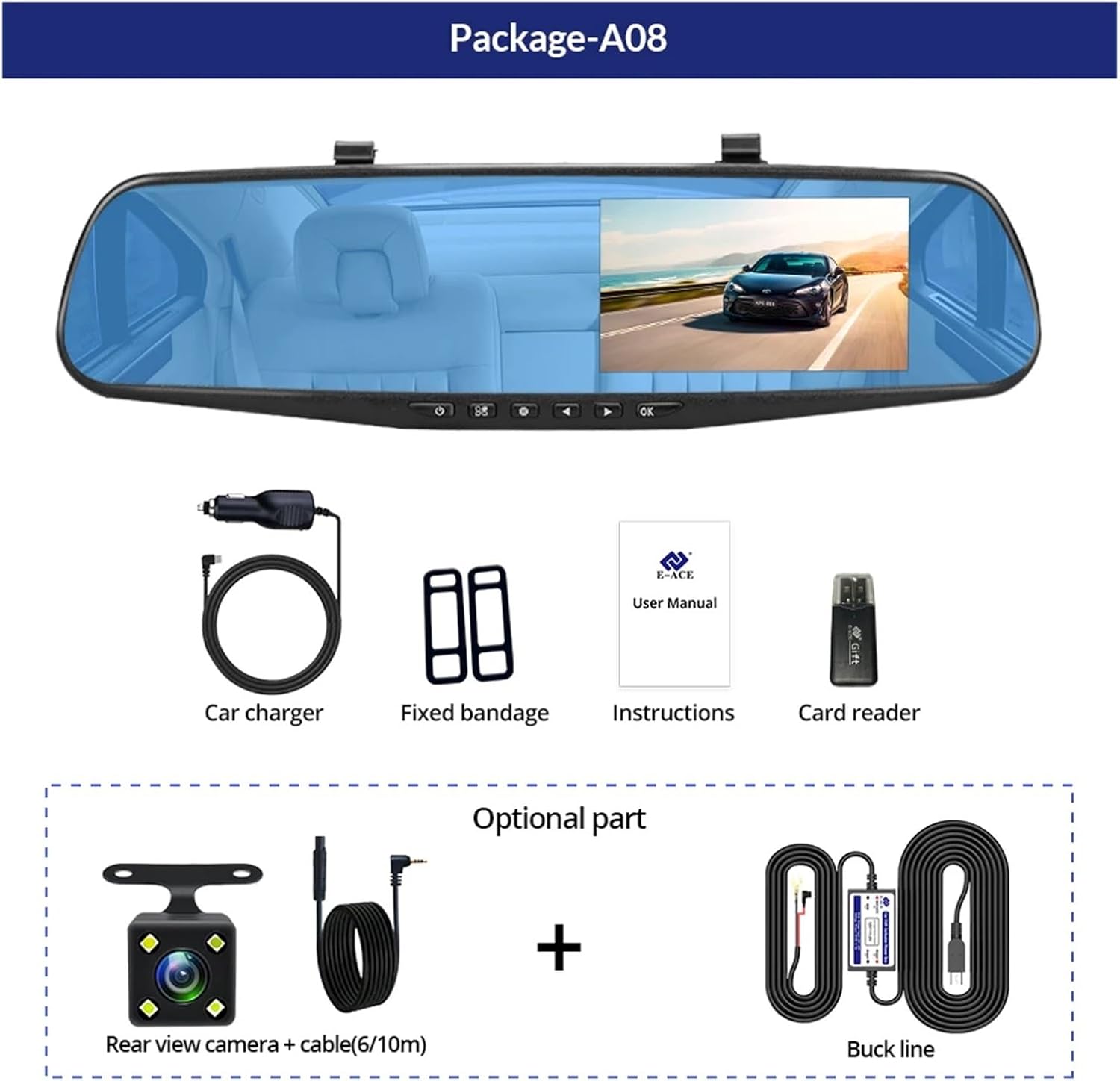
Image: A visual representation of the items included in the E-ACE dash cam package, showing the main unit and accessories.
3. Toote omadused
- 4.3-tolline kõrglahutusega ekraan: Provides clear visibility for real-time monitoring and playback.
- Kahe objektiivi disain: Captures both front and rear footage simultaneously for comprehensive coverage.
- Built-in Night Vision Technology: Ensures clear recordings in low-light conditions.
- Kasutajasõbralik paigaldus: Sleek rearview mirror design integrates seamlessly into your vehicle.
- Loop salvestamine: Kirjutab automaatselt üle vanima footagkui mälukaart on täis, tagades pideva salvestamise.
- G-Sensor Feature: Detects sudden movements or impacts and automatically locks the current video file et vältida selle ülekirjutamist.
- Parkimise jälgimine: Records video when motion or impact is detected while the vehicle is parked (requires buck line connection).
- 170-kraadine lainurk: Pakub laia valikut view eesolevast teest.
- Tagurpidi pilt: Displays the rear camera view with parking guidelines when reversing.
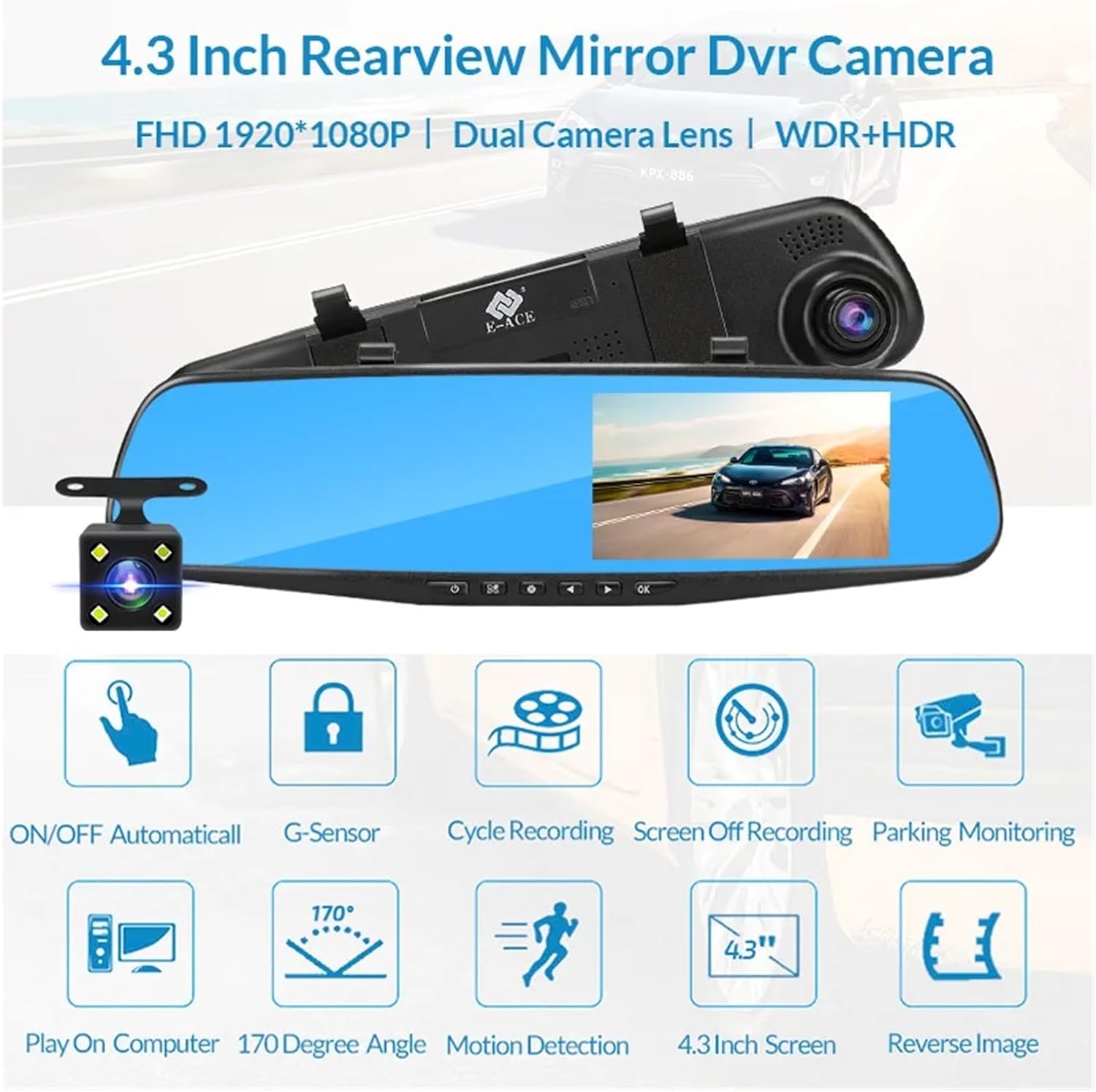
Image: An illustration highlighting the various functional features of the E-ACE dash cam.
4. Komponentide identifitseerimine
Familiarize yourself with the various parts and controls of your E-ACE dash cam:

Image: A detailed diagram identifying the buttons, ports, and features on the E-ACE dash cam unit.
- ON/OFF nupp: Lülitab seadme sisse või välja.
- Menüünupp: Avab seaded ja valikud.
- Režiimi nupp: Switches between video recording, photo, and playback modes.
- ÜLES nupp: Navigates up in menus or adjusts settings.
- Nupp alla: Navigates down in menus or adjusts settings.
- OK nupp: Kinnitab valikuid või alustab/peatab salvestamise.
- TF-kaardi pesa: Insert your MicroSD (TF) card here.
- AV-sisendport: Ühendab tagumise kaamera.
- USB-port: Toiteallika ja andmeedastuse jaoks.
- Lähtestamisnupp: Resets the device to factory settings (use a thin pin).
- Mikrofon: Salvestab heli sõiduki sees.
5. Seadistamine ja installimine
5.1 Mälukaardi sisestamine
Before installation, insert a high-speed MicroSD (TF) card (Class 10 or higher, up to 64GB recommended) into the TF Card Slot (7) with the contacts facing the screen. Ensure the card is inserted correctly until it clicks into place.
5.2 Videoregistraatori paigaldamine
- Attach the fixed bandages to the back of the dash cam unit.
- Securely strap the dash cam over your vehicle's existing rearview mirror using the fixed bandages. Ensure it is centered and stable.
5.3 Toiteallika ühendamine
- Connect the car charger to the USB Port (9) on the dash cam.
- Ühenda autolaadija teine ots oma sõiduki sigaretisüütaja pistikupessa.
- Route the power cable neatly along the windshield trim to avoid obstructing your view.
5.4 Tagumise kaamera paigaldamine (valikuline)
- Connect the rear camera cable to the AV-IN Port (8) on the dash cam.
- Route the rear camera cable from the dash cam to the rear of your vehicle. This typically involves tucking the cable under the headliner and along the side pillars.
- Mount the rear camera on the rear windshield or near the license plate using its adhesive or screws. Ensure it has a clear view taga olevast teest.
- If using the reverse image function, connect the red wire from the rear camera cable to your vehicle's reverse light power supply.
6. Kasutusjuhised
6.1 Toide sisse/välja
- Automaatne: The dash cam will automatically power on and start recording when your vehicle's ignition is turned on (if connected to a switched power source).
- Käsiraamat: Press and hold the ON/OFF Button (1) to manually power the device on or off.
6.2 Põhitoimingud
- Režiimide vahetamine: Press the Mode Button (3) to cycle between Video Recording, Photo, and Playback modes.
- Juurdepääsu menüü: In any mode, press the Menu Button (2) to enter the settings menu. Use the UP (4) and Down (5) buttons to navigate, and OK (6) to select.
- Alusta/peata salvestamine: In Video Recording mode, press the OK Button (6) to manually start or stop recording.
6.3 Kuvareziimid
While recording, you can typically switch between different display views by pressing the UP or Down buttons:
- Front Camera Only
- Rear Camera Only
- Picture-in-Picture (Front main, Rear sub-window)
- Picture-in-Picture (Rear main, Front sub-window)
6.4 Silmussalvestus
Set the loop recording duration (e.g., 1, 3, or 5 minutes) in the settings menu. When the memory card is full, the oldest unlocked files kirjutatakse uute salvestistega üle.
6.5 G-sensor
The G-sensor automatically detects collisions or sudden braking. When triggered, it locks the current video file, preventing it from being overwritten by loop recording. Adjust sensitivity in the settings.
6.6 Parkimise jälgimine (valikuline)
If the buck line is installed, the dash cam can monitor your vehicle while parked. When motion or impact is detected, it will automatically record a short video. Enable this feature in the settings.
6.7 Kuupäeva ja kellaaja seadistus
It is important to set the correct date and time in the system settings for accurate timestamps teie salvestistel.
7. Hooldus
- Puhastamine: Objektiivi ja ekraani puhastamiseks kasutage pehmet ja kuiva lappi. Vältige abrasiivseid puhastusvahendeid ega lahusteid.
- Mälukaart: Format the MicroSD card regularly (e.g., once a month) within the dash cam's settings to maintain optimal performance and prevent data corruption. Back up important files enne vormindamist.
- Temperatuur: Avoid exposing the device to extreme temperatures, as this can affect battery life and component integrity.
- Püsivara värskendused: Kontrollige tootja poolt website periodically for firmware updates that may improve performance or add features.
8. Veaotsing
| Probleem | Võimalik põhjus | Lahendus |
|---|---|---|
| Videoregistraator ei lülitu sisse. | No power supply; faulty charger; loose connection. | Check car charger connection and vehicle's cigarette lighter. Try a different USB cable/charger. |
| Salvestamine peatub automaatselt. | Memory card full; slow memory card; G-sensor sensitivity too high. | Format the memory card. Use a Class 10 or higher MicroSD card. Lower G-sensor sensitivity in settings. |
| Video footage on udune. | Objektiivi kaitsekile; määrdunud objektiiv; vale fookus. | Remove any protective film. Clean the lens with a soft cloth. |
| Tagumine kaamera ei kuva pilti. | Loose connection; faulty cable/camera. | Check the AV-IN connection. Ensure the rear camera is properly installed. |
| Seade hangub või jookseb kokku. | Tarkvaraprobleem; mälukaardi viga. | Press the Reset Button (10) with a thin pin. Format the memory card. |
9. Tehnilised andmed
- Mudeli nimi: DMMRUTXB
- Kuva: 4.3 tolli
- Kaamera: Dual Lens (Front & Rear support)
- Video eraldusvõime: FHD 1920x1080P (Front)
- Omadused: Loop Recording, G-Sensor, Night Vision, Parking Monitoring, 170-degree wide angle
- Hoiustamine: Supports MicroSD (TF) card, Class 10 or higher (up to 64GB)
- Ühenduvus: USB, AV-IN (for rear camera)
- Kauba kaal: Umbes 1.76 grammi (50 untsi)
- Pakendi mõõtmed: Ligikaudu 0.39 x 0.39 x 0.39 tolli
- Tootja: DMMRUTXB
10. Garantii ja tugi
For warranty information and technical support, please refer to the documentation provided with your purchase or contact the retailer/manufacturer directly. Keep your purchase receipt as proof of purchase.


