1. Sissejuhatus
The Hama WM-450 Multi-Device Wireless Mouse is an optical mouse designed for versatile use across multiple devices. It features 7 buttons, a scroll wheel, and supports wireless connectivity via Bluetooth (two channels) and a 2.4 GHz radio frequency (one channel) using a USB-A receiver. This allows simultaneous connection to up to three devices, with quick switching between them. An integrated AI Assist button enhances productivity by activating an inter-program AI assistant. The mouse is designed for comfortable and silent operation.

Pilt 1.1: läbiview of the Hama WM-450 mouse highlighting its key features: Bluetooth connectivity, 10-meter wireless range, USB-A receiver, and battery power.
2. Seadistamine
2.1 Aku paigaldamine
- Leidke hiire alumisel küljel akupesa.
- Avage patareipesa kaas.
- Insert the two AAA batteries (included) according to the polarity markings (+/-) inside the compartment.
- Sulgege akupesa kaas kindlalt.
2.2 Sisse-/väljalülitamine
Slide the ON/OFF switch, located on the underside of the mouse, to the 'ON' position to power on the mouse. Slide it to 'OFF' when not in use to conserve battery life.
2.3 Connecting via USB-A Receiver (2.4 GHz Radio)
- Remove the USB-A receiver from its storage slot on the underside of the mouse.
- Plug the USB-A receiver into an available USB-A port on your computer, laptop, or compatible device.
- The mouse should be automatically recognized and ready for use. This connection uses the 2.4 GHz radio channel.
2.4 Bluetoothi kaudu ühendamine
The mouse supports two Bluetooth channels for connecting to different devices.
- Veenduge, et hiir oleks sisse lülitatud.
- Press the channel switch button (usually on the underside or top of the mouse) to select either Bluetooth Channel 1 or Bluetooth Channel 2. The corresponding indicator light will flash.
- On your device (PC, tablet, smartphone), go to Bluetooth settings and enable Bluetooth.
- Otsi new devices. The mouse should appear as 'Hama WM-450' or similar.
- Select the mouse to pair. Follow any on-screen prompts.
- Once paired, the indicator light will stop flashing and remain solid for a few seconds, indicating a successful connection.

Image 2.1: The underside of the Hama WM-450 mouse, illustrating the battery compartment, the ON/OFF switch, and the integrated storage for the USB-A receiver.
3. Töötamine
3.1 Põhifunktsioonid
- Vasak klõps: Esmane valik ja aktiveerimine.
- Paremklõps: Avab kontekstimenüüd.
- Kerimisratas: Kerib dokumente ja web pages. The high-quality aluminum scroll wheel provides precise control.
- Vaikse klõpsuga nupud: The left and right click buttons are designed for silent operation, reducing noise in quiet environments.
3.2 Mitme seadme vahetamine
To switch between connected devices (USB-A, Bluetooth 1, Bluetooth 2), press the dedicated channel switch button on the mouse. The mouse will instantly connect to the selected device.
3.3 Side Navigation Buttons
The mouse features two practical side buttons. These buttons typically function as 'Back' and 'Forward' for easier navigation in web browsers, file explorers, and applications like Outlook.

Pilt 3.1: Lähivõte view of the two side navigation buttons on the Hama WM-450 mouse, used for 'Back' and 'Forward' functions.
3.4 DPI reguleerimine
The mouse includes a DPI switch button, usually located near the scroll wheel. Press this button to cycle through different sensitivity settings: 800, 1200, and 1600 DPI (Dots Per Inch). Choose the DPI setting that best suits your preference and task.
3.5 AI Assist Button
The dedicated AI Assist button activates an inter-program AI assistant, designed to enhance productivity. Refer to your device's software documentation for specific functionalities enabled by this feature.
4. Hooldus
4.1 Puhastamine
To clean the mouse, use a soft, dry, lint-free cloth. For stubborn dirt, slightly dampen the cloth with water or a mild cleaning solution. Avoid using harsh chemicals, abrasive cleaners, or excessive moisture, as these can damage the mouse.
4.2 Aku vahetamine
When the mouse performance degrades or the indicator light signals low battery, replace the two AAA batteries. Always use fresh batteries of the same type.
4.3 USB Receiver Storage
When transporting the mouse or not using the 2.4 GHz radio connection, store the USB-A receiver in its dedicated slot on the underside of the mouse to prevent loss.
5. Veaotsing
- Hiir ei reageeri:
- Veenduge, et hiir oleks sisse lülitatud.
- Kontrollige aku taset ja vajadusel vahetage välja.
- For USB-A connection, ensure the receiver is securely plugged into a working USB port. Try a different USB port.
- Bluetooth-ühenduse loomiseks veenduge, et Bluetooth on teie seadmes lubatud ja hiir on seotud. Proovige hiir uuesti siduda.
- Ensure the correct channel (USB-A, BT1, BT2) is selected on the mouse.
- Katkendlik ühendus:
- Move the mouse closer to the receiver/device. The effective range is up to 10 meters, but obstacles can reduce this.
- Vältige hiire kasutamist teiste traadita seadmete läheduses, mis võivad häireid põhjustada.
- Kursori liikumine on ebaühtlane või aeglane:
- Puhastage hiire alumisel küljel asuv optiline andur.
- Veenduge, et kasutate hiirt sobival pinnal. Tugevalt peegeldavad või läbipaistvad pinnad võivad jõudlust mõjutada.
- Adjust the DPI setting to a higher value if the cursor is too slow.
- Side buttons or AI Assist button not working:
- Ensure your operating system or application supports these functions.
- Check for any specific software or driver requirements for your device.
6. Tehnilised andmed
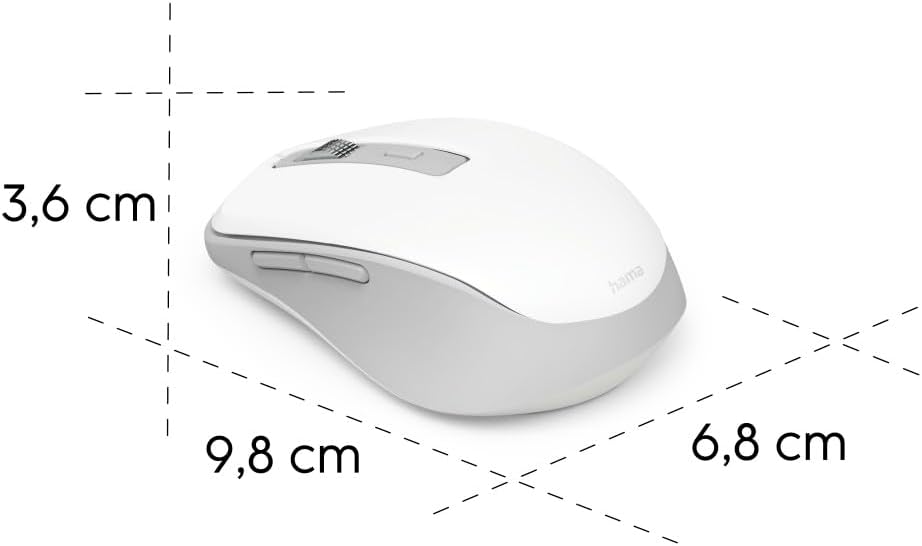
Image 6.1: Dimensional diagram of the Hama WM-450 mouse, indicating its length, width, and height.
| Kaubamärk | Hama |
| Mudeli nimi | WM-450 |
| Mudeli number | 00173080 |
| Ühenduvustehnoloogia | Bluetooth, 2.4 GHz Radio (USB-A) |
| Wireless Range | Kuni 10 meetrit |
| sensor Technology | Optiline |
| DPI seaded | 800, 1200, 1600 |
| Nuppude arv | 7 (including scroll wheel click) |
| Toiteallikas | 2 x AAA patareid (kaasas) |
| Mõõdud (P x L x K) | 9.8 x 6.8 x 3.6 cm (ligikaudne) |
| Kaal | 140 grammi |
| Ühilduvad seadmed | PC, Tablet, Laptop, Smartphone, iPad |
| Eriomadused | Multi-device connectivity (3 devices), AI Assist button, Silent click buttons, Side navigation buttons, Retractable USB receiver, Polymer-coated mouse feet, High-quality aluminum scroll wheel. |
| Materjali koostis | At least 20% recycled materials |
| Pakendamine | 100% plastikvaba |
7. Garantii ja tugi
For warranty information, technical support, or service inquiries, please refer to the warranty card included with your product or visit the official Hama websaidil. Klienditoe kontaktandmed on tavaliselt saadaval tootja veebisaidil. websaidile.


