Sissejuhatus
The Surfans F28 is a high-fidelity portable music player designed to deliver an immersive audio experience. Featuring dual ESS9018 DACs, a 4.4mm balanced output, and comprehensive Bluetooth 5.2 support including LDAC and aptX HD, the F28 supports a wide range of lossless audio formats. This manual provides detailed instructions for setting up, operating, maintaining, and troubleshooting your device to ensure optimal performance and longevity.

Joonis 1: Esi- ja tagakülg view of the Surfans F28 HiFi Music Player.
Pakendi sisu
Palun veenduge, et kõik allpool loetletud esemed on teie pakendis olemas:
- 1x Surfans F28 HiFi Music Player
- 1x USB-C laadimiskaabel
- 1x 128GB Micro SD Card (pre-installed or included separately)
- 1x Kasutusjuhend (käesolev dokument)

Figure 2: Illustration of typical package contents.
Toode läbiview
Familiarize yourself with the various components and controls of your F28 music player.
Peamised omadused:
- Dual ESS9018 DACs: For high-resolution audio decoding and minimal distortion.
- 4.4 mm tasakaalustatud väljund: Provides enhanced audio quality and power for demanding headphones.
- 3.5 mm üheotsaline väljund: Standard audio output for common headphones.
- Kahesuunaline Bluetooth 5.2: Supports LDAC and aptX HD for high-quality wireless audio transmission and reception.
- 3.5-tolline IPS-puuteekraan: For intuitive navigation and control.
- ALPS Analog Volume Knob: For precise volume adjustments.
- Laiendatav salvestusruum: Toetab kuni 512 GB suuruseid Micro SD-kaarte.
- USB-C port: Laadimiseks ja andmeedastuseks.

Figure 3: The F28 player showcasing its display and audio capabilities.

Figure 4: The dual ESS9018K2M DAC chips, central to the F28's high-fidelity audio.

Figure 5: Top panel with 4.4mm balanced and 3.5mm single-ended audio outputs, and the ALPS analog volume knob.
Seadistamine
1. Seadme laadimine
Before first use, fully charge the F28. Connect the included USB-C cable to the player's USB-C port and the other end to a USB power adapter (5V/1A recommended) or a computer's USB port. The charging indicator will show the charging status. A full charge typically takes several hours.
2. Micro SD-kaardi sisestamine
The F28 supports Micro SD cards up to 512GB. Locate the Micro SD card slot on the bottom of the device. Gently insert the Micro SD card with the gold contacts facing down until it clicks into place. To remove, push the card in slightly until it springs out.

Figure 6: Inserting the Micro SD card and connecting via USB-C for data transfer.
3. Muusika edastamine Files
Connect the F28 to your computer using the USB-C cable. The player will appear as a removable storage device. You can then drag and drop your music files directly into the Micro SD card's folders. The F28 supports various lossless formats including DSD (DSF/DFF), FLAC/WAV (up to 384kHz), AIFF/APE, as well as MP3/AAC.

Joonis 7: Toetatud heli file formats for the F28 player.
Kasutusjuhised
1. Toide sisse/välja
- Toide sisse: Vajutage ja hoidke toitenuppu (asub küljel) all, kuni ekraan süttib.
- Toide välja: Vajutage ja hoidke toitenuppu all, kuni kuvatakse väljalülitusaken, seejärel kinnitage.
2. Põhiline navigeerimine
The F28 features a 3.5-inch IPS touchscreen for primary navigation. Swipe gestures and taps are used to select options and move between menus. Physical buttons on the side provide additional control for playback (play/pause, next/previous track) and menu navigation.
3. Muusika taasesitus
From the main menu, select "My Music" or "Folder" to browse your audio files. Tap on a song to begin playback. The playback screen displays track information, progress, and playback controls.
4. Helitugevuse juhtimine
Adjust the volume using the gold-colored ALPS analog knob located on the top right of the device. Rotate clockwise to increase volume and counter-clockwise to decrease. The volume level will be displayed on the screen.
5. Bluetooth-ühenduvus
The F28 supports Bidirectional Bluetooth 5.2 with LDAC and aptX HD codecs for high-quality wireless audio. To pair with Bluetooth headphones or speakers:
- Go to "System Settings" and select "Bluetooth".
- Lülitage Bluetooth SISSE.
- Mängija otsib saadaolevaid seadmeid. Valige sidumiseks oma seade loendist.
The F28 can also act as a Bluetooth receiver, allowing you to stream audio from your phone or PC to the player.

Figure 8: The F28 features a Bluetooth 5.2 chip for stable and high-quality wireless connections.
6. Ekvalaiseri sätted
The F28 includes an equalizer to customize your sound. Navigate to the "Equalizer" option in the settings. You can choose from various presets or create a custom sound profile by adjusting the frequency bands.
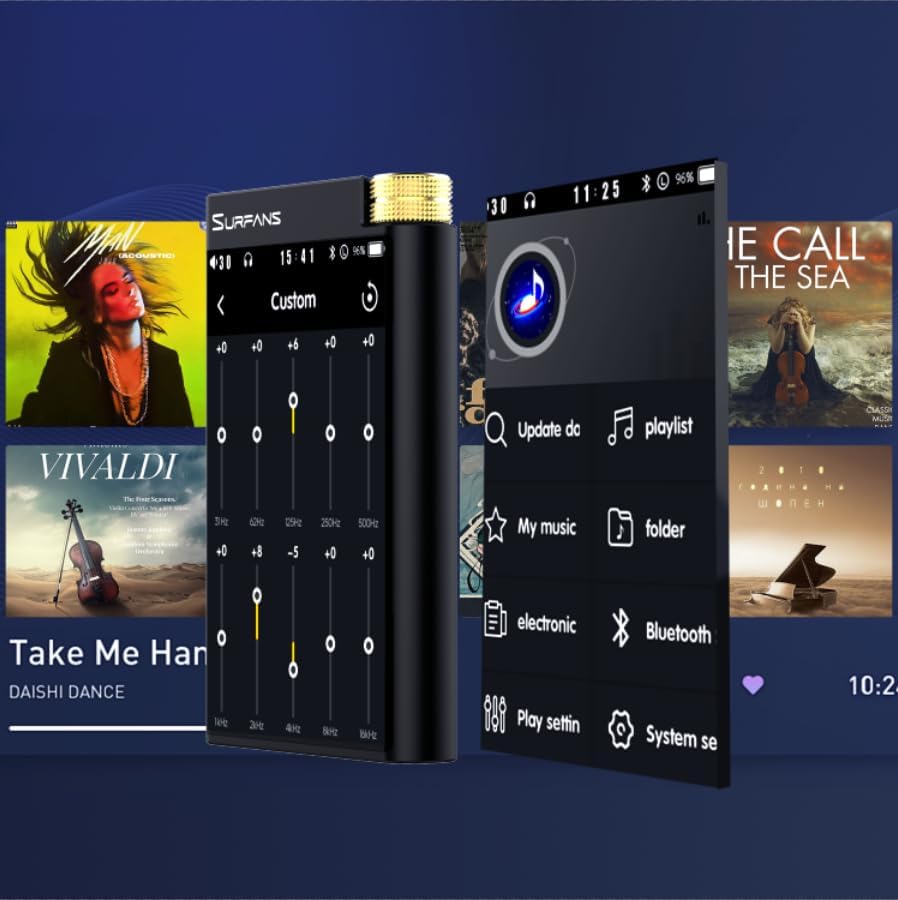
Figure 9: Customizing audio with the built-in equalizer.
7. Väliste seadmetega ühendamine
Use the 4.4mm balanced or 3.5mm single-ended output to connect to headphones, amplifiers, or speakers. The USB-C port also supports USB DAC functionality, allowing the F28 to act as an external sound card for your computer.

Figure 10: The F28 can be connected to various audio systems, including acting as a USB DAC for computers.
Hooldus
- Puhastamine: Seadme puhastamiseks kasutage pehmet ja kuiva lappi. Vältige abrasiivsete puhastusvahendite või lahustite kasutamist.
- Hoiustamine: Hoidke mängijat jahedas ja kuivas kohas, eemal otsesest päikesevalgusest ja äärmuslikest temperatuuridest.
- Aku hooldus: Aku eluea pikendamiseks vältige aku sagedast täielikku tühjendamist. Pikemaajalise hoiustamise korral laadige akut iga paari kuu tagant umbes 50%-ni.
Veaotsing
| Probleem | Võimalik põhjus | Lahendus |
|---|---|---|
| Seade ei lülitu sisse. | Aku tühjeneb; seade hangub. | Charge the device for at least 30 minutes. If still unresponsive, try holding the power button for 10-15 seconds for a hard reset. |
| Touchscreen is unresponsive or slow. | Ajutine tarkvaratõrge; ekraanikaitse segamine. | Restart the device. Ensure the screen is clean and free of debris. If using a screen protector, ensure it is properly applied and not too thick. |
| Bluetoothi sidumise probleemid. | Device not in pairing mode; distance; interference. | Ensure both devices are in pairing mode and within range. Turn off and on Bluetooth on both devices. Clear previous pairings if necessary. |
| Low volume via Bluetooth. | Volume settings on both devices; codec compatibility. | Increase volume on both the F28 and the connected Bluetooth device. Ensure optimal codec (LDAC/aptX HD) is selected if supported by the receiving device. |
| Muusika files not recognized or played in incorrect order. | Rikutud files; file system indexing issue. | Tagada files are in supported formats. Re-scan the music library from the player's settings. If issues persist, try reformatting the Micro SD card (backup data first) and re-transferring files. Note: Some players may sort by filename alphabetically rather than track number metadata. |
Tehnilised andmed
| Funktsioon | Detail |
|---|---|
| Mudeli nimi | F28 128G |
| Toote mõõtmed | 0.7 x 2.6 x 4.7 tolli |
| Kauba kaal | 9.6 untsi |
| DAC kiip | Dual ESS9018K2M |
| Toetatud helivormingud | DSD (DSF/DFF), FLAC/WAV (up to 384kHz/32-bit), AIFF/APE, MP3/AAC, WMA Lossless |
| Bluetoothi versioon | 5.2 (Bidirectional, supports LDAC/aptX HD) |
| Ekraani suurus | 3.5 Inches IPS Touchscreen |
| Sisemälu | 128GB (included Micro SD card) |
| Laiendatav salvestusruum | Kuni 512 GB Micro SD-kaardi kaudu |
| Aku | 1x 12V battery (included), approx. 12-hour playback |
| Väljundpordid | 4.4mm Balanced, 3.5mm Single-Ended |
| Ühenduvustehnoloogia | Aux, Bluetooth 5.2, USB-C |
| Erifunktsioon | Ekvalaiser |
Garantii ja tugi
For warranty information and technical support, please refer to the official Surfans webveebisaidilt või võtke otse ühendust nende klienditeenindusega. Hoidke ostutšekk ostutõendina garantiinõuete korral.
You can visit the official Surfans Store on Amazon for more information and support: Surfans Audio Store


