1. Sissejuhatus
This manual provides detailed instructions for the setup, operation, and maintenance of your Transformers GK01 Wireless Mechanical Keyboard. The GK01 is a versatile keyboard featuring tri-mode connectivity (Bluetooth 5.0, 2.4GHz wireless, and USB-C wired), a 101-key layout, RGB backlighting, and hot-swappable switches for a customizable typing experience.

Figure 1.1: Transformers GK01 Wireless Mechanical Keyboard.
2. Pakendi sisu
Palun veenduge, et kõik allpool loetletud esemed on teie pakendis olemas:
- Transformers GK01 Wireless Mechanical Keyboard
- USB-C-USB-A kaabel
- 2.4 GHz traadita USB-adapter
- 2-in-1 Võtmekork ja lüliti tõmbaja
- Kasutusjuhend (see dokument)
- Varulülitid (2 tk)
- Klaviatuuri kate
3. Seadistamine ja ühendus
3.1. Tri-Mode Connection Overview
The GK01 keyboard supports three connection modes: USB-C wired, 2.4GHz wireless, and Bluetooth 5.0. You can connect to up to five devices simultaneously and switch between them seamlessly.

Figure 3.1: Tri-Mode Connection Capabilities.
3.2. USB-C juhtmega ühendus
- Leidke klaviatuuril USB-C-port.
- Ühendage kaasasoleva USB-C-kaabli üks ots klaviatuuriga.
- Connect the other end of the USB-C cable to an available USB-A port on your computer.
- Klaviatuur tuvastatakse automaatselt ja see on kasutusvalmis.
3.3. 2.4 GHz traadita ühendus
- Locate the 2.4GHz wireless USB dongle.
- Ühendage dongel arvuti vabasse USB-A-porti.
- On the keyboard, ensure the mode switch (usually on the side or back) is set to 2.4GHz mode.
- Klaviatuur peaks automaatselt ühenduma. Kui mitte, vajutage Fn + R sidumise algatamiseks.

Figure 3.2: USB-C Port and 2.4GHz Dongle Location.
3.4. Bluetooth 5.0 ühendus
The keyboard supports connecting to up to three Bluetooth devices (BT1, BT2, BT3).
- On the keyboard, set the mode switch to Bluetooth mode.
- To enter pairing mode for a specific Bluetooth channel, press and hold Fn + Q (BT1 jaoks) Fn + W (BT2 puhul) või Fn + E (for BT3) for 3-5 seconds until the indicator light flashes rapidly.
- On your device (PC, tablet, smartphone), open Bluetooth settings and search for new devices.
- Select "Transformers GK01" from the list of available devices.
- Once connected, the indicator light on the keyboard will stop flashing.
- Paaristatud Bluetooth-seadmete vahel vahetamiseks vajutage lihtsalt Fn + Q, Fn + W, või Fn + E.
4. Põhitoimingud
4.1. Keyboard Layout and Anti-Ghosting
The GK01 features a 101-key layout, providing a full set of keys including a numeric keypad. All keys are equipped with anti-ghosting technology, ensuring that every keystroke is registered accurately, even when multiple keys are pressed simultaneously.
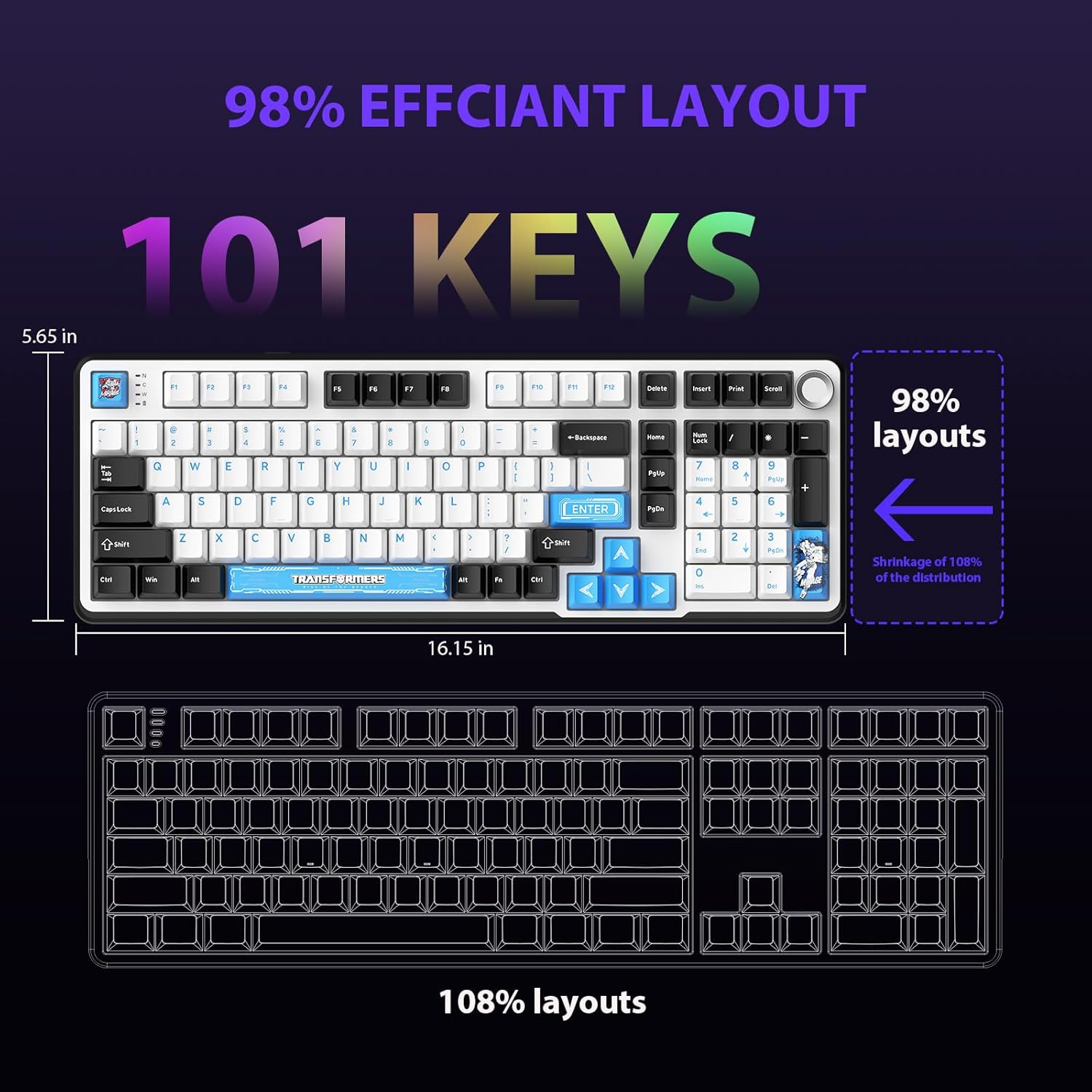
Figure 4.1: 101-Key Layout.
4.2. Multimedia Control Knob
The dedicated knob located on the top right of the keyboard provides convenient multimedia control:
- Pööra päripäeva: Suurenda helitugevust.
- Rotate Counter-Clockwise: Vähenda helitugevust.
- Vajutage alla: Heli vaigistamine/heli sisselülitamine.
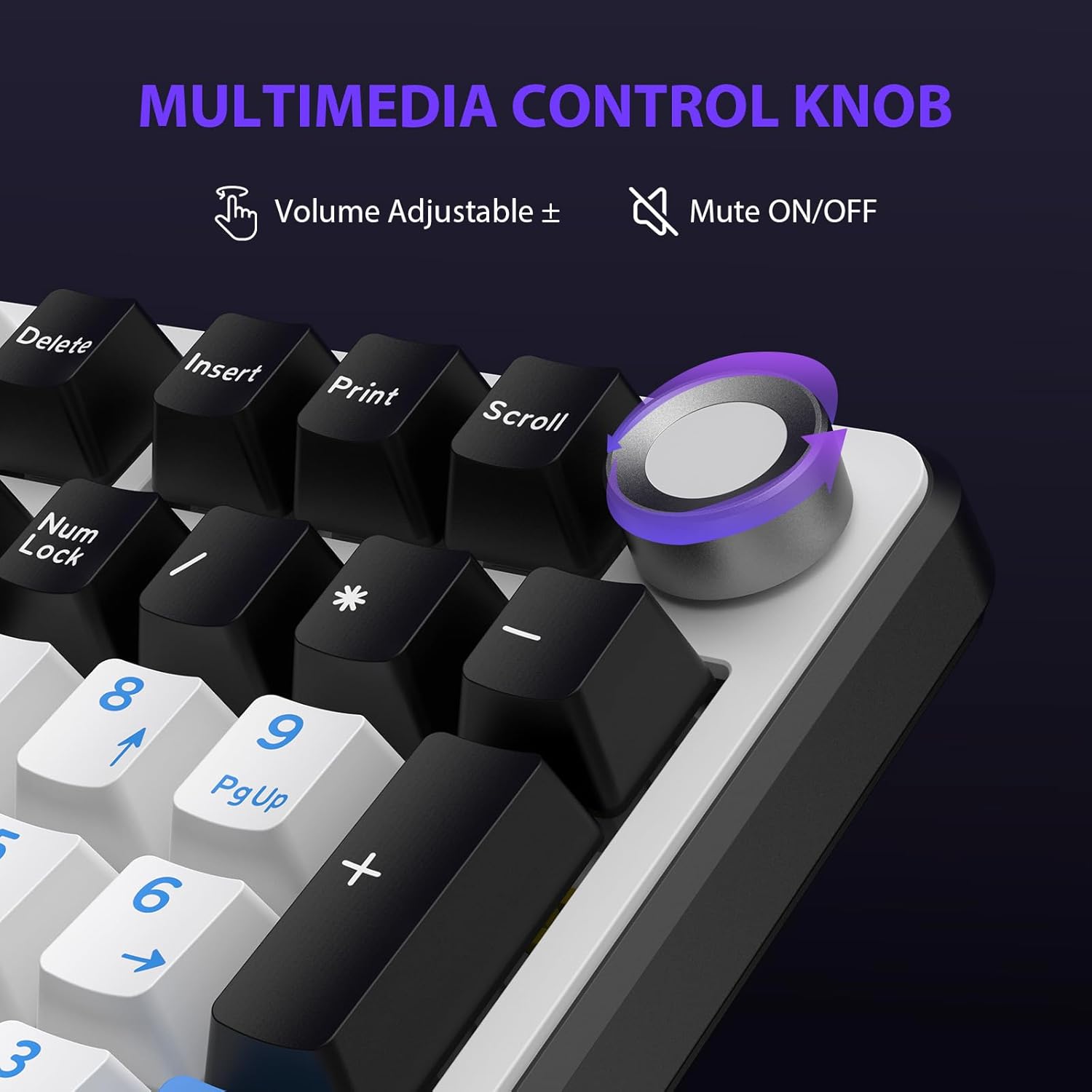
Figure 4.2: Multimedia Control Knob.
4.3. RGB-taustvalgustuse juhtimine
The GK01 keyboard features 16.8 million color RGB backlighting with various effects.
- Fn + [Right Arrow]: Adjust 5 brightness levels.
- Fn + [Left Arrow]: Adjust 5 speed levels for dynamic effects.
- Fn + [Sisesta]: Switch between 20 different backlight modes.
- Fn + [Sisesta]: Switch color order within certain modes.
- Fn + [X]: Turn off light / activate power-saving mode.
- Fn + [Tagasilükke]: Switch color order within certain modes.

Figure 4.3: RGB Backlight Controls.
5. Täiustatud funktsioonid
5.1. Vahetatavad lülitid
The GK01 keyboard is equipped with pre-lubricated Cybertron linear switches and supports solder-free hot-swapping. This allows you to easily replace switches with compatible 3-pin or 5-pin mechanical switches without soldering.
Lüliti asendamiseks:
- Using the provided 2-in-1 keycap and switch puller, gently remove the keycap from the desired switch.
- Insert the switch puller onto the switch, ensuring it grips the top and bottom clips of the switch.
- Tõmmake lülitit õrnalt otse üles, et see trükkplaadilt eemaldada.
- Joonda uue lüliti tihvtid trükkplaadi aukudega. Veendu, et tihvtid on sirged, et vältida paindumist.
- Suruge uus lüliti kindlalt oma kohale, kuni see klõpsatab.
- Kinnitage klahvikate uuesti.

Figure 5.1: Hot-Swappable Switch Replacement.
5.2. Programmeeritav tarkvara
The GK01 supports custom software for advanced customization, including key remapping, macro creation, and detailed RGB lighting effects.
- The software is compatible only with the Windows operating system.
- The keyboard must be connected via USB-C wired mode to use the software.
- For driver download, please visit the official Transformers Keyboard website or refer to the link provided in the product packaging.
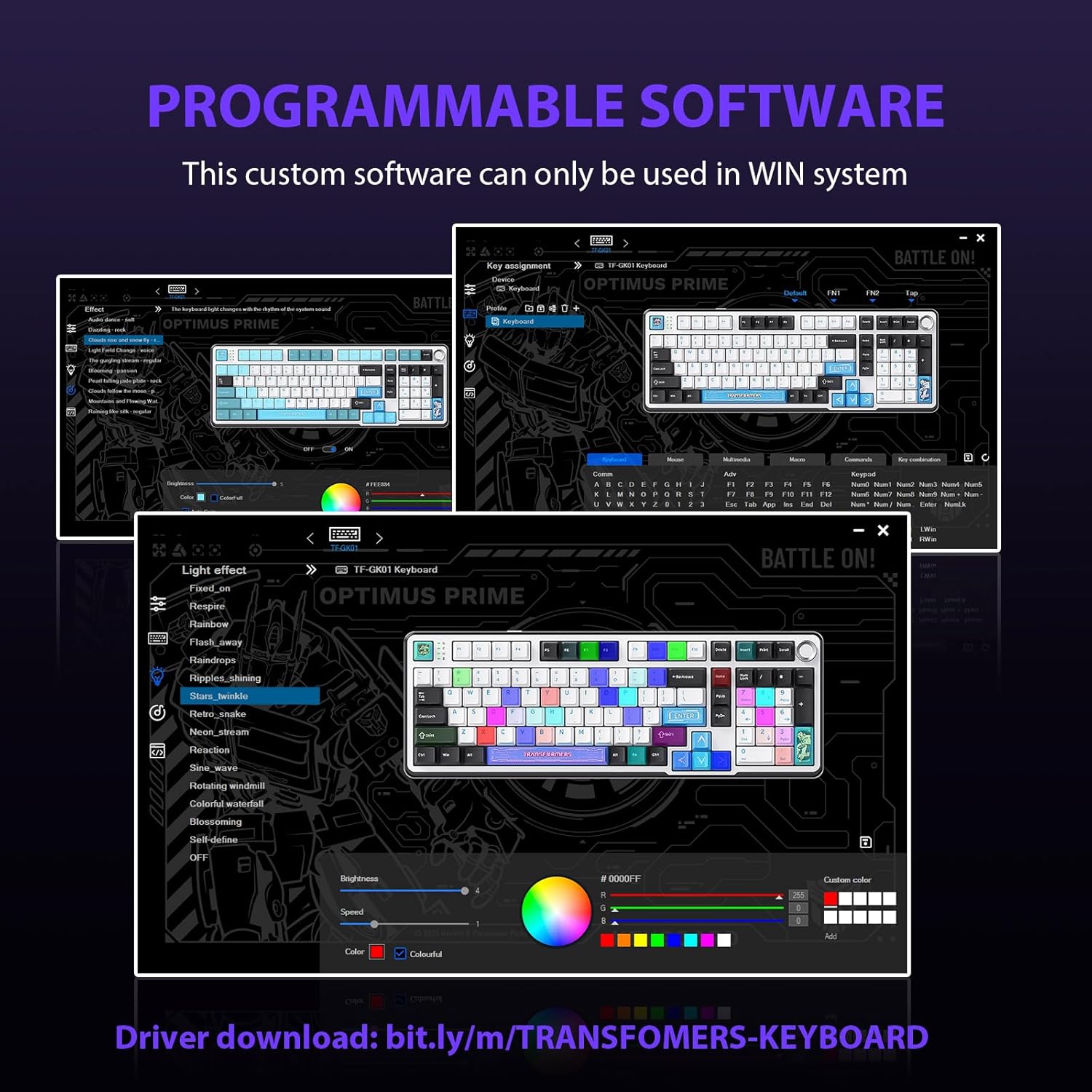
Figure 5.2: Programmable Software Interface.
5.3. Gasket Mounted Structure
The keyboard features a five-layer sound-absorbing and shock-absorbing gasket mounted structure. This design effectively reduces hollow noise and provides a softer, more consistent typing feel by isolating the plate from the case.
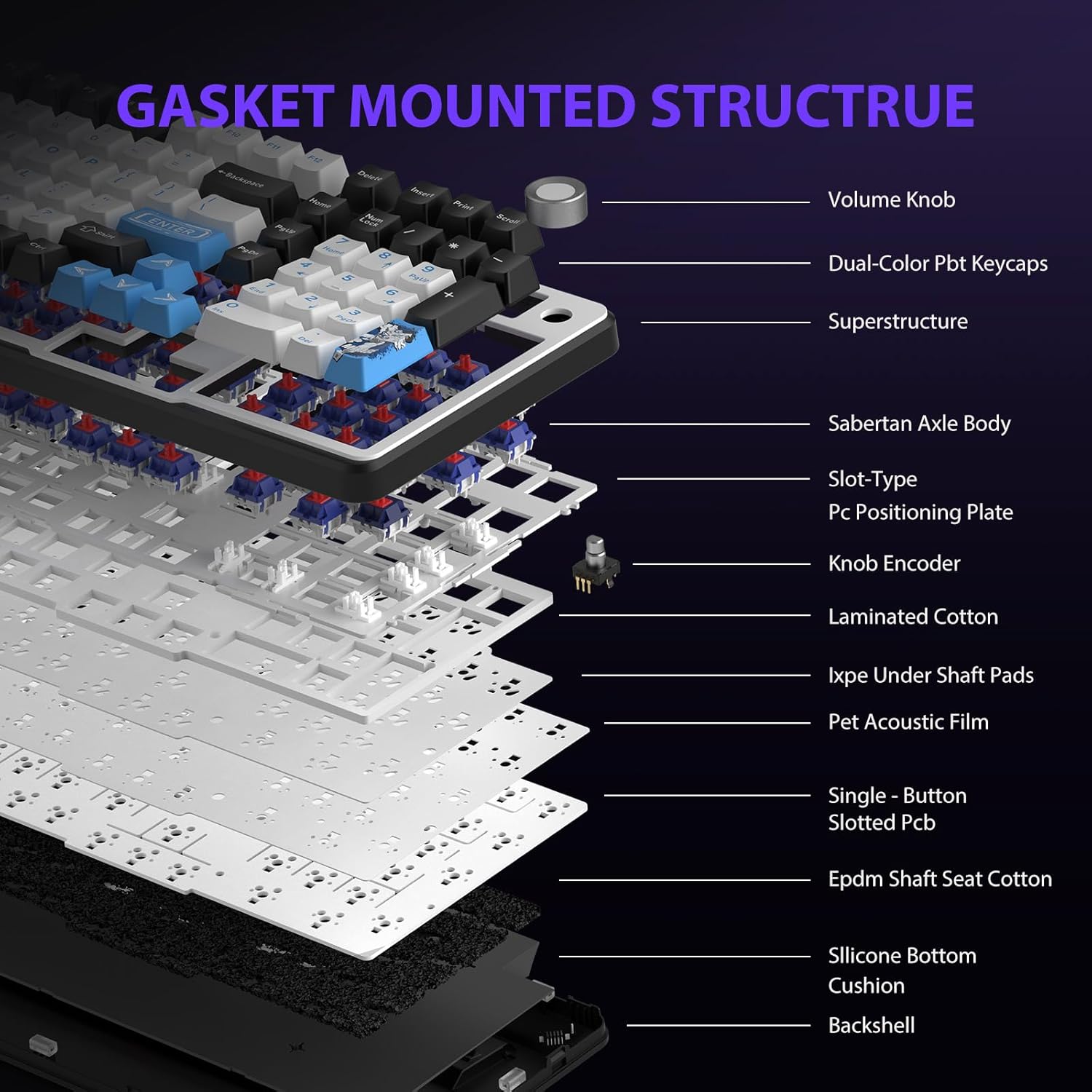
Figure 5.3: Gasket Mounted Structure Components.
6. Akuhaldus
The GK01 keyboard is equipped with a 4000mAh rechargeable battery.
- Laadimine: Connect the keyboard to a USB power source using the provided USB-C cable. The indicator light will show charging status.
- Aku eluiga: A fully charged battery provides extended usage time. Actual battery life may vary based on usage patterns and RGB lighting intensity.
- Energiasääst: The keyboard will enter a power-saving sleep mode after a period of inactivity to conserve battery. Press any key to wake it up.
7. Hooldus
7.1. Klaviatuuri puhastamine
- Enne puhastamist ühendage klaviatuur kõikidest toiteallikatest lahti.
- Kasutage kergelt pehmet ebemevaba lappi dampKlahvikatete ja korpuse pühkimiseks loputage veega või õrna puhastuslahusega.
- Klahvikatete vaheliste tolmu ja prahi eemaldamiseks kasutage suruõhku või väikest harja.
- Vältige tugevate kemikaalide või abrasiivsete materjalide kasutamist.
7.2. Keycap and Switch Care
- The PBT keycaps are designed for durability and fade resistance.
- Refer to Section 5.1 for instructions on safely removing and replacing keycaps and switches.
- Ensure the keyboard feet are clean and free of debris for stable placement.

Figure 7.1: Adjustable Keyboard Feet.
8. Veaotsing
| Probleem | Võimalik põhjus | Lahendus |
|---|---|---|
| Klaviatuur ei reageeri traadita režiimis. | Low battery, incorrect mode selected, dongle not connected, Bluetooth not paired. | Charge the keyboard. Ensure the mode switch is set correctly (2.4GHz or BT). Re-insert the 2.4GHz dongle. Re-pair Bluetooth connection. Try wired mode to confirm keyboard functionality. |
| Võtmed ei registreeru või sisestatakse topelt. | Loose switch, software issue, debris under keycap. | Ensure switches are fully seated. Clean under keycaps. If using programmable software, ensure it's updated or try resetting keyboard settings. |
| RGB-taustvalgustus ei tööta või on kinni kiilunud. | Backlight turned off, software conflict. | Vajutage Fn + X to toggle backlight. Check programmable software settings. |
| Bluetoothi kaudu ei saa ühendust luua. | Klaviatuur ei ole sidumisrežiimis, seadme Bluetooth on välja lülitatud, esineb häireid. | Ensure keyboard is in Bluetooth pairing mode (Fn + Q/W/E long press). Ensure device Bluetooth is on and discoverable. Move closer to the device. |
9. Tehnilised andmed
| Funktsioon | Detail |
|---|---|
| Mudeli number | TF-GK01 |
| Ühenduvus | Bluetooth 5.0, 2.4 GHz juhtmevaba, USB-C juhtmega |
| Klaviatuuri tüüp | Mehaaniline |
| Paigutus | 101 Keys (Full-size) |
| Lülitid | Pre-lubed Cybertron Linear Switches, Hot-Swappable (3-pin/5-pin compatible) |
| Klahvistikud | Heat-sublimated PBT |
| Taustvalgustus | RGB (16.8 Million Colors, 20 modes, music rhythm effects via driver) |
| Aku mahutavus | 4000 mAh |
| Toote mõõtmed | 16.15 x 5.65 x 1.63 tolli (41.02 x 14.35 x 4.14 cm) |
| Kauba kaal | 2.24 naela (1.02 kg) |
| Ühilduvad seadmed | Sülearvuti, arvuti, nutitelefon, tahvelarvuti |
| Eriomadused | Anti-Ghosting (all keys), Multimedia Control Knob, Programmable Keys (via software), Rechargeable |
10. Garantii ja tugi
For information regarding warranty coverage, technical support, or service inquiries, please refer to the warranty card included with your product or visit the official Transformers Keyboard websaidile.
Tootja: Trafod


