1. Sissejuhatus
The LNCOON LL301 Car GPS Tracker is a robust and versatile tracking device designed for real-time vehicle monitoring. It features a large 10000mAh battery, waterproof design, and multiple positioning systems (GPS, BDS, LBS) to ensure accurate location data. The device provides various anti-theft alarms and remote monitoring capabilities via a mobile application, making it suitable for personal and fleet management applications.
2. Mis on karbis
Veenduge, et pakendis on kõik esemed olemas:
- LNCOON LL301 4G GPS Tracker
- Magnetne alus
- Rechargeable Battery (integrated 10000mAh)
- SIM-kaart (eelinstallitud või kaasas)
- User Manual Card (with QR codes for digital manual and app)
- Laadimiskaabel
- Bracket with 3M Tape

Figure 2.1: Package Contents. The image displays the 4G GPS Tracker, its packaging box, a user manual card with QR codes, a bracket with 3M adhesive tape, and a charging cable.
3. Põhiomadused
- Täpne positsioneerimine: Utilizes GPS, BDS, LBS, and Wi-Fi for precise location tracking on the cloud platform. Operates on a 4G LTE network.
- Suure võimsusega aku: Integrated 10000mAh rechargeable battery offering multiple operating modes for extended standby time (up to 2 years in power-saving mode).
- Mitu häiret: Instant alerts for events such as cover removal, device removal, unusual vibrations, low battery, over-speed, and geo-fence.
- Remote Monitoring (VoLTE): Discreet internal microphone allows remote audio monitoring of the device's surroundings, with real-time recording to the platform.
- Tugev magnetiline alus: Built-in magnet for easy and secure attachment to ferromagnetic surfaces.
- Tellimusteenus: Requires a subscription for full functionality. Pricing options are available for monthly ($9.99), semi-annual ($6.99/month, billed at $41.99), and annual ($4.99/month, billed at $59.99) plans.

Figure 3.1: Multiple Positioning Systems. The image illustrates the device's capability to use GPS, BDS, LBS, and Wi-Fi for enhanced positioning accuracy.

Figure 3.2: Magnetic Attachment. The image shows the tracker attaching to a metal surface, highlighting its strong magnetic base and the concept of removal alerts.
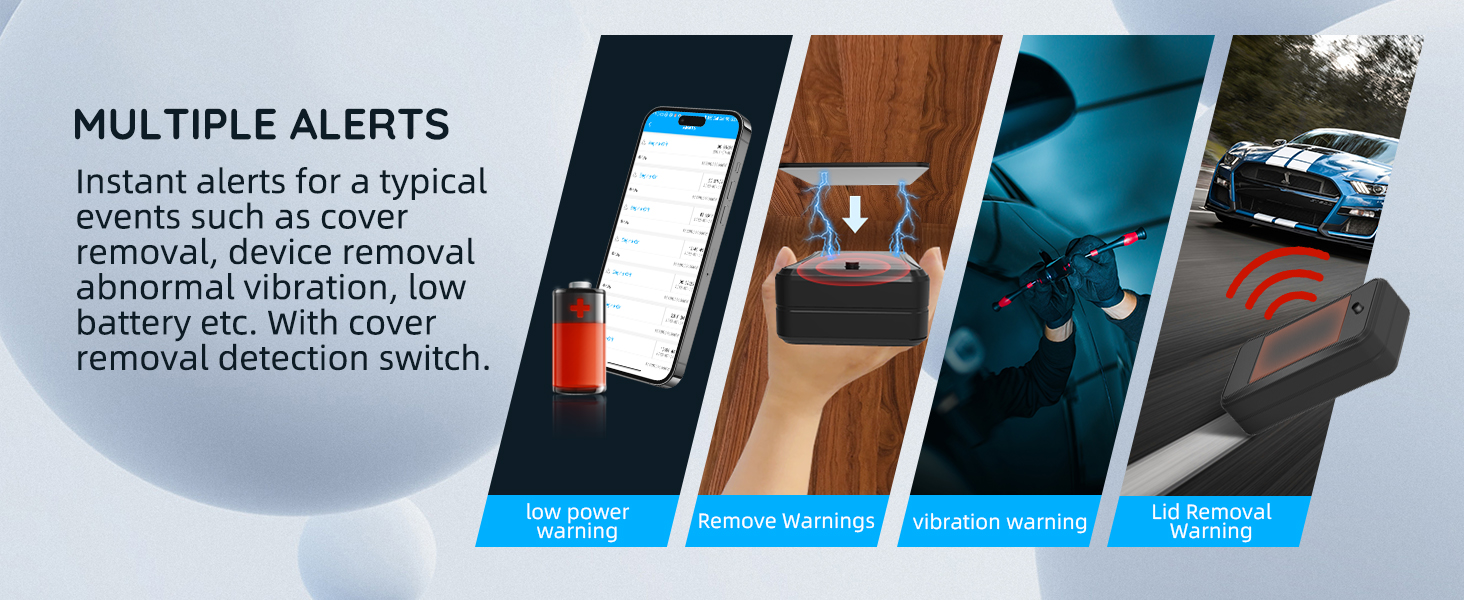
Figure 3.3: Multiple Alert Types. This image illustrates the mobile application interface showing different alert notifications such as low power, vibration, removal, over-speed, and geo-fence alarms.

Figure 3.4: Subscription Plans. The image displays the available subscription plans for the LNCOON service, including monthly, yearly, and semi-annual options with their respective pricing.
4. Seadistusjuhend
- Sisestage SIM-kaart: Open the device cover. Locate the SIM card slot and insert the provided SIM card. Ensure it is correctly seated. The device has a detection switch that will turn OFF if the cover is removed, triggering an alarm.
- Laadige seadet: Connect the charging cable to the Micro USB port on the device and to a power source. The 4-grid LED power indicator will show charging status. Ensure the device is fully charged before first use.
- Laadige alla mobiilirakendus: Scan the QR code on the User Manual Card or visit lncoon.com/download-app to download the official LNCOON mobile application.
- Activate Subscription: A subscription is required for the device to function. Follow the instructions within the app or on the website to activate your chosen subscription plan.
- Seadme paigaldamine:
- Magnetkinnitus: The device has a strong built-in magnet. Attach it directly to any ferromagnetic material on your vehicle.
- Using 3M Tape Bracket: For non-magnetic surfaces or added security, stick the 3M tapes on one side of the device bracket, attach the bracket to the target object, then place the device onto the bracket.

Figure 4.1: SIM Card Installation. The image shows the device with its cover open, indicating the SIM card slot and the internal detection switch.

Figure 4.2: Charging Port and Power Switch. This image highlights the Micro USB charging port and the power switch on the side of the tracker.
5. Kasutusjuhised
5.1. Toide sisse/välja
To power on the device, slide the power switch to the 'ON' position. To power off, slide it to 'OFF'.
5.2. Jälgimisrežiimid
The device supports three operating modes, configurable via the mobile app or web platvorm:
- Real-time Tracking Mode: Provides continuous, real-time location updates. This mode consumes more battery.
- Intelligent Tracking Mode: The device tracks the vehicle in real-time, uploading a position fix every 20 seconds if the vehicle is moving.
- Energiasäästurežiim: The device wakes up at configured intervals to upload position fixes, maximizing battery life up to 2 years.

Figure 5.1: Tracking Modes. This image illustrates the three available tracking modes: Timed, Smart (default), and Long Standby, explaining their basic functionality.
5.3. Real-Time Tracking and Historical Playback
Access the mobile app or web platvormi view the device's current location in real-time. The platform also allows you to review up to 180 days of historical tracking data, including speed and mileage.

Figure 5.2: Historical Playback. The image displays the mobile app's playback feature, showing a vehicle's route, speed, and mileage over a chosen date range.
5.4. Geo-Fencing
Set up virtual boundaries (geo-fences) on the map. You will receive instant alerts when the device enters or exits these predefined areas. This feature is useful for monitoring specific zones.

Figure 5.3: Multiple Device Management. This image shows the mobile application managing several trackers simultaneously on a map, illustrating its utility for fleet management.
5.5. Remote Listening (VoLTE)
The device includes a discreet microphone. Through the app, you can remotely monitor the audio environment around the tracker and record it to the platform for later playback.

Figure 5.4: Remote Listening. This image depicts the remote listening feature, showing how the device's microphone can capture audio from its surroundings, accessible via the mobile app.
5.6. Tamper hoiatus
The device is equipped with a pressure-sensitive button. If the device is removed or tampered with, the button will become loose, triggering an immediate alert to your registered contact. This helps prevent unauthorized removal.
Video 5.1: Tamper Alert Demonstration. This video demonstrates the tamper alert feature of the LNCOON LL301 GPS tracker, showing how the device detects unauthorized removal or cover dismantlement and sends an alert. It also highlights the pressure-sensitive button for removal detection.
6. Hooldus
6.1. Laadimine
Recharge the device when the low battery indicator flashes. Use the provided charging cable and a compatible power adapter. A full charge ensures optimal performance and standby time.
6.2. Puhastamine
Wipe the device with a soft, dry cloth. Avoid using harsh chemicals or abrasive materials that could damage the casing or internal components. Ensure the device is dry before charging or operating.
7. Veaotsing
| Probleem | Võimalik põhjus | Lahendus |
|---|---|---|
| Device not tracking | No active subscription, SIM card not inserted correctly, poor signal, low battery. | Verify subscription status. Reinsert SIM card. Move to an area with better network coverage. Charge the device. |
| Ebatäpne asukoht | Weak GPS signal (e.g., indoors, underground), interference. | Viige seade avatud alale, kus on selge view of the sky. Ensure no large metal objects are obstructing the signal. |
| No alerts received | Alert settings not configured in app, app notifications disabled, device offline. | Check alert settings in the mobile app. Enable notifications for the app on your phone. Ensure the device is online and has sufficient battery. |
| Lühike aku tööiga | Device set to real-time tracking mode, frequent movement, old battery. | Switch to Intelligent Tracking Mode or Power-Saving Mode for extended battery life. Ensure the device is fully charged. If battery life remains significantly short, contact support. |
| Device removal alarm triggers easily | Improper installation, sensitive surface. | Ensure the device is securely attached. If using the magnetic base, confirm the surface is flat and stable. The pressure-sensitive button is designed to minimize false alarms on uneven surfaces. |
8. Tehnilised andmed
- Mudel: LL301
- Ühenduvustehnoloogia: Mobiilside (4G LTE)
- Positsioneerimissüsteemid: GPS, BDS, LBS, Wi-Fi (auto-switching based on signal strength)
- Aku: 10000mAh liitiumpolümeer laetav aku
- Ooteaeg: Up to 2 years (in power-saving mode); Up to 35 days (in real-time tracking mode, based on 2 hours driving/day)
- Eriomadused: Built-In Microphone (VoLTE), Magnetic Base, Real-Time Tracking, Rechargeable, Multiple Alarms (Tamper, Vibration, Low Battery, Over-speed, Geo-fence)
- Toetatud rakendus: Mobiilirakendus
- Konkreetsed kasutusalad: Sõiduki jälgimine
- Kauba kaal: 15.7 untsi
- Pakendi mõõtmed: 6.22 x 4.13 x 2.52 tolli
- Tootja: Jimiiot
9. Garantii ja tugi
For any questions, technical assistance, or warranty inquiries, please contact LNCOON customer support:
- E-post: support@lncoon.com
- Amazon Center: Contact us via the Amazon messaging system for prompt assistance.
Täpsemate garantiitingimuste kohta vaadake palun oma ostudokumentatsiooni.


