Sissejuhatus
Täname, et valisite mustaview W50PRO Smartwatch. This manual provides essential information for setting up, operating, and maintaining your device. Please read it carefully to ensure optimal performance and a safe user experience. Keep this manual for future reference.
Pakendi sisu
Veenduge, et pakis on kõik esemed olemas:
- Mustview W50PRO Smartwatch
- Silikoonist rihm
- Replacement Nylon Braided Strap
- Magnetiline laadimiskaabel
- Kasutusjuhend (see dokument)

Image: Package contents and product dimensions.
Toode läbiview
Mustview W50PRO Smartwatch features a 1.45-inch HD touchscreen display, function buttons, a powerful flashlight, and a comfortable silicone strap. Its robust design is suitable for various activities.

Pilt: mustview W50PRO Smartwatch with its key features labeled.
Seadistamine
1. Seadme laadimine
Before first use, fully charge your smartwatch. Connect the magnetic charging cable to the charging points on the back of the watch and plug the USB end into a power adapter (not included) or a computer's USB port. The watch will display a charging indicator.
- Täislaadimine võtab tavaliselt umbes 3 tundi.
- The 960mAh battery provides up to 30 days of typical use and 100 days of standby time.

Image: Battery capacity and charging information.
2. Rakenduse installimine
Laadige alla ja installige "Da Fit" application on your smartphone. You can find it in the App Store (iOS) or Google Play Store (Android).
3. Device Pairing and Bluetooth Calls
To connect your smartwatch and enable Bluetooth calling:
- Download the Da Fit app from your phone's app store.
- Lubage oma nutitelefonis Bluetooth.
- Open the Da Fit app and add your device.
- Confirm the pairing request on your phone and watch.
- Grant necessary notification permissions within the Da Fit app for calls and messages.
- Pärast sidumist saate otse oma kellast kõnesid teha ja vastu võtta.

Image: Connection and calling setup guide.
Kasutusjuhised
1. Põhiline navigeerimine
- Puuteekraan: Menüüdes navigeerimiseks ja funktsioonidele juurdepääsuks libista vasakule/paremale, üles/alla. Valimiseks puuduta.
- Funktsiooninupud: Use the physical buttons on the side of the watch for quick access to specific functions or to return to the home screen.
2. Flashlight and Compass
The W50PRO includes a built-in flashlight and compass for outdoor activities.
- Taskulamp: Activate the flashlight feature from the watch's menu. It offers fixed and intermittent modes for various situations.
- Kompass: Access the compass feature from the watch's menu for accurate directional guidance.
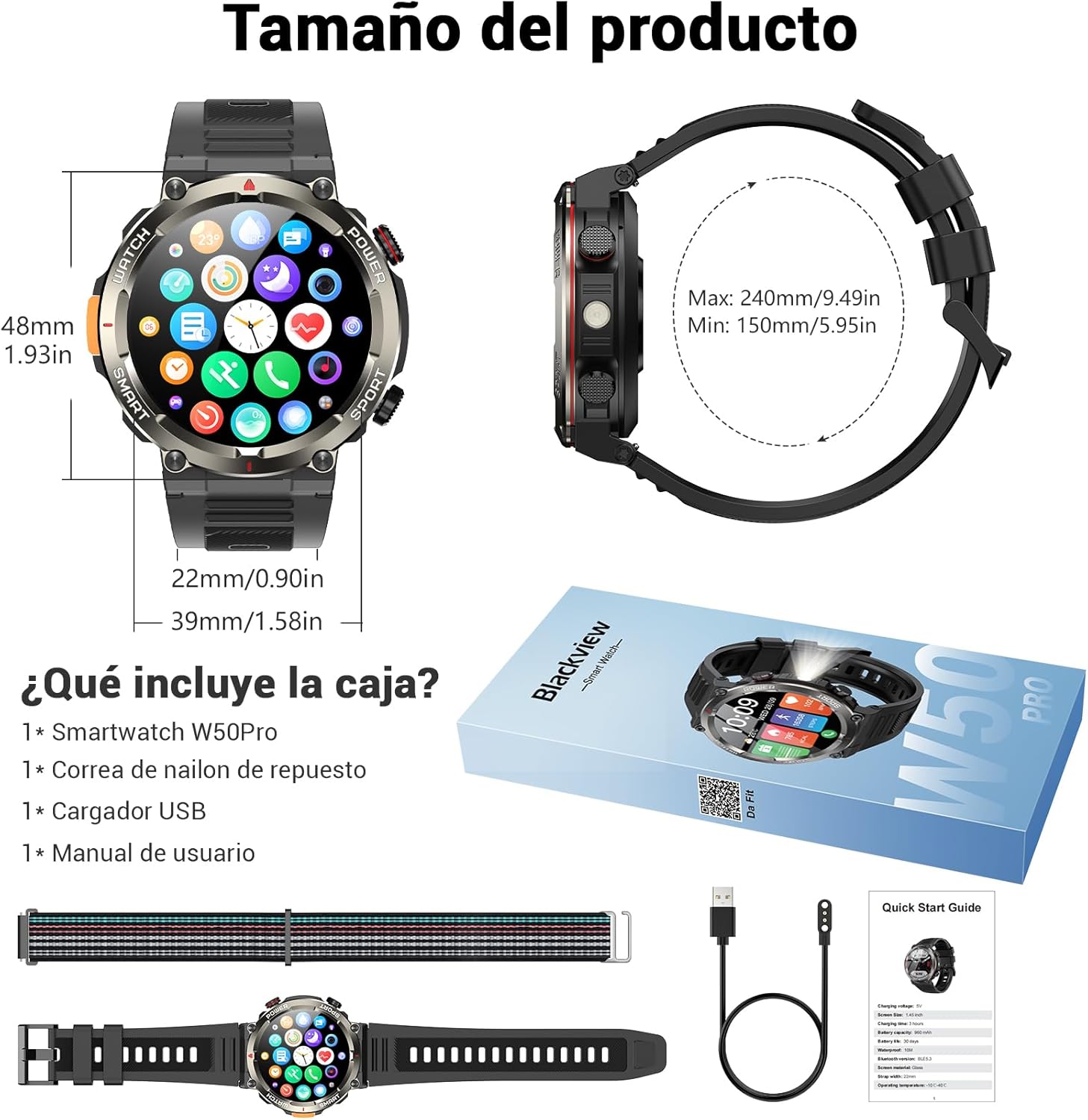
Image: Compass feature for outdoor navigation.

Image: Powerful LED flashlight in action.
3. Bluetooth Calling and Notifications
Once paired with your smartphone, the W50PRO allows you to manage calls and notifications directly from your wrist.
- Kõnede tegemine/vastuvõtmine: Use the integrated speaker and microphone to make or answer calls.
- Märguanded: Receive real-time alerts for text messages, emails, and social media apps.
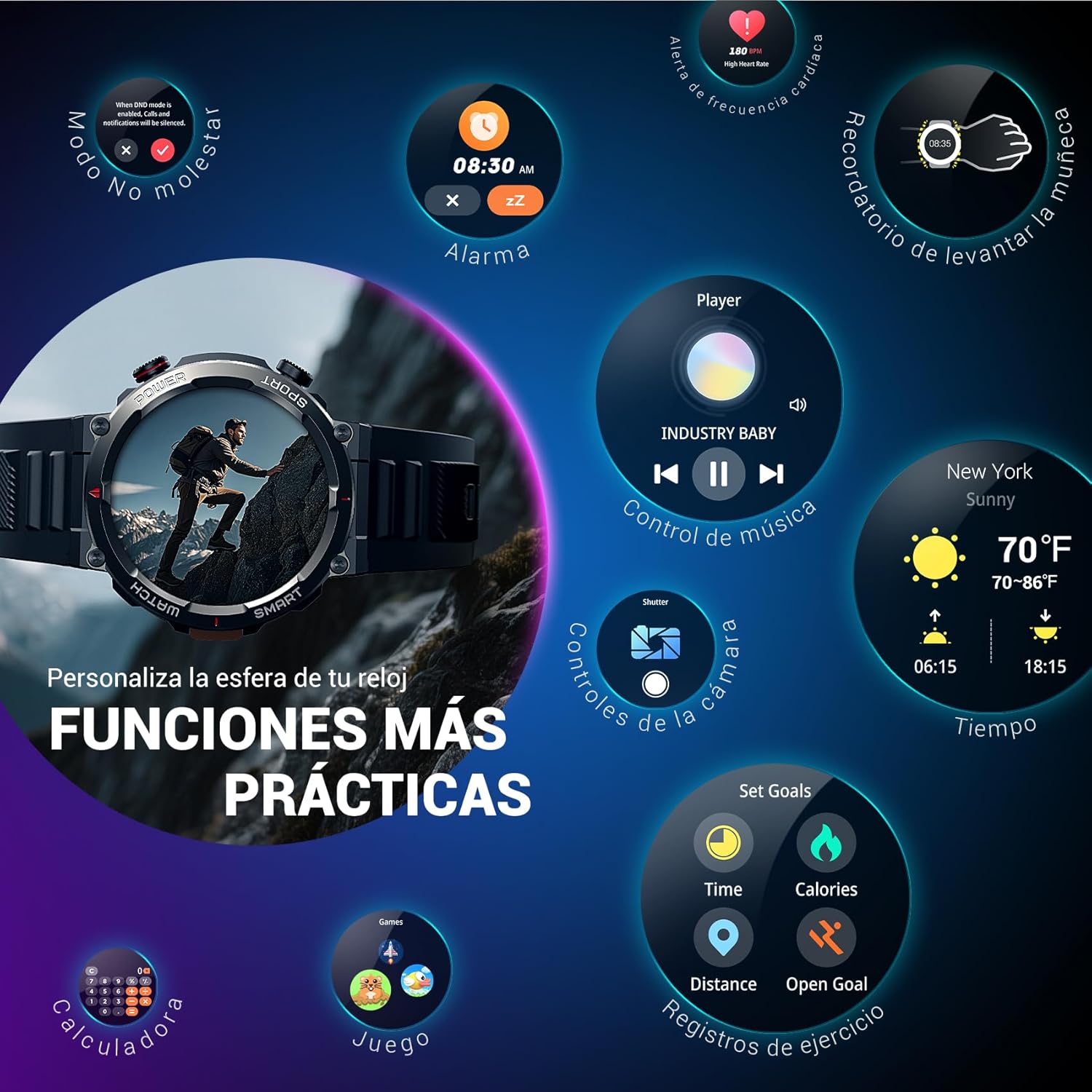
Image: Bluetooth calling and notification features.
4. Tervise jälgimine
The smartwatch is equipped with high-precision sensors to monitor various health indicators:
- Südame löögisagedus: Reaalajas pulsisageduse jälgimine.
- Vere hapnik (SpO2): Jälgige oma vere hapnikusisaldust.
- Une monitor: Tracks sleep quality and patterns.
- Stressitasemed: Annab ülevaate teie stressitasemest.
All health data synchronizes with the Da Fit app for detailed analysis and trend tracking.

Image: Real-time health monitoring features.
5. Spordirežiimid
The W50PRO offers over 100 integrated sports modes, including running, cycling, climbing, rope skipping, football, and basketball. It accurately records exercise time, distance, steps, calorie consumption, and heart rate changes, providing clear and intuitive performance data. Detailed data can be viewed rakenduses Da Fit.

Pilt: Üleview of 100+ sports modes.
6. Kella sihverplaatide kohandamine
The Da Fit app provides a wide selection of watch faces to suit various styles. You can also upload personal photos as wallpaper and adjust text color and widget layout to create a unique watch interface.

Image: Customizable watch faces.
7. Muud praktilised funktsioonid
Mustview W50PRO includes additional features for daily convenience:
- Ilmateade
- Muusika juhtimine
- Kaamera kaugjuhtimispult
- Äratused
- Meeldetuletus istumisest
- Joogivee meeldetuletus
- Stopper
- Taimer
- Leidke telefon
- Kalkulaator
- Mängud
- Heleduse reguleerimine

Image: Multiple smart functions available on the smartwatch.
Hooldus
1. Puhastamine
Puhastage nutikellu ja rihma regulaarselt, et vältida nahaärritust ja säilitada seadme toimimine. Kasutage pehmet jaamp lapiga ekraani ja c pühkimiseksasing. For the strap, follow the manufacturer's cleaning recommendations based on the material (silicone or nylon).
2. Veekindlus
Mustview W50PRO Smartwatch features an IP68 water resistance rating. This means it is protected against dust ingress and can withstand immersion in water up to 1.5 meters for up to 30 minutes. It is suitable for daily use, such as hand washing or light rain. Avoid using it in hot water, saunas, or during diving, as steam and high pressure can compromise the seals.

Image: Durability features including IP68 water resistance.
3. Aku hooldus
Aku tööea pikendamiseks:
- Vältige äärmuslikke temperatuure.
- Ärge laske akul sageli täielikult tühjeneda.
- Charge the device using the provided magnetic charging cable.
Veaotsing
Kui teil tekib probleeme oma musta värvigaview W50PRO Smartwatch, try the following:
- Seade ei lülitu sisse: Veenduge, et kell oleks täielikult laetud.
- Ei saa telefoniga siduda: Check if Bluetooth is enabled on both devices. Restart both the watch and phone. Ensure the Da Fit app has necessary permissions.
- Ebatäpsed terviseandmed: Veenduge, et kell oleks randmel tihedalt. Puhastage andureid regulaarselt.
- Teateid ei saadud: Verify that notification permissions are granted in the Da Fit app and your phone's settings. Ensure the app is running in the background.
- Lühike aku tööiga: Reduce screen brightness, disable unnecessary features, and limit frequent heart rate monitoring.
For persistent issues, refer to the Da Fit app's help section or contact customer support.
Tehnilised andmed
| Funktsioon | Spetsifikatsioon |
|---|---|
| Kaubamärk | Mustview |
| Mudel | W50PRO |
| Ekraani suurus | 1.45 tolli |
| Kuva tüüp | LCD |
| Resolutsioon | 360 x 360 pikslit |
| Aku mahutavus | 960 mAh |
| Tüüpiline aku tööiga | Kuni 30 päeva |
| Ooteaeg | Kuni 100 päeva |
| Laadimisaeg | u. 3 tundi |
| Ühenduvus | Bluetooth |
| Inimliidese sisend | Buttons, Microphone |
| Veekindlus | IP68 |
| Ühilduvad telefonimudelid | iOS ja Android |
| Toote mõõtmed | 8.8 x 2.2 x 18.1 cm |
| Toote kaal | 136 g |
Garantii ja tugi
For warranty information and technical support, please refer to the documentation included with your purchase or visit the official Blackview webveebisait. Hoidke ostutõendit garantiinõuete esitamiseks.


