1. Sissejuhatus
Thank you for choosing the Infiniity DM56 Sport Smartwatch. This device is designed to enhance your active lifestyle with advanced fitness tracking, health monitoring, and smart connectivity features. Equipped with a vibrant 1.43-inch AMOLED display, built-in GPS, and comprehensive health sensors, the DM56 is your reliable companion for both daily wear and intense workouts.
This manual provides detailed instructions on how to set up, operate, maintain, and troubleshoot your smartwatch to ensure optimal performance and longevity.

Pilt 1.1: esikülg view of the Infiniity DM56 Sport Smartwatch, showcasing its round AMOLED display and rugged design.
2. Mis on karbis
Upon opening your Infiniity DM56 Sport Smartwatch package, please ensure all the following items are present:
- Infiniity DM56 Sport Smartwatch
- Laadimiskaabel
- Kasutusjuhend (see dokument)
3. Seadistamine
3.1 Nutikella laadimine
Before first use, fully charge your DM56 smartwatch. A full charge typically takes approximately 2 hours.
- Ühenda magnetiline laadimiskaabel nutikella tagaküljel asuvate laadimiskontaktidega. Veendu, et tihvtid on õigesti joondatud.
- Ühenda laadimiskaabli USB-ots tavalisse USB-toiteadapterisse (soovitatav on 5V/1A) või arvuti USB-porti.
- The watch display will show a charging indicator. Once fully charged, the indicator will change or disappear.
3.2 Nutitelefoniga sidumine
To unlock the full potential of your DM56 smartwatch, you need to pair it with your smartphone via Bluetooth using the dedicated companion application. The DM56 is compatible with Android 5.0+ and iOS 11 and above.
- Laadige rakendus alla: Otsi the official Infiniity companion app (refer to the packaging or quick start guide for the exact app name) on the Google Play Store (for Android) or Apple App Store (for iOS) and install it.
- Bluetoothi lubamine: Veenduge, et Bluetooth oleks teie nutitelefonis lubatud.
- Avage rakendus: Launch the companion app on your smartphone and follow the on-screen instructions to create an account or log in.
- Lisa seade: Within the app, navigate to the 'Add Device' or 'Pair Device' section. The app will search for available smartwatches.
- Select DM56: Select 'DM56' from the list of found devices. A pairing request may appear on both your phone and the watch. Confirm the pairing on both devices.
- Täielik seadistamine: Once paired, the app will guide you through initial settings, such as profile information, notification permissions, and data synchronization.
4. Nutikella kasutamine
4.1 Lihtne navigeerimine
The DM56 features a responsive touchscreen and physical buttons for intuitive control.
- Puuteekraan: Menüüdes ja teavitustes navigeerimiseks libista üles, alla, vasakule või paremale. Üksuste valimiseks puuduta.
- Füüsilised nupud: The watch has multiple buttons, typically labeled 'SPORT', 'SEL', 'BACK', and a dedicated 'GPS' button. Their functions may vary depending on the current screen or mode.
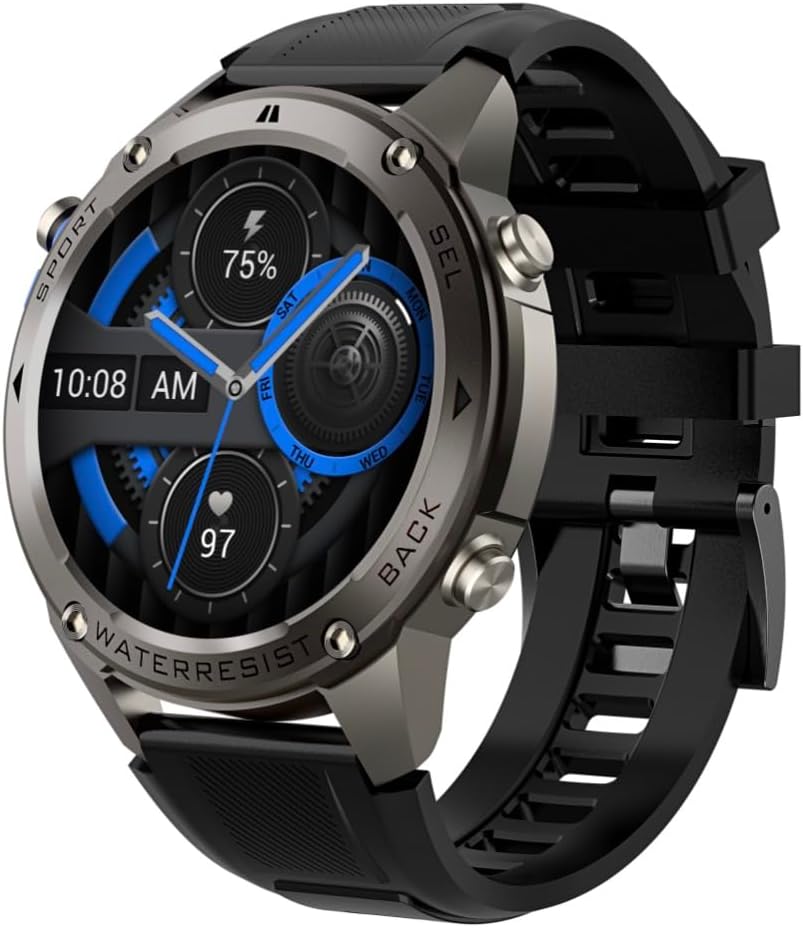
Pilt 4.1: Külg view of the Infiniity DM56 Sport Smartwatch, highlighting the physical control buttons.
4.2 Ekraani funktsioonid
The 1.43-inch AMOLED display offers vibrant colors and deep blacks with a resolution of 466x466 pixels.
- Alati sisse lülitatud ekraan: The DM56 supports Always-On Display functionality, allowing you to see the time and essential information at a glance without needing to raise your wrist or press a button. This feature can be configured in the watch settings.

Image 4.2: The Infiniity DM56 Sport Smartwatch display, showcasing a typical watch face with various data points.
4.3 Built-in GPS & Compass
The DM56 features dual-frequency GPS (L1+L5) and supports multiple satellite systems (GPS, GLONASS, BDS, Galileo, NAVIC, QZSS) for precise outdoor tracking. A built-in compass further aids navigation.
- GPS-i jälgimine: When starting an outdoor activity (e.g., running, cycling), the watch will automatically attempt to acquire a GPS signal. Ensure you are in an open area for faster signal acquisition. Your route, distance, and pace will be recorded.
- Kompass: Access the compass feature from the watch's menu to get real-time directional information.

Image 4.3: The Infiniity DM56 Sport Smartwatch from an angle, highlighting the dedicated GPS button on the side.

Pilt 4.4: Lähivõte view of the GPS button on the Infiniity DM56 Sport Smartwatch, indicating its function.
4.4 All-Day Health Monitoring
The DM56 is equipped with the VC30F sensor for continuous health monitoring.
- Südame löögisageduse jälgimine: Track your heart rate in real-time throughout the day. View your current heart rate on the watch face or in the dedicated heart rate app.
- Vere hapniku (SpO2) jälgimine: Mõõtke oma vere hapniku küllastuse taset.
- Une jälgimine: The watch automatically monitors your sleep patterns, including deep sleep, light sleep, and awake times. View üksikasjalik uneanalüüs kaasrakenduses.
- Stressi jälgimine: Monitor your stress levels throughout the day.
- Pedomeeter: Counts your daily steps, distance, and estimated calories burned.
Note: The Infiniity DM56 Smartwatch is NOT A MEDICAL DEVICE. All health monitoring data is for reference only and should not be used for medical diagnosis or treatment.
4.5 spordirežiimi
The DM56 offers over 170 customizable sports modes, with 14 built-in modes such as outdoor running, cycling, and swimming. You can add up to 10 additional modes manually via the companion app.
- Tegevuse alustamine: Navigate to the 'Workout' or 'Sports' menu on the watch, select your desired activity, and tap to start.
- Tegevuse ajal: The watch will display real-time metrics such as duration, distance, heart rate, and calories burned.
- Ending Activity: Swipe or press the designated button to pause or end the activity. Your workout data will be saved and synchronized with the app.
4.6 Smart Notifications & Calls
Once paired with your smartphone, the DM56 can receive notifications and handle calls directly on your wrist.
- Märguanded: Receive alerts for incoming calls, SMS messages, and app notifications (e.g., social media, email). Configure which app notifications you want to receive in the companion app.
- Make/Answer Call: The DM56 allows you to make and answer calls directly from the watch, utilizing its built-in microphone and speaker. Ensure the watch is connected to your phone via Bluetooth.
5. Hooldus
5.1 Veekindluse hinnang
The DM56 has a 5ATM waterproof rating, meaning it can withstand water pressures equivalent to a depth of 50 meters. This makes it suitable for swimming, showering, and other water-based activities. However, it is not recommended for diving or high-pressure water activities.
- Avoid exposing the watch to hot water, steam, or strong detergents.
- Pärast soolase veega kokkupuudet loputage kell puhta veega ja kuivatage hoolikalt.
5.2 Puhastamine ja hooldus
Nutikella välimuse ja funktsionaalsuse säilitamiseks:
- Puhastage kella korpust ja rihma regulaarselt pehme lapigaamp riie.
- Enne laadimist veenduge, et kella tagaküljel olevad laadimiskontaktid on puhtad ja kuivad.
- Vältige abrasiivsete puhastusvahendite või lahustite kasutamist.
5.3 Aku tööea optimeerimine
The DM56 is powered by a 500mAh high-voltage battery, offering extended usage. To maximize battery life:
- Reguleerige ekraani heledust madalamale tasemele.
- Piira alati sisse lülitatud ekraani kasutamist, kui see pole hädavajalik.
- Lülita välja mittevajalikud teavitused.
- Keela pidev pulsisageduse jälgimine, kui seda pole ööpäevaringselt vaja.
6. Veaotsing
If you encounter issues with your Infiniity DM56 smartwatch, try the following common solutions:
- Kell ei lülitu sisse: Veendu, et kell on täielikult laetud. Ühenda see laadijaga ja oota paar minutit, enne kui proovid seda uuesti sisse lülitada.
- Ei saa telefoniga siduda:
- Veenduge, et Bluetooth oleks teie telefonis ja kellas lubatud.
- Veenduge, et kell oleks teie telefoni Bluetoothi leviala piires.
- Taaskäivitage nii kell kui ka telefon.
- Tühjendage oma telefoni (Android) Bluetoothi vahemälu või unustage seade ja siduge see uuesti.
- Veenduge, et kaasrakendus oleks uusima versioonini värskendatud.
- Ebatäpsed terviseandmed:
- Veendu, et kell on randmel tihedalt, mitte liiga pingul ega liiga lõdvalt.
- Puhastage kella tagaküljel olev andur.
- Note that environmental factors and individual physiology can affect readings. Remember, it is not a medical device.
- Teateid ei saadud:
- Kontrollige teavitusseadeid kaasrakenduses.
- Ensure the app has necessary permissions on your phone (e.g., notification access).
- Veenduge, et kell on teie telefoniga ühendatud.
- Lühike aku tööiga: Aku optimeerimise näpunäidete saamiseks vaadake jaotist 5.3.
Kui probleem pärast nende sammude proovimist püsib, võtke edasise abi saamiseks ühendust klienditoega.
7. Tehnilised andmed
| Funktsioon | Spetsifikatsioon |
|---|---|
| Mudeli number | 56 DM |
| Ekraan | 1.43-inch AMOLED, 466x466 pixels |
| Andurid | Heart Rate (VC30F), Accelerometer (STK8321), Magnetometer (Compass), Barometer+Altitude (SPL07-03) |
| Ühenduvus | Bluetooth 5.3 |
| Aku mahutavus | 500 mAh |
| Veekindel tase | 5 ATM |
| Ühilduvus | Android 5.0+ and iOS 11 and above |
| Kauba kaal | 3 untsi |
| Pakendi mõõtmed | 4.25 x 4.25 x 2.8 tolli |
| Operatsioonisüsteem | Android Wear 2.7 (Note: This refers to the underlying OS, not necessarily full Android Wear functionality) |
| GPS | Built-in GPS (L1+L5 dual-frequency) |
| Kuju | Ümar |
| Aku tüüp | Nonstandard Battery, Lithium Ion |
8. Garantii ja tugi
The Infiniity DM56 Sport Smartwatch comes with a standard manufacturer's warranty. Please refer to the warranty card included in your product packaging for specific terms and conditions, including warranty duration and coverage details.
For technical support, troubleshooting assistance beyond what is covered in this manual, or warranty claims, please contact Infiniity customer service through the contact information provided on the product packaging or the official Infiniity websaidile.
Palun hoidke oma ostutõend garantiinõuete täitmiseks alles.


