1. Sissejuhatus ja lõppview
The DEWENWILS PTM01 is a heavy-duty 24-hour mechanical timer switch designed for automatic control of various electrical appliances. It features a robust metal enclosure, is weatherproof, and is suitable for both indoor and outdoor applications. This timer is ideal for managing devices such as pool pumps, water heaters, lights, and fans, offering reliable scheduling with its mechanical dial.
Põhifunktsioonide hulka kuuluvad:
- Automatic 24-hour control with up to two ON/OFF programs daily.
- High power load capacity: Max 40A, 120V, 2HP motor.
- Simplified wiring for easier installation.
- Weatherproof NEMA-3R metal enclosure with IP44 rating.
- ETL-sertifikaat ohutuse ja töökindluse tagamiseks.
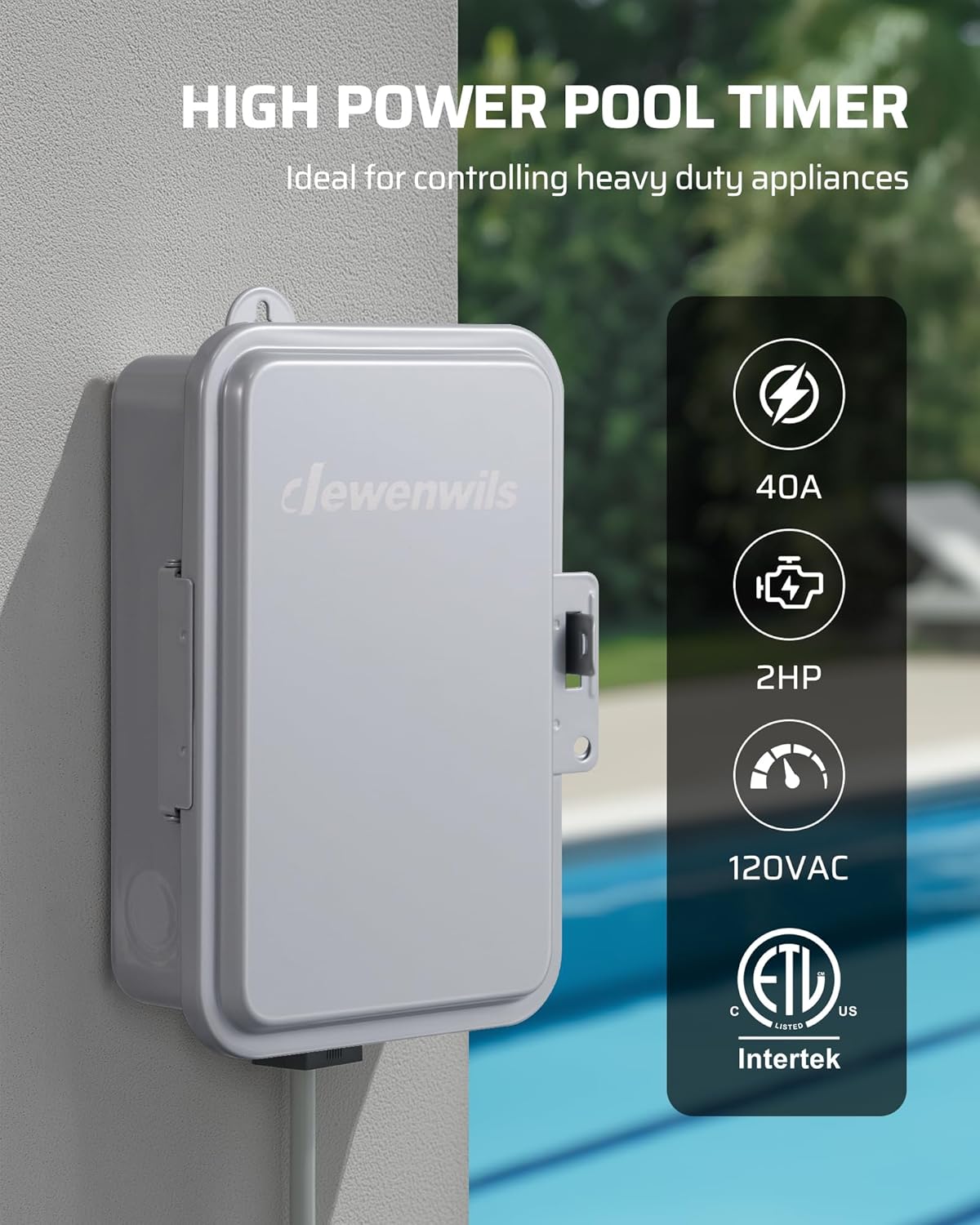
Image 1.1: The DEWENWILS PTM01 Mechanical Timer Switch, showcasing its robust design and suitability for heavy-duty applications.
2. Ohutusalane teave
Enne seadme paigaldamist või kasutamist lugege palun kõik juhised läbi ja mõistke neid. Nende juhiste eiramine võib põhjustada elektrilöögi, tulekahju või tõsiseid vigastusi.
- HOIATUS: Risk of electric shock. Installation should be performed by a qualified electrician or service personnel.
- Enne taimeri paigaldamist või hooldamist ühendage alati toide lahti kaitselülitist või kaitsmekarbist.
- Veenduge, et kõik juhtmestikuühendused on kindlad ja vastavad kohalikele elektrieeskirjadele.
- Do not exceed the maximum load ratings of 40A, 120VAC, 2HP.
- This timer is designed for 120VAC applications only. Do not use with 240VAC systems.
- Keep the enclosure door closed and latched to maintain its weatherproof rating.
- Kasutage ainult vaskjuhte.
3. Pakendi sisu
Enne paigaldamise alustamist veenduge, et kõik komponendid on olemas:
- DEWENWILS PTM01 Mechanical Timer Switch Unit
- Paigaldusjuhend (see dokument)
- Kinnitusdetailid (kruvid, ankrud)
- ON/OFF Trippers (pre-installed or included separately)
4. Toote omadused
- 24-Hour Mechanical Dial: Allows for setting up to two ON/OFF cycles within a 24-hour period, which repeat daily.
- Suure koormusega kandevõime: Supports a maximum load of 40 Amps at 120 Volts AC, suitable for motors up to 2 Horsepower.
- Ilmastikukindel korpus: Constructed with a NEMA-3R rated metal enclosure and IP44 waterproof protection, ensuring durability in harsh outdoor conditions (operating temperature range: -40°F to 140°F).
- Käsitsi tühistamise lüliti: Provides immediate ON/OFF control without affecting the programmed schedule.
- Lihtne juhtmestik: Designed with clear internal layout and wiring guides to simplify installation.
- ETL sertifikaat: Ensures the product meets recognized safety standards.

Image 4.1: The timer's weatherproof design, suitable for outdoor installation in various weather conditions.
5. Tehnilised andmed
| Mudeli number | PTM01 |
| Sisend Voltage | 120VAC, 60Hz |
| Lüliti tüüp | SPST (Single Pole Single Throw) |
| Maksimaalne koormus | 40A Resistive, 2HP (120VAC) |
| Korpuse reiting | NEMA-3R, IP44 Weatherproof |
| Töötemperatuur | -40 °F kuni 140 °F (-40 °C kuni 60 °C) |
| Materjal | Metallist |
| Mõõtmed | 4.72" P x 6.69" L x 7.87" K |
| Sertifikaadid | ETL noteeritud |
6. Paigaldamine
TÄHTIS: All wiring must comply with national and local electrical codes. Installation should be performed by a qualified electrician. Ensure power is disconnected at the main panel before beginning installation.
6.1 Taimeri paigaldamine
- Choose a suitable location for mounting the timer box. It should be easily accessible and protected from direct impact.
- Use the provided mounting hardware to securely attach the timer box to a wall or sturdy surface. Ensure the box is level.
6.2 Juhtmete ühendamise juhised
The PTM01 timer box is designed for straightforward wiring. Refer to the internal wiring diagram and the images below for guidance. This timer supports controlling one or two 120VAC loads simultaneously.
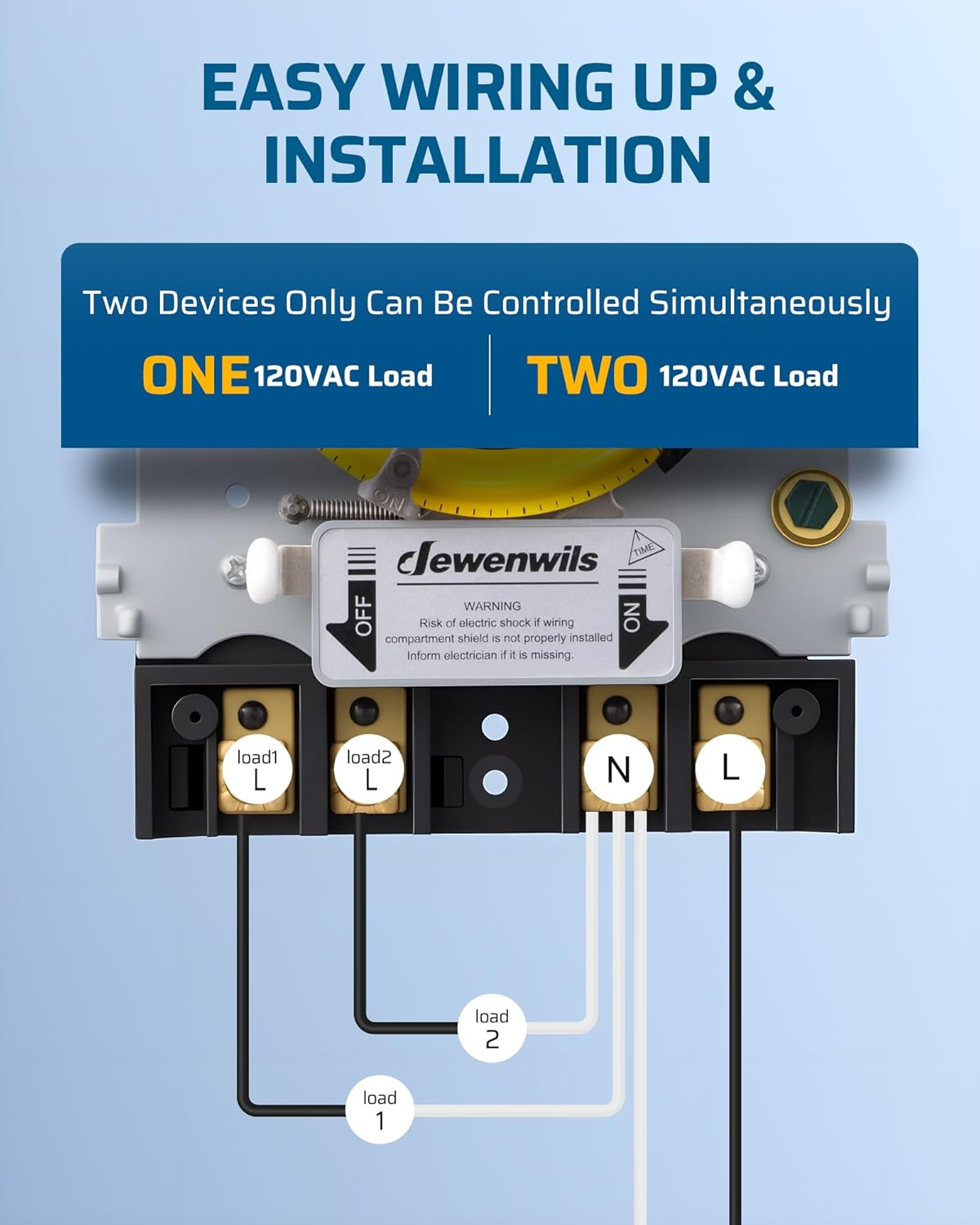
Image 6.1: Simplified wiring diagram for connecting one or two 120VAC loads to the timer switch.

Pilt 6.2: Sisemine view of the timer box, showing the mechanical dial, manual override switch, and clearly labeled wiring terminals.
- Toite sisend: Connect the incoming 120VAC Line (L) and Neutral (N) wires to the designated "Power L" and "Power N" terminals.
- Load Output (One Device):
- Connect the load's Line wire to the "Load L" terminal.
- Connect the load's Neutral wire to the "Load N" terminal.
- Load Output (Two Devices):
- For Load 1: Connect its Line wire to "Load1 L" and its Neutral wire to "Load1 N".
- For Load 2: Connect its Line wire to "Load2 L" and its Neutral wire to "Load2 N".
- Veenduge, et kõik ühendused on tihedad ja kindlad.
- After wiring, close and latch the enclosure door to maintain its weatherproof integrity.
7. Kasutusjuhised
7.1 Praeguse kellaaja seadistamine
- Open the timer box door.
- Gently rotate the yellow mechanical dial clockwise until the current time aligns with the "TIME" arrow indicator on the inner housing. The dial is marked with 24 hours (1-12 AM, 1-12 PM).
- No tools are required for this adjustment.

Pilt 7.1: Detailne view of the mechanical dial, showing the current time indicator and the ON/OFF trippers.
7.2 Sisse-/väljalülitustsüklite programmeerimine
The timer comes with two sets of trippers: a white tripper for ON and a black tripper for OFF. These trippers are inserted into the slots around the edge of the yellow dial.
- Sisselülitusaja määramine: Insert a white tripper into the slot corresponding to the desired ON time.
- Väljalülitusaja määramine: Insert a black tripper into the slot corresponding to the desired OFF time.
- You can set up to two ON/OFF cycles per 24-hour period. Ensure that an ON tripper is followed by an OFF tripper for each cycle.
- Once set, the timer will automatically repeat these cycles daily.

Pilt 7.2: Visuaalne näideample of setting ON/OFF times for a fountain, illustrating the daily cycle.
7.3 Käsitsi tühistamine
The timer features a manual override switch located below the dial. This switch allows you to temporarily turn the connected device ON or OFF without altering the programmed schedule.
- Slide the switch to "ON" to keep the device continuously ON, overriding the schedule.
- Slide the switch to "OFF" to keep the device continuously OFF, overriding the schedule.
- Slide the switch to "AUTO" (center position) to resume the programmed schedule.

Image 7.3: Explanation of the manual override switch positions and their functions.
8. Hooldus
- Puhastamine: Periodically wipe the exterior of the timer box with a damp cloth. Do not use abrasive cleaners or solvents. Ensure the door seal is free of debris.
- Ülevaatus: Regularly check the timer box for any signs of damage, corrosion, or loose connections. Ensure the door latch is functioning correctly to maintain weatherproof integrity.
- Kasutaja poolt hooldatavaid osi pole: The internal mechanism of the timer is not user-serviceable. Do not attempt to open or repair the internal components.
9. Veaotsing
| Probleem | Võimalik põhjus | Lahendus |
|---|---|---|
| Seade ei lülitu programmeeritud aegadel sisse/välja. |
|
|
| Seade on alati sisse lülitatud või alati välja lülitatud. | Käsitsi juhtimise lüliti on sisse lülitatud. | Set the manual override switch to "AUTO" to resume programmed operation. |
| Ühendatud seadmel puudub toide. |
|
|
10. Ametlik tootevideo
Video 10.1: An official product video demonstrating the features and operation of the DEWENWILS PTM01 24-Hour Mechanical Timer Switch, including its weatherproof design and ease of setting.
11. Garantii ja tugi
For warranty information or technical support, please refer to the warranty card included with your product or contact DEWENWILS customer service directly. Contact details can typically be found on the manufacturer's official webveebilehel või toote pakendil.