1. Sissejuhatus
This manual provides detailed instructions for the installation, operation, and maintenance of your ESX Vision VMX900DAB Universal 1-DIN Multimedia Receiver. Please read this manual thoroughly before using the device to ensure proper functionality and to maximize your user experience.
The ESX Vision VMX900DAB is a versatile 1-DIN multimedia receiver featuring a 9-inch multi-angle touchscreen display. It integrates advanced connectivity options including wireless Apple CarPlay and Android Auto, DAB+ digital radio, Bluetooth hands-free calling and audio streaming, and a comprehensive media player. The unit is designed for universal compatibility and offers a removable monitor for enhanced security.
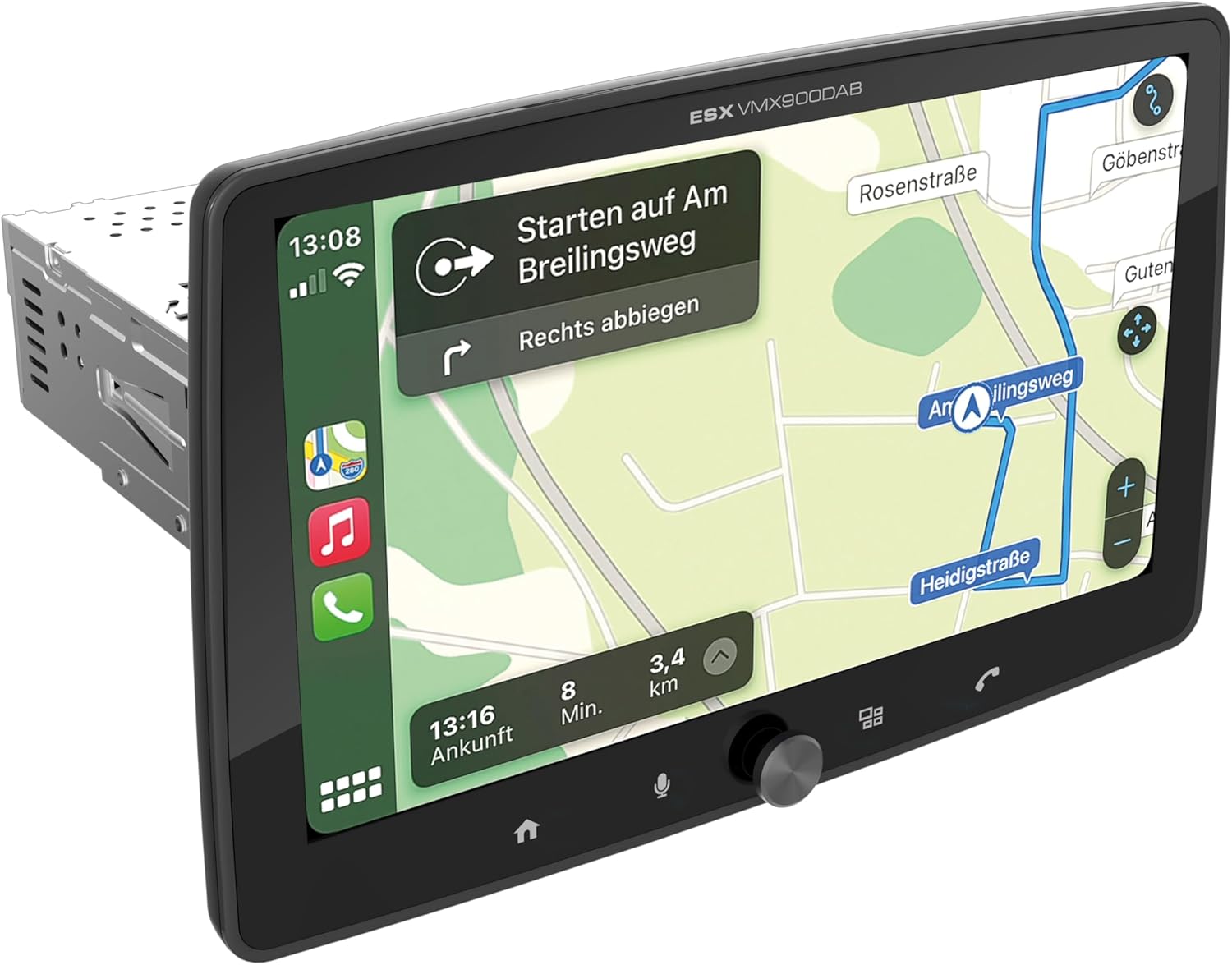
Figure 1.1: ESX Vision VMX900DAB with navigation interface.
2. Seadistamine ja installimine
2.1 Pakendi sisu
Enne paigaldamist veenduge, et kõik komponendid on olemas:
- ESX Vision VMX900DAB Main Unit
- Detachable 9-inch Touchscreen Monitor
- Power/Speaker Wiring Harness
- Väline mikrofon
- GPS antenn
- DAB+ antenn
- USB pikenduskaablid
- Kinnitusdetailid (klambrid, kruvid)
- Kasutusjuhend (see dokument)

Joonis 2.1: Komplektis olevad tarvikud ja komponendid.
2.2 Mounting the Main Unit
- Enne paigaldamise alustamist veenduge, et sõiduki aku on lahti ühendatud.
- Insert the 1-DIN main unit into the vehicle's dashboard opening.
- Secure the main unit using the provided mounting brackets and screws.
2.3 Monitori ühendamine
The 9-inch monitor is detachable and connects to the main unit via a click system.
- Align the monitor's connector with the slot on the main unit.
- Gently push the monitor until it clicks securely into place.
- To remove, press the release button (if applicable) and pull the monitor away.

Figure 2.2: Detachable monitor with click system.
2.4 Juhtmete ühendamine
Refer to the wiring diagram provided with the unit for specific connections. Key connections include:
- Power and Speakers: Connect the main wiring harness to the vehicle's power supply and speakers.
- Väline mikrofon: Plug the external microphone into its dedicated input for optimal hands-free call quality.
- GPS-antenn: Ühendage GPS-antenn ja paigaldage see kohta, kus on vaba valgusallikas. view taevast täpse positsioneerimise tagamiseks.
- DAB+ antenn: Connect the DAB+ antenna for digital radio reception.
- USB-pordid: Two USB-A ports are available. One for media playback and charging (1.5A), and another specifically for Apple CarPlay/Android Auto and charging (1.5A).
- RCA eelamplifitseeritud väljundid: Six 4V RCA outputs (FL/FR/RL/RR/SUB1/SUB2) are available for connecting external ampelupäästjad.
- AUX RCA Inputs: Stereo audio and video inputs (L/R/VIDEO) for external audio/video sources.
- Camera RCA Inputs: Eraldi sisendid esi- ja tagakaamerale.
- Rooli juhtimine: Analog steering wheel remote control input (learnable) for integration with vehicle controls.
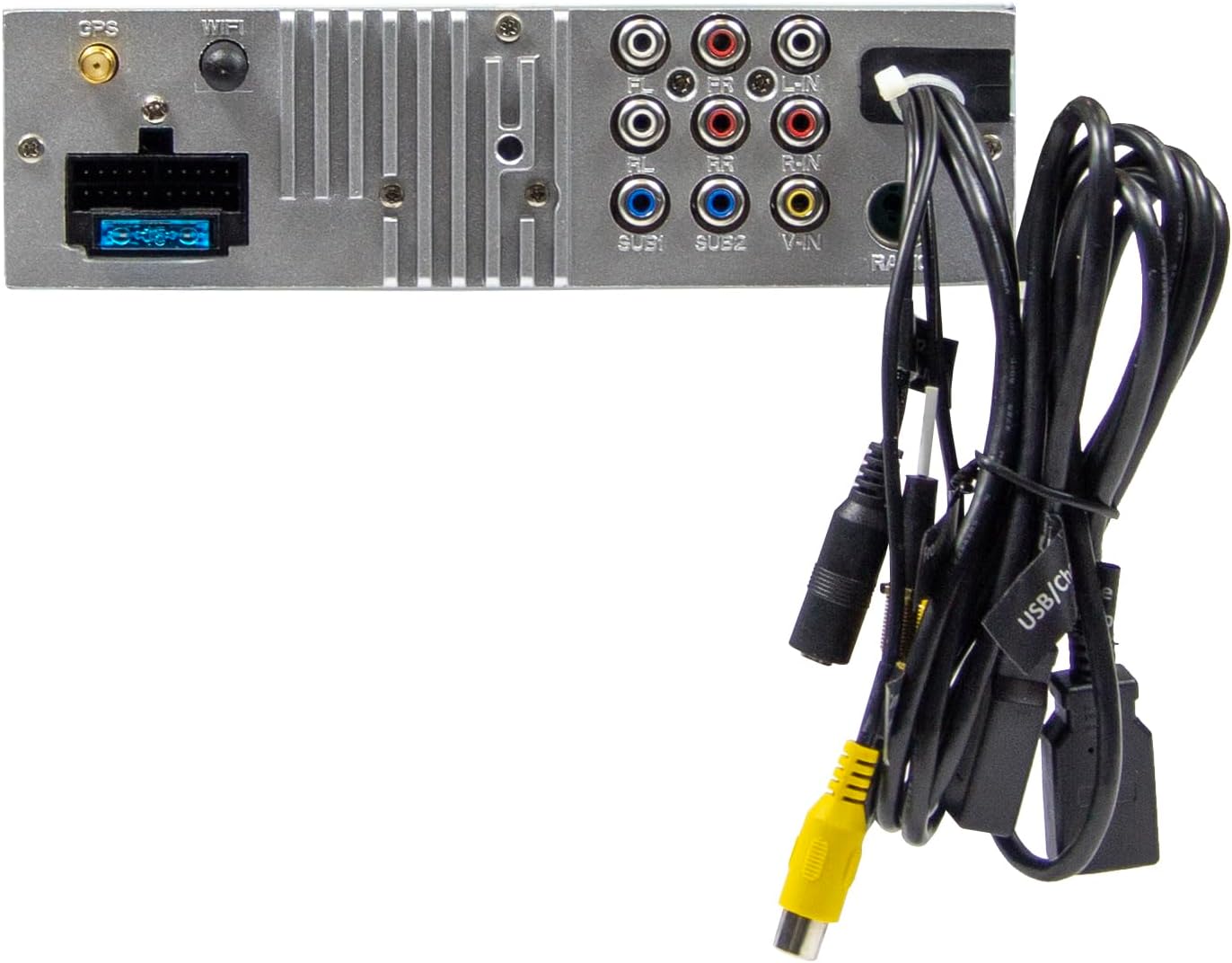
Joonis 2.3: Põhiseadme tagumised ühendused.
3. Kasutusjuhised
3.1 Toite sisse-/väljalülitamine ja põhilised juhtnupud
- Toide sisse: The unit will power on automatically with the vehicle's ignition.
- Toide välja: The unit will power off automatically with the vehicle's ignition.
- Helitugevuse juhtimine: Helitugevuse reguleerimiseks kasutage esipaneelil asuvat suurt pöördnuppu.
- Funktsiooniklahvid: Four function keys on the front panel provide quick access to common features.
- Puuteekraan: All primary functions are controlled via the 9-inch touchscreen.
3.2 Home Screen and Navigation
The home screen provides access to all main functions and applications.

Figure 3.1: Main menu/home screen.
3.3 Apple CarPlay ja Android Auto
The VMX900DAB supports both wireless and wired (via USB) Apple CarPlay and Android Auto.
- Traadita ühendus: Enable Bluetooth and Wi-Fi on your smartphone and follow the on-screen prompts to connect.
- Juhtmega ühendus: Connect your smartphone to the dedicated USB-A port using a compatible USB cable.
- Once connected, your smartphone's compatible apps (navigation, music, calls, messages) will be mirrored on the receiver's display.

Joonis 3.2: Apple CarPlay liides.
3.4 Radio Functions (DAB+/FM/AM)
- DAB+ raadio: Select the DAB+ icon from the home screen. The unit will scan for available digital radio stations.
- FM/AM-raadio: Select the Radio icon. Use the touchscreen to tune to stations, save presets, and access RDS functions.
3.5 Bluetooth Hands-Free and Audio Streaming
- Sidumine: Enable Bluetooth on your smartphone and search for the VMX900DAB. Select the device and confirm pairing.
- Käed-vabad helistamine: Once paired, you can make and receive calls directly through the receiver. The external microphone ensures clear voice transmission. Your phonebook can be synchronized.
- Heli voogesitus: Stream music wirelessly from your smartphone to the receiver.
3.6 Meedia taasesitus
The unit supports various audio, video, and photo formats via USB.
- Toetatud File Vormingud: AVI, FLV, MOV, MKV, WMV, WMA, MP3, FLAC, JPEG, PNG, BMP.
- Insert a USB drive into the media USB-A port. Select the USB icon from the home screen to browse and play media files.
3.7 Monitori reguleerimine
The monitor can be tilted and adjusted in height to achieve the optimal viewing angle and prevent obstruction of vehicle controls.

Figure 3.3: Adjustable monitor mechanism.
MITTE KUNAGI kohandamist
- Startup Logo: Customize the startup logo in the settings menu.
- RGB Key Illumination: Select from various RGB colors and animation effects for the key illumination.
- Menüü keeled: Supported languages include DEU, ENG, SWE, ITA.
4. Hooldus
4.1 Seadme puhastamine
- Use a soft, dry cloth to wipe the display and unit surfaces.
- For stubborn marks on the screen, use a screen cleaner specifically designed for electronic displays and a microfiber cloth.
- Do not use abrasive cleaners, solvents, or harsh chemicals, as these can damage the finish or screen.
4.2 Üldine hooldus
- Vältige seadme jätmist äärmuslike temperatuuride, pikaajalise otsese päikesevalguse või kõrge õhuniiskuse kätte.
- Ülekuumenemise vältimiseks tagage seadme ümber korralik ventilatsioon.
- When removing the monitor, handle it carefully to avoid damage to the connectors.
5. Veaotsing
If you encounter issues with your VMX900DAB, refer to the following common problems and solutions:
| Probleem | Võimalik põhjus | Lahendus |
|---|---|---|
| Pole jõudu | Incorrect wiring; Blown fuse; Vehicle ignition off | Check power connections; Replace fuse; Turn on vehicle ignition |
| Ei mingit heli | Helitugevus liiga madal; Vaigistus aktiveeritud; Kõlari juhtmestiku probleem | Suurenda helitugevust; Deaktiveeri vaigistus; Kontrolli kõlariühendusi |
| Bluetooth ei loo ühendust | Bluetooth off on phone/unit; Incorrect pairing process | Ensure Bluetooth is on; Re-attempt pairing process |
| Apple CarPlay/Android Auto not starting | Incorrect USB port; Faulty USB cable; Phone not compatible/configured | Use the dedicated USB port; Try a different USB cable; Check phone settings for CarPlay/Android Auto |
| Halb raadiovastuvõtt | Antenna not connected; Poor antenna placement; Weak signal area | Check antenna connection; Adjust antenna position; Try in a different location |
| Monitor ei kuva | Monitor not securely attached; Connector issue | Ensure monitor is fully clicked into place; Check for debris in connector |
If the problem persists after attempting these solutions, please contact ESX customer support or your authorized dealer.
6. Tehnilised andmed
| Funktsioon | Spetsifikatsioon |
|---|---|
| Mudeli number | VMX900DAB |
| Ekraan | 9-inch Multi-angle Touchscreen |
| Vormitegur | 1-DIN Universal |
| Ühenduvus | USB, Bluetooth, Auxiliary |
| Eriomadused | Wireless Apple CarPlay, Wireless Android Auto, Detachable Monitor with Click System |
| Raadiotuuner | DAB+ (Digital Radio), FM/AM with RDS |
| Bluetooth | Hands-free function, Audio Streaming |
| USB-pordid | 2x USB-A (1.5A charging, one dedicated for CarPlay/Android Auto) |
| Max Music Power | 4 x 80 W |
| eel-amplifitseeritud väljundid | 6x RCA (4V) (FL/FR/RL/RR/SUB1/SUB2) |
| AUX sisendid | RCA (L/R/VIDEO) |
| Kaamera sisendid | RCA (Front/Rear) |
| Toetatud File Vormingud | AVI, FLV, MOV, MKV, WMV, WMA, MP3, FLAC, JPEG, PNG, BMP |
| Väline mikrofon | Kaasas |
| Rooli juhtimine | Analog (learnable) |
| GPS vastuvõtja | Kaasas |
| Menüü keeled | DEU, ENG, SWE, ITA |
| Kogu väljundvõimsus | 320 vatti |
| Ruumilise heli kanali konfiguratsioon | 4.2 |
| Heliväljundi režiim | Stereo |
7. Garantii ja tugi
For warranty information, please refer to the documentation provided at the time of purchase or contact your authorized ESX dealer. Warranty terms and conditions may vary by region and retailer.
For technical support or further assistance, please contact ESX customer service or visit the official ESX webtugiressursside sait.


