1. Sissejuhatus
Tänan ostu eestasing the LEKATO FP-10 88-Key Foldable Digital Piano. This portable digital piano is designed for musicians of all levels, offering a full 88-key experience in a compact, travel-friendly design. This manual provides essential information for setting up, operating, and maintaining your instrument to ensure optimal performance and longevity.
Palun lugege see kasutusjuhend enne toote kasutamist hoolikalt läbi ja hoidke see alles edaspidiseks kasutamiseks.
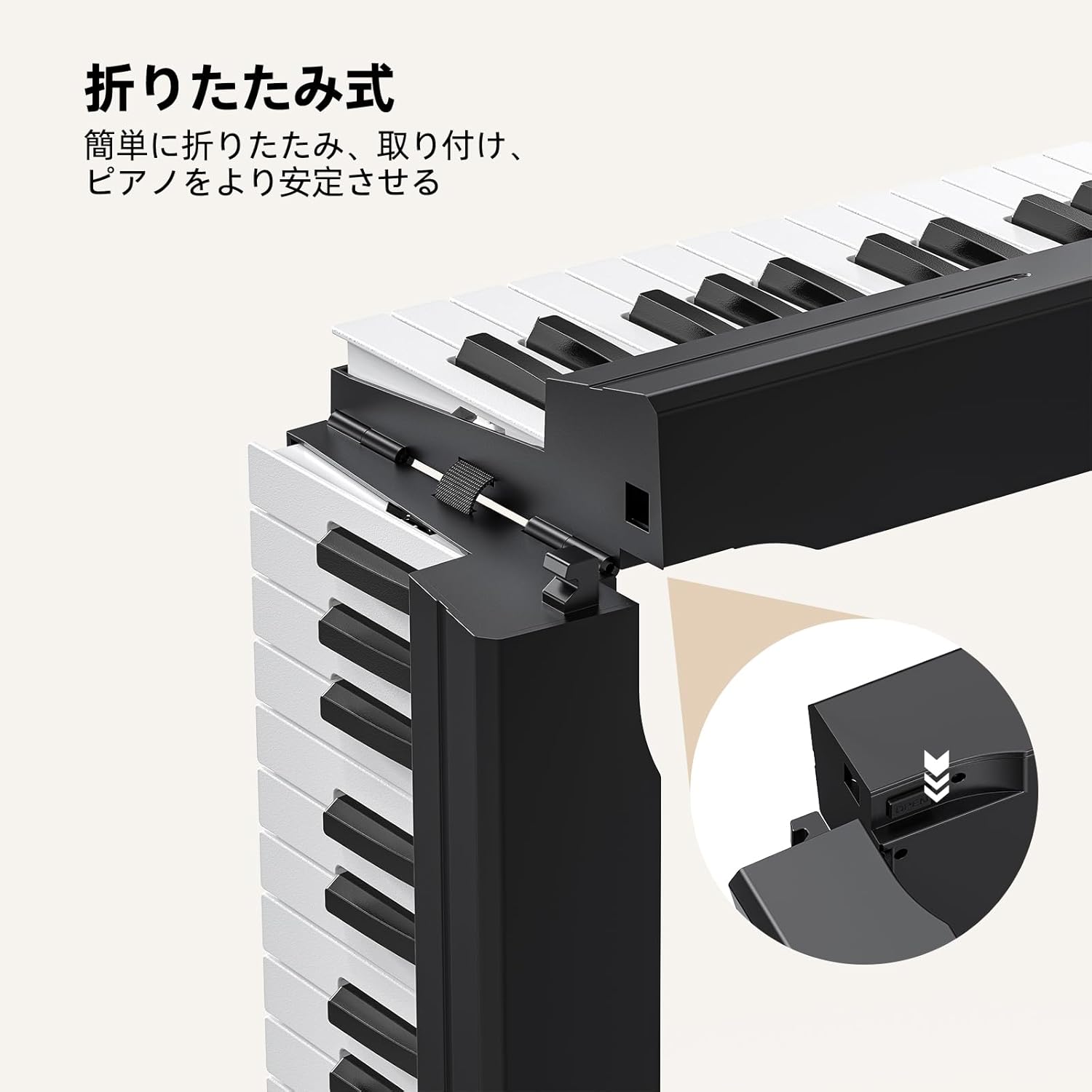
Figure 1: LEKATO FP-10 88-Key Foldable Digital Piano Overview
2. Pakendi sisu
Veenduge, et pakendis on kõik esemed olemas:
- LEKATO FP-10 88-Key Foldable Digital Piano
- Muusikaalus
- Kaitsev kandekott
- Toiteadapter
- USB kaabel
- Sustain Pedal
- Kasutusjuhend (see dokument)
- Kleebised

Joonis 2: Kaasasolevad tarvikud
3. Toote omadused
- 88-Key Foldable Design: Lightweight (2.9kg / 6.3 lbs) and easily folds for portability. Extended length: 125.5cm (49.4 inches), folded length: 62.5cm (24.6 inches).
- Mitmekülgne ühenduvus: Integrated Bluetooth for music applications and USB-MIDI for Digital Audio Workstations (DAW). Supports audio input and external headphones.
- Rich Sound and Functions: Features 128 rhythms, 128 tones, 21 demo songs, automatic chord, transpose, recording, metronome, and dual keyboard mode.
- Reageerivad võtmed: Wood grain design with high-speed rebound keys for an authentic playing feel.
- Kasutajasõbralik liides: Quick function buttons for convenient mode adjustment and function switching.
- Pikk aku tööiga: Approximately 10 hours of operation on a full charge.

Joonis 3: Peamised omadused üleview
4. Seadistamine
4.1 Klaveri lahtivoltimine
- Asetage kokkupandud klaver tasasele ja stabiilsele pinnale.
- Gently unfold the two halves of the keyboard until they are fully extended and locked into place. Ensure the locking mechanism is secure.

Figure 4: Unfolding Mechanism
4.2 Power Connection and Initial Charge
Connect the power adapter to the DC IN port on the piano and plug it into a wall outlet. For the first use, charge the piano for at least 6 hours. Subsequent full charges typically take about 4 hours.

Figure 5: Power and Connectivity Ports
4.3 Sustain-pedaali ühendamine
Plug the included sustain pedal into the dedicated sustain pedal input port on the piano.
5. Kasutusjuhised
5.1 Toide sisse/välja
Locate the power switch on the piano. Slide it to the "ON" position to power on the instrument. Slide it to "OFF" to power off.
5.2 Juhtpaneel üleview
The control panel features various buttons for selecting tones, rhythms, demo songs, and adjusting other functions. Refer to the detailed diagram below for button identification.

Joonis 6: Juhtpaneel
5.3 Helitugevuse reguleerimine
Use the dedicated volume buttons (usually labeled "Vol+" and "Vol-") on the control panel to adjust the master volume of the piano.
5.4 Key Touch Sensitivity
The keys are designed with touch sensitivity, meaning the volume and timbre change based on how hard you press them. This allows for expressive playing. The piano features a wood grain design and high-speed rebound keys for an authentic feel.

Figure 7: Key Touch Sensitivity
6. Ühenduvus
6.1 Bluetooth-ühendus
The FP-10 features integrated Bluetooth for wireless connection to music applications on your smartphone, tablet, or computer. This allows for interactive learning and practice.
- Turn on the piano and activate Bluetooth on your device.
- Otsi "GZUT-MUSIC" or "GZUT-MIDI" in your device's Bluetooth settings and connect. "GZUT-MUSIC" connects the piano as a Bluetooth speaker, while "GZUT-MIDI" connects it for MIDI data transfer with music apps.
- Once connected, you can use compatible music applications for learning or playback.

Joonis 8: Bluetooth-ühenduvus
6.2 USB-MIDI Port
The USB-MIDI port allows you to connect the piano to a computer for use with Digital Audio Workstations (DAW) or other music software. Use the provided USB cable for connection.
6.3 Kõrvaklappide väljund
For silent practice, connect standard headphones to the headphone jack. The piano's internal speakers will be muted automatically.

Figure 9: Headphone Use
7. Funktsioonid
The FP-10 offers a variety of functions to enhance your playing and learning experience.
- Tones (128 options): Select from a wide range of instrument sounds. Use the "Tone+" and "Tone-" buttons to cycle through available tones.
- Rhythms (128 options): Choose from various rhythmic accompaniments. Use the "Rhythm+" and "Rhythm-" buttons to select a rhythm.
- Demo Songs (21 options): Play pre-recorded demo songs for enjoyment or learning. Use the "Demo" button to start/stop and cycle through songs.
- Automatic Chord: Engages automatic chord accompaniment based on your playing.
- Transponeerida: Adjust the pitch of the entire keyboard up or down.
- Salvestus: Record your performances. Consult the control panel for specific record/playback buttons.
- Metronom: Provides a steady beat for practice. Adjust tempo using dedicated buttons.
- Kahe klaviatuuri režiim: Splits the keyboard into two identical sections, allowing two players to play simultaneously or for a teacher and student to play together.

Figure 10: Dual Keyboard Mode

Figure 11: Rich Tones and Rhythms
8. Laadimine ja aku
The LEKATO FP-10 is equipped with a rechargeable battery for portable use. A full charge provides approximately 10 hours of playing time.
- Esimene tasu: For optimal battery health, charge the piano for at least 6 hours before its first use.
- Tavaline laadimine: Subsequent full charges typically take about 4 hours.
- Laadimisindikaator: The display or an indicator light will show the charging status.

Figure 12: 10-Hour Battery Life
9. Hooldus
- Puhastamine: Use a soft, dry cloth to clean the surface of the piano. Do not use abrasive cleaners or solvents.
- Hoiustamine: When not in use, fold the piano and store it in the protective carry bag in a cool, dry place away from direct sunlight and extreme temperatures.
- Käitlemine: Avoid dropping the piano or subjecting it to strong impacts.
10. Veaotsing
| Probleem | Võimalik põhjus | Lahendus |
|---|---|---|
| Ei mingit heli | Volume too low; headphones connected; piano not powered on. | Increase volume; disconnect headphones; ensure piano is powered on. |
| Bluetooth-ühendus ebaõnnestub | Bluetooth pole seadmel lubatud; klaver ei ole sidumisrežiimis; häire. | Ensure Bluetooth is on; restart piano and device; try connecting again. |
| Klahvid ei reageeri | Piano not powered on; internal issue. | Ensure piano is powered on. If problem persists, contact customer support. |
11. Tehnilised andmed
- Mudel: FP-10 (BC3359)
- Klahvid: 88, semi-weighted with wood grain texture
- Toonid: 128
- Rütmid: 128
- Demolaulud: 21
- Ühenduvus: Bluetooth, USB-MIDI, Audio Input, Headphone Output
- Aku eluiga: u. 10 tundi
- Kaal: 2.9 kg (6.3 naela)
- Laiendatud pikkus: 125.5 cm (49.4 tolli)
- Kokkuvolditud pikkus: 62.5 cm (24.6 tolli)
12. Garantii ja tugi
The LEKATO FP-10 Digital Piano comes with a 1-year warranty from the date of purchase. If you encounter any quality issues with the product, exchanges are possible within the warranty period.
For any questions, concerns, or support needs, please contact our customer service. Refer to your purchase documentation for contact details.
13. Toote tutvustusvideo
Watch this video for a demonstration of the LEKATO FP-10's features and sound capabilities.
Video: Demonstration of LEKATO FP-10 Digital Piano sounds and features.


