Sissejuhatus
The Motorola DLR1060 is a 6-channel digital business radio designed for reliable and private communication in various professional environments. Operating in the digital 900 MHz ISM license-free band, this radio offers enhanced clarity and security compared to analog systems. Its compact and lightweight design, combined with robust features, makes it an essential tool for efficient team coordination.
Mis on kaasas
The Motorola DLR1060 package typically includes the following items:
- Motorola DLR1060 2-Way Digital Business Radio (quantity as per pack size)
- Laetav liitium-ioon aku
- Charging Tray with Power Adapter
- Swivel Belt Holster
- User Guide and Safety Leaflet

Image: A typical 6-pack of Motorola DLR1060 digital business radios, showcasing the compact design of each unit.
Põhifunktsioonid
- Digital 900 MHz ISM License-Free Band: Ensures private and reliable communication.
- Laiendatud ulatus: Covers up to 300,000 square feet or 20 floors.
- 6 kanalit: Provides multiple communication lines for different teams or purposes.
- Hääljuhised: User-friendly voice prompts for channel navigation, battery status, and feature customization.
- Raadio Profile ID: Unique 4-digit ID for enhanced privacy and direct communication.
- Computer Programming Software (CPS): Allows for personalized setups, including Private Groups, custom channel names, and radio settings.
- Vastupidav konstruktsioon: Complies with Military Standards 810 C, D, E, F, and G for resistance against shock, vibration, extreme temperatures, and dust.
- Pikk aku tööiga: Internal rechargeable battery provides up to 14 hours of continuous operation.
- Instant Mute: Quickly silence the radio when needed.
- Kohandatav ülemine nupp: Assign frequently used functions for quick access.
Seadistamine
1. Aku laadimine
- Insert the rechargeable Lithium-Ion battery into the radio, ensuring it clicks securely into place.
- Place the radio into the charging tray.
- Connect the power adapter to the charging tray and plug it into a standard electrical outlet.
- The charging indicator light on the tray will illuminate to show charging status. A full charge typically takes several hours.

Image: The Motorola DLR1060 radio securely seated in its charging cradle, ready for power connection.
2. Attaching the Belt Holster
- Align the radio with the swivel belt holster.
- Slide the radio into the holster until it locks into position.
- Attach the holster to your belt or clothing for convenient carrying.
Kasutusjuhised
1. Toide sisse/välja
- Sisselülitamiseks vajutage ja hoidke all nuppu Toide/menüü button (usually located on the top or side) until you hear a tone or voice prompt.
- Väljalülitamiseks hoidke all klahvi Toide/menüü button again until the radio shuts down.

Pilt: Külg view of the DLR1060 radio, highlighting the power button and volume controls for easy access.
2. Helitugevuse reguleerimine
- Kasutage Helitugevuse suurendamine (+) ja Hääl maha (-) raadio küljel olevad nupud kuulamishelitugevuse reguleerimiseks.
3. Kanali valimine
- Pöörake Kanalivalija nupp (typically on the top) to choose one of the 6 available channels.
- The radio will provide a voice prompt announcing the selected channel number.
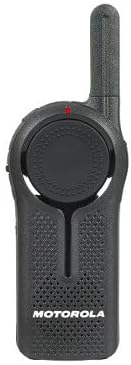
Pilt: Esikülg view of the DLR1060 radio, featuring the prominent channel selector knob and integrated speaker.
4. Edastamine ja vastuvõtmine
- Edastamise alustamiseks vajutage ja hoidke all Push-to-Talk (PTT) raadio küljel asuvat nuppu. Rääkige selgelt mikrofoni.
- Vastuse kuulamiseks vabastage PTT-nupp.
- Veendu, et oled samal kanalil kui inimene, kellega soovid suhelda.
5. Private Communication (Radio Profile ID)
- The DLR1060 uses a unique 4-digit Radio Profile ID for private communication. This ID must be programmed into all radios intended for a private group.
- Refer to the Computer Programming Software (CPS) manual for detailed instructions on setting up and managing Radio Profile IDs and Private Groups.
Hooldus
Raadio puhastamine
- Pühkige raadio välispind pehme lapigaamp riie.
- Do not use harsh chemicals, cleaning solvents, or strong detergents, as these can damage the radio's casing ja sisemised komponendid.
- Ensure the radio is powered off and disconnected from any charging accessories before cleaning.
Aku hooldus
- Always use genuine Motorola batteries and charging accessories.
- Vältige aku kokkupuudet äärmuslike temperatuuridega.
- If the radio will not be used for an extended period, store the battery separately in a cool, dry place.
Veaotsing
| Probleem | Võimalik lahendus |
|---|---|
| Raadio ei lülitu sisse. | Veenduge, et aku on täielikult laetud ja õigesti sisestatud. |
| Ei saa edastada ega vastu võtta. | Verify that all radios are on the same channel and have the correct Radio Profile ID. Check if the battery is low. |
| Halb helikvaliteet või staatiline müra. | Move closer to the other radio or to an open area. Check for obstructions. Ensure the antenna is clear. |
| Aku eluiga on oodatust lühem. | Ensure the battery is fully charged before use. Battery performance can degrade over time; consider replacing older batteries. |
Tehnilised andmed
| Funktsioon | Detail |
|---|---|
| Sagedusriba | 900 MHz ISM (License-Free) |
| Kanalid | 6 |
| Vahemik | Up to 300,000 sq ft / 20 Floors |
| Aku tööiga | Kuni 14 tundi (tüüpiline kasutus) |
| Vastupidavusstandardid | Military Standards 810 C, D, E, F, G |
| Korpuse materjal | Polükarbonaat |
| FCC ID | AZ489FT5870 |
| Ühilduvad seadmed | Speaker, Headphone, Laptop (for CPS) |
| Värv | Must |
Garantii ja tugi
For detailed warranty information and technical support, please refer to the documentation provided with your product or visit the official Motorola Solutions webveebisait. Hoidke ostutšekk ostutõendina garantiinõuete korral.


