1. Sissejuhatus
This manual provides essential information for the safe and efficient use of your AT&T Cingular Flex 2 Smart Flip Phone (Model 6723D). Please read these instructions carefully before operating your device to ensure optimal performance and longevity.
The Cingular Flex 2 is a compact flip phone designed for reliable communication. It features a vibrant display, a built-in camera for capturing moments, and 4GB of internal storage for essential files and applications. The device operates on KaiOS, offering a streamlined user experience.
2. Mis on karbis
Veenduge, et tootepakendis on kõik esemed olemas:
- AT&T Cingular Flex 2 Smart Flip Phone
- Toiteadapter
- Liitiumioonaku (eelinstallitud või eraldi)
3. Seade üleview
Familiarize yourself with the physical components of your AT&T Cingular Flex 2 phone.
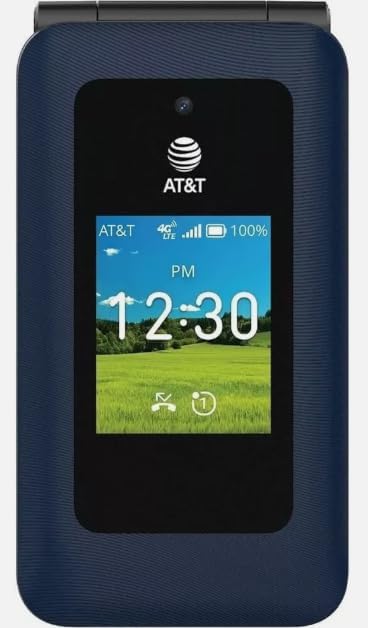
Joonis 3.1: Esiosa view of the AT&T Cingular Flex 2 Smart Flip Phone, showing the main display with time, network signal, and battery indicator.

Joonis 3.2: Tagumine view of the AT&T Cingular Flex 2 Smart Flip Phone, highlighting the textured back cover and the speaker grille at the top.
Põhikomponendid:
- Väline ekraan: Shows notifications, time, and caller ID when closed.
- Põhiekraan: Internal screen for navigation and content.
- Klaviatuur: Numeric and navigation buttons for input.
- Kaamera: Located on the device for capturing photos and videos.
- Helitugevuse nupud: Reguleerige helitugevust.
- Power/End Call Button: Turns the device on/off and ends calls.
- Laadimisport: Toiteadapteri ühendamiseks.
4. Seadistamine
4.1. SIM-kaardi ja aku paigaldamine
- Veenduge, et telefon oleks välja lülitatud.
- Eemaldage ettevaatlikult telefoni tagakaas.
- If the battery is installed, remove it by gently lifting it from the notch.
- Locate the SIM card slot, typically beneath the battery compartment. Insert your SIM card with the gold contacts facing down and the notched corner aligned correctly.
- Insert the battery, ensuring the contacts align with those in the phone.
- Pange tagakaas tagasi, kuni see kindlalt paika klõpsatab.
4.2. Seadme laadimine
- Connect the power adapter to the charging port on your phone.
- Ühendage toiteadapter tavalisse pistikupessa.
- Enne esmakordset kasutamist laske telefonil täielikult laadida. Ekraanil olev aku indikaator näitab laadimise olekut.
4.3. Toite sisse / välja lülitamine
- Sisselülitamiseks: Vajutage ja hoidke all toite-/kõne lõpetamise nuppu, kuni ekraan süttib.
- Väljalülitamiseks: Vajutage ja hoidke all toite-/kõne lõpetamise nuppu, seejärel valige ekraanil kuvatavate valikute hulgast „Lülita välja”.
5. Telefoni kasutamine
5.1. Põhiline navigeerimine
The Cingular Flex 2 uses a physical keypad for navigation. Use the directional pad (D-pad) to move between menu items and the center button to select. The left and right soft keys perform actions indicated on the screen above them.
5.2. Helistamine ja kõnede vastuvõtmine
- Helistamiseks tehke järgmist. Enter the phone number using the keypad and press the Call button (usually the green button).
- Kõnele vastamiseks: Kui telefon heliseb, vajutage helistamisnuppu.
- Kõne lõpetamiseks: Press the Power/End Call button (usually the red button).
5.3. Sõnumite saatmine ja vastuvõtmine
Liikuge peamenüüst rakendusse „Sõnumid”.
- To Send a New Message: Select 'New Message', enter the recipient's number or select from contacts, then type your message using the keypad.
- Note on Multimedia Messaging: Sending photos via text message may not be consistently supported. Receiving multimedia messages can also be intermittent.
- Hääl tekstiks: This device does not support voice-to-text input for messaging.
5.4. Kaamera kasutamine
The phone includes a built-in camera. You can access it via the main menu or by pressing the dedicated camera shortcut button on the side of the device.
- Fotode tegemine: Open the camera app, frame your shot, and press the center button or camera button to capture.
- Videote salvestamine: Switch to video mode within the camera app and press the record button.
5.5. Internet ja rakendused
The Cingular Flex 2 runs on KaiOS. Access the KaiOS store for additional applications. Pre-installed apps include YouTube and a feature-reduced version of Google Maps. Be aware that some utility apps downloaded from the store may display advertisements.
6. Hooldus
6.1. Aku hooldus
- Vältige aku kokkupuudet äärmuslike temperatuuridega.
- Charge the battery using only the provided power adapter.
- Unplug the charger once the battery is fully charged to conserve energy.
6.2. Seadme puhastamine
Telefoni ekraani ja korpuse puhastamiseks kasutage pehmet, kuiva ja ebemevaba lappi. Vältige karmide kemikaalide või abrasiivsete materjalide kasutamist.
6.3. Tarkvaravärskendused
Periodically check for software updates in the phone's settings menu to ensure your device has the latest features and security enhancements.
7. Veaotsing
If you encounter issues with your Cingular Flex 2, refer to the following common problems and solutions:
| Probleem | Võimalik lahendus |
|---|---|
| Slow interface or app loading | Close unused applications. Restart the phone. Consider uninstalling less frequently used apps to free up resources. |
| Operating System crashes | Restart the device. Ensure the software is up to date. If persistent, a factory reset may be necessary (back up data first). |
| Wi-Fi or network connectivity issues | Toggle Wi-Fi/Mobile Data off and on. Restart the phone. Check router or network settings. Ensure notifications for network disconnections are managed in settings to avoid excessive alerts. |
| Keyboard input errors (e.g., double key strokes) | Ensure you are pressing keys firmly and deliberately. If the issue persists, contact customer support. |
| Cannot send photos via text message | This is a known limitation for some devices. Try alternative methods for sharing images if available, or reduce image size if an option. |
| Kehv aku tööiga | Reduce screen brightness. Close background apps. Limit use of power-intensive features like GPS. Ensure the battery is fully charged. |
7.1. Tehaseseaded
Tehase lähtestamine kustutab kõik teie telefoni andmed ja taastab selle algsed tehaseseaded. See võib lahendada püsivaid tarkvaraprobleeme. Back up all important data before performing a factory reset. Consult your phone's settings menu for the 'Reset' or 'Erase all data' option.
8. Tehnilised andmed
Detailed technical specifications for the AT&T Cingular Flex 2 Smart Flip Phone (Model 6723D):
| Funktsioon | Spetsifikatsioon |
|---|---|
| Mudeli nimi | Cingular Flex 2 |
| Kauba mudeli number | 6723D |
| Kaubamärk | AT&T |
| Operatsioonisüsteem | KaiOS |
| Mälu salvestusmaht | 4 GB |
| Paigaldatud RAM-mälu suurus | 512 MB |
| CPU mudel | Mediatek Dimension 1100 |
| Resolutsioon | 720 x 1520 |
| Ühenduvustehnoloogia | 4G LTE |
| Mobiiltehnoloogia | 4G |
| Juhtmevaba kandja | Lukustamata |
| GPS | Tõsi |
| Vormitegur | Pöörake |
| Värv | Klassikaline merevägi |
| Aku mahutavus | 1400 miljonitamp Tundi |
| Aku võimsuse reiting | 2800 Amp Tundi |
| Kauba kaal | 7.4 untsi (0.21 kilogrammi) |
| Pakendi mõõtmed | 4.69 x 2.91 x 2.13 tolli |
| Tootja | AT&T |
| Esmakordselt saadaval olev kuupäev | 11. veebruar 2025 |
9. Garantii ja tugi
For warranty information, please refer to the documentation provided with your purchase or visit the official AT&T support website. If you require technical assistance or have questions not covered in this manual, please contact AT&T customer support.
Lisateavet tugiressursside ja kontaktandmete kohta leiate aadressilt AT&T Store on Amazon.