Sissejuhatus
This manual provides essential information for setting up, operating, and maintaining your PlayStation®5 Console – ASTRO BOT Bundle. The PlayStation®5 console offers lightning-fast loading with an ultra-high speed SSD, deeper immersion with support for haptic feedback, adaptive triggers, and 3D Audio, and access to an all-new generation of incredible PlayStation games. This bundle includes the award-winning ASTRO BOT game, offering a supersized space adventure.
Mis on kaasas
Your PlayStation®5 Console – ASTRO BOT Bundle package contains the following items:
- PlayStation®5 Console (1TB SSD, Disc Drive)
- ASTRO BOT full game voucher* (Account for PlayStation Network and internet connection required to redeem voucher)
- Juhtmeta kontroller
- 2 horisontaalset statiivi jalga
- HDMI kaabel
- Vahelduvvoolu toitejuhe
- USB kaabel
- Printed Materials (including this manual)
- ASTRO’s PLAYROOM (Pre-installed game)
Põhifunktsioonid
- Välkkiire kiirus: Harness the power of a custom CPU, GPU, and SSD with Integrated I/O that redefine console capabilities.
- Uimastavad mängud: Marvel at incredible graphics and experience new PS5 features, including a back catalog of supported PS4 games.
- Hingemattev sukeldumine: Discover a deeper gaming experience with support for haptic feedback, adaptive triggers, and 3D Audio technology.
- ASTRO BOT Adventure: Embark on a galactic quest across 50+ planets, utilizing ASTRO’s new power-ups for enhanced immersion.
- PlayStation Camaraderie: Reunite with over 150 iconic PlayStation heroes, celebrating 30 years of PlayStation history.
Seadistusjuhend
1. Karbist lahtivõtmine ja esmane ülevaatus
Carefully remove all components from the packaging. Ensure all items listed in the 'What's Included' section are present and undamaged. The console and accessories are designed for safe transport.

Esiosa view of the PlayStation 5 Console and ASTRO BOT Bundle box, showing the console, controller, and game art.

Külg view of the PlayStation 5 Console and ASTRO BOT Bundle box, highlighting the console's profile.
2. Aluse kinnitamine
The PS5 console can be placed in either a vertical or horizontal position using the included stand feet. Refer to the quick start guide for detailed instructions on attaching the stand for your preferred orientation. For the horizontal position, place the console with the rear side facing up, align the base with the marked area on the console, and press the base in firmly. For vertical position, you may need to remove a screw from the bottom of the console and attach the base with the screw.
3. Ühenduskaablid
Connect the HDMI cable from the PS5 console to your TV's HDMI input. Then, connect the AC power cord to the console and plug it into an electrical outlet. Ensure all connections are secure.
4. Installing the Disc Drive (if applicable)
If you have the Digital Edition and wish to add a disc drive, follow these steps. First, ensure the console is powered off and unplugged. Remove the console's cover plate. Align the disc drive clips with the two holes on the console and firmly push until you hear a click. Replace the cover plate and attach the larger feet for stability.
Video demonstrating how to install the disc drive on a PlayStation 5 console, converting a Digital Edition to a Disc Edition.
Video providing an overview of the PlayStation 5 console and its contents, including initial setup components.
Kasutusjuhised
1. Toite sisse / välja lülitamine
Press the power button on the console or the PlayStation button on your DualSense wireless controller to power on the system. To power off, hold the PlayStation button on your controller to access the Control Center, then select the power icon and choose 'Turn Off PS5'.
2. Kasutajaliidese navigeerimine
The PS5 features a clean and modern user interface. Use the DualSense controller's directional buttons or analog sticks to navigate through the 'Games' and 'Media' tabs, access your game library, PlayStation Store, and various settings.
Videoshowcasing the PlayStation 5 console and its user interface, demonstrating navigation and game selection.
3. DualSense Wireless Controller
The DualSense controller provides immersive haptic feedback and adaptive triggers, enhancing gameplay. It is rechargeable via the included USB-C cable. The controller also features a built-in microphone for voice chat.
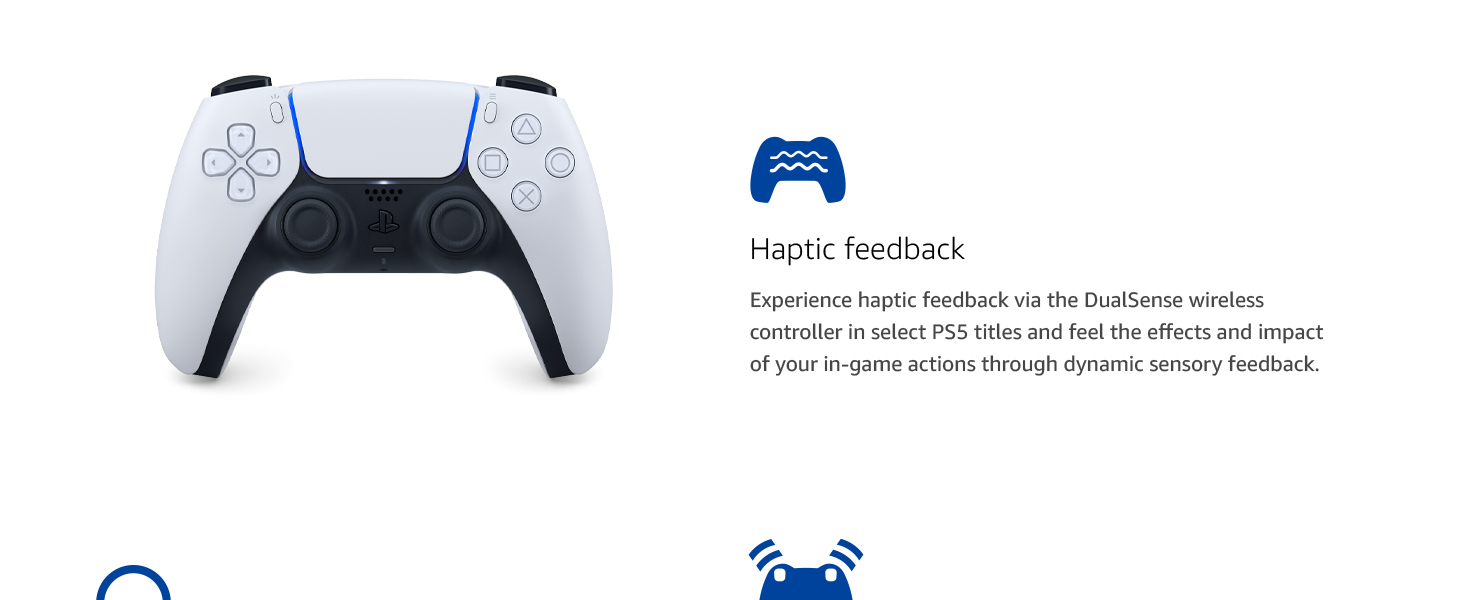
Image illustrating the DualSense wireless controller and its haptic feedback capabilities for enhanced immersion.
Video highlighting the top 10 features of the PlayStation 5, likely including controller functionalities and UI aspects.
Hooldus
To ensure optimal performance and longevity of your PlayStation®5 console, follow these maintenance guidelines:
- Puhastamine: Regularly wipe the console and controller with a soft, dry cloth to remove dust and fingerprints. Avoid using harsh chemicals or abrasive materials.
- Ventilatsioon: Ensure the console is placed in a well-ventilated area, free from obstructions that could block airflow. Do not place it on carpet or in enclosed spaces.
- Tarkvaravärskendused: Keep your console's system software updated to the latest version for improved performance, features, and security.
- Plaadi hooldus: Handle game discs by the edges to avoid scratches. Store them in their cases when not in use.
Veaotsing
If you encounter any issues with your PlayStation®5 console, try the following basic troubleshooting steps:
- Toide puudub: Check all power cable connections. Ensure the power outlet is functional.
- Kuvarit pole: Verify the HDMI cable is securely connected to both the console and the TV. Try a different HDMI port or cable.
- Kontroller ei reageeri: Ensure the controller is charged. Try resetting the controller by pressing the small reset button on the back with a pin.
- Game Freezing/Crashing: Ensure the game and system software are updated. Try restarting the console.
- Disc Drive Issues: Ensure the disc is clean and inserted correctly.
Täpsema tõrkeotsingu või püsivate probleemide korral vaadake ametlikku PlayStationi tugilehte. websaidil või võtke ühendust klienditeenindusega.
Tehnilised andmed
| Funktsioon | Spetsifikatsioon |
|---|---|
| ASIN | B0DWGLDS2V |
| Väljalaske kuupäev | 13. märts 2025 |
| Toote mõõtmed | 16.99 x 14.25 x 6.99 tolli |
| Kauba kaal | 10.65 naela |
| Kauba mudeli number | CFI-2015A01X |
| Tootja | Sony interaktiivne meelelahutus |
| Keel | inglise keel |
| Hinnatud | Teismeline |
| Patareid | Vaja on 1 liitiumioonakut. (kaasas) |
Garantii ja tugi
Your PlayStation®5 Console – ASTRO BOT Bundle is covered by a limited manufacturer's warranty. Please refer to the printed materials included in your package for specific warranty terms and conditions.
For technical support, warranty claims, or additional assistance, please visit the official PlayStation support website or contact PlayStation customer service directly. Contact information can be found in your product documentation or on the PlayStation websaidile.


