1. Sissejuhatus
This manual provides detailed instructions for the setup, operation, maintenance, and troubleshooting of your Transformers TF-Crystal 85 Keys Mechanical Keyboard. Please read this manual thoroughly before using the product to ensure proper functionality and longevity.
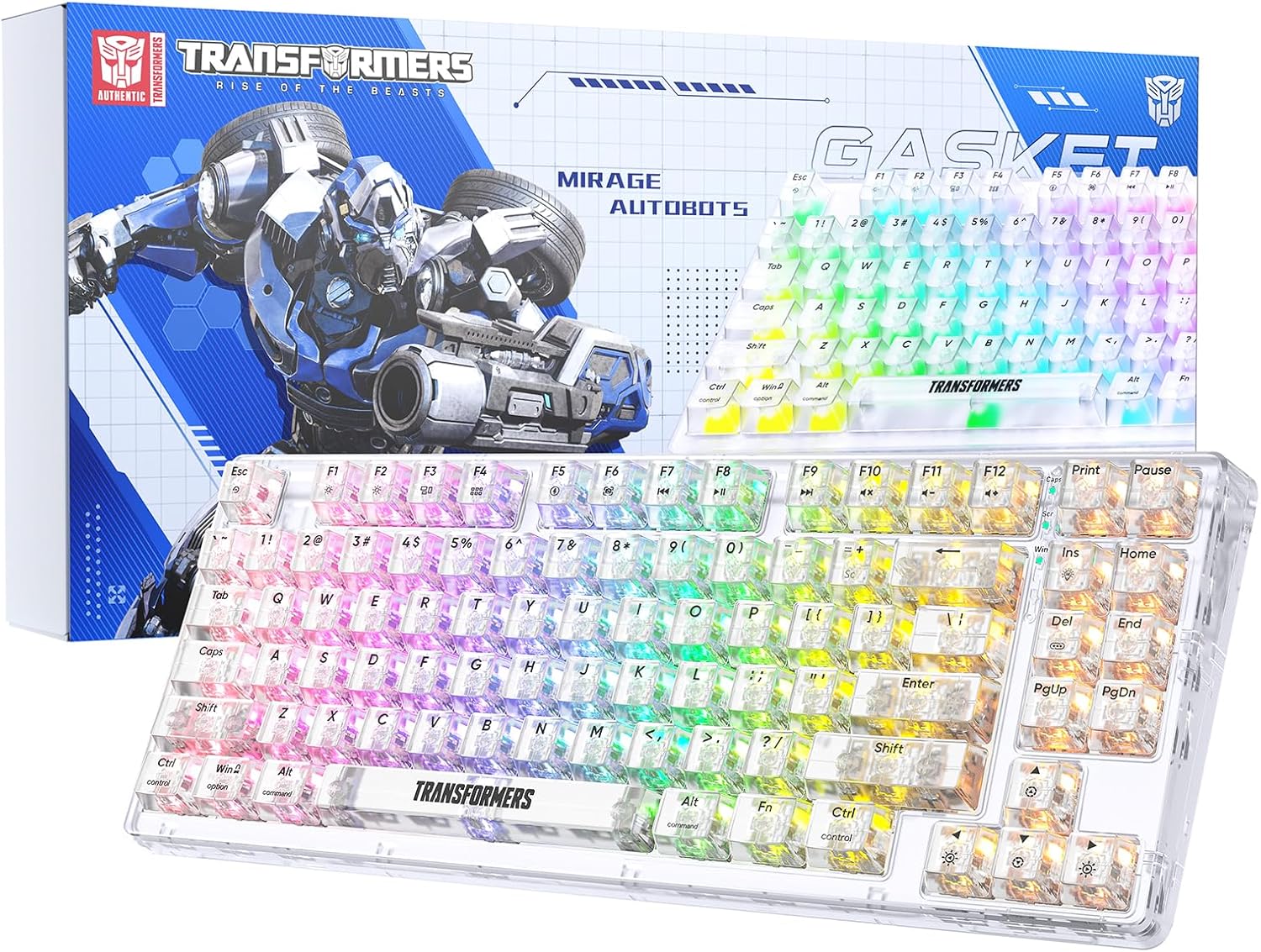
Image 1.1: Transformers TF-Crystal 85 Keys Mechanical Keyboard with its packaging, showcasing the transparent design and RGB lighting.
2. Toote lõppview
2.1 Põhifunktsioonid
- 85-klahvi paigutus: Compact 75% design retaining essential functions, arrow, and navigation keys.
- Kolme režiimiga ühenduvus: Supports Bluetooth 5.0, 2.4GHz wireless, and USB-C wired connections.
- Vahetatav trükkplaat: Compatible with most 3-pin and 5-pin mechanical switches, allowing for easy customization and replacement.
- Linear Switches: Pre-lubricated switches with a 50 million keystroke lifespan for durability and smooth operation.
- Tihendi struktuur: Incorporates high-quality gasket materials and a silicone pad to absorb vibrations and reduce typing noise.
- Kohandatav RGB-taustvalgustus: Features 20 built-in backlight modes, 16.8 million color options, and dynamic music rhythm effects.
- Programmable Driver: Enables macro customization, key function remapping, and advanced lighting control.
- Pikk aku tööiga: Equipped with a 4000mAh battery, providing up to 240 hours of continuous use in 2.4GHz mode without backlighting.
- Lai ühilduvus: Supports Mac, Windows, iOS, Android, PC, Laptop, Smartphone, Tablet, Switch, Xbox, and PlayStation.
- Läbipaistev disain: Features transparent keycaps and base for enhanced aesthetic appeal.
3. Seadistamine
3.1 Klaviatuuri laadimine
Before initial use, fully charge the keyboard. Connect the provided USB-C cable to the keyboard's USB-C port and the other end to a powered USB port (e.g., computer, wall adapter). The charging indicator will show the charging status.
3.2 Ühendamine 2.4 GHz traadita režiimi kaudu
- Leidke 2.4 GHz USB-vastuvõtja, mis tavaliselt asub klaviatuuril olevas sahtlis.
- Ühendage USB-vastuvõtja arvuti vabasse USB-porti.
- Toggle the mode switch on the keyboard to the 2.4G positsiooni.
- The keyboard will automatically connect to your device.
3.3 Ühendamine Bluetoothi kaudu 5.0 Režiim
- Toggle the mode switch on the keyboard to the BT positsiooni.
- Vajutage ja hoidke all fn+1 (või fn+2, fn+3) 3–5 sekundit, kuni märgutuli vilgub kiiresti, mis näitab sidumisrežiimi.
- Luba oma seadmes (arvutis, tahvelarvutis, nutitelefonis) Bluetooth ja otsi uusi seadmeid.
- Select "TF-Crystal 85" from the list of available devices to pair.
- Once paired, the indicator light will stop flashing and remain solid. You can pair up to three Bluetooth devices using fn+1, fn+2, ja fn+3.
3.4 Ühendamine USB-C juhtmega režiimi kaudu
- Ühendage kaasasolev USB-C-kaabel klaviatuuri USB-C-porti.
- Ühendage USB-C-kaabli teine ots arvuti vaba USB-porti.
- The keyboard will automatically switch to wired mode and function without battery power.

Image 3.1: Diagram illustrating the three connection modes: Bluetooth 5.0, 2.4GHz wireless, and USB-C wired, compatible with various devices.
4. Kasutusjuhised
4.1 Režiimide vahetamine
Use the physical switch located on the keyboard to select between BT (Bluetooth), 2.4G (2.4GHz wireless), and USB-C (wired) modes.
4.2 RGB taustvalgustuse juhtimine
The keyboard features customizable RGB backlighting. Use the following key combinations to adjust:
- Fn + Ins: Cycle through 20 different backlight effects.
- Fn + Del: Switch backlight colors within certain modes.
- Fn + ↑ / ↓: Taustvalgustuse heleduse reguleerimine (5 taset).
- Fn + ← / →: Adjust backlight effect speed (5 levels).
- Fn + Esc (hold for 3s): Reset backlight settings to default.

Image 4.1: Visual guide for controlling RGB backlight effects, brightness, and speed using Fn key combinations.
4.3 Programmable Driver Usage
The keyboard includes a programmable driver for advanced customization. This driver allows you to:
- Makrode redigeerimine: Record and edit complex key sequences.
- Key Redefinition: Customize the function of individual keys.
- RGB Effect Customization: Fine-tune lighting modes, colors, and speeds, including music rhythm lighting effects.
Refer to the software's dedicated user interface for detailed instructions on using these features.

Image 4.2: Screenshot of the programmable driver interface, showing options for macro editing, RGB effects, and key redefinition.
4.4 Käigult vahetatavad lülitid
The TF-Crystal 85 keyboard features a hot-swappable PCB, allowing you to change mechanical switches without soldering. This supports most 3-pin and 5-pin mechanical switches.
- Lülitage klaviatuur välja või eemaldage see seadmest.
- Kasutage soovitud klahvikatte ettevaatlikuks eemaldamiseks kaasasolevat klahvikatte tõmmitsat.
- Use the provided switch puller to gently grip the switch from its top and bottom clips, then pull it straight up to remove it.
- Joonda uue lüliti tihvtid trükkplaadi aukudega. Veendu, et tihvtid on sirged.
- Suruge uus lüliti õrnalt oma kohale, kuni see kindlalt klõpsatab. Ärge suruge seda jõuga.
- Vaheta klahvikate tagasi.

Image 4.3: Illustration of the hot-swappable feature, showing how to remove and insert 3-pin/5-pin switches and the linear switch specifications.
5. Hooldus
5.1 Klaviatuuri puhastamine
- Enne puhastamist ühendage klaviatuur kõikidest toiteallikatest lahti.
- Kasutage kergelt pehmet ebemevaba lappi dampKlahvikatete ja korpuse pühkimiseks loputage veega või õrna puhastuslahusega.
- Klahvide vahelise tolmu ja prahi eemaldamiseks kasutage suruõhku või väikest harja.
- Avoid using harsh chemicals or abrasive materials that could damage the keyboard's surface.
5.2 Aku hooldus
- Vältige aku sagedast täielikku tühjenemist.
- Hoidke klaviatuuri jahedas ja kuivas kohas, kui seda pikemat aega ei kasutata.
- Kui klaviatuuri pikka aega ei kasutata, laadige see enne hoiulepanekut umbes 50% ulatuses.
6. Veaotsing
| Probleem | Võimalik põhjus | Lahendus |
|---|---|---|
| Klaviatuur ei reageeri traadita režiimis. | Low battery, incorrect mode selected, receiver not connected, Bluetooth not paired. | Charge the keyboard. Ensure the mode switch is set correctly (2.4G or BT). Re-insert the 2.4G receiver. Re-pair Bluetooth. |
| Võtmed ei registreeru või sisestatakse topelt. | Faulty switch, debris under keycap, software issue. | Clean under the keycap. Try hot-swapping the switch with a known working one. Restart your computer. |
| RGB backlight not working or incorrect. | Backlight turned off, incorrect settings, software conflict. | Reguleerige heledust, kasutades Fn + ↑. Cycle modes with Fn + Ins. Reset backlight with Fn + Esc (hold 3s). Check programmable driver settings. |
| Keyboard not charging. | Faulty USB-C cable, power source issue, keyboard port damage. | Try a different USB-C cable. Use a different USB port or power adapter. Ensure the cable is fully inserted. |
7. Tehnilised andmed
| Funktsioon | Detail |
|---|---|
| Mudeli number | TF-Crystal 85 |
| Klahvi paigutus | 85 klahvi (75% kompaktsem) |
| Ühenduvus | Bluetooth 5.0, 2.4 GHz juhtmevaba, USB-C juhtmega |
| Lüliti tüüp | Pre-lubricated Linear Mechanical Switches |
| Lülitage eluiga | 50 miljonit klahvivajutust |
| Kuumalt vahetatav | Yes (3-pin/5-pin compatible) |
| Taustvalgus | RGB (20 modes, 16.8 million colors) |
| Aku mahutavus | 4000 mAh |
| Battery Life (2.4G, no light) | Kuni 240 tundi |
| Battery Life (Backlit ON) | Umbes 22 tundi |
| Mõõdud (P x L x K) | 34.7 cm x 14 cm x 4.5 cm |
| Ühilduvus | Mac, Windows, iOS, Android, PC, Laptop, Smartphone, Tablet, Switch, Xbox, PlayStation |

Image 7.1: Visual representation of the keyboard's battery life: 240 hours with backlight off, 22 hours with backlight on, powered by a 4000mAh battery.
8. Garantii ja tugi
Transformers is committed to providing exceptional customer service. If you encounter any problems with your TF-Crystal 85 Keys Mechanical Keyboard, our after-sales support team is available to assist you. This includes technical support, exchanges, or installation guidance.
Please contact our customer service for assistance. We guarantee a hassle-free service experience.