1. Sissejuhatus
This manual provides essential information for the safe and efficient use of your SBS Powerbank 10K Slim. Please read these instructions carefully before using the device and retain them for future reference.
The SBS Powerbank 10K Slim is a portable charging device designed to provide power to various electronic devices, including smartphones, tablets, and other USB-powered gadgets. It features a 10,000 mAh capacity, intelligent charging technology, and multiple output ports for versatile use.
2. Pakendi sisu
Veenduge, et pakendis on kõik esemed olemas:
- SBS Powerbank 10K Slim
- USB-A-USB-C kaabel
- Kasutusjuhend
3. Toote omadused
- 10,000 mAh mahutavus: Capable of recharging a smartphone up to 4 times or a tablet up to 2 times.
- Intelligent Charge (IC) 10 Watts: Automatically detects the maximum power your device can accept and adjusts output accordingly, providing protection against overheating and short circuits.
- Õhuke ja kompaktne disain: Portable and lightweight for easy transport in a pocket or bag.
- USB-C sisend/väljund: The USB-C port functions for both charging the power bank and charging external devices.
- Oleku LED-indikaatorid: Easily monitor the remaining charge level of the power bank.
- Mitu väljundporti: Includes 1x USB-C port and 2x USB-A ports for charging various devices simultaneously.
4. Seadistamine
4.1 Välislaadija esmane laadimine
Before first use, fully charge the power bank. Connect the supplied USB-A to USB-C cable to the power bank's USB-C port and the USB-A end to a compatible USB wall charger (not included) or a computer's USB port. The LED indicators will illuminate to show the charging progress.

Image: The power bank being charged using the included USB-C to USB-A cable connected to a laptop.
4.2 Identifying Ports
The power bank features various ports for charging and discharging:
- USB 1 (USB-A 1A Standard): Output for standard charging (5W).
- USB-C (Type-C Fast Charge): Input/Output for fast charging (10W).
- USB 2 (USB-A 2.1A Intelligent Charge): Output for intelligent fast charging (10W).

Pilt: Detailne view of the power bank's charging ports, indicating their types and power outputs.
5. Kasutusjuhised
5.1 Väliste seadmete laadimine
To charge your device, connect it to one of the power bank's output ports (USB 1, USB 2, or USB-C) using an appropriate charging cable. The power bank will automatically begin charging. You can charge up to three devices simultaneously.

Image: The power bank actively charging a smartphone and a pair of wireless earbuds.
5.2 Aku oleku kontrollimine
Press the power button once to activate the LED indicators. The blue LEDs will show the remaining charge level of the power bank. Each LED typically represents approximately 25% of the battery capacity.

Image: The power bank's side with the power button and LED indicators displaying the charge level.
5.3 Intelligent Charge (IC) Function
The Intelligent Charge feature on the USB 2 (USB-A 2.1A) and USB-C ports automatically identifies the connected device and delivers the optimal charging current up to 10W. This ensures efficient and safe charging for a wide range of devices.

Image: The power bank charging a smartphone, highlighting its 10,000 mAh capacity and recharge capability.
6. Hooldus
6.1 Üldine hooldus
- Hoidke varupatareid kuivana ja niiskuse eest kaitstult.
- Vältige äärmuslikke temperatuure (nii kuuma kui ka külma).
- Puhastage seadet pehme ja kuiva lapiga. Ärge kasutage tugevaid kemikaale ega abrasiivseid materjale.
- Ärge pillake akupanka maha, võtke seda lahti ega proovige seda ise parandada.
6.2 Säilitamine
Akupanga pikemaajalisel hoiustamisel veenduge, et see oleks laetud umbes 50–75% ulatuses. Aku heas seisukorras hoidmiseks laadige seda iga 3–6 kuu tagant.
6.3 Ohutusmeetmed
- This power bank includes built-in protections against short circuits, overcharging, and over-discharging.
- Do not expose the power bank to fire or direct sunlight.
- Hoida lastele kättesaamatus kohas.
7. Veaotsing
7.1 Välispatarei ei lae
- Veenduge, et laadimiskaabel oleks kindlalt ühendatud nii varupatarei kui ka toiteallikaga.
- Proovige mõnda teist USB-seinaadapterit või USB-porti.
- Veenduge, et toiteallikas on aktiivne.
7.2 Seade ei lae akupangast
- Check if the power bank has sufficient charge (press the button to check LEDs).
- Ensure the charging cable connecting your device to the power bank is functional and correctly inserted.
- Proovi varupatareil mõnda teist väljundporti.
- Some devices may require a specific charging cable or adapter.
7.3 Aeglane laadimine
- Ensure you are using the appropriate port for faster charging (USB-C or USB 2).
- The charging speed can be affected by the cable quality, the device being charged, and the power bank's remaining charge level.
8. Tehnilised andmed
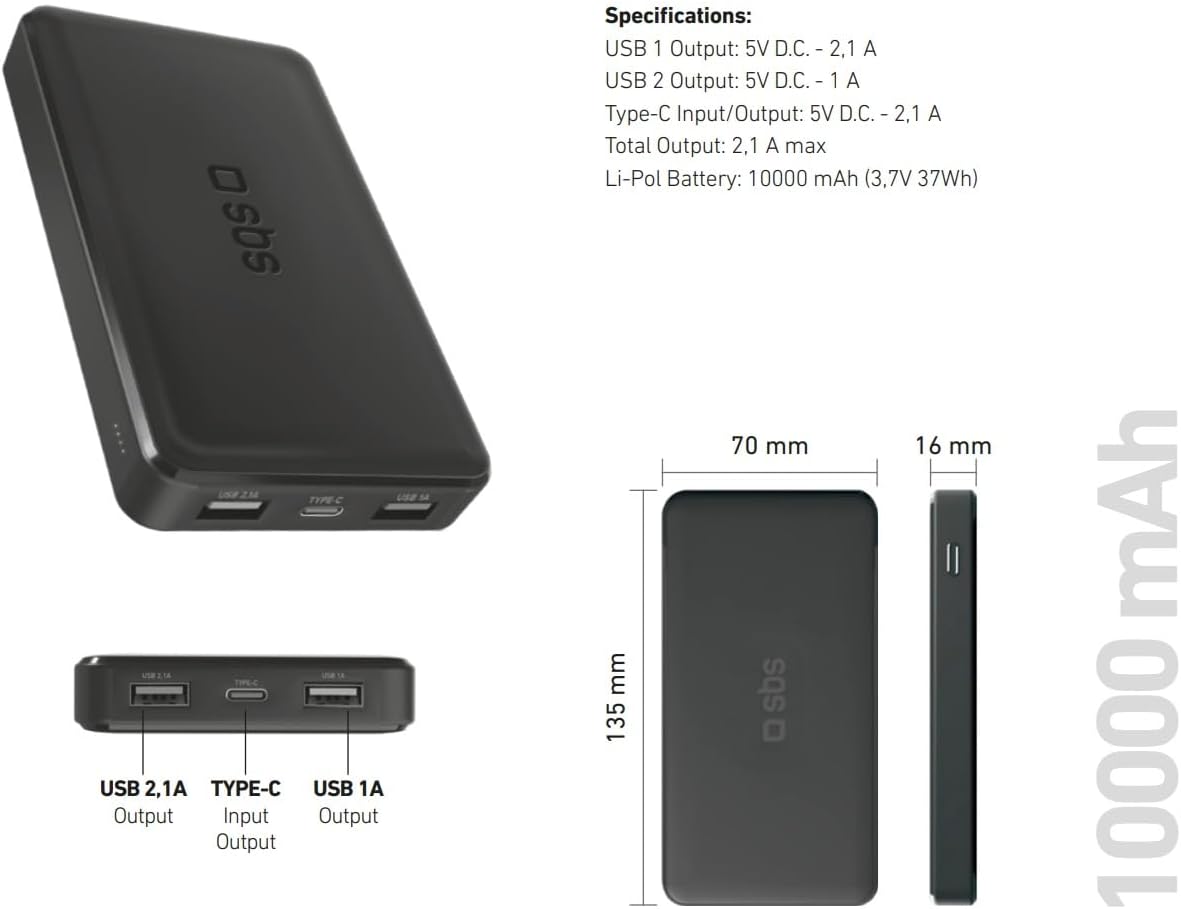
Image: Technical specifications and physical dimensions of the power bank.
| Funktsioon | Detail |
|---|---|
| Mudeli nimi | TTBB10000TCK |
| Aku mahutavus | 10,000 mAh (3.7V 37Wh) |
| Aku tüüp | Liitium-polümeer |
| USB 1 väljund | 5V D.C. - 1A (5W) |
| USB 2 väljund | 5V D.C. - 2.1A (10W Intelligent Charge) |
| USB-C sisend/väljund | 5V D.C. - 2.1A (10W Fast Charge) |
| Koguväljund | Maksimaalselt 2.1A |
| Värv | Must |
| Mõõtmed | 135 mm x 70 mm x 16 mm |
| Kaal | 230 grammi |
| Eriomadused | Fast Charge, Lightweight, Short-circuit Protection, Over-discharge Protection, Slim Design |
| Ühilduvad seadmed | Smartphone, Tablet, Smartwatch, Speaker, Laptop (charging only) |
9. Garantii ja tugi
9.1 Tootja garantii
This SBS Powerbank 10K Slim comes with a 2-aastane tootjagarantiiPalun hoidke oma ostutõend garantiinõuete esitamiseks alles. Garantii katab materjali- ja tootmisdefektid normaalse kasutamise korral.
9.2 Klienditugi
For further assistance, technical support, or warranty inquiries, please visit the official SBS website or contact their customer service department. You can find more information and products from SBS by visiting their official store: SBS Brand Store.


