1. Sissejuhatus
Thank you for choosing the Taiahiro Bk6301 Wireless Mechanical Gaming Keyboard and Mouse Combo. This manual provides detailed instructions for setting up, operating, and maintaining your new peripheral devices. This combo offers versatile connectivity options including 2.4G wireless, Bluetooth 5.0, and wired USB-C, ensuring compatibility with various devices.
2. Pakendi sisu
Palun kontrollige, kas pakis on kõik esemed olemas:
- Taiahiro Bk6301 Wireless Mechanical Gaming Keyboard
- Taiahiro Wireless Gaming Mouse
- USB 2.4G Receiver (stored in mouse battery compartment)
- USB-C ja USB-A laadimis-/andmesidekaabel
- Kasutusjuhend
- 1 AA Battery (for mouse, may be pre-installed or included separately)

Image 2.1: Contents of the Taiahiro Bk6301 Keyboard and Mouse Combo package, including the keyboard, mouse, USB receiver, and USB-C cable.
3. Toote lõppview
3.1 Klaviatuuri funktsioonid
- 98-klahvi paigutus: Compact design with a full numeric keypad.
- Mechanical Blue Switches: Provide tactile and audible feedback for typing.
- RGB-taustvalgustus: Kohandatavad valgusefektid.
- Adjustable Keyboard Stand: Allows for ergonomic positioning.
- Mitme režiimiga ühenduvus: Supports 2.4G wireless, Bluetooth 5.0, and wired USB-C.
- Laetav aku: Built-in 2000mAh battery for wireless operation.
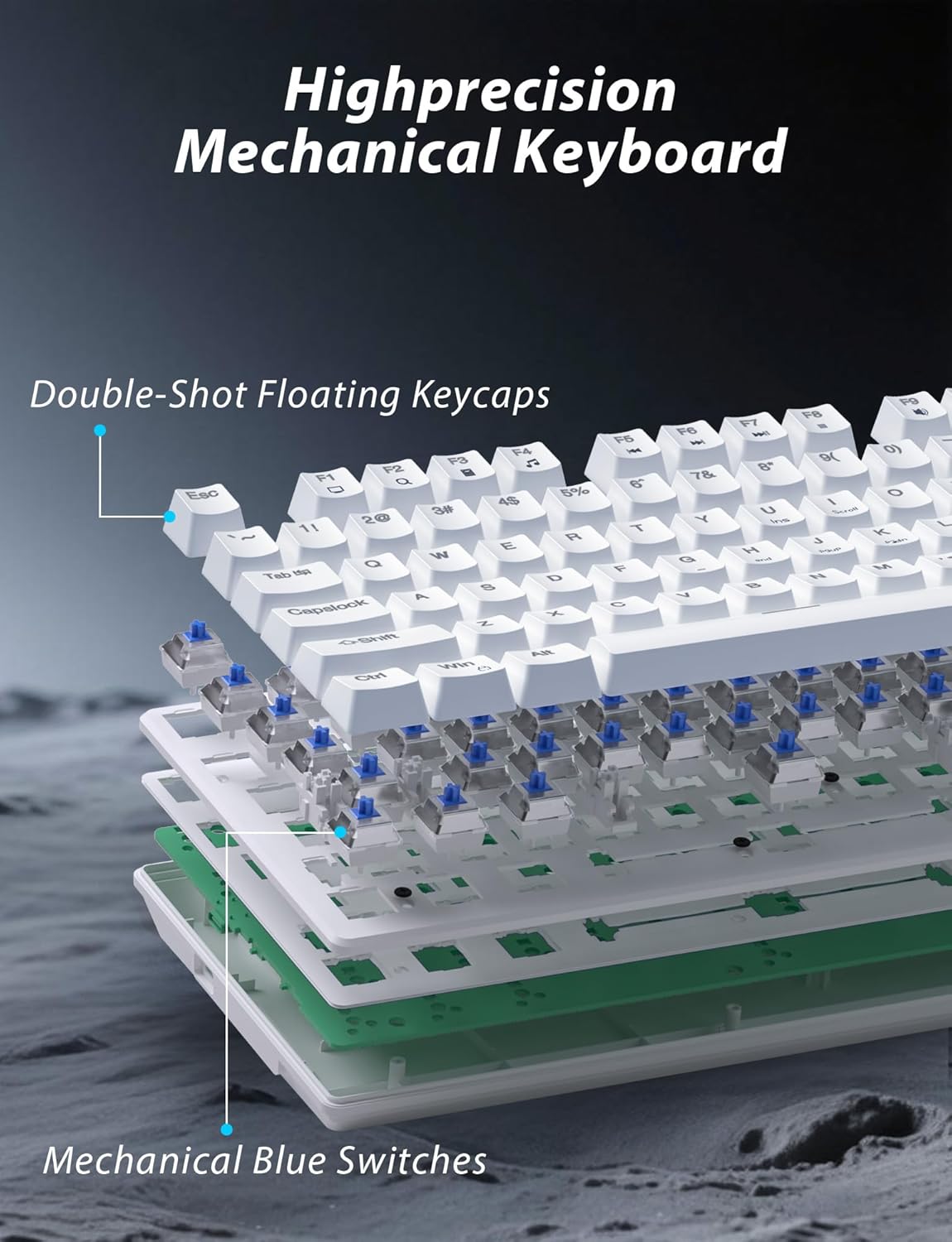
Pilt 3.1: Lõhkekujuline view illustrating the internal structure of the mechanical keyboard, highlighting the double-shot floating keycaps and mechanical blue switches.

Pilt 3.2: Külg view of the keyboard demonstrating its ergonomic design and adjustable stand for comfortable use.
3.2 Hiire funktsioonid
- Ergonoomiline disain: Shaped for comfortable grip.
- Reguleeritav DPI: Four levels (800/1600/2400/3200) for precision control.
- Edasi/tagasi nupud: Convenient side buttons for navigation.
- Kahe režiimiga ühenduvus: Supports 2.4G wireless and Bluetooth.

Image 3.3: The wireless gaming mouse, highlighting its ergonomic shape and four adjustable DPI levels.
4. Seadistusjuhised
4.1 Keyboard Connection
The keyboard supports three connection modes: 2.4G wireless, Bluetooth, and wired USB-C.

Image 4.1: The keyboard displaying its three connectivity options: Bluetooth, 2.4GHz wireless, and USB-C wired connection.
2.4G traadita režiim:
- Locate the USB 2.4G receiver, typically stored in the mouse's battery compartment.
- Sisestage USB-vastuvõtja arvuti vabasse USB-porti.
- On the keyboard, slide the mode switch (usually located on the top edge or bottom) to the '2.4G' position.
- Klaviatuur peaks automaatselt ühenduma.
Bluetooth-režiim:
- Slide the mode switch on the keyboard to the 'BT' (Bluetooth) position.
- The keyboard's indicator light will flash, indicating it is in pairing mode.
- On your device (computer, laptop, smartphone), open Bluetooth settings and search for new devices.
- Select "Taiahiro Bk6301" or a similar name from the list of available devices to pair.
- Pärast sidumist jääb märgutuli põlema.
Juhtmega USB-C režiim:
- Ühendage kaasasolev USB-C-kaabel klaviatuuri USB-C-porti.
- Ühendage teine ots (USB-A) arvuti vaba USB-porti.
- The keyboard will function as a wired device and will charge simultaneously.
4.2 Mouse Connection
The mouse supports 2.4G wireless and Bluetooth connectivity.

Image 4.2: The underside of the mouse, illustrating the battery compartment for one AA battery and the storage slot for the tiny USB receiver.
Aku paigaldamine:
- Ava hiire allosas asuv patareipesa.
- Sisestage üks AA-patarei, jälgides õiget polaarsust.
- Sulgege patareipesa.
2.4G traadita režiim:
- Ensure the USB 2.4G receiver is plugged into your computer.
- Slide the mode switch on the underside of the mouse to the '2.4G' position.
- Hiir peaks automaatselt ühenduse looma.
Bluetooth-režiim:
- Slide the mode switch on the underside of the mouse to the 'BT' (Bluetooth) position.
- Hiir siseneb sidumisrežiimi.
- On your device, open Bluetooth settings and search for new devices.
- Select "Taiahiro Mouse" or a similar name from the list to pair.
5. Kasutusjuhised
5.1 Klaviatuuri funktsioonid
Taustvalgustuse juhtimine:
Klaviatuuril on kohandatav RGB-taustvalgustus.
- Taustavalgustuse režiimi muutmine: Vajutage Fn + kodu to cycle through 18 different lighting effects.
- Heleduse reguleerimine: Vajutage Fn + ↑ (ülesnool) or Fn + ↓ (allanool) to adjust between 5 brightness levels.
- Kiiruse reguleerimine: Vajutage Fn + ← (vasaknool) or Fn + → (paremnool) to adjust between 5 lighting speed levels.

Image 5.1: Keyboard layout highlighting the function key combinations for controlling backlight modes, brightness, and speed.
Multimeedia funktsioonid:
Multimeedia juhtnuppudele juurdepääsemiseks vajutage Fn key in combination with the designated F-keys (F1-F12).
- Fn+F1: Meediumipleier
- Fn+F2: Helitugevuse vähendamine
- Fn+F3: Helitugevuse suurendamine
- Fn+F4: Vaigista
- Fn+F5: Peatus
- Fn+F6: Eelmine lugu
- Fn+F7: Esita/Paus
- Fn+F8: Järgmine lugu
- Fn+F9: Meil
- Fn+F10: Web Brauser
- Fn+F11: Minu arvuti
- Fn+F12: Kalkulaator
5.2 Hiire funktsioonid
DPI reguleerimine:
Vajutage nuppu DPI nupp (located behind the scroll wheel) to cycle through the four DPI settings: 800, 1600, 2400, and 3200. Each press changes the sensitivity, allowing you to adjust cursor speed to your preference.
6. Hooldus
6.1 Puhastamine
- Klaviatuur: Use a soft, dry cloth to wipe the surface. For deeper cleaning, use compressed air to remove debris from between keys. Avoid using harsh chemicals or abrasive materials.
- Hiir: Pühkige hiire pinda pehme, kergelt kuiva lapigaamp lapiga. Veenduge, et vedelik ei satuks sisemistesse komponentidesse.
6.2 Akuhaldus
- Klaviatuur: The keyboard has a built-in rechargeable battery. Connect the USB-C cable to a power source (e.g., computer USB port, USB wall adapter) to charge. The indicator light will show charging status.
- Hiir: The mouse uses one AA battery. Replace the battery when the mouse performance degrades or it stops responding. Ensure proper polarity when inserting a new battery.
7. Veaotsing
If you encounter issues with your Taiahiro keyboard and mouse combo, please refer to the following solutions:
| Probleem | Võimalik lahendus |
|---|---|
| Keyboard/Mouse not responding (2.4G) |
|
| Keyboard/Mouse not connecting (Bluetooth) |
|
| Keyboard backlight not working or stuck |
|
| Klahvid ei reageeri või vajutatakse topelt |
|
8. Tehnilised andmed
| Funktsioon | Detail |
|---|---|
| Mudeli number | Bk6301 |
| Ühenduvus | Bluetooth 5.0, 2.4G traadita, USB-C juhtmega |
| Klaviatuuri tüüp | Mehaaniline mänguklaviatuur |
| Klahvi paigutus | 98 Keys (with Numeric Keypad) |
| Lüliti tüüp | Mehaanilised sinised lülitid |
| Klaviatuuri taustvalgus | RGB (18 režiimi, 5 heleduse, 5 kiiruse taset) |
| Klaviatuuri aku | 2000mAh laetav |
| Hiire DPI tasemed | 800/1600/2400/3200 |
| Hiire aku | 1 x AA patarei |
| Ühilduvad seadmed | Personaalarvuti, sülearvuti, nutitelefon |
| Kauba kaal | 2.72 naela (kombineeritud) |
| Pakendi mõõtmed | 15 x 5.59 x 3.11 tolli |
9. Garantii ja tugi
9.1 Garantii teave
Taiahiro products are covered by a limited warranty from the date of purchase. Please refer to the warranty card included in your package or visit the official Taiahiro website for detailed warranty terms and conditions. This warranty typically covers manufacturing defects and material faults under normal use.
9.2 Klienditugi
For technical assistance, troubleshooting, or any questions regarding your Taiahiro Bk6301 combo, please contact our customer support team. You can find contact information on the Taiahiro official website or through your purchase platform. When contacting support, please have your product model number (Bk6301) and purchase details ready.


