Sissejuhatus
Welcome to your JLab Go Lux ANC Wireless Headphones. This manual provides detailed instructions to help you get the most out of your new headphones, covering setup, operation, maintenance, and troubleshooting.
Mis on karbis
- JLab Go Lux ANC Wireless Headphones
- USB-C laadimiskaabel

Image: JLab Go Lux ANC Headphones and included USB-C charging cable.
Toode läbiview
Familiarize yourself with the key components and controls of your JLab Go Lux ANC Wireless Headphones.

Pilt: Lähivõte view of the right earcup, highlighting the power button, volume controls, and ANC/Be Aware mode button.
Peamised omadused:
- Hübriidne aktiivne mürasummutus (ANC): Reduces external distractions by up to 30 dB.
- Teadlikkuse režiim: Võimaldab kuulda ümbritsevat heli samal ajal kuulates.
- Pilvevahu mugavus: Ergonomically shaped Form-Fit Earcups with 1-inch Cloud Foam cushions and adjustable hinges for extended comfort.
- JLabi rakenduse kohandamine: Personalize ANC/Be Aware settings, touch controls, and sound preferences.
- Kristallselged kõned: Equipped with noise-canceling microphones for clear communication.
- Bluetoothi mitmikpunkt: Ühendage korraga kahe seadmega.
- Juhtmevaba jagamisrežiim: Share audio wirelessly between two Lux headphones.
- Google Fast Pair ja Microsoft Swift Pair: Effortless pairing with Android and Windows devices.
- Google'i Leia minu seade: Leidke kõrvaklapid, kui need on kadunud.
- Kokkupandav disain: Rotating earcups for compact storage and portability.
Seadistamine
1. Esialgne laadimine
Before first use, fully charge your headphones using the provided USB-C cable. The LED indicator will show charging status.
2. Toide sisse/välja
- Toide sisse: Vajutage ja hoidke toitenuppu all, kuni LED-indikaator süttib.
- Toide välja: Vajutage ja hoidke toitenuppu all, kuni LED-indikaator kustub.
3. Bluetoothi sidumine
- Turn on your JLab Go Lux ANC headphones.
- Kõrvaklapid sisenevad automaatselt sidumisrežiimi (LED vilgub siniselt/punaselt).
- On your device (smartphone, laptop, etc.), open Bluetooth settings and select "JLab Go Lux ANC" from the list of available devices.
- Kui ühendus on loodud, hakkab LED-tuli siniselt põlema.
Google Fast Pair ja Microsoft Swift Pair: For supported Android and Windows 10/11 devices, simply turn on your headphones near the device, and a pop-up notification will prompt you to connect with a single click.
4. JLabi rakenduse kohandamine
Download the JLab App from the App Store or Google Play Store to unlock full customization options for your headphones.
- Kohanda ANC/Be Aware seadeid.
- Puutetundlike juhtnuppude reguleerimine.
- Fine-tune sound with the equalizer (JLab Signature, Balance, Bass Boost presets available).
- Enable Safe Hearing with volume limits.
- Tarkvarauuenduste saamine.

Image: The JLab App interface on a smartphone, demonstrating sound and noise control customization options.
Kasutusjuhised
1. Active Noise Cancelling (ANC) & Be Aware Mode
Toggle between ANC, Be Aware, and ANC Off modes using the dedicated button on the earcup.
- Hübriidne ANC: Eliminates external distractions for an immersive audio experience.
- Teadlikkuse režiim: Laseb ümbritsevatel helidel läbi pääseda, hoides sind ümbritsevast teadlikuna.

Image: A person wearing the headphones, demonstrating the use of ANC or Be Aware mode in a public environment.
2. Kutsefunktsioonid
The built-in noise-canceling microphones ensure clear calls.
- Kõnele vastamine/lõpetamine: Vajutage multifunktsionaalset nuppu üks kord.
- Keeldu kõnest: Vajutage ja hoidke multifunktsionaalset nuppu all.
- Hääleabi aktiveerimine: Vajutage multifunktsionaalset nuppu kaks korda.

Image: A person engaged in a phone call while wearing JLab Go Lux ANC headphones, emphasizing the clear call feature.
3. Muusika taasesitus
- Esita/peata: Vajutage multifunktsionaalset nuppu üks kord.
- Helitugevuse suurendamine: Vajutage lühidalt nuppu „+”.
- Hääl maha: Vajutage lühidalt nuppu '-'.
- Järgmine lugu: Vajutage pikalt nuppu „+”.
- Eelmine lugu: Vajutage pikalt nuppu '-'.
4. Bluetoothi mitmikpunkt
Connect your headphones to two devices simultaneously. For example, connect to your laptop for work calls and your phone for music. The headphones will intelligently switch between devices.
5. Wireless Share Mode
Share your audio with another pair of JLab Lux headphones. Refer to the JLab App or JLab support for detailed instructions on activating Wireless Share Mode.
6. Google Find My Device
If you misplace your headphones, use the Google Find My Device feature to locate them. Ensure this feature is enabled and configured on your connected Android device.

Image: A person using the Google Find My Device app on a smartphone to locate their JLab headphones.
Mugavus ja sobivus
The JLab Go Lux ANC headphones are designed for comfort during extended use.
- Vormilt istuvad kõrvaklapid: Ergonomically shaped to the natural outline of the ear.
- Pilvevahust padjad: 1-inch thick cushions provide plush comfort.
- Reguleeritavad hinged: Customize the fit for various head sizes and shapes.

Image: A person wearing JLab Go Lux ANC headphones, showcasing the comfortable Cloud Foam earcups.
Laadimine ja aku tööiga
Your JLab Go Lux ANC headphones offer extended battery life.
- Aku eluiga: Up to 70+ hours of playtime (40+ hours with ANC on).
- Laadimine: Use the included USB-C cable to charge. A full charge typically takes a few hours.
- LED indikaator: The LED light on the earcup indicates charging status and battery level.
Hooldus
- Clean headphones with a soft, damp riie. Vältige tugevaid kemikaale.
- Hoida jahedas ja kuivas kohas, kui seda ei kasutata.
- Ärge jätke äärmuslikele temperatuuridele ega niiskusele.
- The headphones are not water resistant. Avoid contact with liquids.
- The foldable design with rotating earcups allows for compact storage.
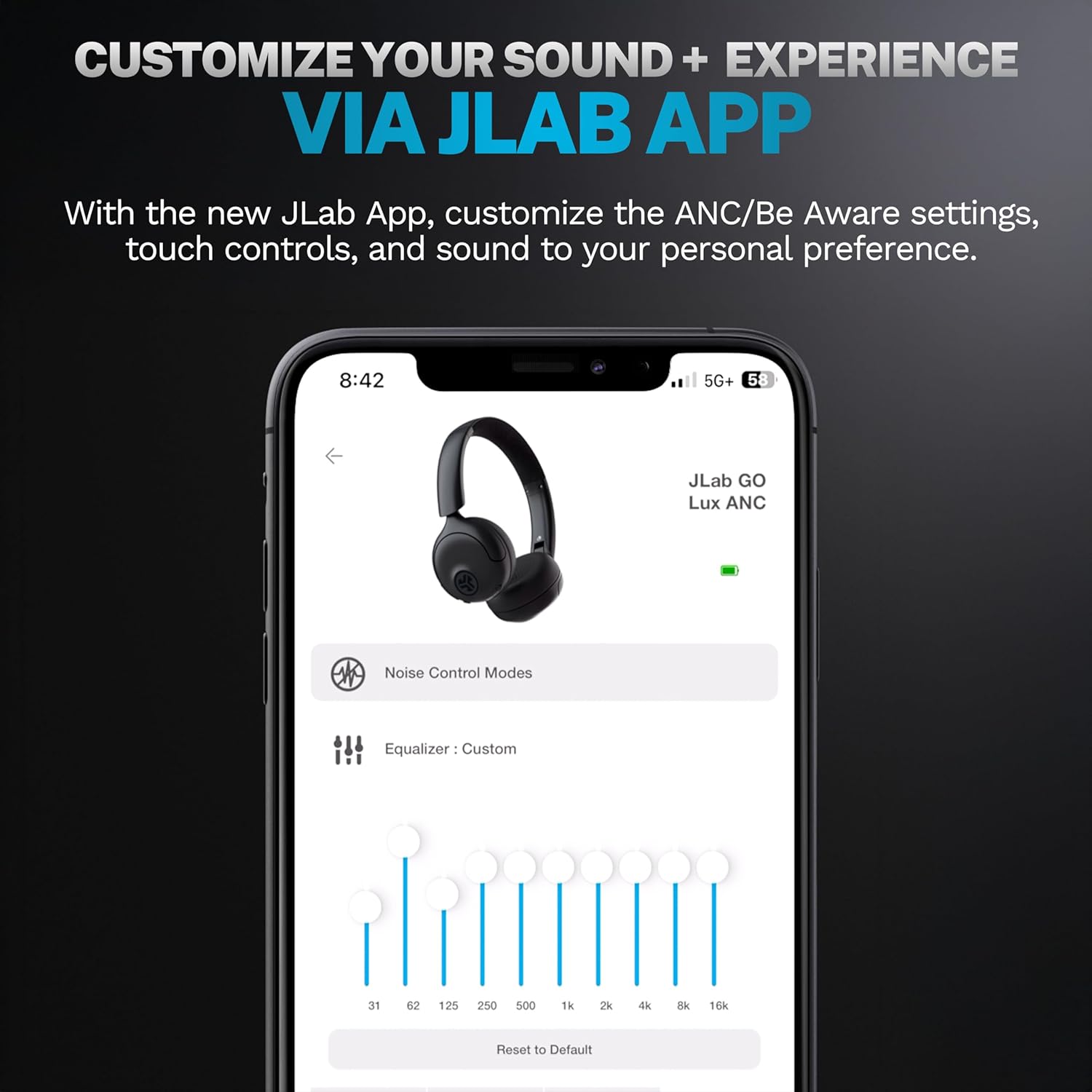
Image: JLab Go Lux ANC headphones in their folded position, demonstrating portability.
Veaotsing
| Probleem | Lahendus |
|---|---|
| Kõrvaklapid ei lülitu sisse | Ensure headphones are charged. Press and hold the power button for 3-5 seconds. |
| Seadmega ei saa siduda | Make sure Bluetooth is enabled on your device. Ensure headphones are in pairing mode (flashing blue/red LED). Forget the device in your Bluetooth settings and re-pair. |
| Heli pole või helitugevus on madal | Check volume levels on both headphones and your connected device. Ensure headphones are properly connected. |
| ANC ei tööta tõhusalt | Veenduge, et ANC-režiim oleks aktiveeritud. Reguleerige kõrvaklappide sobivust, et need tihedalt teie kõrvade ümber istuksid. |
| Kõne kvaliteedi probleemid | Ensure microphones are not obstructed. Check your device's connection and signal strength. |
Tehnilised andmed
| Funktsioon | Detail |
|---|---|
| Mudeli nimi | HBGOLUXANCMVE20WEB |
| Ühenduvustehnoloogia | Juhtmeta (Bluetooth) |
| Bluetoothi versioon | 5.0 |
| Kuulari kuju | Kõrva peal |
| Mürakontrolli funktsioonid | Hübriidne aktiivne mürasummutus, oleku režiim |
| Helidraiveri tüüp | Dünaamiline draiver (40 mm) |
| Sagedusvastus | 20 Hz–20 kHz |
| Tundlikkus | 104 dB |
| Aku tööiga | Up to 70+ hours (40+ hours with ANC) |
| Kontrollimeetod | Puudutage, rakenduse juhtimine |
| Kauba kaal | 10.6 untsi (0.3 kilogrammi) |
| Toote mõõtmed | 2.95 x 6.1 x 7.48 tolli |
| Veekindluse tase | Ei ole veekindel |
Garantii ja tugi
Teie JLab Go Lux ANC juhtmevabad kõrvaklapid on varustatud JLabi 2-aastane garantii.
For detailed warranty information, product support, or to contact customer service, please visit the official JLab webveebisaidilt või vaadake tootega kaasasolevat garantiikaarti.
Võite külastada ka JLabi pood Amazonis Lisateabe ja tarvikute saamiseks.


