1. Sissejuhatus
This manual provides essential information for the safe and efficient operation of your Philips Evnia 24M2N3200L 24-inch Gaming Monitor. Please read this manual thoroughly before using the product and retain it for future reference.
2. Ohutusalane teave
Monitori kahjustamise vältimiseks ja kasutaja ohutuse tagamiseks järgige järgmisi ohutusnõudeid:
- Ärge jätke monitori vihma ega niiskuse kätte.
- Ärge avage monitori korpustasing; pöörduge kogu hoolduse eest kvalifitseeritud personali poole.
- Tagada monitori ümber korralik ventilatsioon.
- Kasutage ainult monitoriga kaasasolevat toiteadapterit.
- Vältige raskete esemete asetamist toitejuhtmele.
- Puhastage ekraani pehme ja ebemevaba lapiga. Ärge kasutage vedelaid puhastusvahendeid otse ekraanil.
3. Pakendi sisu
Veenduge, et pakendis on kõik esemed olemas:
- Philips Evnia 24M2N3200L Monitor
- Monitori alus (alus ja kael)
- Toitekaabel
- HDMI kaabel
- DisplayPort-kaabel
- Kasutusjuhend (see dokument)

Image: The retail packaging box for the Philips Evnia 24M2N3200L monitor, showing the product name and design awards.
4. Seadistamine
4.1. Statiivi kokkupanek
- Kriimustuste vältimiseks asetage monitor ekraaniga allapoole pehmele ja puhtale pinnale.
- Attach the stand neck to the monitor's VESA mounting area. Secure with screws if provided.
- Attach the stand base to the bottom of the stand neck. Tighten the thumb screw or screws until secure.

Pilt: Tagumine view of the monitor showing the attached stand and the VESA mounting area.
4.2. Arvutiga ühendamine
Monitor toetab HDMI ja DisplayPort ühendusi.
- Toiteühendus: Ühendage toitekaabel monitori toitesisendisse ja seejärel pistikupessa.
- Video ühendus:
- HDMI puhul: Ühendage HDMI-kaabli üks ots monitori HDMI-porti ja teine ots arvuti HDMI-väljundisse.
- For DisplayPort: Connect one end of the DisplayPort cable to the monitor's DisplayPort and the other end to your computer's DisplayPort output.
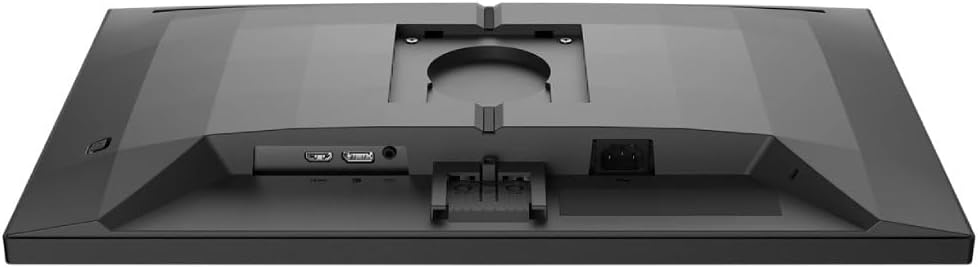
Pilt: Detailne view of the monitor's rear panel, showing the HDMI, DisplayPort, and power input ports.
5. Monitori kasutamine
5.1. Toide sisse/välja
Press the power button, usually located on the bottom right or rear of the monitor, to turn it on or off. The power LED will indicate the monitor's status.
5.2. Ekraanikuva (OSD) menüü
The OSD menu allows you to adjust various monitor settings. Use the joystick or buttons (refer to your monitor's specific layout) to navigate and select options.
- Pilt: Reguleerige heledust, kontrasti, teravust ja gammat.
- Värv: Valige värvitemperatuur, sRGB-režiim või kasutaja määratletud värviseaded.
- Heli: Reguleerige helitugevust, kui monitoril on sisseehitatud kõlarid või heliväljund.
- Sisend: Valige sisendallikas käsitsi (HDMI, DisplayPort).
- Mängimine: Access specific gaming features like SmartImage Game, Low Input Lag, and Adaptive Sync settings.
- OSD seaded: Reguleerige ekraanimenüü keelt, läbipaistvust ja ajalõppu.

Image: The Philips Evnia 24M2N3200L monitor showcasing a high-quality image from a video game, highlighting its display capabilities.
6. Hooldus
6.1. Monitori puhastamine
- Enne puhastamist eemaldage monitor alati vooluvõrgust.
- Use a soft, clean, lint-free cloth to gently wipe the screen.
- Kangekaelsete plekkide korral dörtsige kergeltampNiisutage lappi veega või õrnatoimelise mitteabrasiivse ekraanipuhastusvahendiga. Ärge pihustage vedelikke otse ekraanile.
- Puhastage monitor casing pehme ja kuiva lapiga.
6.2. Ladustamine
Kui monitori pikemaks ajaks hoiule panna, ühendage kõik kaablid lahti ja pakkige see originaalpakendisse, et kaitsta seda tolmu ja füüsiliste kahjustuste eest. Hoidke jahedas ja kuivas kohas.
7. Veaotsing
Kui teil tekib monitoriga probleeme, vaadake järgmisi levinud probleeme ja lahendusi.
| Probleem | Võimalik põhjus | Lahendus |
|---|---|---|
| Ekraanil pole pilti | Power cable disconnected, video cable loose, incorrect input source. | Check power and video cable connections. Select correct input source via OSD. |
| Pildi virvendamine | Loose video cable, graphics card issue, refresh rate mismatch. | Ensure video cable is secure. Update graphics drivers. Adjust refresh rate in OS settings. |
| Värvid on valed | Incorrect color settings, faulty cable. | Reset color settings in OSD. Try a different video cable. |
| Monitor ei lülitu sisse | Toide puudub, toiteadapter on vigane. | Check power outlet and cable. Ensure power adapter is functioning. |
8. Tehnilised andmed
| Funktsioon | Detail |
|---|---|
| Mudeli number | 24M2N3200L |
| Ekraani suurus | 24 tolli |
| Paneeli tüüp | IPS |
| Resolutsioon | 1920 x 1080 (täis-HD) |
| Kuvasuhe | 16:9 |
| Värskendussagedus | 180 Hz |
| Reageerimisaeg | 0.5 ms (MPRT) |
| Ühenduvus | 1x HDMI, 1x DisplayPort |
| Toiteallikas | Elektrienergia |
| Toote mõõtmed (alustega) | 19.5 x 54 x 43.3 cm (sügavus x laius x kõrgus) |
| Toote kaal (koos alusega) | 4.96 kilogrammi |
| Tootja | Philips |
9. Garantii ja tugi
For warranty information and technical support, please refer to the warranty card included in your package or visit the official Philips support webveebisait. Hoidke ostutšekk ostutõendina garantiinõuete korral.
Veebitugi: www.philips.com/support


