1. Sissejuhatus
Welcome to the user manual for your Nothing Phone (3a). This guide provides detailed instructions on setting up, operating, maintaining, and troubleshooting your device to ensure optimal performance and user experience.

Figure 1.1: The Nothing Phone (3a) showcasing its unique transparent back design and Glyph Interface.
2. Seadistamine
2.1. Karbist lahtivõtmine ja esmane ülevaatus
Upon receiving your Nothing Phone (3a), carefully open the packaging and inspect the contents. Ensure all items listed in the "What's in the Box" section are present and undamaged.
- Nothing Phone (3a) device
- USB-C kaabel
- SIM-i salve väljastus
- Eelnevalt paigaldatud ekraanikaitse
2.2. SIM-kaardi sisestamine
- Leidke telefoni küljelt SIM-kaardi salv.
- Sisestage SIM-kaardi salve väljutustööriist salve kõrval olevasse väikesesse auku ja vajutage kindlalt, kuni salv välja hüppab.
- Asetage nano-SIM-kaart(id) salve nii, et kuldsed kontaktid oleksid allapoole.
- Sisestage SIM-kaardi salv ettevaatlikult telefoni tagasi, kuni see klõpsuga oma kohale lukustub.
2.3. Esmane sisselülitamine ja seadistusviisard
Press and hold the power button on the right side of the phone until the Nothing logo appears. Follow the on-screen instructions to complete the initial setup, including language selection, Wi-Fi connection, Google account sign-in, and data transfer.
3. Operating Your Nothing Phone (3a)
3.1. Nothing OS 3.1 Overview
The Nothing Phone (3a) runs on Nothing OS 3.1, an intuitive and customizable Android-based operating system. It features functional adaptations for an optimized user experience.

Figure 3.1: Visual representation of Nothing OS 3.1's customizable interface.
3.2. Kaamerasüsteem
The Nothing Phone (3a) is equipped with an advanced camera system designed to capture high-quality photos and videos.
- Põhikaamera: 50-MP OIS (Optical Image Stabilization) main camera for detailed and stable shots.
- Telekaamera: 50-MP telephoto lens with up to 30x Ultra Zoom for capturing distant subjects.
- Ülilainurkkaamera: 8-MP ultra-wide-angle lens for expansive landscape and group shots.
- Esikaamera: 32-MP front camera for sharp selfies and video calls.

Figure 3.2: Detailed breakdown of the Phone (3a)'s Elite Camera System components.

Figure 3.3: Illustration of the telephoto zoom lens technology and its capability to capture distant scenes.
3.3. Essential Key and Essential Space
The Essential Key is a new physical button on the side of your device. A short press captures screen content, while a long press allows you to record voice notes, ideas, and inspirations. The Essential Space organizes your captures and provides personalized suggestions.

Figure 3.4: The Essential Key and its integration with the Essential Space for content organization.
3.4. Glüüfi liides
The Glyph Interface on the back of the phone provides unique LED light and sound notifications for calls, messages, and other alerts, offering a distinct visual and auditory experience.

Figure 3.5: The Glyph Interface on the rear of the Nothing Phone (3a), demonstrating its illuminated patterns.
4. Hooldus
4.1. Akuhaldus
The Nothing Phone (3a) features a 5,000 mAh battery with 50W fast charging. To maximize battery lifespan:
- Vältige äärmuslikke temperatuure.
- Laadimiseks kasutage kaasasolevat USB-C-kaablit.
- Vältige aku sagedast täielikku tühjenemist.

Figure 4.1: Visual representation of the 5,000 mAh battery capacity.
4.2. Seadme puhastamine
Use a soft, lint-free cloth to clean the screen and back of your phone. For stubborn smudges, slightly dampLoputage lappi veega. Vältige tugevate kemikaalide või abrasiivsete materjalide kasutamist.
4.3. Tarkvaravärskendused
Kontrollige ja installige regulaarselt tarkvarauuendusi, et teie seadmel oleksid uusimad funktsioonid, turvapaigad ja jõudluse täiustused. Navigeerige aadressile Seaded > Süsteem > Tarkvarauuendus värskenduste kontrollimiseks.
5. Veaotsing
5.1. Levinumad probleemid ja lahendused
| probleem | Võimalik põhjus | Lahendus |
|---|---|---|
| Telefon ei lülitu sisse | Tühja aku, tarkvara krahh | Charge the phone for at least 30 minutes. Perform a forced restart by holding the power button for 10-15 seconds. |
| Rakendused jooksevad kokku või hanguvad | App bug, insufficient RAM, outdated software | Clear app cache/data. Close background apps. Update the app or phone software. |
| Kehv aku tööiga | High screen brightness, background apps, network issues | Adjust screen brightness. Close unused apps. Disable unnecessary features like GPS/Bluetooth. |
5.2. Tehaseseaded
If issues persist, a factory reset may be necessary. This will erase all data on your phone, so ensure you have backed up important information. Navigate to Seaded > Süsteem > Lähtestamisvalikud > Kustuta kõik andmed (tehaseseadetele lähtestamine).
6. Tehnilised andmed
Key technical specifications for the Nothing Phone (3a) (Model: A059).
| Funktsioon | Detail |
|---|---|
| Mudeli nimi | Mitte midagi Telefon (3a) |
| Mudeli number | A059 |
| Operatsioonisüsteem | Android 15, mitte midagi OS 3.1 |
| Ekraan | 6.77-inch Flexible FHD+ AMOLED, 120 Hz, 1.07 billion colors |
| Protsessor | Snapdragon 7s Gen 3 (2.5 GHz, 8-core) |
| RAM | 12 GB (up to 20GB RAM Boost) |
| Säilitamine | 256 GB |
| Peamine kaamera | 50-MP OIS |
| Telekaamera | 50-MP (30x Ultra Zoom) |
| Ülilainurkkaamera | 8 MP |
| Esikaamera | 32 MP |
| Aku | 5,000 mAh (50W kiirlaadimine) |
| Mõõtmed | 7.75 x 0.83 x 16.35 cm |
| Kaal | 201 grammi |
| Vee-/tolmukindlus | IP64 |
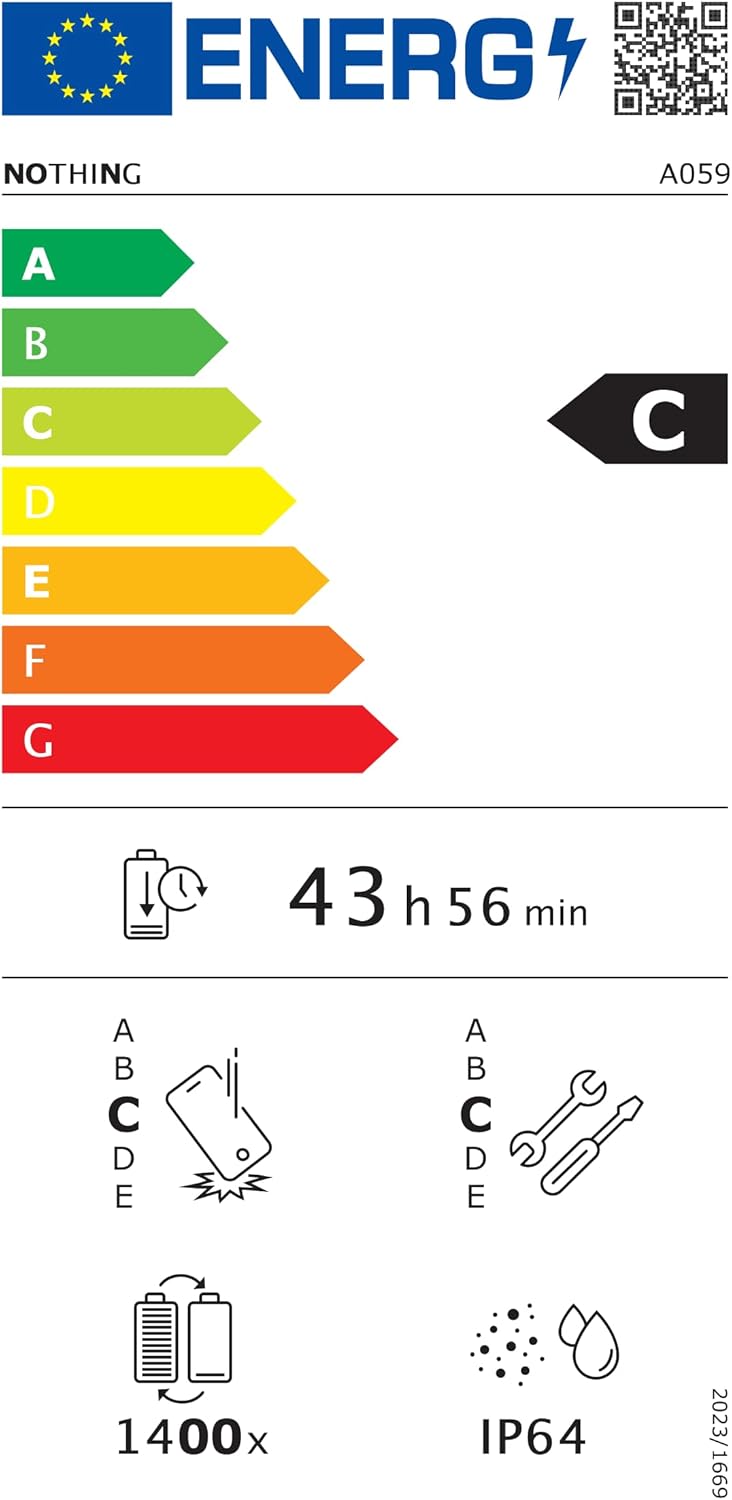
Figure 6.1: EU Energy Label for Nothing Phone (3a), indicating energy efficiency and IP64 rating. More details available at eprel.ec.europa.eu/qr/2179652.
7. Garantii ja tugi
Your Nothing Phone (3a) comes with a manufacturer's warranty. Please refer to the warranty card included in your product packaging for specific terms and conditions.
For further assistance, technical support, or warranty claims, please visit the official Nothing support websaidil või võtke ühendust nende klienditeenindusega. Lisateavet leiate aadressilt Midagi poodi Amazonis.


