1. Sissejuhatus
Tänan ostu eestasing the XO F41 Mirror Bluetooth Speaker. This device combines a digital clock display with a portable Bluetooth speaker, offering multiple playback options including Bluetooth, TF card, and FM radio. Please read this manual carefully before use to ensure proper operation and to maximize your experience with the product.

Image 1.1: The XO F41 Mirror Bluetooth Speaker in use, showing its digital clock display.
2. Toote omadused
- Bluetooth 5.3 ühenduvus: Stabiilse ja tõhusa juhtmevaba heli voogedastuse jaoks.
- Peegelkuva: Clear digital time display with adjustable brightness.
- Mitu taasesitusrežiimi: Supports Bluetooth, TF card, and FM radio.
- Integreeritud mikrofon: Käed-vabad helistamiseks.
- Pikk taasesitusaeg: Up to 8 hours at 50% volume, 5 hours at 100% volume.
- Kompaktne ja kaasaskantav disain: Easy to carry and place anywhere.
- USB-C laadimine: Moodne ja mugav laadimisport.
3. Pakendi sisu
Palun kontrollige pakendilt järgmisi esemeid:
- XO F41 Mirror Bluetooth Speaker
- USB-C laadimiskaabel
- Kasutusjuhend

Image 3.1: The XO F41 Mirror Bluetooth Speaker packaging.
4. Seadme paigutus ja juhtnupud
Tutvuge kõlari nuppude ja portidega:
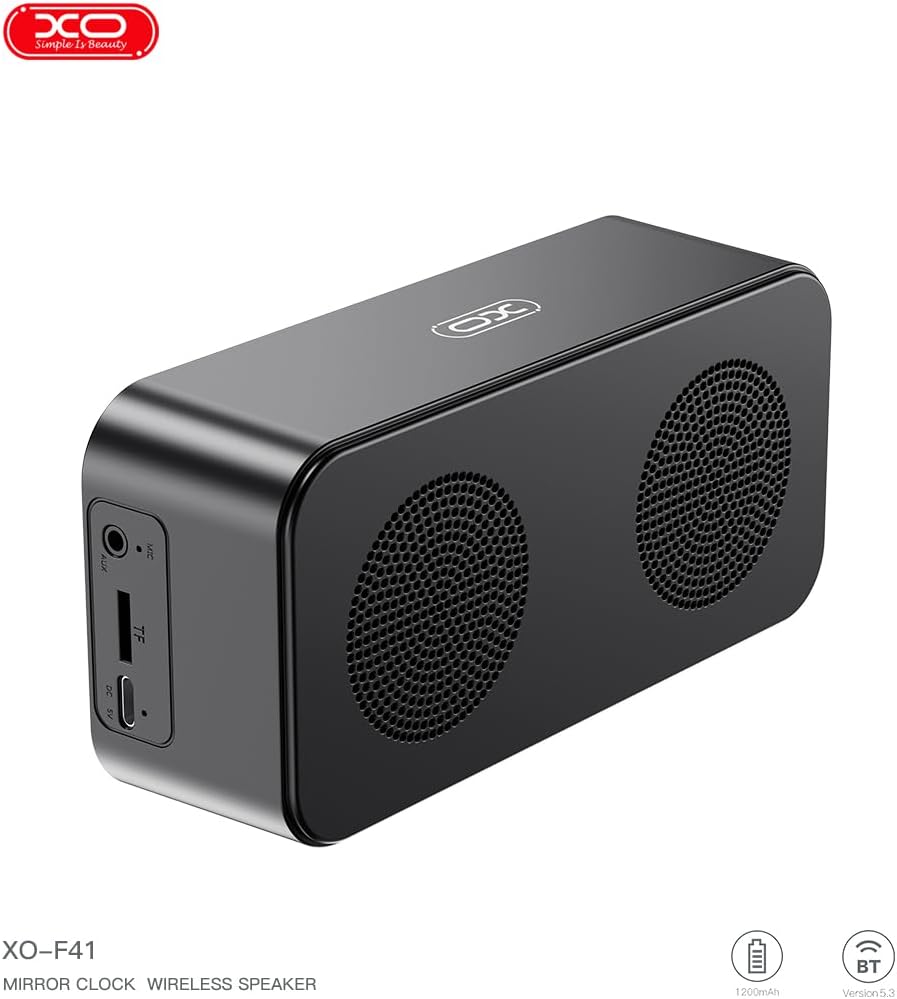
Pilt 4.1: Külg view of the XO F41 with ports labeled.
- Toitenupp: Sisse-/väljalülitamiseks vajutage ja hoidke all. Režiimide vahetamiseks vajutage lühidalt.
- Esitamise/pausi nupp: Heli esitamine või peatamine. Kõnedele vastamine/lõpetamine.
- Helitugevuse suurendamine/järgmine lugu: Lühike vajutus helitugevuse suurendamiseks, pika vajutus järgmise loo jaoks.
- Helitugevuse vähendamine/eelmine lugu: Lühike vajutus helitugevuse vähendamiseks, pikk vajutus eelmise loo kuulamiseks.
- USB-C port: Seadme laadimiseks.
- TF-kaardi pesa: Insert a TF (MicroSD) card for local music playback.
- AUX-port: Juhtmega helisisendi jaoks.
5. Seadistamine
5.1 Kõlari laadimine
- Ühenda kaasasolev USB-C-kaabel kõlari laadimisporti.
- Ühendage kaabli teine ots USB-toiteadapteriga (ei kuulu komplekti) või arvuti USB-porti.
- The charging indicator will illuminate. It takes approximately 3 hours for a full charge.
- The indicator will turn off or change color once fully charged.
5.2 Toide sisse/välja
- Sisselülitamiseks: Vajutage ja hoidke toitenuppu umbes 3 sekundit all. Kuulete helisignaali.
- Väljalülitamiseks: Vajutage ja hoidke toitenuppu umbes 3 sekundit all. Kuulete helisignaali.
6. Kasutusjuhised
6.1 Bluetoothi sidumine
- Ensure the speaker is powered on and in Bluetooth mode. If not, short press the Power button to cycle through modes until "BT" or a Bluetooth icon appears on the display.
- Lubage oma mobiilseadmes Bluetooth ja otsige saadaolevaid seadmeid.
- Select "XO-F41" from the list of devices.
- Once paired, the speaker will indicate a successful connection, and you can begin playing audio from your device.
6.2 TF-kaardi režiim
- Sisestage MP3-helifailidega TF (MicroSD) kaart files TF-kaardi pessa.
- The speaker will automatically switch to TF card mode and begin playing music. If not, short press the Power button to cycle to TF card mode.
- Use the Volume Up/Down buttons for track navigation and the Play/Pause button for playback control.
6.3 FM-raadiorežiim
- Short press the Power button to switch to FM radio mode. The display will show the FM frequency.
- Saadaval olevate FM-jaamade automaatseks skannimiseks ja salvestamiseks vajutage pikalt nuppu Esita/Paus.
- Short press the Volume Up/Down buttons to switch between saved stations.
6.4 Kella ja äratuse seaded
The XO F41 features a digital clock display. Specific instructions for setting the time and alarm are typically found in the detailed manual included with the product. Generally, a dedicated 'M' (Mode) or 'Set' button is used to enter time/alarm setting mode, and volume buttons are used to adjust values.

Image 6.1: The XO F41 speaker functioning as a bedside clock.
6.5 Ekraani heleduse reguleerimine
The display brightness is adjustable. Look for a dedicated button (often labeled with a sun icon or similar) or a combination of button presses (e.g., double-pressing the Power button) to cycle through brightness levels. Refer to the included quick start guide for exact steps.
7. Hooldus
- Puhastamine: Kõlari pinna puhastamiseks kasutage pehmet ja kuiva lappi. Ärge kasutage abrasiivseid puhastusvahendeid ega lahusteid.
- Hoiustamine: Hoidke kõlarit jahedas, kuivas ja otsese päikesevalguse ning äärmuslike temperatuuride eest kaitstult, kui seda pikemat aega ei kasutata.
- Veekindlus: See seade ei ole veekindel. Vältige kokkupuudet veega või liigse niiskusega.
- Aku hooldus: Aku tööea pikendamiseks vältige aku sagedast täielikku tühjendamist. Laadige seadet regulaarselt, isegi kui seda pidevalt ei kasutata.
8. Veaotsing
| Probleem | Võimalik põhjus | Lahendus |
|---|---|---|
| Kõlar ei lülitu sisse. | Aku tühi. | Laadige kõlarit vähemalt 30 minutit. |
| Ei saa Bluetoothi kaudu siduda. | Kõlar ei ole sidumisrežiimis; Bluetooth on seadmel keelatud; seadmest liiga kaugel. | Ensure speaker is in Bluetooth mode. Enable Bluetooth on your device. Move speaker closer to your device (within 10 meters). |
| No sound from TF card. | TF-kaart pole õigesti sisestatud; ei toetata file format; no audio files on card. | Sisestage TF-kaart uuesti. Veenduge, et files are in MP3 format. Verify audio files are present on the card. |
| Halb FM-raadio vastuvõtt. | Nõrk signaal; keskkonnahäired. | Move the speaker to a different location. Re-scan for stations. |
9. Tehnilised andmed
| Funktsioon | Detail |
|---|---|
| Mudeli number | XO-F41 |
| Bluetoothi versioon | Bluetooth V5.3 |
| Bluetoothi sagedus | 2.402-2.480 GHz |
| Aku mahutavus | 1200 mAh |
| Laadimissisend | USB-C, DC5V/0.5A |
| Laadimisaeg | Umbes 3 tundi |
| Mänguaeg | 8H (50% volume); 5H (100% volume) |
| Tõhus vahemaa | Vähem kui 10 meetrit |
| Maksimaalne võimsus | 5W |
| Valjuhääldi üksus | 52 mm |
| Signaali-müra suhe | >80 dB |
| Toote mõõtmed | 15 x 3.81 x 11 cm (umbes 150 x 45 x 72 mm) |
| Toote kaal | 320 g (approx. 0.28 kg) |
| Materjal | Plastikust |
| Erifunktsioon | Reguleeritav heledus |

Image 9.1: Detailed product parameters.
10. Garantii teave
The XO F41 Mirror Bluetooth Speaker comes with a standard manufacturer's warranty. Please refer to the warranty card included in your package for specific terms, conditions, and duration. Keep your purchase receipt as proof of purchase for any warranty claims.
11. Klienditugi
For further assistance, technical support, or inquiries regarding your XO F41 Mirror Bluetooth Speaker, please contact the retailer or manufacturer's customer service department. Contact details are typically provided on the product packaging or the official brand websaidile.