1. Sissejuhatus
This manual provides detailed instructions for the installation, operation, and maintenance of your VANBAR 2-in-1 Android Car Wireless Adapter. This device converts your car's wired Apple CarPlay or Android Auto system into a wireless connection, enhancing convenience and user experience.
2. Ohutusalane teave
- Ärge püüdke seadet lahti võtta ega muuta.
- Hoidke seadet eemal veest, niiskusest ja äärmuslikest temperatuuridest.
- Ensure the device is securely placed to avoid obstruction while driving.
- Operate the device responsibly and avoid distractions while driving.
3. Pakendi sisu
Palun kontrollige pakendilt järgmisi esemeid:
- VANBAR 2-in-1 Wireless Adapter (Model: Carplay01)
- USB-A to USB-C Adapter Cable
- Kasutusjuhend (see dokument)
4. Toote lõppview
The VANBAR 2-in-1 Wireless Adapter is a compact device designed to enable wireless Apple CarPlay and Android Auto in compatible vehicles. It features a durable alloy casing for efficient heat dissipation and includes both USB-A and USB-C connectivity options.

Image 4.1: VANBAR 2-in-1 Wireless Adapter showing USB-A and USB-C connectivity. The adapter is a small black square with a USB cable attached, and an additional USB-C adapter is shown.

Image 4.2: Diagram illustrating the internal structure of the adapter, highlighting the glass and metal alloy components for excellent heat dissipation.
5. Seadistusjuhised
Esialgseks seadistamiseks järgige neid samme.
- Ühendage adapter:
Plug the VANBAR wireless adapter into your car's USB port that supports wired Apple CarPlay or Android Auto. Use the provided USB-C adapter if your car has a USB-C port.
- Sidumine Bluetoothi kaudu:
Luba oma nutitelefonis Bluetooth ja Wi-Fi. Otsi the adapter's Bluetooth name (e.g., "VANBAR-XXXX") and pair with it. Confirm any pairing requests on your phone and car display.
- Automaatne ühendus:
Once paired, the adapter will automatically connect to your phone via Wi-Fi to initiate Apple CarPlay or Android Auto. The car's display should switch to the CarPlay or Android Auto interface.

Image 5.1: Visual guide for connecting the adapter to the car's USB port, pairing via Bluetooth, and the automatic connection process.
6. Kasutusjuhised
After successful setup, the adapter will automatically connect to your smartphone when you start your car. You can then use Apple CarPlay or Android Auto wirelessly.
- Navigeerimine: Kasutage oma eelistatud navigatsioonirakendusi otse oma auto ekraanil.
- Muusika ja meedia: Stream music, podcasts, and audiobooks.
- Kõned ja sõnumid: Helistage ja võtke vastu kõnesid ning saatke/võtke vastu sõnumeid häälkäskluste või auto liidese abil.
- Hääljuhtimine: Utilize Siri (for Apple CarPlay) or Google Assistant (for Android Auto) for hands-free operation.

Pilt 6.1: Näideample of a car display showing multiple CarPlay functions simultaneously, including navigation, music playback, and an incoming call.

Image 6.2: Illustration of different control methods for the car's infotainment system, including touchscreen, steering wheel buttons, and a central rotary knob.
7. Ühilduvus
This wireless adapter is designed for vehicles equipped with factory-wired Apple CarPlay or Android Auto. It supports:
- Sõidukid: Compatible with most car models from 2015 onwards that have wired CarPlay/Android Auto.
- Nutitelefonid:
- Apple CarPlay: Requires iPhone with iOS 10 or later.
- Android Auto: Requires Android phone with Android 11 or later.
For detailed compatibility lists, please refer to the official resources:
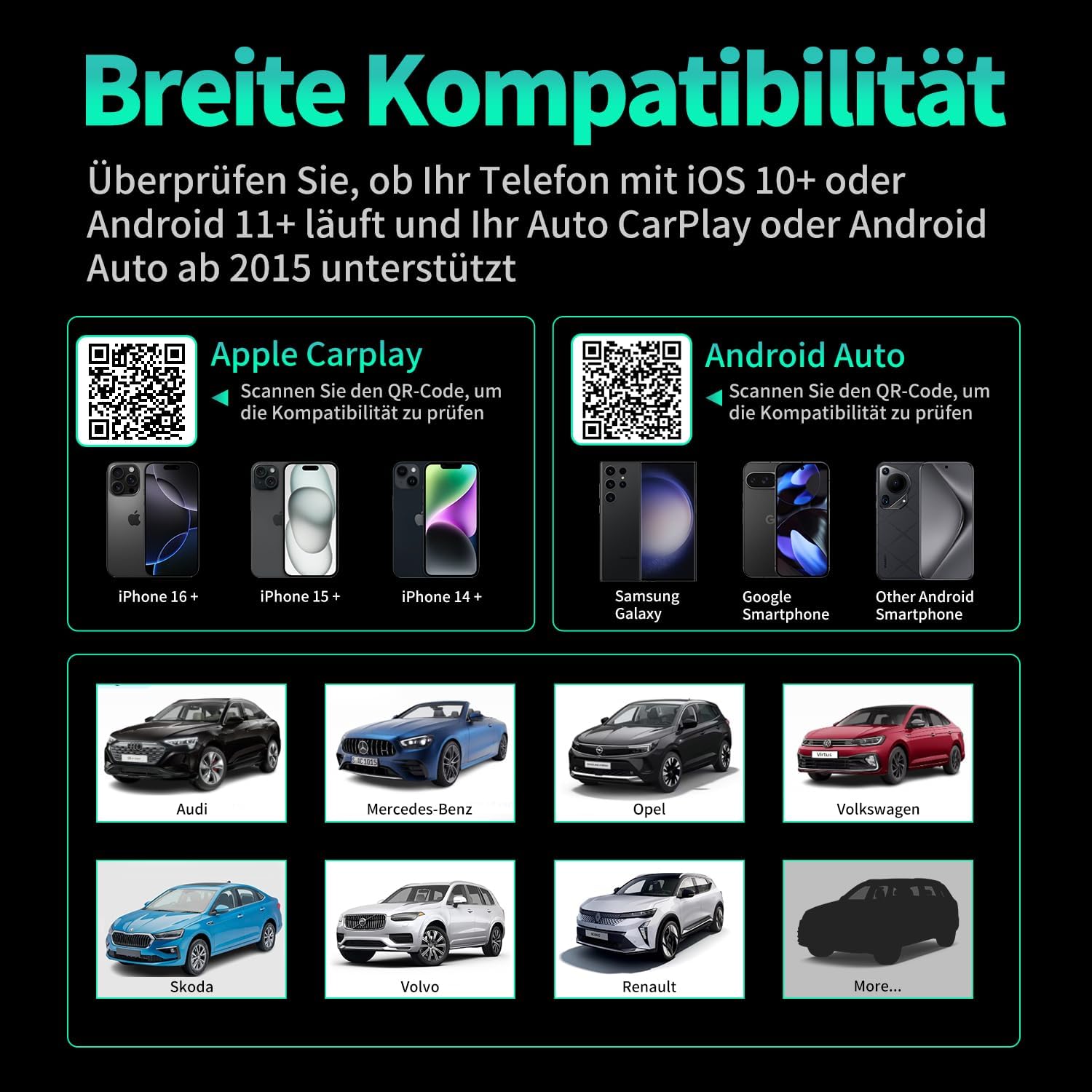
Pilt 7.1: Ühilduvus üleview displaying supported iPhone models (14+, 15+, 16+), Samsung Galaxy, Google, and other Android smartphones, along with car brands like Audi, Mercedes-Benz, Opel, Volkswagen, Skoda, Volvo, and Renault.
8. Hooldus
- Puhastamine: Pühkige seadet pehme ja kuiva lapiga. Ärge kasutage vedelaid puhastusvahendeid ega abrasiivseid materjale.
- Hoiustamine: Hoidke seadet jahedas ja kuivas kohas, kui seda pikemat aega ei kasutata.
- Püsivara värskendused: Kontrollige tootja poolt webOptimaalse jõudluse ja ühilduvuse tagamiseks külastage regulaarselt veebisaiti, et näha saadaolevaid püsivara värskendusi.
9. Veaotsing
| Probleem | Võimalik põhjus | Lahendus |
|---|---|---|
| Adapter not connecting to car. | Incorrect USB port, car not compatible, loose connection. | Ensure the adapter is plugged into the correct USB port that supports wired CarPlay/Android Auto. Verify car compatibility. Re-plug the adapter firmly. |
| Phone not connecting to adapter. | Bluetooth/Wi-Fi off, incorrect pairing, phone OS not supported. | Ensure Bluetooth and Wi-Fi are enabled on your phone. Forget previous Bluetooth connections and re-pair. Check phone OS version for compatibility (iOS 10+, Android 11+). |
| Katkendlik ühendus või viivitus. | Interference, weak signal, outdated firmware. | Ensure no other devices are causing Wi-Fi interference. Try restarting both the car's infotainment system and your phone. Check for firmware updates. |
| CarPlay/Android Auto ei käivitu. | CarPlay/Android Auto not enabled in car settings, app issues. | Check your car's infotainment settings to ensure CarPlay/Android Auto is enabled. Restart your phone and the car's system. |
10. Tehnilised andmed
| Mudeli number | Carplay01 |
| Kaubamärk | VANBAR |
| Ühenduvustehnoloogia | Bluetooth 5.0, Wi-Fi (2.4 GHz + 5 GHz), USB |
| Ühilduvad seadmed | Nutitelefonid (iOS 10+, Android 11+) |
| Ühenduse tüüp | USB Type A, USB Type C (with adapter) |
| Toote mõõtmed | 1 x 5.5 x 4.5 cm |
| Kauba kaal | 12 g |
| Värv | Must |
| Eriomadused | Wireless Android Auto, Wireless Apple CarPlay, GPS Navigation, Spotify, iHeart Radio support |
11. Garantii ja tugi
For warranty information and technical support, please refer to the official VANBAR webveebisaidilt või võtke otse ühendust nende klienditeenindusega. Hoidke ostutšekk garantiinõuete esitamiseks alles.


