Sissejuhatus
The Mars Gaming MPB650SI is a 650W ATX power supply designed for desktop computers. It features an advanced cooling system with an SI fan, FDB bearings, and AI2-RPM smart control for optimal balance between silence and cooling efficiency. This power supply also incorporates DC-DC and SMD technologies for enhanced durability and energy efficiency, holding an 80 Plus Bronze 230V EU certification. This manual provides essential information for the proper installation, operation, maintenance, and troubleshooting of your MPB650SI power supply.
Ohutusteave
Please read all safety instructions before installing or operating the power supply. Failure to do so may result in damage to the unit, other components, or personal injury.
- Enne paigaldamist või hooldust veenduge, et toiteallikas on vahelduvvoolu pistikupesast lahti ühendatud.
- Ärge avage toiteallikat casing. Suur mahttagSees on osad olemas ja puuduvad kasutaja poolt hooldatavad osad.
- Paigaldage toiteplokk hästi ventileeritavasse kohta, eemale soojusallikatest ja niiskusest.
- Kasutage ainult toiteplokiga kaasasolevaid kaableid.
- Ensure all connectors are securely attached to prevent electrical shorts or damage.
Pakendi sisu
Veenduge, et pakendis on kõik esemed olemas:
- Mars Gaming MPB650SI 650W ATX Power Supply
- Vahelduvvoolu toitejuhe
- Kinnituskruvid
- Kasutusjuhend (see dokument)
Seadistamine ja installimine
Follow these steps to install your Mars Gaming MPB650SI power supply:
- Valmistage oma süsteem ette: Veenduge, et arvuti on täielikult välja lülitatud ja pistik seinakontaktist eemaldatud. Avage arvuti korpus.
- Eemaldage vana toiteplokk (kui see on olemas): Ühenda lahti kõik kaablid vanast toiteplokist emaplaadi, graafikakaardi, draivide ja muude komponentidega. Keera lahti ja eemalda vana toiteplokk korpusest.
- Uue toiteallika paigaldamine: Carefully place the MPB650SI power supply into the designated power supply bay in your computer case. Ensure the fan is oriented correctly for optimal airflow (typically facing downwards if there's a bottom vent, or upwards if not). Secure the power supply with the provided mounting screws.

Joonis 1: The SI fan with copper core, designed for extreme silence and efficient cooling. Ensure proper fan orientation during installation.
- Ühendage peamised toitekaablid:
- Connect the 24-pin ATX motherboard power cable to the corresponding port on your motherboard.
- Connect the 4+4-pin EPS +12V CPU power cable to the CPU power port on your motherboard.

Joonis 2: Läbiview of available connectors: 1x ATX MB 24 PIN, 1x EPS +12V 4+4 PIN, 2x PCIe 6+2 PIN, 5x SATA, 3x Molex 4 PIN.
- Ühendage graafikakaardi toide: If your graphics card requires external power, connect the 6+2-pin PCIe power cables from the power supply to your graphics card. The MPB650SI provides two 6+2-pin PCIe connectors.
- Connect Peripheral Power: Connect SATA power cables to your SSDs, HDDs, and optical drives. Use Molex connectors for any other peripherals that require them.
- Kaabli haldamine: Juhtmed on korpuse õhuvoolu ja esteetika parandamiseks korralikult paigutatud.
- Sulgege korpus ja ühendage vahelduvvoolutoide: Close your computer case. Connect the AC power cord to the power supply's AC inlet and then plug it into a wall outlet. Ensure the power switch on the power supply is in the OFF position before plugging it in.
Kasutusjuhised
Operating the Mars Gaming MPB650SI power supply is straightforward:
- Toide sisse: After all connections are secure and the AC power cord is plugged in, flip the power switch on the back of the power supply to the ON (I) position.
- Süsteemi käivitamine: Press the power button on your computer case to start your system. The power supply will provide stable power to all connected components.
- AI2-RPM Smart Control: The integrated AI2-RPM technology will automatically adjust the fan speed based on the system's load and temperature. This ensures optimal cooling while maintaining low noise levels.

Joonis 3: The MPB650SI incorporates AI2-RPM for intelligent fan control, alongside DC-DC and SMD technologies for efficiency and durability.
- Toide välja: To shut down your system, use the operating system's shutdown procedure. Once the system is off, you can flip the power switch on the power supply to the OFF (O) position for complete power disconnection.
Hooldus
Nõuetekohane hooldus tagab teie toiteallika pikaealisuse ja optimaalse jõudluse:
- Tolmu puhastamine: Periodically (every 3-6 months, depending on environment) disconnect the power supply from the AC outlet and use compressed air to clean dust from the fan and ventilation grilles. Dust accumulation can hinder cooling and reduce efficiency.
- Tagage õige õhuvool: Make sure there are no obstructions blocking the air intake or exhaust vents of the power supply. Good airflow is crucial for heat dissipation.
- Kaabli kontroll: Occasionally check all power cables to ensure they are securely connected and not damaged.
Veaotsing
If you encounter issues with your MPB650SI power supply, refer to the following common problems and solutions:
| Probleem | Võimalik põhjus | Lahendus |
|---|---|---|
| Süsteem ei lülitu sisse. |
|
|
| Süsteem lülitub sisse, aga lülitub kohe välja. |
|
|
| Ventilaator on lärmakas või ei pöörle. |
|
|
If the problem persists after attempting these solutions, please contact Mars Gaming customer support.
Tehnilised andmed
Key technical specifications for the Mars Gaming MPB650SI power supply:
| Funktsioon | Detail |
|---|---|
| Mudeli nimi | MPB650SI |
| Kaubamärk | Mars Gaming |
| Väljund vattage | 650W |
| Vormitegur | ATX |
| Tõhususe sertifitseerimine | 80 Plus Bronze 230V EU (90% efficiency) |
| Jahutusmeetod | Air (SI Extreme Silence Fan with Copper Core, FDB bearings, AI2-RPM) |
| Tehnoloogiad | DC-DC, SMD |
| Kaitsesüsteemid | OPP, OVP, UVP, SCP, OCP |
| Sisend Voltage | 230 volti (AC) |
| Mõõdud (P x L x K) | 5.91 x 5.71 x 3.35 tolli (150 x 145 x 85 mm) |
| Kaal | 1.5 kilogrammi |
| Ühendused |
|

Joonis 4: Power supply label detailing 650W total power and DC output voltages.
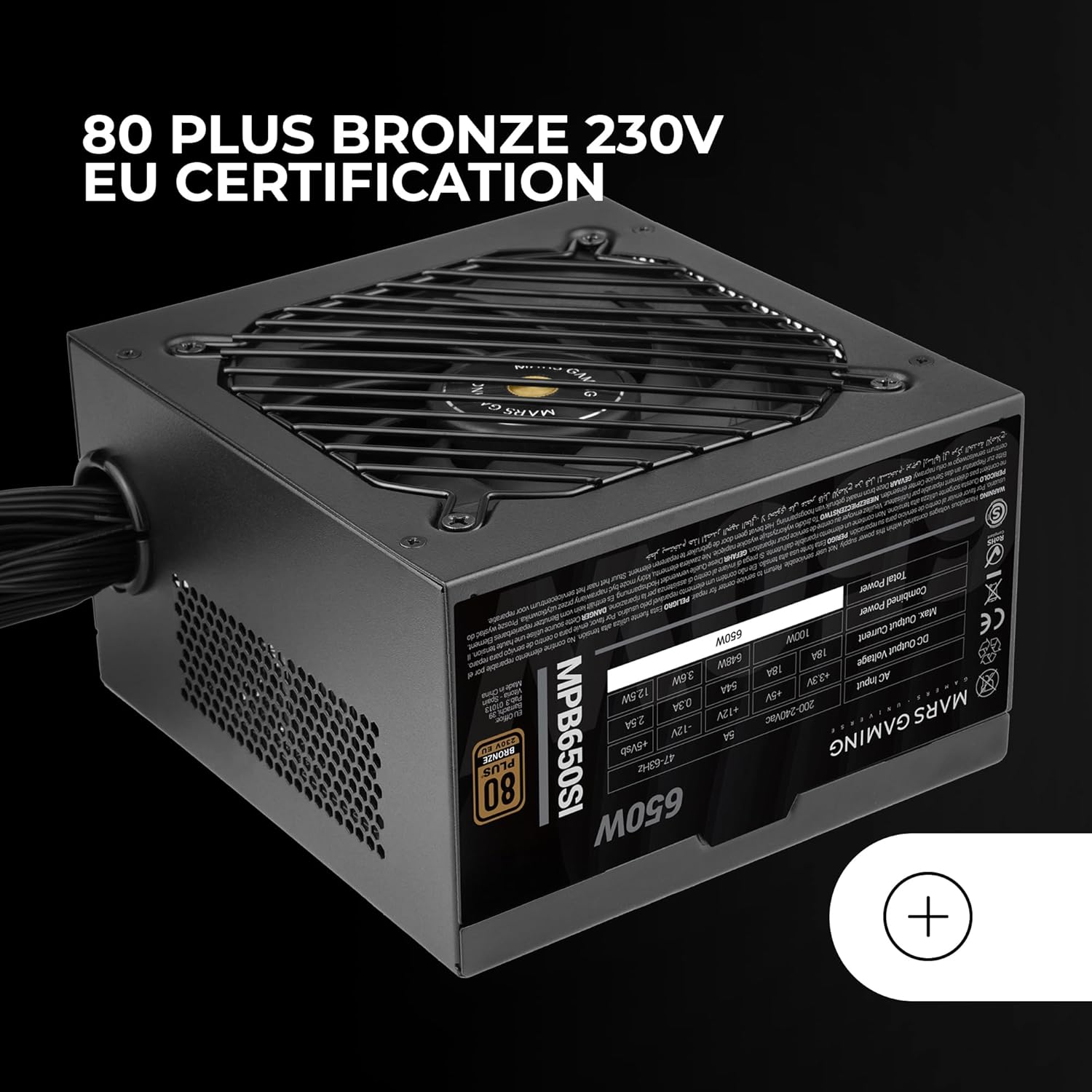
Joonis 5: The 80 Plus Bronze 230V EU certification logo, indicating high energy efficiency.
Garantii ja tugi
Garantii teave
The Mars Gaming MPB650SI power supply comes with an extended 7-aastane garantii from the date of purchase. This warranty covers defects in materials and workmanship under normal use. It does not cover damage caused by improper installation, accident, abuse, misuse, natural disaster, or unauthorized modification.
For warranty claims, please retain your proof of purchase. The warranty is subject to the terms and conditions specified by Mars Gaming.
Klienditugi
If you have any questions, require technical assistance, or need to initiate a warranty claim, please contact Mars Gaming customer support through their official website or the retailer where you purchased the product. Please have your product model (MPB650SI) and proof of purchase ready when contacting support.
For the most up-to-date support information, visit the official Mars Gaming websait: www.marsgaming.eu


