Sissejuhatus
The ScopeAround Digital Otoscope with IPS Screen (Model SASA160) is designed for clear, real-time visual inspection of the ear canal. This device allows users to perform ear checks instantly without the need for external connections like phones or apps. It is equipped with a high-resolution camera and integrated lighting to provide detailed views, making it suitable for personal and family ear care, including monitoring ear wax and general ear health.

Image: The ScopeAround Digital Otoscope, showing the main unit with its integrated screen, detachable lens with extension cable, various ear picks, specula, alcohol pads, Q-tips, and USB cable.
Põhifunktsioonid
- Built-In IPS Screen: Features a clear IPS display for instant viewing without requiring a phone or app connection. Simply power on and view reaalajas pildid.
- Kõrge eraldusvõimega kaamera: The 720p HD camera and integrated IPS screen provide sharp, true-to-life images, allowing clear visualization of fine details within the ear canal without glare or distortion.
- Slim 3.9mm Lens with LED Lights: Designed for comfort and safety, the slim lens is gentle for all ages. Six LED lights with three brightness levels ensure optimal illumination for clear viewing.
- Flexible Detachable Lens and Extension Cable: The lens can be detached and connected to an extended cable, offering flexibility for self-inspection or assisting others comfortably.
- Fotode ja videote jäädvustamine: Capture clear photos and videos of the ear canal. Files are saved on the included 8GB memory card, useful for tracking progress or sharing with healthcare professionals.
- Kasutajasõbralik disain: Ergonomic grip and intuitive controls make the device easy to handle for both professionals and home users.

Image: Diagram highlighting the integrated screen for easy and efficient ear examinations, providing a clear and detailed view kuulmekäigust.
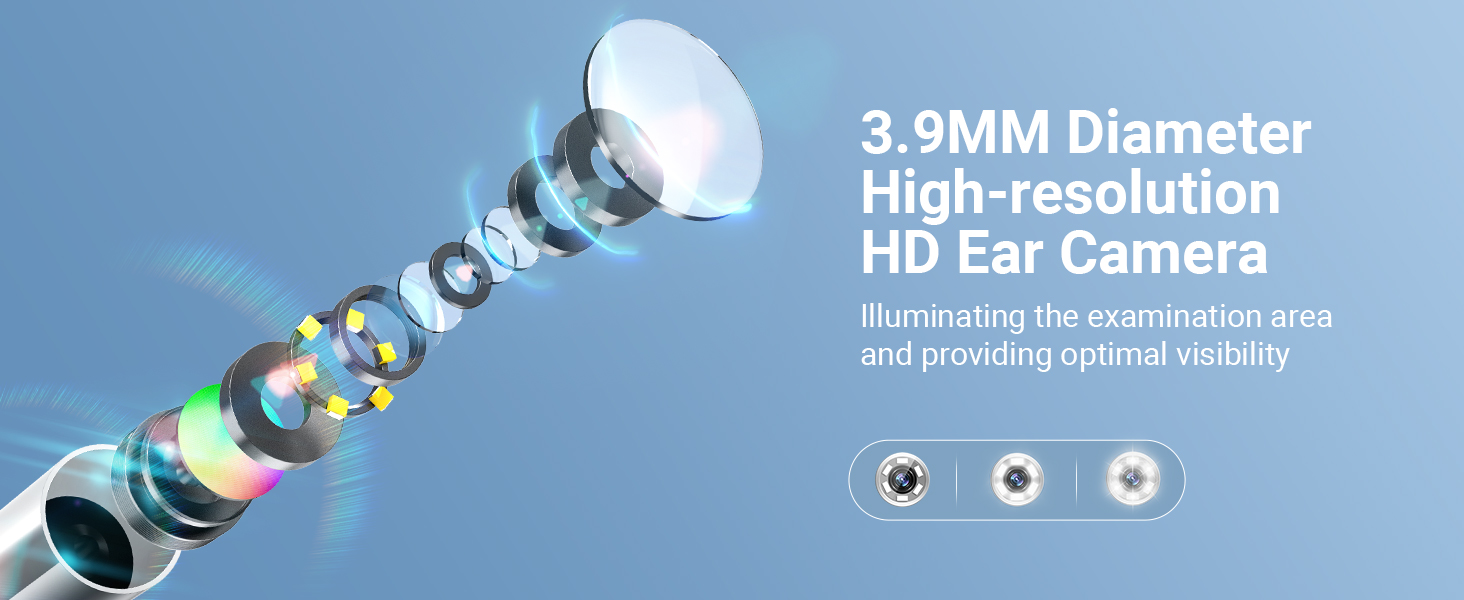
Image: Illustration of the 3.9mm diameter high-resolution HD ear camera, showing how it illuminates the examination area and provides optimal visibility.
Mis on karbis
- SA160 Digital Otoscope (Main Unit)
- Kõrvatihvtid x 4
- Spekula x 5
- Alcohol Pads x 4
- 1 pakk vatitupsusid
- Pikenduskaabel
- USB laadimiskaabel
- 8 GB mälukaart (eelinstallitud või eraldi kaasas)

Image: A visual representation of all items included in the product package, such as the otoscope, various ear picks, specula, alcohol pads, Q-tips, extension cable, USB cable, and user manual.
Seadistamine
- Laadige seadet: Before first use, fully charge the otoscope using the provided USB charging cable. The charging port is located on the device.
- Sisestage mälukaart: Ensure the 8GB memory card is properly inserted into the designated slot on the otoscope. This is necessary for saving photos and videos.
- Attach Lens/Extension Cable:
- For direct use, attach the lens probe directly to the main unit.
- For self-examination or extended reach, connect the lens probe to the extension USB cable, then connect the extension cable to the main unit. Ensure connections are secure.
- Attach Specula/Ear Picks: Select an appropriate speculum or ear pick and attach it to the tip of the lens probe. Ensure it is securely fitted to prevent accidental detachment during use.
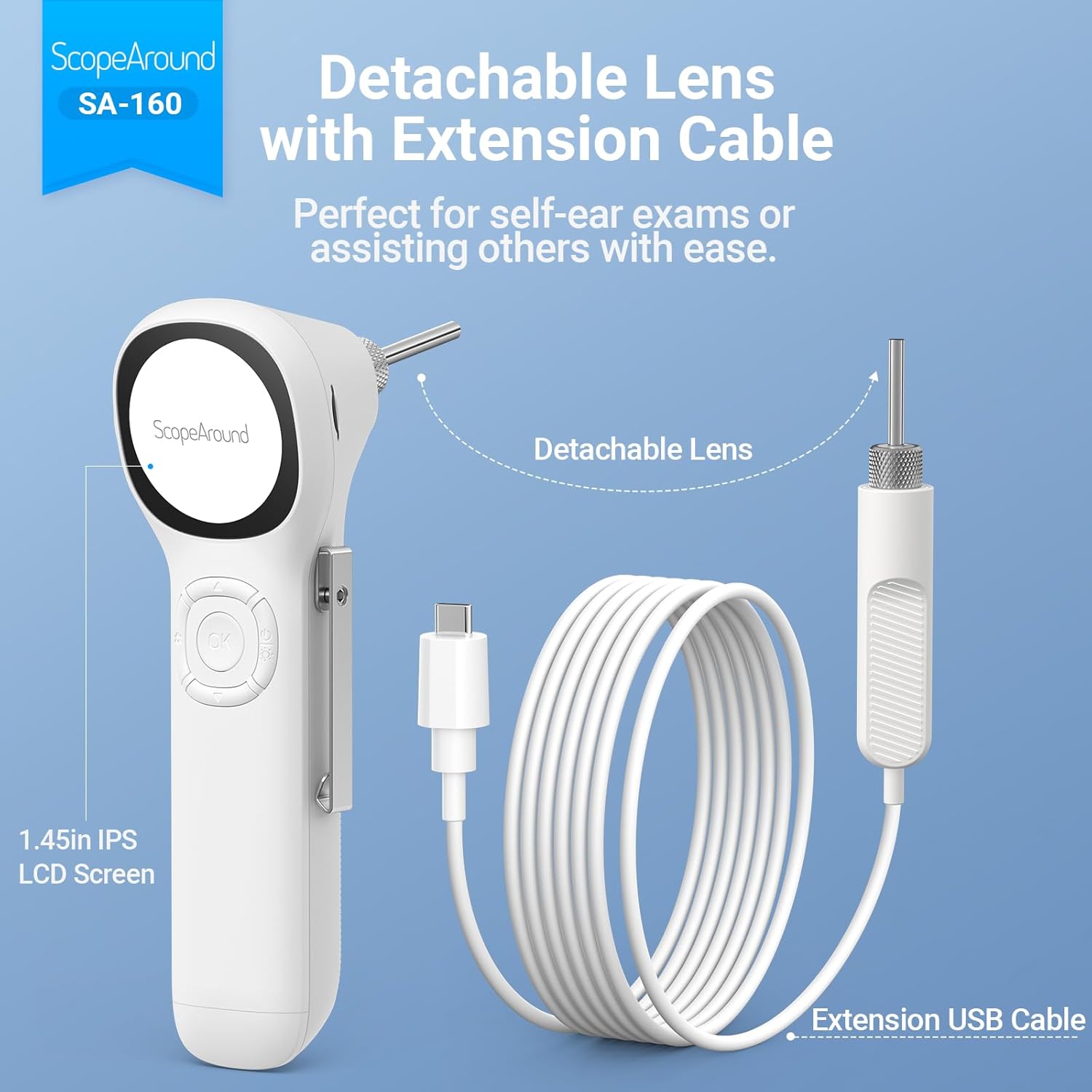
Image: The detachable lens and extension USB cable, illustrating how they connect to the main unit for flexible use, perfect for self-ear exams or assisting others.

Image: A detailed diagram labeling the various components and controls of the ScopeAround Smart Otoscope, including the 1.45-inch screen, settings button, OK button, Up/Down buttons, power button, lens module, capture button, reset, and Type-C port.
Operatsioon
- Toide sisse: Press and hold the Power Button to turn on the device. The IPS screen will activate, displaying the live view kaamerast.
- Heleduse reguleerimine: Use the dedicated button (often integrated with the power button or a separate control) to cycle through the three brightness levels of the LED lights for optimal visibility.
- Perform Examination: Gently insert the speculum-covered lens into the ear canal. Observe the live feed on the IPS screen. Move the otoscope slowly and carefully to get a comprehensive view.
- Fotode/videote jäädvustamine:
- Press the Capture Button to take a still photo.
- Press and hold the Capture Button to start recording a video. Press again to stop recording.
- Files are automatically saved to the 8GB memory card.
- Adjust Magnification/Rotation: If available, use the controls to adjust magnification (e.g., 1.0x, 1.3x, 1.5x) for more detailed views or rotate the image 180 degrees for flexible positioning.
- Review Meedia: Access saved photos and videos through the device's menu. You can transfer these files to a computer via the Type-C interface for larger screen viewing and health documentation.
- Toide välja: Press and hold the Power Button to turn off the device after use.

Image: Demonstrates the two primary uses: self-ear checks using the extension cable and assisting others with direct use of the otoscope.

Image: Illustrates the adjustable magnification (1.0x, 1.3x, 1.5x) for detailed views and the 180-degree image rotation feature for flexible positioning during examinations.

Image: Shows a user transferring files from the otoscope to a laptop via the Type-C interface, emphasizing the ease of sharing ear health documentation with professionals.
Hooldus
- Cleaning the Lens and Specula:
- After each use, especially when used on different individuals, clean the lens and specula thoroughly.
- Use the provided alcohol pads or a soft cloth dampened with isopropyl alcohol to wipe the lens and the exterior of the specula.
- Ensure the lens is free of debris or earwax before storage.
- Põhiseadme puhastamine: Wipe the main unit with a soft, dry cloth. Avoid using abrasive cleaners or submerging the device in water.
- Hoiustamine: Store the otoscope and its accessories in a clean, dry place, away from direct sunlight and extreme temperatures. Keep all small parts, especially ear picks and specula, organized in their case to prevent loss.
- Aku hooldus: Aku tööea pikendamiseks vältige seadme sagedast täielikku tühjenemist. Laadige seadet regulaarselt, isegi kui seda pidevalt ei kasutata.

Image: Illustrates safe and dangerous methods of ear cleaning, emphasizing the importance of proper technique to avoid ear canal injury and cross-infection.

Image: Close-up of the removable and soft silicone ear pick, highlighting its design for protection and convenience during ear wax removal.
Veaotsing
| Probleem | Võimalik põhjus | Lahendus |
|---|---|---|
| Seade ei lülitu sisse. | Aku tühjenemine; seadme talitlushäire. | Laadige seade täielikult. Kui probleem püsib, võtke ühendust klienditoega. |
| Pilt on udune või ebaselge. | Dirty lens; incorrect focal distance; insufficient lighting. | Clean the lens with an alcohol pad. Adjust the distance from the ear canal. Increase LED brightness. |
| Fotosid/videoid ei saa salvestada. | Memory card full or not inserted correctly; card error. | Check if the 8GB memory card is properly inserted. Delete old files to free up space or format the card (backup important data first). |
| Seade hangub või ei reageeri. | Tarkvara tõrge. | Perform a soft reset (refer to user manual for specific reset instructions, usually a small reset button). |
Tehnilised andmed
- Mudeli nimi: Otoscope SA160
- Kauba mudeli number: SASA160
- Kaubamärk: UlatusAround
- Värv: Valge
- Materjal: Plastikust
- Pakendi mõõtmed: 8.19 x 4.41 x 2.4 tolli
- Kauba kaal: 9.6 untsi
- Valgusallika tüüp: LED
- Tegelik nurk View: 78 kraadi
- Maksimaalne suurendus: 1.5 x
- Voltage: 3.7 volti (DC)
- Patareid: Vaja on 1 liitiumpolümeerakut (kaasas)
- Ühilduvad seadmed: No device needed (standalone operation)
- Esimene saadaolev kuupäev: 4. november 2024

Image: Detailed specifications of the SA-160 camera, including 3.9mm HD ear camera, 6 LED lights, 3 brightness adjustments, 0.39-1.18 inch focal distance, and 78-degree field of view.
Garantii ja tugi
For warranty information, technical support, or service inquiries, please refer to the official ScopeAround webveebisaidilt või võtke otse ühendust nende klienditeenindusega. Hoidke ostutšekk ostutõendina alles garantiinõuete korral.
ScopeAround is committed to providing high-quality products and customer satisfaction. For further assistance, please visit the ScopeAround Store on Amazon või võtke ühendust nende tugimeeskonnaga.


