1. Sissejuhatus
Thank you for choosing the BAOFENG K5Plus Two-Way Radio. This device is a high-performance communication tool designed for reliable long-range communication, featuring advanced functions such as GPS positioning, Type-C charging, DTMF signaling, and NOAA weather reception. This manual provides essential information for the safe and efficient operation of your radio. Please read it thoroughly before use.
2. Ohutusalane teave
- Aku ohutus: Use only the specified Lithium-Ion battery pack. Do not short-circuit, incinerate, or disassemble the battery. Dispose of batteries properly.
- Antenni ohutus: Ärge puudutage antenni edastuse ajal. Vältige raadio kasutamist kahjustatud antenniga, kuna see võib põhjustada kergeid põletusi.
- Kuulmiskaitse: Keep the volume at a comfortable level. Prolonged exposure to loud volumes may cause hearing damage.
- Plahvatusohtlikud keskkonnad: Turn off your radio in potentially explosive atmospheres (e.g., near gas pumps, chemical storage areas).
- Veekindlus: See seade on EI OLE veekindel. Avoid exposure to water or moisture.
- Häired: Turn off your radio when instructed to do so in hospitals or aircraft.
3. Pakendi sisu
Palun kontrollige pakendit hoolikalt, et kõik esemed oleksid olemas:
- 1 x Portable Radio (BAOFENG K5Plus)
- 1 x 2500mAh liitiumioonaku
- 1 x Antenn
- 1 x Type-C kaabel
- 1x Vööklamber
- 1 x kaelapael
- 1 x tootejuhend (käesolev dokument)
- 1 x programmeerimiskaabel
4. Toote lõppview
The BAOFENG K5Plus features a 1.77-inch TFT large screen, a full keypad for direct frequency input and menu navigation, and a robust design for outdoor use. Key components include the antenna connector, PTT (Push-to-Talk) button, speaker, microphone, and Type-C charging port.
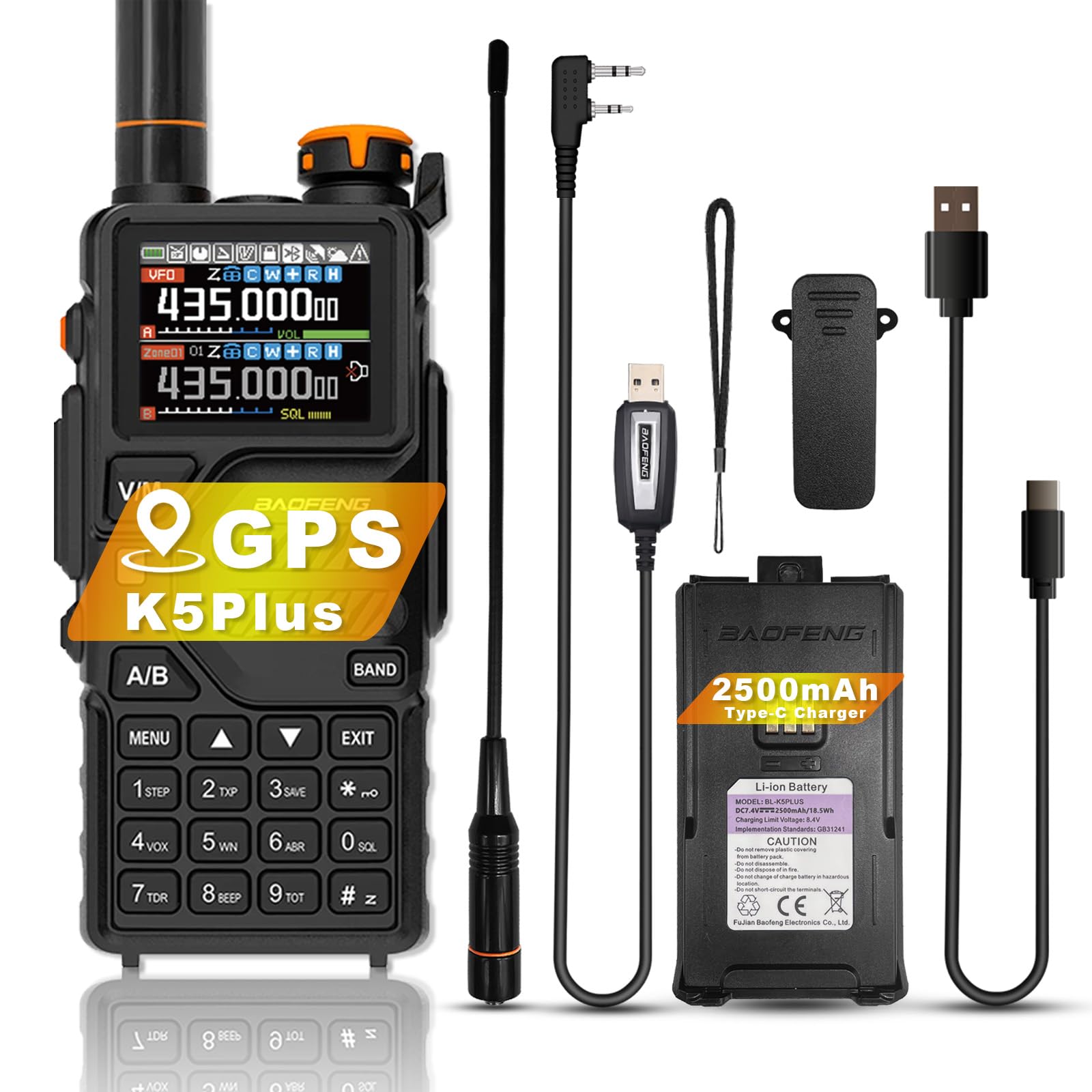
Pilt 1: esikülg view of the BAOFENG K5Plus Two-Way Radio, showing the display, keypad, and speaker.
5. Seadistamine
5.1. Aku paigaldamine
- Veenduge, et raadio oleks VÄLJA lülitatud.
- Align the battery pack with the compartment on the back of the radio.
- Lükake aku oma kohale, kuni see kindlalt klõpsatab.
5.2. Aku laadimine
The BAOFENG K5Plus supports convenient Type-C USB charging.
- Veenduge, et teie raadio on VÄLJA lülitatud.
- Plug the Type-C USB cable into the Type-C USB charging port on your battery pack.
- Connect the other end of the Type-C cable to a compatible USB power source (e.g., wall adapter, computer USB port).
- An empty battery will typically be fully charged in approximately 4 hours. The battery meter on the LCD will indicate charging status.
5.3. Antenni kinnitus
- Keerake antenn päripäeva raadio ülaosas oleva pistiku külge, kuni see on sõrmedega tihedalt kinni. Ärge pingutage üle.
5.4. Vööklamber ja kaelarihma kinnitus
Attach the belt clip to the designated slot on the back of the radio for easy carrying. The lanyard can be attached to the top or side loop for added security.
6. Kasutusjuhised
6.1. Toite sisse-/väljalülitamine ja helitugevuse reguleerimine
- Toide sisse: Keera toite/helitugevuse nuppu päripäeva, kuni kuuled klõpsu.
- Toide välja: Keerake toite/helitugevuse nuppu vastupäeva, kuni kuulete klõpsu.
- Helitugevuse reguleerimine: Kuulamise helitugevuse reguleerimiseks keerake toite/helitugevuse nuppu.
6.2. Kanali valik
The radio supports up to 640 named memory channels. You can select channels using the keypad or the up/down navigation buttons.
- Otsene sisenemine: Enter the channel number directly using the keypad.
- Skannimisrežiim: Activate scan mode to automatically search for active channels.
6.3. Edastamine ja vastuvõtmine
- Vastuvõtmine: When a signal is detected on the current channel, the radio will automatically open the squelch and you will hear the transmission.
- Edastamine: Press and hold the PTT (Push-to-Talk) button on the side of the radio. Speak clearly into the microphone. Release the PTT button to stop transmitting and return to receive mode.
6.4. GPS-i funktsioon
The BAOFENG K5Plus includes an optional GPS function for location sharing and requesting. This feature requires hardware support and specific settings.
- Aktiveerimine: Access the position system menu to enable/disable GPS, set time zone, and GPS mode.
- Viewasukoht: Press and hold the designated key (refer to your radio's specific key mapping) to view your current location information.
- Sharing/Requesting Location: This is a DTMF calling application. Ensure radios are on the same frequency/channel and main frequency band. Refer to the "Signaling Calls" section in the radio's on-screen menu for setting call codes, names, and local IDs.
- Märkus. GPS-režiimis saate ainult view location information. To make normal voice calls, you must exit GPS mode.
6.5. DTMF-funktsioon
DTMF (Dual-Tone Multi-Frequency) is an in-band signaling method used for various applications, including signaling calls and GPS location requests.
- The radio supports DTMF encoder and DTMF manual dial.
- Refer to the radio's menu for specific DTMF settings and usage for signaling calls.
6.6. NOAA Weather Forecast
The BAOFENG K5Plus can receive 10 channels of America NOAA weather forecasts, providing timely weather alerts for the United States and Canada.
- Access the NOAA weather forecast menu to select and monitor weather channels.
6.7. VOX (häälega aktiveeritav edastus)
VOX allows for hands-free operation by automatically transmitting when it detects your voice. Adjust VOX sensitivity in the radio's menu.
6.8. Häire funktsioon
The radio includes an alarm function for emergency situations. Consult the menu for activation and settings.
6.9. Programmeerimine
The BAOFENG K5Plus is PC programmable. Use the included programming cable and compatible software (available from BAOFENG's official website or authorized dealers) to customize channels, frequencies, and other advanced settings.
7. Omadused
- 1.77” TFT large screen, full keypad, fully open menu operation
- Sisseehitatud sisestusmeetod kanalite nimede muutmiseks
- 10 Channels America NOAA weather forecast reception
- Type-C direct charging and charging stand compatibility
- DTMF-kooder ja DTMF-i käsitsivalimine
- VOX (häälaktiveeritud edastus)
- Häire funktsioon
- 50 CTCSS tooni ja 105 DCS koodi
- 10 tsooni salvestusruum, kuni 640 nimega mälukanalit
- Ekraani valgustus programmeeritav klahvistiku abil
- Kõrge või madala võimsuse valimine
- Klaviatuuril olev funktsioonipiiks
- Aku säästmise funktsioon
- Programmeeritav repiiteri nihe
- Skannimisrežiim
- Edastamise ajalõpp
- Sisseehitatud CTCSS/DCS toonid
- Hõivatud kanal lukustatakse
- PC programmeeritav
- Ribalaiaülene vastuvõtt
- Kümme (10) müra reguleerimise taset
- One touch search frequency
- End of transmission tone (Roger Beep)
- Analog signaling DTMF, 2TONE, 5TONE, BDC1200 codecs
- GPS positioning function, location sharing and requesting location information from others
8. Tehnilised andmed
| Funktsioon | Spetsifikatsioon |
|---|---|
| Mudeli number | K5Plus |
| Frequency Range F1 (RX/TX) | 136-174 MHz |
| Frequency Range F2 (RX/TX) | 220-260 MHz |
| Frequency Range F3 (RX) | 400-520 MHz |
| Frequency Range F3 (TX) | 400-480 MHz |
| Frequency Range F4 (AM RX) | 108-136 MHz |
| Frequency Range F5 (Police RX) | 350-390 MHz |
| Frequency Range F6 (FM RX) | 65-108 MHz |
| Kanalite arv | 640 |
| Aku tüüp | 1 liitiumioonaku (2500 mAh) |
| Aku tööiga | Kuni 48 tundi (tüüpiline kasutus) |
| Laadimisport | C-tüüpi USB |
| Kauba kaal | 1.06 naela (umbes 16.93 untsi) |
| Toote mõõtmed | 1.57 x 2.54 x 4.92 tolli (S x L x K) |
| Maksimaalne kõneulatus | 6.21 miili (optimaalsetes tingimustes) |
| Veekindluse tase | Ei ole veekindel |
9. Hooldus
- Puhastamine: Kasutage pehmet, damp Raadio välispinna puhastamiseks kasutage lappi. Ärge kasutage tugevatoimelisi kemikaale ega lahusteid.
- Aku hooldus: Hoidke akut mittekasutamise ajal jahedas ja kuivas kohas. Vältige aku pikaajalist täielikku tühjenemist.
- Antenn: Veenduge, et antenn on kindlalt kinnitatud. Ärge painutage ega rakendage antennile jõudu.
- Hoiustamine: If storing the radio for a long time, remove the battery.
10. Veaotsing
- Raadio ei lülitu sisse: Kontrollige, kas aku on õigesti paigaldatud ja laetud. Veenduge, et toite-/helitugevuse nupp on sisse lülitatud.
- Ei saa edastada ega vastu võtta: Verify that the antenna is attached. Check the selected frequency/channel. Ensure the battery has sufficient charge. Adjust squelch level.
- Halb helikvaliteet: Check volume level. Ensure the antenna is secure. Move to an area with better signal reception.
- GPS ei tööta: Ensure GPS function is enabled in the menu. Move to an open outdoor area for better satellite reception.
- Radio is unresponsive: Try removing and reinserting the battery to perform a soft reset.
11. Garantii ja tugi
The BAOFENG K5Plus comes with a 1-aastane garantii Pakub ainult "Shiqun Electronics Co., Ltd". Palun hoidke ostutõendit garantiinõuete esitamiseks.
For technical support, troubleshooting assistance beyond this manual, or warranty inquiries, please contact the seller or an authorized BAOFENG service center.


