1. Sissejuhatus
This manual provides detailed instructions for the Transformers TF-T07 Ear Hanging Wireless Headphones. Please read this manual carefully before using the product to ensure proper operation and to maximize your listening experience.
The TF-T07 headphones feature an ergonomic ear-hanging design, Bluetooth 5.4 connectivity, ultra-low latency for gaming, a high-quality microphone, and a sweatproof build, delivering clear audio with deep bass.
2. Pakendi sisu
Paki avamisel palun kontrollige, kas kõik järgmised esemed on olemas:
- Transformers TF-T07 Ear Hanging Wireless Headphones
- Laadimiskaabel (tüüp-C)
- Laadimisümbris
- Kasutusjuhend (see dokument)
3. Toote lõppview
The Transformers TF-T07 headphones are designed for comfort and high-fidelity audio. They feature an open-ear, ear-hanging design, providing a comfortable fit without entering the ear canal.

Image: The TF-T07 headphones in their charging case, highlighting the non-in-ear design for comfortable wear.
Põhifunktsioonide hulka kuuluvad:
- Bluetooth 5.4: Stabiilse ja tõhusa traadita ühenduse jaoks.
- HD hääl: Enhanced call clarity.
- Mängu madal latentsusaeg: Minimized audio delay for gaming.
- Ruumiline heli: Kaasahaarav helikogemus.
- Värvilised tuled: Integrated lighting feature.

Image: Visual representation of the TF-T07's main features, including Bluetooth 5.4 and low latency gaming.
4. Seadistamine ja laadimine
4.1 Esmane laadimine
Enne esmakordset kasutamist laadige kõrvaklapid ja laadimisümbris täielikult.
- Ühenda kaasasolev C-tüüpi laadimiskaabel korpuse laadimisporti.
- Ühendage kaabli teine ots USB-toiteallikaga (nt seinaadapter, arvuti USB-port).
- The charging indicator lights on the case will show charging status.
- Täislaadimine võtab tavaliselt umbes 2 tundi.
4.2 Kõrvaklappide kandmine
The TF-T07 features an ergonomic ear-hanging design for a secure and comfortable fit.
- Identify the left (L) and right (R) headphones.
- Gently hook each headphone over your ear, ensuring the speaker portion is positioned correctly near your ear canal without entering it.
- Reguleeri mugava ja tiheda istuvuse tagamiseks.
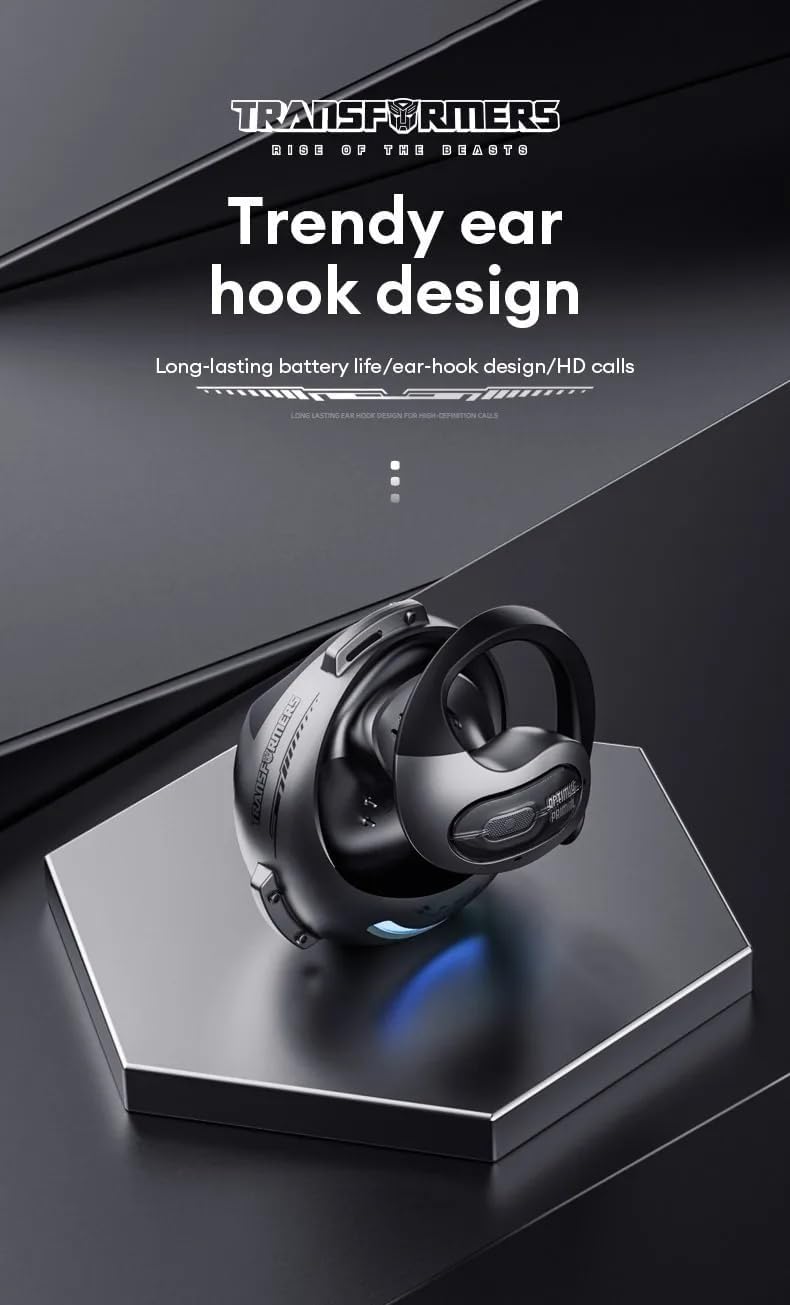
Image: Close-up of the TF-T07's ear hook design, emphasizing its ergonomic shape.
4.3 Bluetoothi sidumine
Kõrvaklappide ühendamiseks seadmega:
- Veenduge, et kõrvaklapid on laetud.
- Open the charging case. The headphones will automatically enter pairing mode (indicated by flashing lights, refer to product specific light indicators if available).
- Luba oma seadmes (nutitelefon, tahvelarvuti, arvuti) Bluetooth.
- Otsi available Bluetooth devices and select "TF-T07" from the list.
- Once connected, the headphones will indicate successful pairing (e.g., a voice prompt or solid light).
- Kõrvaklapid ühenduvad ümbrisest väljavõtmisel automaatselt viimati seotud seadmega uuesti, kui seadmel on Bluetooth lubatud.
5. Kasutusjuhised
5.1 Põhilised juhtnupud
The TF-T07 headphones feature integrated controls for easy management of audio and calls. Specific touch or button functions may vary; refer to the quick start guide included in your package for precise details.
- Toide sisse/välja: Headphones power on automatically when removed from the case and power off when placed back in the case.
- Esita/peata: Üks puudutus kummalgi kõrvaklapil.
- Helitugevuse juhtimine: Adjust volume directly on the headphones (specific gesture/button location not detailed in product info, assume standard controls).
- Järgmine / eelmine lugu: Double tap or long press (refer to quick start guide).
- Kõnele vastamine/lõpetamine: Üks puudutus sissetuleva kõne ajal.
- Keeldu kõnest: Long press during an incoming call.
- Hääleabi aktiveerimine: Triple tap (refer to quick start guide).
5.2 Helistamine ja kõnede vastuvõtmine
The built-in high-quality microphone with DNS noise reduction ensures clear communication.

Image: The TF-T07 headphones are designed for high-definition calls, even in noisy environments.
5.3 Mängukogemus
The TF-T07 headphones offer ultra-low latency, crucial for competitive gaming, ensuring audio synchronization with on-screen action.
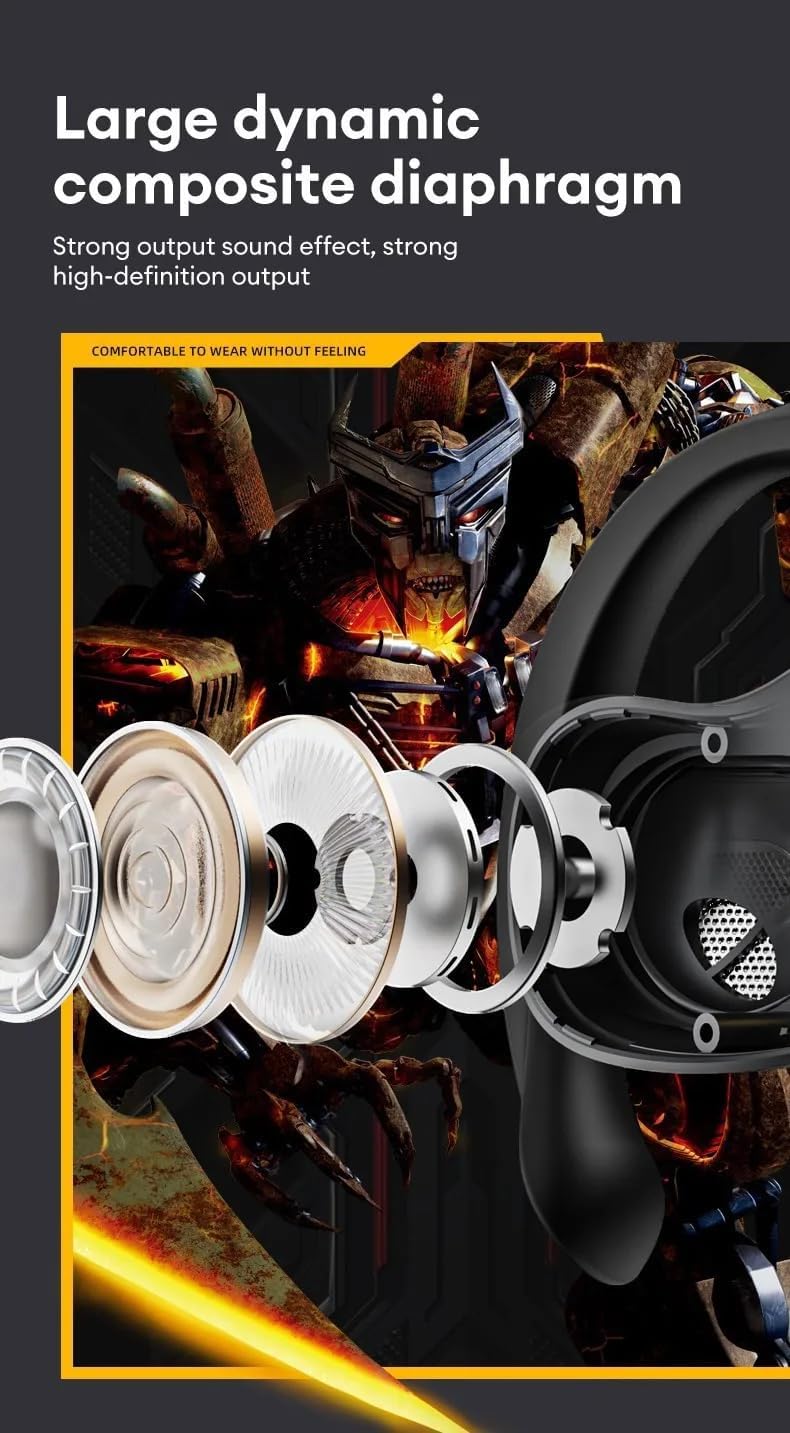
Image: Internal components of the TF-T07 headphones, highlighting the large dynamic composite diaphragm for strong sound output.

Image: The TF-T07 headphones provide a full spectrum listening experience with excellent sound transmission.
6. Hooldus ja hooldus
To ensure the longevity and optimal performance of your TF-T07 headphones, follow these care guidelines:
- Puhastamine: Kõrvaklappide ja laadimisümbrise puhastamiseks kasutage pehmet, kuiva ja ebemevaba lappi. Ärge kasutage abrasiivseid puhastusvahendeid, alkoholi ega keemilisi lahusteid.
- Higikindel disain: The headphones are designed to be sweatproof, making them suitable for workouts. However, avoid submerging them in water or exposing them to heavy rain. Dry them thoroughly after exposure to sweat.
- Hoiustamine: Kui kõrvaklappe ei kasutata, hoidke neid tolmu ja kahjustuste eest kaitsmiseks laadimisümbrises. Hoidke jahedas, kuivas ja äärmuslike temperatuuride eest kaitstud kohas.
- Aku hooldus: Aku tööea pikendamiseks laadige kõrvaklappe regulaarselt, isegi kui neid sageli ei kasutata. Vältige aku pikaajalist täielikku tühjenemist.
7. Veaotsing
If you encounter issues with your TF-T07 headphones, try the following solutions:
- Toide puudub:
- Veenduge, et kõrvaklapid ja laadimisümbris on täielikult laetud.
- Kontrollige laadimiskaablit ja toiteallikat.
- Ei saa paari panna:
- Veenduge, et Bluetooth on teie seadmes lubatud ja kõrvaklapid on sidumisrežiimis.
- Liigutage kõrvaklapid seadmele lähemale (10 meetri raadiusesse).
- Häirete vältimiseks lülitage lähedalasuvate seadmete Bluetooth välja.
- Forget "TF-T07" from your device's Bluetooth list and try pairing again.
- Taaskäivitage seade ja kõrvaklapid.
- Heli puudub või heli on madal:
- Suurenda helitugevust nii oma seadmes kui ka kõrvaklappides.
- Veenduge, et kõrvaklapid oleksid teie seadmega korralikult ühendatud.
- Check if the audio output is set to "TF-T07" on your device.
- Halb helikvaliteet:
- Häirete vähendamiseks liikuge oma seadmele lähemale.
- Vältige kõrvaklappide ja seadme vahelisi takistusi.
- Ensure the headphones are clean and free from debris.
If the issue persists, please refer to the warranty and support section.
8. Tehnilised andmed
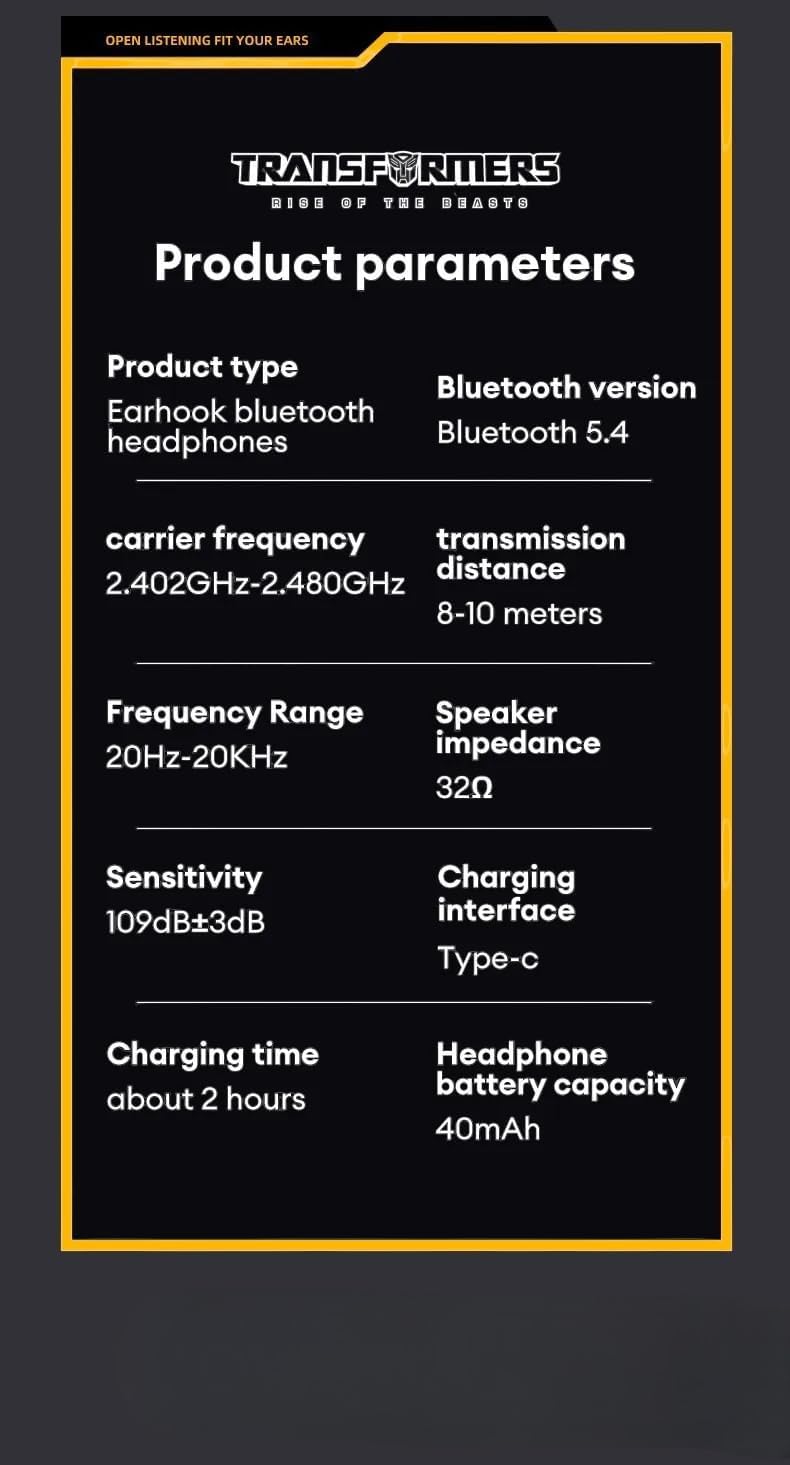
Image: Detailed product parameters for the TF-T07 headphones.
| Funktsioon | Detail |
|---|---|
| Toote tüüp | Kõrvakonksu Bluetooth kõrvaklapid |
| Mudeli nimi | TF-T07 |
| Kaubamärk | Trafod |
| Ühenduvustehnoloogia | Traadita (Bluetooth 5.4) |
| Bluetoothi versioon | Bluetooth 5.4 |
| Kandja sagedus | 2.402 GHz kuni 2.480 GHz |
| Edastuskaugus | 8-10 meetrit |
| Sagedusvahemik | 20Hz - 20KHz |
| Kõlari takistus | 32Ω |
| Tundlikkus | 109 dB ± 3 dB |
| Laadimisliides | Tüüp-C |
| Laadimisaeg | Umbes 2 tundi |
| Kõrvaklappide aku maht | 40 mAh |
| Eriomadused | Noise Isolation, Sweatproof Design, Ultra-Low Latency |
| Värv | Hall |
9. Garantii teave
The Transformers TF-T07 Ear Hanging Wireless Headphones come with a Manufacturer's Warranty of 6 kuud alates ostukuupäevast.
This warranty covers defects in materials and workmanship under normal use. It does not cover damage caused by misuse, accidents, unauthorized modifications, or normal wear and tear.
Garantiinõuete esitamiseks säilitage ostutõend.
10. Klienditugi
For further assistance, technical support, or warranty inquiries, please contact your retailer or the manufacturer's customer service department.
Please have your product model number (TF-T07) and proof of purchase ready when contacting support.


