1. Sissejuhatus ja lõppview
The ARCTIC Freezer 4U-M Ampere is a high-performance CPU air cooler designed for server environments. It provides efficient cooling for a range of processors, including Ampere Altra and Altra Max, as well as various AMD and Intel server CPUs. This cooler is engineered for continuous operation and features a compact design to ensure broad compatibility within 4U server cases and with dual-CPU motherboards.
Põhifunktsioonide hulka kuuluvad:
- Ampere Ready: Includes mounting kit for Ampere Altra and Altra Max processors.
- Kompaktne disain: Optimized for 4U server cases and dual-CPU motherboards, ensuring RAM slot clearance.
- Suure jõudlusega jahutus: Equipped with two custom 120 mm fans in a push-pull configuration with PWM control.
- Vastupidav konstruktsioon: Fans feature double ball bearings for extended lifespan and 24/7 operation.
- Lihtne paigaldamine: Comes with pre-installed mounting brackets and thermal paste.

Image: The ARCTIC Freezer 4U-M Ampere CPU Cooler, showcasing its compact design and dual fan setup.
2. Mis on karbis
The ARCTIC Freezer 4U-M Ampere package includes the following components:
- ARCTIC Freezer 4U-M (Rev. 2) CPU Cooler with Ampere Clips
- Pre-applied thermal paste (ARCTIC MX-6)
- Pre-installed mounting brackets

Image: A close-up of the cooler's heat pipes and the included ARCTIC MX-6 thermal paste syringe.
3. Seadistamine ja installimine
The Freezer 4U-M is designed for straightforward installation. Follow these general steps for mounting the cooler onto your CPU.
3.1 Ühilduvus
This cooler is compatible with a variety of CPU sockets, including:
- AMD: SP6, SP3, sTR5, TR4, sWRX8, sTRX4
- Intel: LGA4677, LGA4189, LGA4710
- Ampsiin: LGA4926 (Mounting Kit for Ampere Altra and Altra Max Processors included)

Image: Visual representation of compatible CPU sockets including AMD EPYC (SP6, SP3), Intel Xeon (LGA4677, LGA4189, LGA4710), AMD Ryzen Threadripper (sTR5, TR4, sWRX8, sTRX4), and Ampere Altra Max (LGA4926).
3.2 Paigaldamise etapid
- Protsessori ettevalmistamine: Ensure your CPU is correctly seated in its socket. The cooler comes with pre-applied thermal paste; if you prefer to use your own, clean the CPU surface thoroughly before application.
- Jahuti asend: Align the cooler's pre-installed mounting brackets with the CPU socket's mounting points.
- Secure Cooler: Gently press down and secure the cooler using the provided screws. Tighten screws evenly in a cross pattern to ensure balanced pressure. Avoid overtightening.
- Ühenda ventilaatorid: Connect the 4-pin PWM fan cables to the appropriate CPU fan headers on your motherboard.
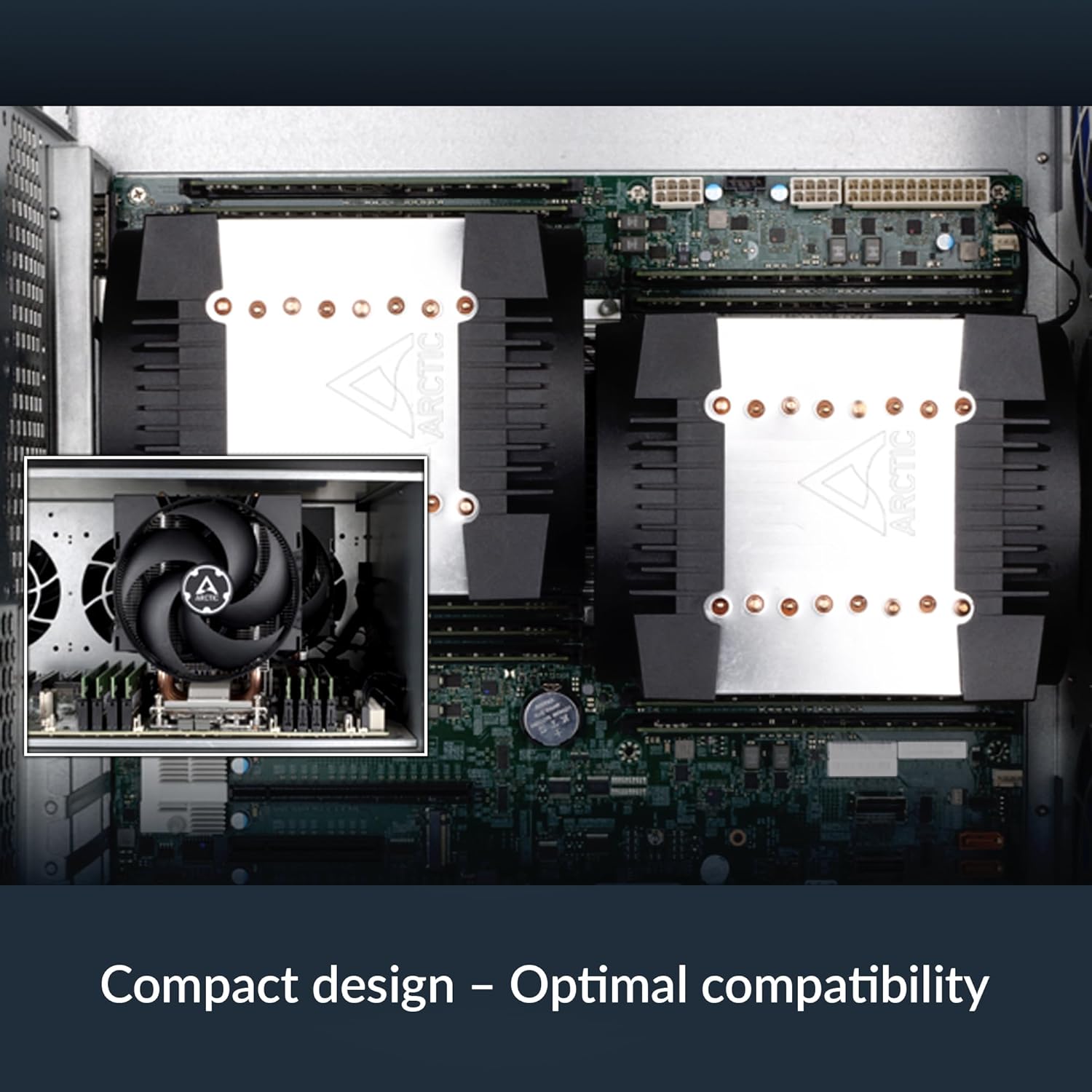
Image: The ARCTIC Freezer 4U-M Ampere installed on a motherboard within a server chassis, demonstrating its compact fit and optimal compatibility with surrounding components.
4. Kasutusjuhised
The ARCTIC Freezer 4U-M Ampere is designed for optimal thermal performance and quiet operation in server environments.
4.1 Ventilaatori juhtimine
The two 120 mm fans support Pulse Width Modulation (PWM) control. This allows your motherboard or system software to dynamically adjust fan speed based on CPU temperature, optimizing cooling performance and noise levels. Ensure the fans are connected to PWM-compatible headers for this functionality.

Image: Diagram illustrating the push-pull fan configuration of the ARCTIC Freezer 4U-M Ampere, showing airflow direction for efficient heat dissipation.
4.2 Pidev töö
The fans are equipped with double ball bearings, engineered for continuous 24/7 operation, making them suitable for demanding server applications.

Image: Cross-section diagram of a fan, highlighting the impeller, dual ball bearings, and steel shaft, indicating a design optimized for continuous operation.
5. Hooldus
Regular maintenance ensures the longevity and optimal performance of your ARCTIC Freezer 4U-M Ampere CPU cooler.
- Tolmu eemaldamine: Periodically inspect the heatsink fins and fan blades for dust accumulation. Use compressed air or a soft brush to gently remove dust. Ensure the system is powered off before cleaning.
- Ventilaatori kontroll: Check fan blades for any obstructions or damage. The double ball bearings are designed for durability, but ensure free rotation.
- Termopasta: While the pre-applied thermal paste offers long-term performance, if you ever remove the cooler, it is recommended to clean off old thermal paste and apply a fresh layer before reinstallation.
6. Veaotsing
If you encounter issues with your ARCTIC Freezer 4U-M Ampere, consider the following troubleshooting steps:
- Kõrge protsessori temperatuur:
- Verify that the cooler is securely mounted and making proper contact with the CPU.
- Kontrollige, kas termopasta on õigesti ja ühtlaselt peale kantud.
- Ensure fans are spinning and connected to the correct motherboard headers.
- Confirm adequate airflow within the server chassis.
- Ventilaatori müra:
- Check for dust buildup on fan blades.
- Ensure fan cables are not obstructing fan rotation.
- Adjust fan speed settings in your motherboard's BIOS/UEFI or system software.
- Mounting Difficulties / Component Interference:
- Some motherboard designs (e.g., with tall VRM heatsinks) may require careful positioning or minor adjustments.
- Ensure the cooler is compatible with your specific motherboard model and server case dimensions.
7. Tehnilised andmed
| Funktsioon | Spetsifikatsioon |
|---|---|
| Mudeli number | ACFRE00171A |
| Toote mõõtmed (P x L x K) | 6.14" x 4.88" x 5.71" |
| Jahutusmeetod | Õhk |
| Ventilaatori suurus | 2 x 120 mm |
| Maksimaalne pöörlemiskiirus | 2300 pööret minutis |
| Õhuvoolu maht | 72 kuupjalga minutis |
| Toitepistiku tüüp | 4-Pin PWM |
| Voltage | 12 volti |
| Wattage | 1.44 vatti |
| Materjal | Metall, Plastik, Kumm |
| Kauba kaal | 2.81 naela |
| Ühilduvad seadmed | Desktop (Server CPUs) |
| UPC | 840033402699 |
8. Garantii ja tugi
For warranty information or technical support, please refer to the official ARCTIC website or contact ARCTIC customer service directly. Keep your proof of purchase for warranty claims.
ARCTIC Official Websait: www.arctic.ac


