Tere tulemast
Thank you for choosing the BYTECH BICONIC True Wireless Earbuds. This manual provides essential information on how to set up, operate, maintain, and troubleshoot your new earbuds. Please read this manual thoroughly before use to ensure optimal performance and longevity of your device.
Olulised ohutusjuhised
- Ärge jätke kõrvaklappe ega laadimisümbrist äärmuslike temperatuuride, niiskuse ega vedelike kätte.
- Vältige seadme maha kukkumist, lööke ega lahtivõtmist.
- Do not use abrasive cleaners or harsh chemicals to clean the earbuds or case.
- Listen at moderate volume levels to prevent hearing damage. Prolonged exposure to loud sounds can cause irreversible hearing loss.
- Hoida lastele ja lemmikloomadele kättesaamatus kohas.
- Dispose of the device responsibly according to local regulations. Do not dispose of with household waste.
Mis on kaasas
Palun kontrollige paki sisu, et kõik esemed oleksid olemas:
- BYTECH BICONIC True Wireless Earbuds (Left and Right)
- Laadimisümbris
- Laadimiskaabel
- Kasutusjuhend
Toode läbiview
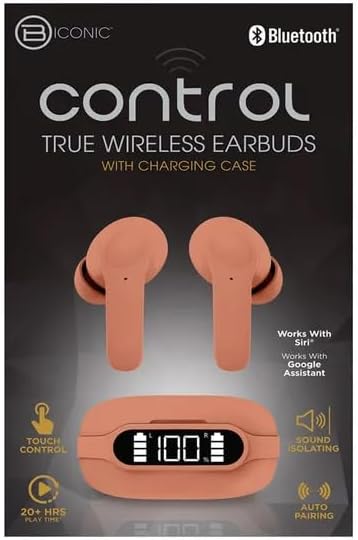
Familiarize yourself with the components of your BYTECH BICONIC True Wireless Earbuds.

Alustamine
Kõrvaklappide ja ümbrise laadimine
The BYTECH BICONIC earbuds come with a rechargeable battery in both the earbuds and the charging case. Ensure both are fully charged before first use.
- Asetage kõrvaklapid laadimiskarpi, veendudes, et need on õigesti oma vastavatesse pesadesse istunud (L vasakule, R paremale).
- Ühenda kaasasolev laadimiskaabel korpuse laadimisporti ja teine ots USB-toiteallikaga (nt arvuti USB-porti või seinaadapterisse).
- The digital display on the charging case will show the battery level. Allow sufficient time for a full charge.
- Pärast täielikku laadimist ühendage laadimiskaabel lahti.
Bluetoothi sidumine
Kõrvaklappide Bluetooth-toega seadmega sidumiseks järgige neid samme.
- Veenduge, et kõrvaklapid on laetud ja laadimisümbrises.
- Open the charging case. The earbuds will automatically enter pairing mode, and an indicator light on the earbuds will flash.
- Oma seadmes (nutitelefon, tahvelarvuti jne) minge Bluetoothi seadetesse ja lülitage Bluetooth sisse.
- Otsi available devices. You should see "BYTECH BICONIC" or a similar name appear in the list.
- Select "BYTECH BICONIC" to connect. Once connected, a voice prompt will confirm the successful pairing, and the indicator lights on the earbuds will stop flashing.
- Kõrvaklapid ühenduvad ümbrisest väljavõtmisel automaatselt viimati seotud seadmega, eeldusel, et seadmes on Bluetooth lubatud.
Kasutusjuhised
Puudutage juhtnuppe
The BYTECH BICONIC earbuds feature intuitive touch controls for easy management of your audio and calls.
| Tegevus | Funktsioon |
|---|---|
| Üks puudutus (vasak/parem kõrvaklapp) | Muusika esitamine/peatamine, kõne vastuvõtmine/lõpetamine |
| Topeltpuudutus (parem kõrvaklapp) | Järgmine lugu |
| Topeltpuudutus (vasak kõrvaklapp) | Eelmine lugu |
| Kolmekordne puudutus (vasak/parem kõrvaklapp) | Häälassistendi (Siri/Google Assistant) aktiveerimine |
| Pikk vajutus (vasak/parem kõrvaklapp) | Keeldu kõnest |
Sisse- ja väljalülitamine
- Toide sisse: Kõrvaklapid lülituvad laadimisümbrisest eemaldamisel automaatselt sisse.
- Toide välja: Asetage kõrvaklapid tagasi laadimiskarpi ja sulgege kaas. Need lülituvad automaatselt välja ja hakkavad laadima.
Hooldus ja hooldus
Proper care will extend the life of your BYTECH BICONIC True Wireless Earbuds.
- Puhastamine: Use a soft, dry, lint-free cloth to clean the earbuds and charging case. Do not use liquids or aerosol cleaners.
- Hoiustamine: Kui kõrvaklappe ei kasutata, hoidke neid alati laadimisümbrises, et neid kaitsta ja laetuna hoida.
- Vältige äärmuslikke tingimusi: Do not expose the device to extreme heat, cold, or direct sunlight.
- Veekindlus: These earbuds are not waterproof. Avoid contact with water or excessive moisture.
Veaotsing
Kui teil tekib kõrvaklappidega probleeme, vaadake järgmisi levinud lahendusi.
| Probleem | Lahendus |
|---|---|
| Kõrvaklapid ei ühendu | Veenduge, et kõrvaklapid on laetud. Lülitage oma seadmes Bluetooth välja ja sisse. Unustage seade Bluetoothi sätetes ja siduge need uuesti. |
| Töökorras ainult üks kõrvaklapp | Asetage mõlemad kõrvaklapid tagasi laadimiskarpi, sulgege kaas, oodake paar sekundit ja võtke need seejärel uuesti välja. Veenduge, et mõlemad on laetud. |
| Ei mingit heli | Kontrollige nii seadme kui ka kõrvaklappide helitugevust. Veenduge, et kõrvaklapid oleksid korralikult ühendatud. Proovige esitada erinevat heli. |
| Laadimiskarp ei lae | Veenduge, et laadimiskaabel oleks kindlalt ühendatud nii korpuse kui ka toiteallikaga. Proovige mõnda teist USB-porti või toiteadapterit. |
Tehnilised andmed
Detailed specifications for your BYTECH BICONIC True Wireless Earbuds:
| Funktsioon | Detail |
|---|---|
| Mudeli number | BC-AU-BE-144-TN |
| Ühenduvustehnoloogia | Juhtmeta (Bluetooth) |
| Vormitegur | In-Ear (Intraurales) |
| Värv | Kohvik |
| Eriomadused | Rechargeable Battery, Touch Control, Sound Isolating, Auto Pairing |
| Kaasatud komponendid | Kaabel |
| Estimated Play Time | 20+ Hours (with charging case) |
Garantiiteave ja klienditugi
BYTECH products are designed and manufactured to the highest quality standards. For information regarding warranty coverage, please refer to the warranty card included with your purchase or visit the official BYTECH websaidile.
If you require further assistance or have questions not covered in this manual, please contact BYTECH customer support through their official channels. Please have your model number (BC-AU-BE-144-TN) and purchase details ready when contacting support.