Sissejuhatus
This manual provides instructions for the safe and effective use of your Ashfly Portable Handheld Kids Microscope. Please read this manual thoroughly before operating the device and retain it for future reference.
The Ashfly Portable Handheld Kids Microscope is designed to introduce young scientists to the microscopic world. Featuring a 2-inch LCD screen and 200x magnification, it allows for real-time observation of small objects.
Pakendi sisu
Veenduge, et kõik allpool loetletud esemed on teie pakendis olemas:
- Ashfly Portable Handheld Kids Microscope
- USB laadimiskaabel
- Lanyard/Wrist Strap
- Kasutusjuhend (see dokument)

Image: Contents of the Ashfly Portable Handheld Kids Microscope package, including the microscope, USB cable, and wrist strap.
Seadistamine
1. Seadme laadimine
- Locate the USB charging port on the microscope.
- Connect the provided USB charging cable to the microscope and a compatible USB power source (e.g., computer, wall adapter).
- Laadimise märgutuli süttib. Täielikuks laadimiseks kulub umbes 2–3 tundi.
- Pärast täielikku laadimist ühendage laadimiskaabel lahti.
2. Attaching the Lanyard/Wrist Strap
Thread the lanyard or wrist strap through the designated loop on the microscope to prevent accidental drops during use.
Kasutusjuhised
1. Toide sisse/välja
- To power on, press and hold the power button (usually marked with a power symbol) for a few seconds until the screen illuminates.
- Väljalülitamiseks vajutage ja hoidke uuesti toitenuppu all, kuni ekraan kustub.
2. Objektide vaatlemine
- Place the object you wish to observe on a flat surface.
- Position the microscope's lens directly over the object.
- Adjust the focus wheel (if present) or move the microscope closer/further from the object until a clear image appears on the 2-inch LCD screen.
- Use the zoom adjustment button (4x zoom) to further magnify the image up to 200x.

Image: A child holding the Ashfly microscope, observing a small object on a surface, demonstrating its handheld operation.
3. Fotode ja videote jäädvustamine
The microscope supports photo and video functions. It comes with built-in memory for storing observations.
- To take a photo: Press the designated photo capture button (refer to device markings).
- To record a video: Press the designated video record button to start recording, and press it again to stop.

Image: The Ashfly microscope's screen displaying a magnified image of an insect, illustrating its digital imaging capability.
4. Dual-Lens Design
This microscope features a dual-lens design. One side is the digital microscope for recording observations, and the other side is a physical magnifier for quick viewobjektide töötlemine.
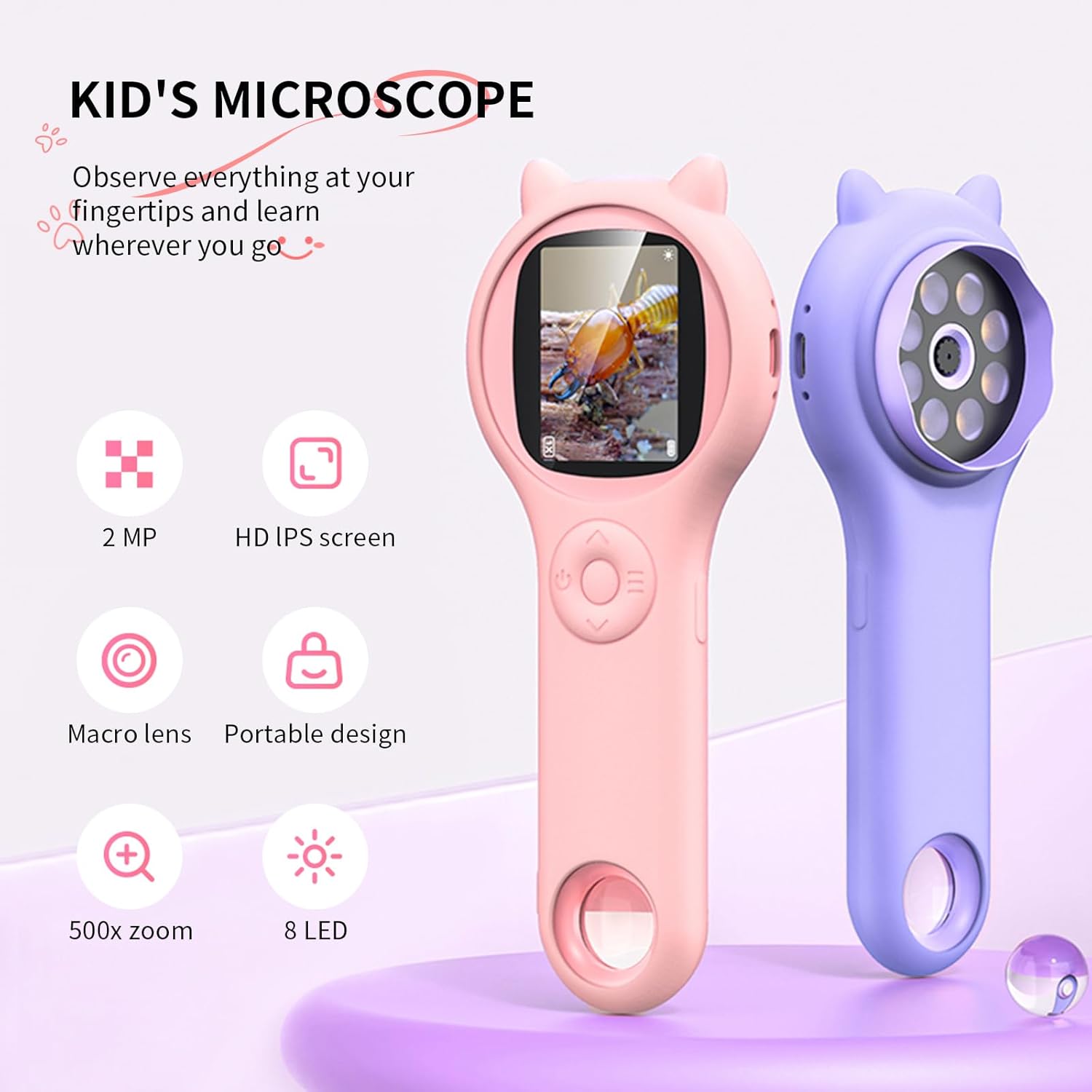
Image: Two Ashfly Kids Microscopes, one pink and one purple, illustrating the compact design and the different lenses/screens on each side.
Hooldus
- Puhastamine: Use a soft, dry cloth to clean the exterior of the microscope. For the lens and screen, use a specialized lens cleaning cloth. Do not use abrasive cleaners or solvents.
- Hoiustamine: Hoidke mikroskoopi jahedas ja kuivas kohas, eemal otsesest päikesevalgusest ja äärmuslikest temperatuuridest.
- Aku hooldus: Aku tööea pikendamiseks vältige aku sagedast täielikku tühjendamist. Laadige seadet regulaarselt, isegi kui seda pikka aega ei kasutata.
Veaotsing
| Probleem | Võimalik põhjus | Lahendus |
|---|---|---|
| Seade ei lülitu sisse. | Aku on tühjaks saanud. | Laadige seadet kaasasoleva USB-kaabli abil. |
| Image on screen is blurry. | Incorrect focus or distance from object. | Adjust the microscope's distance from the object or use the focus wheel (if applicable) until the image is clear. |
| Cannot capture photos/videos. | Sisemälu on täis. | Transfer existing photos/videos to a computer to free up space. |
Tehnilised andmed
| Funktsioon | Detail |
|---|---|
| Mudel | ASIN B0DBVB3RGT |
| Kaubamärk | Ashfly |
| Suurendus | Up to 200x (with 4x zoom adjustment) |
| Ekraan | 2-inch LCD, 1080P HD digital imaging |
| Valgusallikas | LED |
| Materjal | Plastikust |
| Värv | Lilla |
| Toiteallikas | Akutoitel |
| Objektiivobjektiiv | Akromaatiline |
Garantii teave
Ashfly products are designed for quality and durability. For specific warranty details, please refer to the warranty card included with your product or visit the official Ashfly webveebisait. Hoidke ostutšekk ostutõendina garantiinõuete korral.
Klienditugi
If you encounter any issues or have questions regarding your Ashfly Portable Handheld Kids Microscope, please contact our customer support team:
- Veebitugi: Külastage Ashfly Store on Amazon KKK ja kontaktvõimaluste jaoks.
- E-post: Vaadake toote pakendit või ametlikku websait otsese e-posti toe saamiseks.


